Openjdk-infrastructure: external tests on test-godaddy-ubuntu1604-x64-4 failed when 'RUN apt-get update && apt-get -y install ant apt-transport-https ca-certificates dirmngr curl git make unzip vim wget'
Looks like those godaddy machines are recently enabled with docker label?
External tests on test-godaddy-ubuntu1604-x64-4 failed when 'RUN apt-get update && apt-get -y install ant apt-transport-https ca-certificates dirmngr curl git make unzip vim wget'
17:18:34 [exec] Step 5/14 : RUN apt-get update && apt-get -y install ant apt-transport-https ca-certificates dirmngr curl git make unzip vim wget
17:18:34 [exec] ---> Running in 6978384a604b
17:19:07 [exec] Err:1 http://archive.ubuntu.com/ubuntu bionic InRelease
17:19:07 [exec] Could not connect to archive.ubuntu.com:80 (91.189.88.162), connection timed out Could not connect to archive.ubuntu.com:80 (91.189.88.152), connection timed out Could not connect to archive.ubuntu.com:80 (91.189.88.161), connection timed out Could not connect to archive.ubuntu.com:80 (91.189.88.149), connection timed out
17:19:07 [exec] Err:2 http://archive.ubuntu.com/ubuntu bionic-updates InRelease
17:19:07 [exec] Unable to connect to archive.ubuntu.com:http:
17:19:07 [exec] Err:3 http://archive.ubuntu.com/ubuntu bionic-backports InRelease
17:19:07 [exec] Unable to connect to archive.ubuntu.com:http:
17:19:07 [exec] Err:4 http://security.ubuntu.com/ubuntu bionic-security InRelease
17:19:07 [exec] Could not connect to security.ubuntu.com:80 (91.189.91.23), connection timed out Could not connect to security.ubuntu.com:80 (91.189.88.161), connection timed out Could not connect to security.ubuntu.com:80 (91.189.91.26), connection timed out Could not connect to security.ubuntu.com:80 (91.189.88.149), connection timed out Could not connect to security.ubuntu.com:80 (91.189.88.162), connection timed out Could not connect to security.ubuntu.com:80 (91.189.88.152), connection timed out
17:19:07 [exec] Reading package lists...
17:19:07 [exec] [91mW: Failed to fetch http://archive.ubuntu.com/ubuntu/dists/bionic/InRelease Could not connect to archive.ubuntu.com:80 (91.189.88.162), connection timed out Could not connect to archive.ubuntu.com:80 (91.189.88.152), connection timed out Could not connect to archive.ubuntu.com:80 (91.189.88.161), connection timed out Could not connect to archive.ubuntu.com:80 (91.189.88.149), connection timed out
17:19:07 [exec] W: Failed to fetch http://archive.ubuntu.com/ubuntu/dists/bionic-updates/InRelease Unable to connect to archive.ubuntu.com:http:
17:19:07 [exec] W: Failed to fetch http://archive.ubuntu.com/ubuntu/dists/bionic-backports/InRelease Unable to connect to archive.ubuntu.com:http:
17:19:07 [exec] W: Failed to fetch http://security.ubuntu.com/ubuntu/dists/bionic-security/InRelease Could not connect to security.ubuntu.com:80 (91.189.91.23), connection timed out Could not connect to security.ubuntu.com:80 (91.189.88.161), connection timed out Could not connect to security.ubuntu.com:80 (91.189.91.26), connection timed out Could not connect to security.ubuntu.com:80 (91.189.88.149), connection timed out Could not connect to security.ubuntu.com:80 (91.189.88.162), connection timed out Could not connect to security.ubuntu.com:80 (91.189.88.152), connection timed out
17:19:07 [exec] W: Some index files failed to download. They have been ignored, or old ones used instead.
17:19:07 [exec] [0mReading package lists...
17:19:07 [exec] Building dependency tree...
17:19:07 [exec] Reading state information...
17:19:07 [exec] [91mE: Unable to locate package ant
17:19:07 [exec] E: Unable to locate package dirmngr
17:19:07 [exec] E: Unable to locate package git
17:19:07 [exec] E: Unable to locate package make
17:19:07 [exec] E: Unable to locate package unzip
17:19:07 [exec] E: Unable to locate package vim
17:19:07 [exec] E: Unable to locate package wget
17:19:07 [exec] The command '/bin/sh -c apt-get update && apt-get -y install ant apt-transport-https ca-certificates dirmngr curl git make unzip vim wget' returned a non-zero code: 100
17:19:07 [exec] [0m
https://ci.adoptopenjdk.net/view/work%20in%20progress/job/Grinder_Sandbox/167/console
 sophia-guo
All 46 comments
There are also some other docker command failures.
https://ci.adoptopenjdk.net/view/Test_external/job/openjdk11_hs_externaltest_extended_x86-64_linux/154/
https://ci.adoptopenjdk.net/view/Test_external/job/openjdk11_hs_externaltest_x86-64_linux/163/
https://ci.adoptopenjdk.net/view/Test_external/job/openjdk11_j9_externaltest_extended_x86-64_linux/141/
Related with https://github.com/AdoptOpenJDK/openjdk-infrastructure/issues/720?
sophia-guo
on 8 Mar 2019
Are those error messages within the container (I assume so since it's the output from apt-get commands). If so it doesn't obviously sound like an issue on the host side.
 sxa
on 11 Mar 2019
sxa
on 11 Mar 2019
Can you reproduce it with a simple example outside the test suite i.e. "run this command within this docker image"
sxa
on 11 Mar 2019
I'm not sure if I can access those machines. However the same dockerfile works fine on other hosts https://ci.adoptopenjdk.net/label/ci.role.test&&hw.arch.x86&&sw.os.linux&&sw.tool.docker/ except Godaddy ones. Note when I say other hosts actually we only have thosts with ubuntu. So I would expect as least godaddy with ubuntu should work(no idea of godaddy with debian or centos) . However godaddy with unbuntu got same failures https://ci.adoptopenjdk.net/view/Test_external/job/openjdk11_hs_externaltest_extended_x86-64_linux/154/
Currently almost all test got the same failures https://ci.adoptopenjdk.net/view/Test_external/
Probably remove label ci.role.test from those godaddy machines for now?
sophia-guo
on 11 Mar 2019
Can you give me recreate instructions - I need to know the image name and the command to run inside it to replicate in a more isolated form that just running the test (or if it's a straightforward dockerfile I can run, please point me at it)
sxa
on 11 Mar 2019
There are different failures for ubuntu, centos and debian. For Ubuntu one you can simply run https://github.com/AdoptOpenJDK/openjdk-tests/tree/master/thirdparty_containers/derby/dockerfile to reproduce it.
sophia-guo
on 11 Mar 2019
Have been able to replicate this with a plain ubuntu docker image. Suggest we remove the docker tag from it for now.
root@test-godaddy-ubuntu1604-x64-4:~# docker run -it ubuntu
Unable to find image 'ubuntu:latest' locally
latest: Pulling from library/ubuntu
898c46f3b1a1: Pull complete
63366dfa0a50: Pull complete
041d4cd74a92: Pull complete
6e1bee0f8701: Pull complete
Digest: sha256:d019bdb3ad5af96fa1541f9465f070394c0daf0ffd692646983f491ce077b70f
Status: Downloaded newer image for ubuntu:latest
root@c59795ea9bb5:/# apt-get update
Err:1 http://archive.ubuntu.com/ubuntu bionic InRelease
  Could not connect to archive.ubuntu.com:80 (91.189.88.152), connection timed out Could not connect to archive.ubuntu.com:80 (91.189.88.162), connection timed out Could not connect to archive.ubuntu.com:80 (91.189.88.149), connection timed out Could not connect to archive.ubuntu.com:80 (91.189.88.161), connection timed out
Err:2 http://archive.ubuntu.com/ubuntu bionic-updates InRelease
Can you raise a separate issue for the issue on the CentOS machine since that looks like it might be different
sxa
on 12 Mar 2019
Have removed sw.tool.docker from https://ci.adoptopenjdk.net/computer/test-godaddy-ubuntu1604-x64-4/ for now.
Have just checked test-godaddy-ubuntu1604-x64-3 and it has the same issue, so I'll remove sw.tool.docker from that and also -1 and -2 for now on the assumption they all have the same issue
sxa
on 12 Mar 2019
The test Dockerfile has never been tried with CentOS and Debian so I'm not sure if Dockerfile itself is good for those OS.
For now could you also remove either label ci.role.test or sw.tool.docker from those godaddy CentOS and Debian machines?
sophia-guo
on 12 Mar 2019
Yes I can do, but it would still be good to create another issue for it so we have the limitation documented
sxa
on 12 Mar 2019
@gdams I assume you added them to all the boxes you created - if so can you remove the tags and log here which ones you've done that on please?
sxa
on 12 Mar 2019
@sophia-guo asked that I remove sw.tool.docker label from all new godaddy machines until this issue is addressed, so that is what I've done.
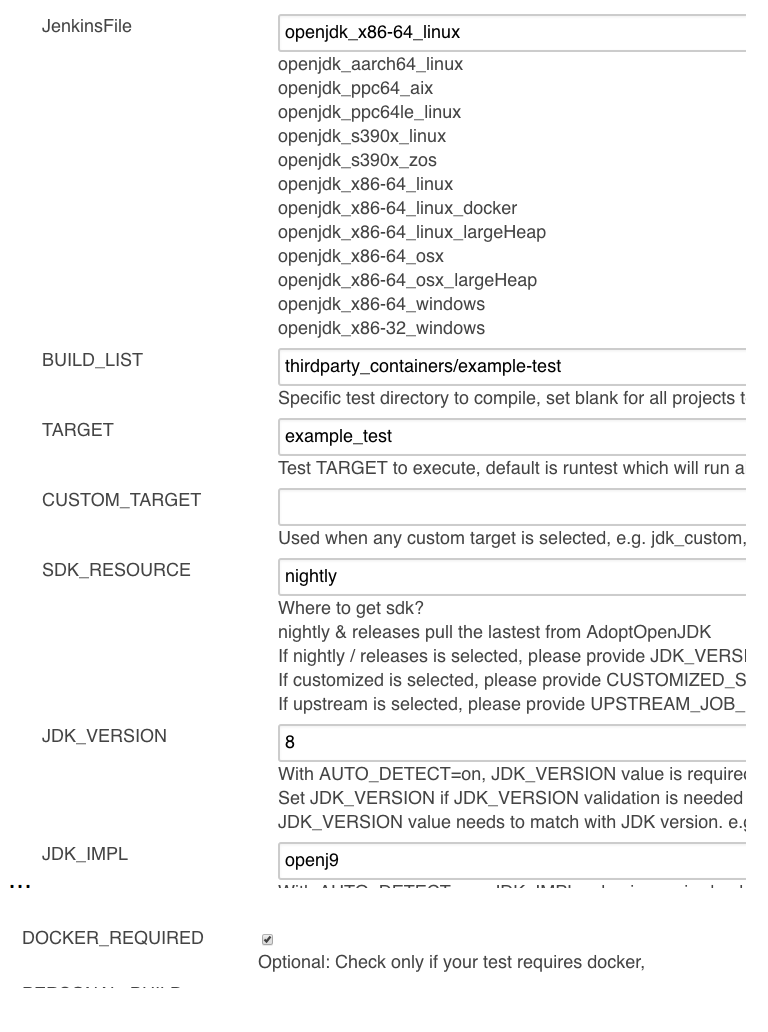
To rerun a test and check if docker is installed correctly and tests can run correctly, you can run a Grinder with the following parameters set:
Jenkinsfile=openjdk_x86-64_linux
BUILD_LIST=thirdparty_containers/example-test
TARGET=example_test
SDK_RESOURCE=nightly
JDK_VERSION=8
JDK_IMPL=openj9
DOCKER_REQUIRED=true
 smlambert
on 12 Mar 2019
smlambert
on 12 Mar 2019
Having recreated the error on a separate machine, a proposed fix is to spin up the ubuntu image by running docker run --network=host -it ubuntu. In this docker container, the apt-get update and upgrade commands should work without error
 Haroon-Khel
on 1 Nov 2019
Haroon-Khel
on 1 Nov 2019
@Haroon-Khel Can you investigate the /opt/godaddy/docker/configure-snat script and see if that is something that might resolve it?
sxa
on 7 Apr 2020
@sxa555 I dont have access to the adoptopenjdk or root user accounts on test-godaddy-ubuntu1604-x64-4, (im assuming that /opt/godaddy/docker/configure-snat lies on that machine).
Could I get access please?
Haroon-Khel
on 7 Apr 2020
The variable ${PUBLIC_IP} in the bottom two iptables commands of the /opt/godaddy/docker/configure-snat,
DOCKER_NETWORK=$(ip -f inet -o addr show docker0 scope global | cut -d\  -f 7)
set -x
iptables -t nat -D POSTROUTING -s ${DOCKER_NETWORK} ! -o docker0 -j SNAT --to ${PUBLIC_IP}
iptables -t nat -I POSTROUTING -s ${DOCKER_NETWORK} ! -o docker0 -j SNAT --to ${PUBLIC_IP}
returned nothing, which causes this script to fail. I hard coded the public external ip of the machine into this variable (not sure if I should have used the external or internal ip of the machine, could use some clarification here). The script then ran without error.
I then ran an apt-get update command in a ubuntu docker image to recreate the original error, as @sxa555 did earlier in this issue, and the results were successful.
root@test-godaddy-ubuntu1604-x64-4:~# docker run -it ubuntu
root@536574dc0780:/# apt-get update
Get:1 http://archive.ubuntu.com/ubuntu bionic InRelease [242 kB]
Get:2 http://security.ubuntu.com/ubuntu bionic-security InRelease [88.7 kB]
Get:3 http://archive.ubuntu.com/ubuntu bionic-updates InRelease [88.7 kB]
Get:4 http://archive.ubuntu.com/ubuntu bionic-backports InRelease [74.6 kB]
Get:5 http://archive.ubuntu.com/ubuntu bionic/main amd64 Packages [1344 kB]
Get:6 http://security.ubuntu.com/ubuntu bionic-security/main amd64 Packages [883 kB]
Get:7 http://security.ubuntu.com/ubuntu bionic-security/multiverse amd64 Packages [7904 B]
Get:8 http://security.ubuntu.com/ubuntu bionic-security/restricted amd64 Packages [43.1 kB]
Get:9 http://security.ubuntu.com/ubuntu bionic-security/universe amd64 Packages [837 kB]
Get:10 http://archive.ubuntu.com/ubuntu bionic/restricted amd64 Packages [13.5 kB]
Get:11 http://archive.ubuntu.com/ubuntu bionic/universe amd64 Packages [11.3 MB]
Get:12 http://archive.ubuntu.com/ubuntu bionic/multiverse amd64 Packages [186 kB]
Get:13 http://archive.ubuntu.com/ubuntu bionic-updates/main amd64 Packages [1181 kB]
Get:14 http://archive.ubuntu.com/ubuntu bionic-updates/universe amd64 Packages [1371 kB]
Get:15 http://archive.ubuntu.com/ubuntu bionic-updates/restricted amd64 Packages [58.4 kB]
Get:16 http://archive.ubuntu.com/ubuntu bionic-updates/multiverse amd64 Packages [12.6 kB]
Get:17 http://archive.ubuntu.com/ubuntu bionic-backports/universe amd64 Packages [4247 B]
Get:18 http://archive.ubuntu.com/ubuntu bionic-backports/main amd64 Packages [2496 B]
Fetched 17.8 MB in 28s (636 kB/s)
Reading package lists... Done
However I am not sure if this is all that is needed to show that this error is solved
Haroon-Khel
on 7 Apr 2020
That soumds really promising! I guess if we can get that into the startup scripts we may have fixed it!!! If the external one wos then that is reasonable
sxa
on 7 Apr 2020
@sxa Yeah I can put something in our Unix playbooks which makes this change for godaddy machines only.
I will also need access to -1, -2 and -3 to test this solution on those machines
Haroon-Khel
on 8 Apr 2020
I'm going to re-enable -4 for now and run some tests on it to verify whether things are running ok on it (I don't want to make any changes that maydestabilise things while we're preparing for a release), then we can look at those changes. I'm in two minds about doing something provider-specific into the playbooks but I'll sleep on it and think about it tomorrow :-)
sxa
on 8 Apr 2020
sxa
on 14 Apr 2020
If you can come up with a good way of doing it on a per-provider basis that I'm ok with adding it into the playbooks with an adoptopenjdk tag :-)
sxa
on 14 Apr 2020
Let's verify whether this is undoing itself on the machine you set up or whether it is now staying permanently fixed, and if so get the fix deployed to the other godaddy machines which have shown symptoms.
sxa
on 4 May 2020
The problem reset itself so, on test-godaddy-ubuntu1604-x64-4, I moved the configure-snat script into /etc/cron.daily to run daily. I have done the same for -1, -2 and -3. Ill be keeping an eye on the 4 machines during this week to see if the problem persists. @sxa Are these the only machines to be experiencing this docker network problem?
Haroon-Khel
on 4 May 2020
-Not sure on the godaddy debian ones - they are all offline too at the moment but if you can log in and see if there is any problem (assuming docker is installed and set up ok on those!) then we can look at re-enabling
sxa
on 4 May 2020
The test-godaddy-debian machines do not have docker installed. Should they? (they dont have docker labels in jenkins)
Haroon-Khel
on 5 May 2020
https://github.com/AdoptOpenJDK/openjdk-infrastructure/issues/347 - my hope would be that we have docker installed on as many of our test machines as possible, as our Docker-based testing has expanded and the more machines we can spread across the better.
smlambert
on 5 May 2020
Those godaddy machines were set up VERY badly and not with a full playbook run as I recall - the current Debian8 playbooks do install Docker properly:
06:05:41 TASK [Docker : Install Docker for Debian] **************************************
06:06:11 changed: [172.28.128.254]
06:06:11
06:06:11 TASK [Docker : Add Jenkins user to the docker group for Ubuntu and Debian] *****
06:06:11 changed: [172.28.128.254]
06:06:11
06:06:11 TASK [Docker : Add Jenkins user to the docker group for SLES 12, cent7, and RHEL7] ***
06:06:11 skipping: [172.28.128.254]
06:06:11
06:06:11 TASK [Docker : Enable and Start Docker Service for Ubuntu and Debian] **********
06:06:13 changed: [172.28.128.254]
Saying that, Since Debian8 is almost out of support it's unclear if it's worth doing anything on them, or whether we'll hit the same issues. At the moment apt-get update does not work on those machines.
sxa
on 5 May 2020
@sxa @smlambert is the a plan to setup docker testing on Deb8 machines? Or can this issue be closed since the original error has been resolved? (I checked the.machines recently and the problem no longer persists)
Haroon-Khel
on 1 Jun 2020
As per @smlambert's comment she wasnts to be able to run docker testing on as large a range of machiens as possible. If we can set up the Debian ones to run docker (based on my earlier comment that seems possible) and they are able to run tests ok then they can be enabled for docker testing. I think all that's needed is to add the ci.role.docker to the machines in jenkins again.
So @Haroon-Khel are you happy that all four Debian machines have a working docker on them now?
If yes, then we can add the label back onto those machines.
sxa
on 1 Jun 2020
@sxa Yeah Im happy with that. I'll get going with running the Docker role on the machines
Haroon-Khel
on 1 Jun 2020
Instead of running the Docker role on the deb8 machines, I repeated the same steps as those on the test-godaddy-ubuntu machines regarding running the configure-snat script and placing that script in /etc/cron.daily. Docker now seems to run fine on each test-godaddy-debian8 machine (can successfully run apt-get update inside a docker container). I cant run a test jenkins job on any of those machines however as theyve been disconnected from jenkins and I dont seem to have the perms to reconnect them
Haroon-Khel
on 1 Jun 2020
I've re-enabled -4 (which had been deactivated with a reference of https://github.com/AdoptOpenJDK/openjdk-infrastructure/issues/1134) - FYI @smlambert
sxa
on 1 Jun 2020
I noticed that the test-godaddy-centos7 machines were experiencing the same Docker issues, so I have also fixed their Docker configuration using the same methods. @sxa Feel free to add the ci.role.docker to them too if needs be
Haroon-Khel
on 1 Jun 2020
Just realised I didn't add the infromation here but https://ci.adoptopenjdk.net/computer/test-godaddy-centos7-x64-4 now has the sw.tooldocker label required for this - I've left the others until we've verified that it works (My grinders didn't run properly but that seemed unrelated)
sxa
on 5 Jun 2020
I'm lost as to whether this requires more work to close :-)
 karianna
on 5 Jun 2020
karianna
on 5 Jun 2020
This needs us to verify that we can run docker-based testing on all of these machines (then add the sw.tool.docker label to all of them), then close.
smlambert
on 5 Jun 2020
We have not completed testing and re-enabled all affected machines, therefore there is more work to fully close.
sxa
on 6 Jun 2020
@sxa test-godaddy-centos7-x64-4 and test-godaddy-debian8-x64-4 both passed a 'baseline' docker based test, https://ci.adoptopenjdk.net/view/Test_grinder/job/Grinder/3285/console and https://ci.adoptopenjdk.net/view/Test_grinder/job/Grinder/3286/console respectively. Could you please reenable the remaining debian8 machines and add the sw.tool.docker tag to them and to the centos machines (or atleast give me perms to) so that I can test them too
Haroon-Khel
on 9 Jun 2020
All re-enabled other than https://ci.adoptopenjdk.net/computer/test-godaddy-debian8-x64-1/ which was disconnected by @gdams due to "flaky"
sxa
on 10 Jun 2020
The centos machines passed the baseline docker test, -1, -2 and -3.
test-godaddy-debian8-x64-2 and -3 failed with the following error: Got permission denied while trying to connect to the Docker daemon socket at unix:///var/run/docker.sock.
Ive seen this before in cases where the jenkins user is not in the docker group.
The jenkins user is in the docker group for both machines, and theyve been reenabled, so jenkins should have picked up on the change, so im not sure why this is occuring
Haroon-Khel
on 10 Jun 2020
Agents hadn't been restarted on debian -2 and -3 - they have now and are in the docker group :-)
sxa
on 10 Jun 2020
Oh perfect, ill run the tests again
Haroon-Khel
on 10 Jun 2020
Woohoo! I'll close this for now then. Thanks for getting it done :-D
sxa
on 10 Jun 2020
thanks @Haroon-Khel and @sxa !
smlambert
on 10 Jun 2020
Related issues
 Willsparker
·
9Comments
Willsparker
·
9Comments
 andrew-m-leonard
·
8Comments
sxa
·
7Comments
sxa
·
3Comments
andrew-m-leonard
·
8Comments
sxa
·
7Comments
sxa
·
3Comments
 LongyuZhang
·
4Comments
LongyuZhang
·
4Comments