Openj9: Files with umlauts don't exist for J9
I just stumbled over an issue with J9 on my Mac (10.13.4 HighSierra). I used the download OpenJDK11U-jdk_x64_mac_openj9_jdk-11.0.1_13_openj9-0.11.0_11.0.1_13.tar.gz from AdoptOpenJDK.
When testing one of my programs I realized that with J9 I could not open any files which contain german umlauts, e.g., a file named "tüst.txt" whereas a file named "test.txt" opens without problem. I have attached a little test program to show this. (You have to create the appropriate files on your local machine of course.) With the hotspot version both files exists. With J9 only the file without umlaut seems to exist.
 mipastgt
All 28 comments
Looking at this.
Update: @tajila already assigned it out.
 JasonFengJ9
on 31 Jan 2019
JasonFengJ9
on 31 Jan 2019
Hello, I tried reproducing this error, but it seems like the jdk doesn't recognize the io.File class...

 AidanHa
on 5 Feb 2019
AidanHa
on 5 Feb 2019
Try javac -encoding UTF8 DotDirDemo.java
 pshipton
on 5 Feb 2019
pshipton
on 5 Feb 2019
What is the output from java -XshowSettings:properties on the Mac?
pshipton
on 5 Feb 2019
I'm not sure how you got the error in the picture. I got the following when I compiled on Linux, for which -encoding UTF8 fixed it. Seems UTF8 is the default encoding on Mac according to the file.encoding property. You could always compile it on another platform.
DotDirDemo.java:6: error: unmappable character (0xC3) for encoding US-ASCII
                File file2 = new File("target/classes/t??st.txt");
I was able to compile the example on MacOS. However I am not able to reproduce the error as both test.txt and tüst.txt are recognized.
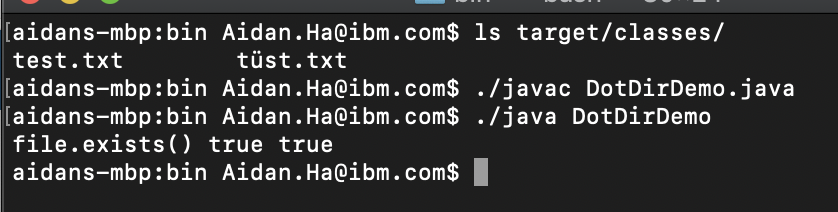
I am using the same jdk that was used in this issue...
Was anyone able to reproduce this issue?
AidanHa
on 5 Feb 2019
I wasn't able to reproduce this issue either.
@mipastgt do you mind to provide testcase .class file as well to rule out compilation difference?
JasonFengJ9
on 5 Feb 2019
I have attached the output of the above mentioned command on my Mac as a text file.
output.txt
mipastgt
on 5 Feb 2019
And here is the requested class file. It was compiled with Eclipse against the J9 runtime.
DotDirDemo.class.zip
mipastgt
on 5 Feb 2019
And just for completeness, here are the test files too.
I just ran the test again. As soon as I switch the runtime to OpenJDK (from Oracle) everything
works, even with the same classfile without recompiling. With the J9 it doesn't.
test_files.zip
mipastgt
on 5 Feb 2019
@mipastgt did you mean to close this issue?
pshipton
on 6 Feb 2019
No, sorry. I must have hit a wrong button.
mipastgt
on 6 Feb 2019
It appears DotDirDemo.java:7 has a reference to jdks.VersionInfos which is missing, in addition, DotDirDemo.class doesn't match DotDirDemo.java.zip provided at https://github.com/eclipse/openj9/issues/4466#issue-403463907.
@mipastgt anything I missed here?
JasonFengJ9
on 6 Feb 2019
Sorry, I missed that piece of code which just prints some version numbers to be sure that I am really running on the right platform. I've now packed everything in a separate Eclipse project and zipped it. See attachement. It also contains a file with the test results with two other VMs. The first of these is the AdoptJDK hotspot variant and the other one is the Oracle OpenJDK. The project JDK was the J9, but according to my tests it does not matter against which JDK the code is compiled. The only thing what matters is which runtime JDK is used to run the code.
In case this should be relevant. My machine is a MacBook Pro with 10.13.4 HighSierra and the new file system APFS. I also tried to put the test files on an USB-stick with FAT32 but that does not make a difference. I also tried re-compiling the code with several other JDKs (Azul, Bellsoft, ...) and all of them work correctly. It's only the J9 which consistently shows this strange behaviour.
J9Eval.zip
mipastgt
on 6 Feb 2019
fyi @AidanHa
JasonFengJ9
on 6 Feb 2019
Sorry, some issues came up with previous PRs that I have been working on. I will try to replicate the issue as soon as I can. Have you tried replicating it @JasonFengJ9 ?
AidanHa
on 6 Feb 2019
Just tried, unfortunately the issue reported wasn't reproduced.
@AidanHa if you can't reproduce this issue either, the next step would be to identify the environment difference, or provide @mipastgt an instrumental patch or JVM to understand the problem, please reach out to @tajila or myself for help if needed.
JasonFengJ9
on 7 Feb 2019
Concerning the environment:
I use Eclipse 2018-12 (4.10.0) which itself is running on Oracles OpenJDK 11.0.2.
My Mac is set to have german as its default locale and the default file encoding is UTF-8.
mipastgt
on 7 Feb 2019
I did some further tests and I consistently get the reported error when I run the program from within Eclipse. But I have now also tried to run it from the command line and there it works as it should. This must be a very strange interaction with Eclipse for which I do not have any explanation. I leave it up to you whether you think it is worth further investigation. I do not normally use the J9 so it is no real problem for me.
results.txt
mipastgt
on 7 Feb 2019
Thanks for the follow up @mipastgt. As you mentioned above, I was unsuccessful in reproducing the issue on the command line, but I will try to pinpoint the issue with the information you just gave.
AidanHa
on 7 Feb 2019
@mipastgt can you please check the command line that Eclipse is using to launch the OpenJ9 test. Likely the answer is there, perhaps Eclipse is changing the default file encoding.
pshipton
on 7 Feb 2019
This is the command line indicated by Eclipse:
/Library/Java/JavaVirtualMachines/jdk-11.0.1-adopt-j9/Contents/Home/bin/java -Dfile.encoding=UTF-8 -classpath <my home dir>/Projects/LocalEval/J9Eval/bin jdks.DotDirDemo
mipastgt
on 7 Feb 2019
I am still unable to replicate this issue even WITH the Eclipse IDE:
Command Line:
/Users/Aidan.[email protected]/Downloads/jdk-11.0.2+9_openj9-0.12.1 2/Contents/Home/bin/java -Dfile.encoding=UTF-8 -classpath /Users/Aidan.[email protected]/Downloads/J9Eval/bin jdks.DotDirDemo

I carefully made sure that both the environment and code (package) were the same. I tried running it both with the prebuilt JDK as well as using the jdk that I built on my local machine (both match the version given in the issue).
AidanHa
on 7 Feb 2019
But your output clearly shows that you are using the most recent 11.0.2+9 build whereas I am still using the older 11.0.1+13 release because the newer one was not yet available at the time when I made my initial tests. Before you invest any more time let me try it with the new version.
mipastgt
on 7 Feb 2019
@mipastgt My fault, I must've accidentally grabbed the wrong one from the website. I've ran it with JDK 11.0.1+13, and I have successfully replicated the Issue. So perhaps this was fixed in the most recent version?
Sorry about that.
AidanHa
on 7 Feb 2019
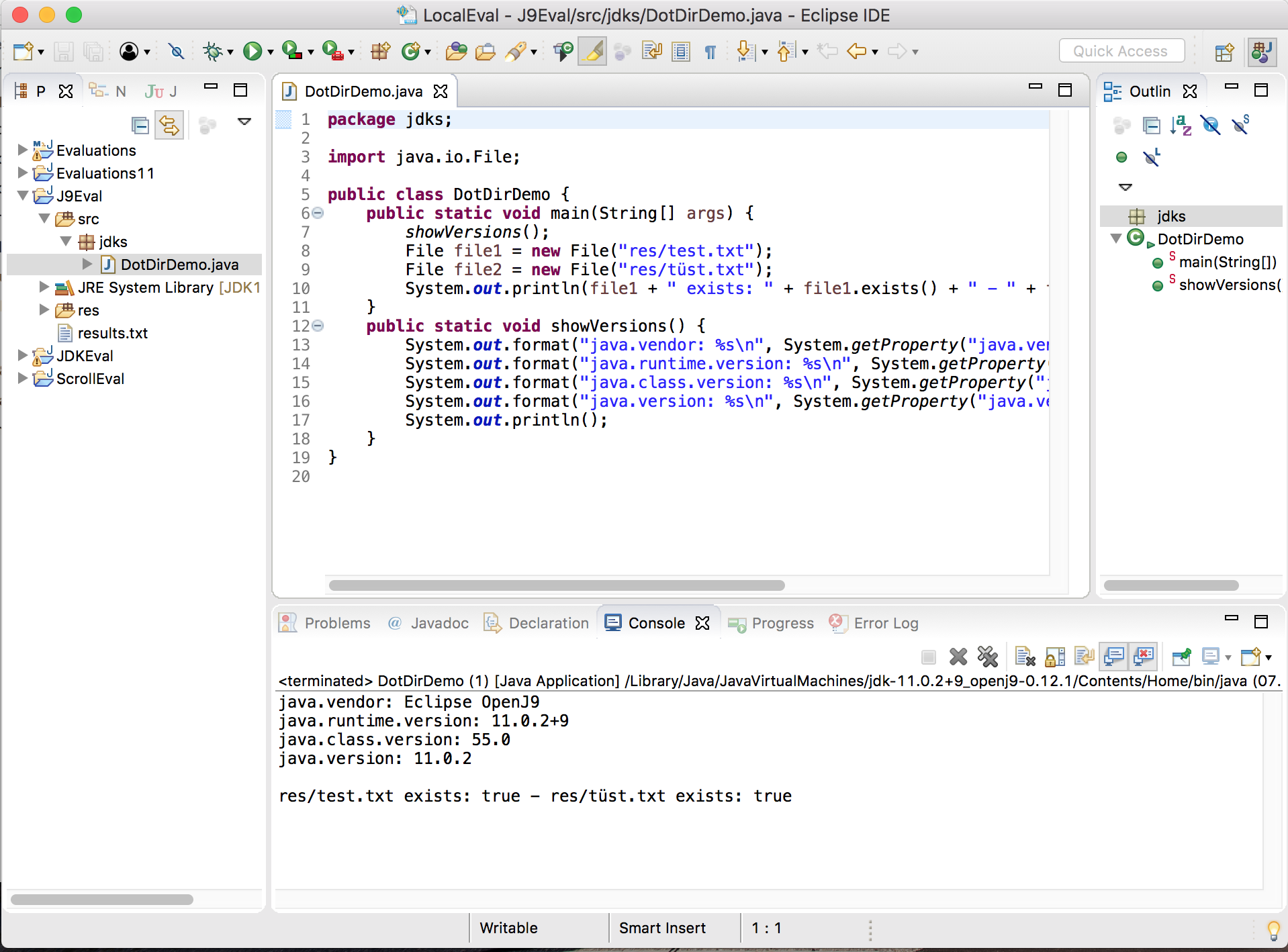
Success!!! I just installed the new version and voila, it works.
I am glad we got that sorted out now. The previous version must have been broken somehow.
mipastgt
on 7 Feb 2019
Great! Should this issue be closed now?
AidanHa
on 7 Feb 2019
As far as I am concerned it can be closed.
mipastgt
on 7 Feb 2019
Related issues
 Jeeppler
·
5Comments
JasonFengJ9
·
3Comments
Jeeppler
·
5Comments
JasonFengJ9
·
3Comments
 xliang6
·
3Comments
JasonFengJ9
·
5Comments
xliang6
·
3Comments
JasonFengJ9
·
5Comments
 0xdaryl
·
3Comments
0xdaryl
·
3Comments
Most helpful comment
Success!!! I just installed the new version and voila, it works.
I am glad we got that sorted out now. The previous version must have been broken somehow.