Openiddict-core: "The user is not logged in." when attempting an implicit flow silent login
My OpenIddict auth server is returning an error with description "The user is not logged in" when attempting a silent implicit flow login (ie. through an iframe via js). Thing is, the user is logged in when visiting the auth server directly.
I'm having trouble debugging this - not sure if this is OpenIddict's fault or my js' (I'm using oidc-client).
I know the user is kept logged in with the auth server via cookies - so technically shouldn't these cookies be available to the iframe?
 Biarity
All 4 comments
OpenIddict doesn't deal with authentication, so it's not an error returned by OpenIddict (in our implicit flow sample, it's the authorization controller which is responsible of that).
Are your authorization server and client app hosted at different addresses? This sounds like a same-site issue. Try to set it to None in the Identity application cookie options.
 kevinchalet
on 19 Jan 2018
kevinchalet
on 19 Jan 2018
Yeah, I meant the authorization controller. Setting SameSiteMode to None or Lax still doesn't solve the problem. Sadly my auth server and client need to be hosted at different addresses.
Specifically, making a request to the authorize controller with prompt=none in an iframe returns a 302 to the return_url with the url hash #error=login_required&error_description=The%20user%20is%20not%20logged%20in. (and no cookies).
Performing this exact same request without the iframe (in the browser with cookies) however works as intended (ie. token returned in url hash).
This does seem like a same-site issue, so maybe the problem is with my configuration? I've tried:
services.AddAuthentication(CookieAuthenticationDefaults.AuthenticationScheme)
.AddCookie(options =>
{
options.Cookie.SameSite = SameSiteMode.None;
});
and
app.UseCookiePolicy(new CookiePolicyOptions() {
MinimumSameSitePolicy = SameSiteMode.None,
HttpOnly = Microsoft.AspNetCore.CookiePolicy.HttpOnlyPolicy.None,
});
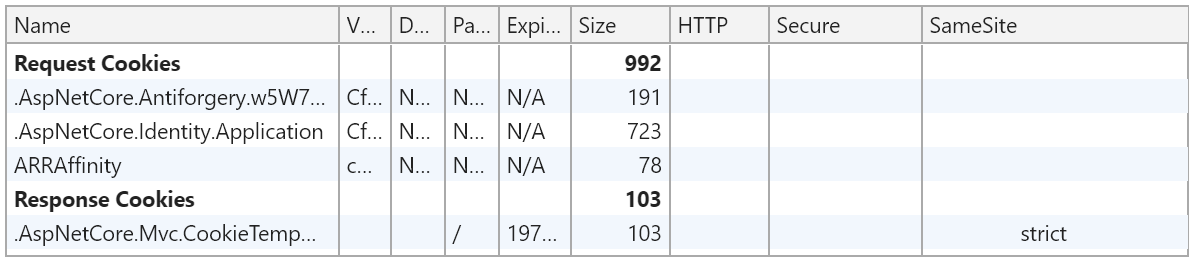
In chorme devtools:
Making a request to the auth server:
Making said iframe request:
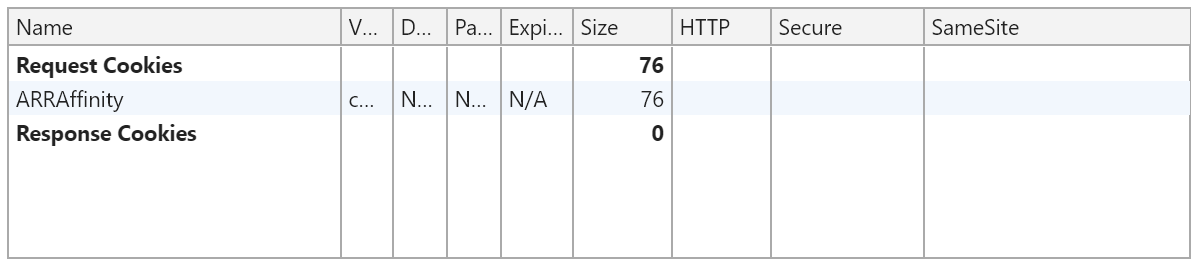
It seems it's already set to None so I'm not sure why my iframe request isn't working! And it seems the
ARRAffinity cookie is used successfully somehow.
Biarity
on 20 Jan 2018
This does seem like a same-site issue, so maybe the problem is with my configuration?
AddCookie() doesn't update the cookie handler managed by Identity but registers a separate instance, so I'm not surprised this doesn't work as you'd expect.
Instead, try that:
services.ConfigureApplicationCookie(options =>
{
    options.Cookie.SameSite = SameSiteMode.None;
});
That fixed it - calling UseCookiePolicy only sets the minimum so it was ignored. Sorry for the trouble.
Biarity
on 20 Jan 2018
Related issues
 ksmuthuus
·
3Comments
ksmuthuus
·
3Comments
 Typiqally
·
4Comments
Typiqally
·
4Comments
 prilutskiy
·
4Comments
prilutskiy
·
4Comments
 masakura
·
3Comments
masakura
·
3Comments
 AlphaCreativeDev
·
3Comments
AlphaCreativeDev
·
3Comments
Most helpful comment
AddCookie()doesn't update the cookie handler managed by Identity but registers a separate instance, so I'm not surprised this doesn't work as you'd expect.Instead, try that: