Openhab-android: Pictures shown small in sitemap
Hello all,
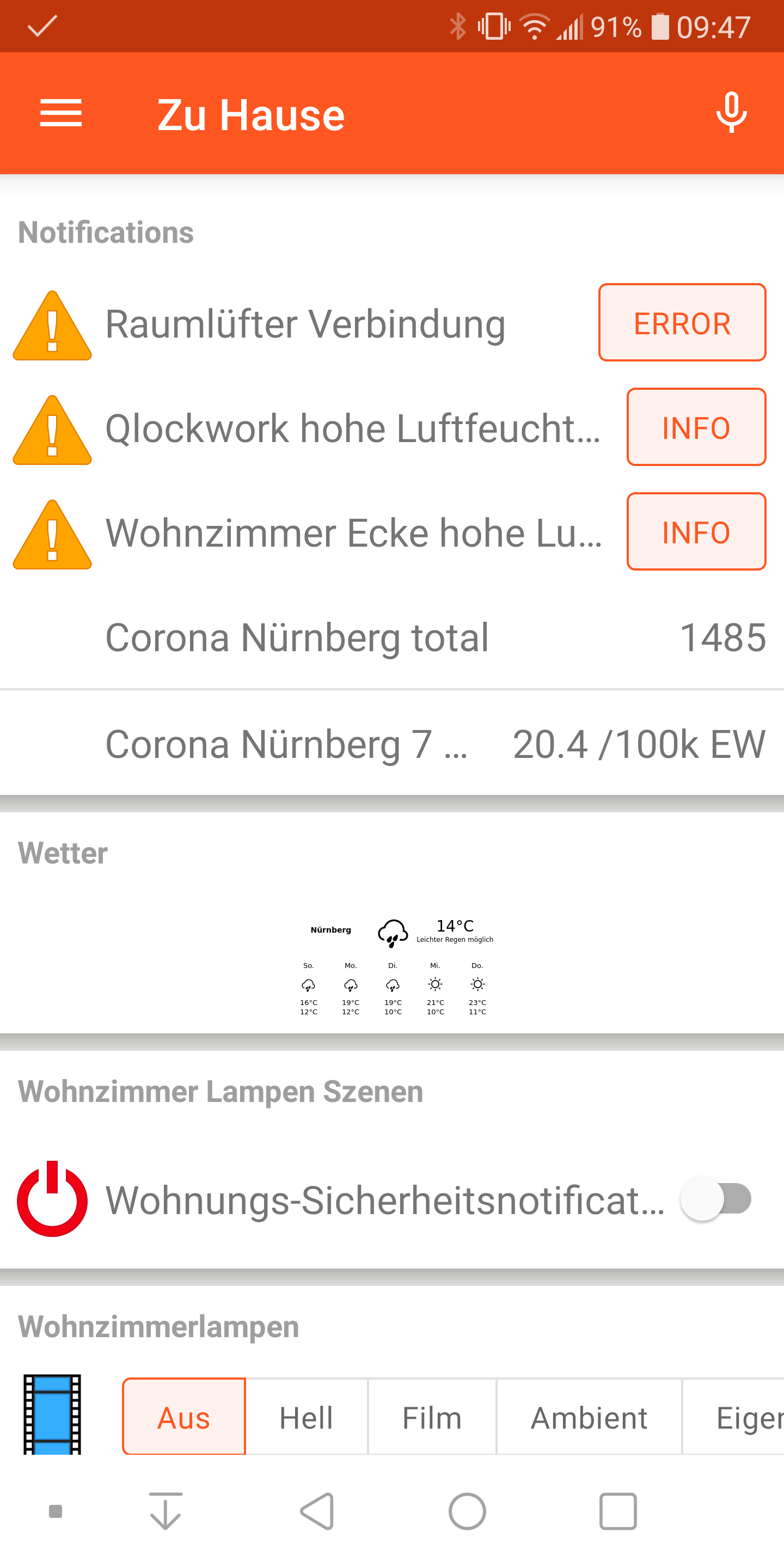
in the latest release of the Android app, my images are shown very small and not as before in full width. This happens both with the latest stable and beta release.
On the Brwoser it is rendered correctly.
Openhab App stable: 2.14.0
Openhab App beta: 2.14.5-beta
Android 9, LG G6
Openhab 2.5.7-1
Here is a picture from the current issue - the picture width is sufficient for the screen to be displayed in full width, as it did before the app update. The picture is within the frame "Wetter".
 NoWhere2Go19
All 18 comments
How large is the image (in pixels)? In general, images aren't scaled up to fit anymore, only scaled down. This behavior matches what BasicUI is doing.
 maniac103
on 30 Aug 2020
maniac103
on 30 Aug 2020
How large is the image (in pixels)? In general, images aren't scaled up to fit anymore, only scaled down. This behavior matches what BasicUI is doing.
Ok, thanks for the quick info. The picture is currently rendered with phantomjs and a script, setting it to 400x230 pixels. I'll rerender using a higher pixel number to see if there is a change
NoWhere2Go19
on 30 Aug 2020
I scaled the image up and the behaviour is as expected by your description (no scaling up, but in case only scaling down)
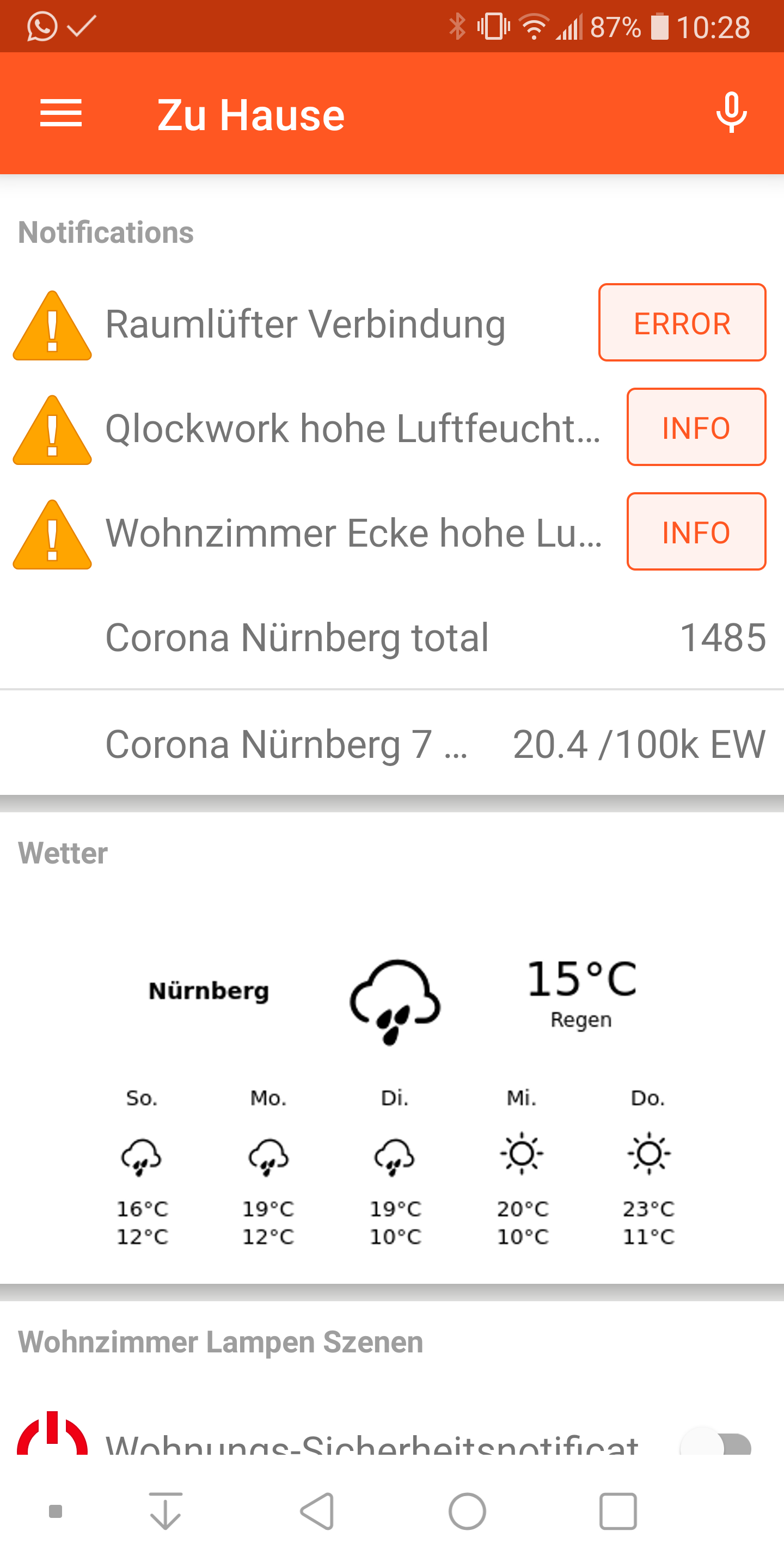
However by this behaviour, I have to manually scale the pictures up after the rendering or edit the html css as the html aligns itself correctly with the font etc for the width of the frame (or the input I give phantomjs to render). But as I would like to have a nice block of this weather section, I put in a smaller number instead of e.g. 2000 pixels, so that the html is rendered more narrowly and then scaled up to view. If I would put in 2000px width to render, the image is obviously crisp sharp, but very wide and unreadable on the screen.
Is there a possibility to input the scaling up function as an option in the settings of the app? In the browser I like that it doesnt scale up to the maximum possible width of the frame, but in the app at least for me this would be very helpfull.
NoWhere2Go19
on 30 Aug 2020
Is there a possibility to input the scaling up function as an option in the settings of the app?
From a technical point of view it's probably not much of a problem, but I question whether this would be a meaningful setting, since it would be an all-or-nothing setting. This kind of upscaling makes sense in your specific use case, but doesn't make sense at all for e.g. a webcam image ... but from the perspective of applying that setting, one can't distinguish one from the other.
Did you explore whether your weather image could be rendered to SVG? If that's the case, that would be the better option, since SVG images can be scaled to match the frame width (if they don't explicitly specify a document size themselves).
maniac103
on 30 Aug 2020
Understand your point. I also added this issue in the forum and if it gets some traction, we might revisit this point. But as of now, I understand your point and let's keep it with the current default behavior.
Did you explore whether your weather image could be rendered to SVG? If that's the case, that would be the better option, since SVG images can be scaled to match the frame width (if they don't explicitly specify a document size themselves).
Yep that's a good point. I actually investigated this point in the past shortly as I have multiple devices and wanted one image for all kind of method. When I initionally wrote the script I used pahntomjs and it does not support vector rendering. I shortly Googled alternatives and I know for Linux there was one kit which might work, but I did not test it if it works and can be edited in the way I would like (setting width parameter etc). Probably time to revisit this :)
Thanks for your quick help, I'll close the topic for now
NoWhere2Go19
on 30 Aug 2020
I'd like to chime into the discussion and thus re-open the issue.
I personally think it makes sense to scale images to the full width for a couple of reasons:
- From a design point of view, it looks better if widgets all have the same width. Just because images are provided in a different resolution should not make the widget have a different appearance.
- Phones tend to have a very high display resolution and image details are hard to be seen if they aren't scaled up (yeah, I am getting old and my eyes aren't as flexible as in the past ;-))
but doesn't make sense at all for e.g. a webcam image
I do not agree as this is exactly my use case. I have a sitemap page with 5 different webcam images. Some of those only provide VGA or other low-res images (either because the camera cannot provide anything better or because a lower resolution is chosen for having a much better image refresh rate due to lower bandwidth). It simply looks broken that all those images have a different width and it would be much better if they were all scaled to the full width. Also, it is hard to see details on the images, see (2) above.
This behavior matches what BasicUI is doing.
Actually, Basic UI scaled it to 100% in the past and the main reason to change it was that images became very large when using a full PC screen - especially portrait mode images weren't properly visible as they required scrolling the page.
I don't think the same applies to the mobile apps, where the screen width is much less (and it is usually operated in portrait mode).
Maybe a compromise could be to scale any landscape image (i.e. aspect ration >=1) to 100% width, while limiting portrait images (aspect ration <1) in their height. Wdyt?
 kaikreuzer
on 30 Aug 2020
kaikreuzer
on 30 Aug 2020
Maybe a compromise could be to scale any landscape image (i.e. aspect ration >=1) to 100% width, while limiting portrait images (aspect ration <1) in their height. Wdyt?
Portrait images are already limited in width anyway.
Please see the discussion in #2072 for the arguments that led to current behavior. In short: we don't know the user's intent, and blowing up small images in size makes the image look blurry (and IMHO, ugly).
IMHO, we'd need a widget option to express the user's intent here, so he can choose whether to allow scaling or not. Alternatively we can scale up by display density, but again, we don't know the desired density of the bitmap...
maniac103
on 30 Aug 2020
I get your point @kaikreuzer. From my standpoint, of course I would be happy to have the scaling back into the app for obvious reasons, but I understand @maniac103 why it was removed.
I think the most prominent + for the now current behaviour is, that by not upscaling the user can decide on its own how it should look like in the end. Of course this is maybe sometimes more prone to the advanced user, who knows how to automatically scale stuff if it's required.
From my perspective, it is easier to use if the scaling is done automatically in both directions in the app like the way I can do in the css of a webpage. I think this is the biggest + for returning to the old behaviour, as I as a user don't have to fiddle width pixels and so on.
NoWhere2Go19
on 30 Aug 2020
I honestly think the discussion in #2072 simply shows a mis-use of the Image widget. This is not meant for displaying icons, but really only for images and as mentioned, any widget type is expected to scale to 100% width to provide a proper overall appearance.
Also, sitemaps were by design not meant to allow users to customize the rendering - this is left to the UI by design.
I'd be ok to have a setting in the app that allows turning of the automatic scaling, but imho by default it must be scaled.
kaikreuzer
on 30 Aug 2020
I honestly think the discussion in #2072 simply shows a mis-use of the Image widget. This is not meant for displaying icons, but really only for images and as mentioned
Well, I used icons there just for testing. IMO image items should be able to display any kind of image, e.g. custom SVG charts.
I could think of some kind of setting with multiple states:
- Scale images to full width
- Scale images to a minimum width, e.g. 50% screen width
- Don't scale images
 mueller-ma
on 30 Aug 2020
mueller-ma
on 30 Aug 2020
Scale images to a minimum width, e.g. 50% screen width
That option doesn't sound exactly straightforward implementation wise. I'd leave that out and make this a binary use original size vs. scale to fit approach unless somebody asks for the third option.
maniac103
on 30 Aug 2020
to display any kind of image, e.g. custom SVG charts.
Yes, but for all of those it should be fine to use the full width :-)
kaikreuzer
on 30 Aug 2020
For me it would also be good to restore the old behavior or have the option to scale up the images. I use Grafana charts as pictures in the UI. I can specify a higher resolution, but then Grafana does not scale up the label font size, so the labels become too small and therefore unreadable. my smartphone screen.
 ArdKuijpers
on 31 Aug 2020
ArdKuijpers
on 31 Aug 2020
I would also love to see the old behaved 👍
For me it is totally impractical how it is solved now.
Attached you see a screenshot of my cell phone:
You can see a chart loaded by URL and once the chart item. The chart loaded by URL is simply unreadable and the chart item just doesn't look nice...

 Bloodboy1986
on 31 Aug 2020
Bloodboy1986
on 31 Aug 2020
For the chart item, try out the chart scaling option in settings ... I'm sure one of the possible values there will make it look nice for you. We probably should consider changing the default value there.
I'm working on an option for the scaling behavior already.
maniac103
on 31 Aug 2020
I proposed a PR that introduces a switch preference: #2186
mueller-ma
on 1 Sep 2020
I proposed a PR that introduces a switch preference: #2186
As mentioned...
I'm working on an option for the scaling behavior already.
... I have a (somewhat more sophisticated) PR as well (which needs testing): #2187
maniac103
on 1 Sep 2020
Sorry, I missed the edit of your previous comment.
mueller-ma
on 1 Sep 2020
Related issues
 Bryan76
·
8Comments
Bryan76
·
8Comments
 LinqLover
·
13Comments
mueller-ma
·
13Comments
LinqLover
·
13Comments
mueller-ma
·
13Comments
 ThomDietrich
·
6Comments
ThomDietrich
·
6Comments
 openschwall
·
4Comments
openschwall
·
4Comments
Most helpful comment
That option doesn't sound exactly straightforward implementation wise. I'd leave that out and make this a binary use original size vs. scale to fit approach unless somebody asks for the third option.