Openhab-android: add (device) prefix to voicecommand
This is a feature request. I have installed the app on several smartphones, but in openhab I cannot differentiate from which device the voicecommand was sent.
It would be great to have an option to add a prefix to the voicecomand.
Then in openhab rule, it could be checked whether the voice command begins with the prefix. Based on that information it would be possible to execute different actions depending on the user.
_This would make sense especially in a multi-family house with several floors, so that every user could control the television on his floor without explicitly mentioning the location of the television (on the ground floor)._
 markusuidl
All 20 comments
Makes sense to me. The existing prefix for background tasks should be reused, also see #1692.
However I'm not sure how to design the preference in good way. Move it to a more common place (away from "Send device information to openHAB")?
 mueller-ma
on 15 Apr 2020
mueller-ma
on 15 Apr 2020
this is my first work on github so correct me if i'm doing wrong
found the lines of code in _VoiceService.kt_ and would do the following improvement:
private suspend fun sendVoiceCommand(client: HttpClient, command: String, headers: Map<String, String>) {

        val devicePrefix = applicationContext.getPrefs().getString(PrefKeys.SEND_DEVICE_INFO_PREFIX)

        var prefixCommand = command
        if (devicePrefix.length != 0) prefixCommand = devicePrefix + ": " + command

        try {
            client.post("rest/voice/interpreters", prefixCommand, "text/plain", headers).close()
        } catch (e: HttpClient.HttpException) {
            if (e.statusCode == 404) {
                Log.d(TAG, "Voice interpreter endpoint returned 404, falling back to item")
                client.post("rest/items/VoiceCommand", prefixCommand, "text/plain").close()
            } else {
                throw e
            }
        }
    }
So in openhab rule it's possible to split by ':' at first occurence and then execute different actions.
So now two questions come to my mind:
- how can I correctly push my work back to the repo and give it a right name? (I have concerns about destroying something)
- there should be a slider in the options to select whether the prefix should be send or not with voicecommand. (at the moment I haven't investigated how to implement this - i try to find out)
Greetings from southern Germany
markusuidl
on 16 Apr 2020
So in openhab rule it's possible to split by ':' at first occurence and then execute different actions.
I'd use | as separator, but colon should be also fine.
how can I correctly push my work back to the repo and give it a right name? (I have concerns about destroying something)
Did you clone your fork or this repo? Don't worry to destroy anything: You don't have write access to this repo.
there should be a slider in the options to select whether the prefix should be send or not with voicecommand.
I try to come up with a preference for that.
mueller-ma
on 16 Apr 2020
| as separator is better because the propability to have it in text is not so high.
I installed android studio, created a new project and inserted the url to this repo. Now I can commit with a message (e.g. #1951 enhancement)
- Is this the right way or shoud I start and work different?
- Can I commit this code - even not in final solution?
- Are you going to code a slider for the menu or should i do it?
- when will this changes come to official beta version in playstore?
_sorry for my questions, i did not get all things toghether in this short time and lot of ideas come to my mind._
markusuidl
on 16 Apr 2020
First of all #1927 should be reviewed and merged first, then we can start working on this.
I installed android studio, created a new project and inserted the url to this repo.
Personally I find the git command line interface much better than the integration in any IDE, including Android Studio. I'm using the command line to do the git stuff. My local repo is a clone of this repo (upstream) and has an additional remote repo called "my", which is my fork.
I make all changes in my fork and then open a PR to the upstream repo. I recommend reading the guides on https://guides.github.com/.
Now I can commit with a message (e.g. #1951 enhancement)
IMO this would be a bad commit message. I'd use "Add prefix to voice command" or similar as title and put "Fixes #1951" in the commit message body.
Can I commit this code - even not in final solution?
You can commit whatever you want to your fork ;) If you mean "open a PR", then the answer is: Yes, but as draft PR. https://github.blog/2019-02-14-introducing-draft-pull-requests/
Are you going to code a slider for the menu or should i do it?
I'm going to do so, but after #1927 is merged. Also I wouldn't use a slider for it, because it doesn't suit here: https://material.io/components/sliders
You probably mean a switch: https://material.io/components/selection-controls#switches
when will this changes come to official beta version in playstore?
Doing the preference stuff in a good way might be a bit tricky, so it may take some time.
sorry for my questions, i did not get all things toghether in this short time and lot of ideas come to my mind.
No problem, we all had these questions in the beginning. If you have ideas for other improvements in the app, feel free to open more issues.
I also recommend to read https://github.com/openhab/openhab-android/blob/master/CONTRIBUTING.md
mueller-ma
on 16 Apr 2020
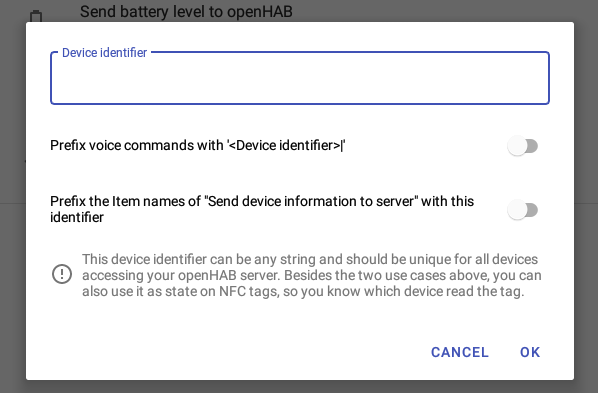
Proposal for the preference:
mueller-ma
on 17 Apr 2020
Very nice. Where do you want to place the pref now though? Keep as is?
 maniac103
on 17 Apr 2020
maniac103
on 17 Apr 2020
Based on #1927, I'd move it back to the main settings page under "Misc" and add a hint to the "Send device info" subscreen. Something like "For easier usage of multiple client on the same server, you can set a device identifier on the main settings page" (if none is set or disabled) and "Items are prefixed with the device identifier "foo"".
mueller-ma
on 17 Apr 2020
@markusuidl Do you want to test #1983?
mueller-ma
on 29 Apr 2020
@mueller-ma so I go to your mueller-ma:device-identifier download it make apk and test?
Sorry I had no time to investigate more on github principles but I try to work on the project in future.
markusuidl
on 30 Apr 2020
Do you have a working Android Studio installation? If so, you can add my fork to your cloned repo and checkout the branch:
bash
git remote add mueller-ma https://github.com/mueller-ma/openhab.android
git fetch mueller-ma
git checkout mueller-ma/device-identifier
Then you can build it.
Or I can upload a debug apk here.
mueller-ma
on 30 Apr 2020
Yes, I have a working Android Studio installation. I will do this tomorrow and test with multiple devices and look at the changes you have done.
markusuidl
on 30 Apr 2020
Finally managed to test your version. At first, app did not start, but then cleared cache and data on my phone and then it worked.
GUI looks fine and works as expected. Great job! Did not expect errors, that belong to your changes. Thanks!
So you can merge it to the main repo and we can close this issue?
_besides that: if I enable to send calling state, I get a promt to grant access to phone by android
this should also come when enabling the send wifi ssid to server. there we ned to grand geo access. should i open a new issue for that?_
markusuidl
on 4 May 2020
So you can merge it to the main repo and we can close this issue?
Generally speaking yes, but I'd like to review it first ;-) I hope to get to that today.
maniac103
on 4 May 2020
there we ned to grand geo access. should i open a new issue for that?
No need to open a new issue as this is already handled by the app. The permission is only needed for Android 10 or higher, though:
- https://github.com/openhab/openhab-android/blob/master/mobile/src/main/java/org/openhab/habdroid/ui/PreferencesActivity.kt#L635
- https://developer.android.com/about/versions/10/privacy/changes#wifi-apis
What Android version runs on your device?
mueller-ma
on 4 May 2020
My LG G6 runs with Android 9.
So actually openhab app did not ask for geo permissions and therefore i get "unknown ssid" to the corresponding openhab item. --> will enable geo permissions manually on android settings ;-)
markusuidl
on 4 May 2020
Ok, in this case you should open a new issue.
mueller-ma
on 4 May 2020
Ok, in this case you should open a new issue.
opened a new issue #1987
markusuidl
on 4 May 2020
Proposal for the preference:
Where has the setting gone? I can't find it in 2.13.9-beta
markusuidl
on 8 Jul 2020
It's under Settings -> Device identifier (in the 'Miscellaneous' category near the bottom of the list)
maniac103
on 8 Jul 2020
Related issues
 dakipro
·
11Comments
dakipro
·
11Comments
 CrazyIvan359
·
13Comments
CrazyIvan359
·
13Comments
 cribskip
·
8Comments
cribskip
·
8Comments
 FredericMa
·
10Comments
FredericMa
·
10Comments
 kaikreuzer
·
4Comments
kaikreuzer
·
4Comments
Most helpful comment
Proposal for the preference:
