Openhab-android: Add support for Image items
A similar request exists for Classic UI and Basic UI: https://github.com/eclipse/smarthome/issues/1800
 lolodomo
All 15 comments
I also ran into images not being supported. I switched to the video tag in the sitemap and it works if you using encoding="mjpeg". For some reason it has to be lowercase.
 FriedCircuits
on 22 Aug 2016
FriedCircuits
on 22 Aug 2016
Any chance to support image items ?
You can see how it is handled in Basic UI.
lolodomo
on 16 May 2017
Looking at the current code, it looks like it can only work if a URL is provided (SmartImageView). The image is downloaded from this URL.
lolodomo
on 14 Oct 2017
Looking at the code, I have finally the feeling that it could be easily implemented by enhancing the claases MySmartImageView and MyWebImage in order to provide a specific getBitmap method that will simply copy data from the item value.
lolodomo
on 14 Oct 2017
I will install an Android dev env and try myself.
lolodomo
on 14 Oct 2017
For some reason it has to be lowercase.
@FriedCircuits While is was working on #402 I found the case sensitive check and made it case insensitive. I will open a PR
 mueller-ma
on 14 Oct 2017
mueller-ma
on 14 Oct 2017
I was able to make it work.
For testing, I finally used the Android emulator and I connected to my server using myopenhab.
Unfortunately, the refresh of the image is not always working. I can see that the code is called but the image remains sometimes unchanged. When it happens, if I reopen the page, the image displayed is the one expected.
I hope that it is not a problem with the emulator...
I bypassed any cache when using image item so the problem is not in this direction.
Here are the few lines of code added/changed:
                boolean useUrl = true;
                MySmartImageView imageImage = (MySmartImageView) widgetView.findViewById(R.id.imageimage);
                OpenHABItem item = openHABWidget.getItem();
                if (item != null && item.getType().equals("Image") && item.getState() != null) {
                    int idx = item.getState().indexOf(",");
                    if (item.getState().startsWith("data:") && (idx > 0)) {
                        byte[] data = Base64.decode(item.getState().substring(idx + 1), Base64.DEFAULT);
                        Bitmap bitmap = BitmapFactory.decodeByteArray(data, 0, data.length);
                        imageImage.setImage(new BitmapImage(bitmap));
                        useUrl = false;
                        Log.d(TAG, "Image from ImageItem");
                    }
                }
                if (useUrl) {
                    imageImage.setImageUrl(ensureAbsoluteURL(openHABBaseUrl, openHABWidget.getUrl()), false,
                        openHABUsername, openHABPassword);
                    Log.d(TAG, "Image from proxy URL");
                }
Any idea ?
lolodomo
on 19 Oct 2017
Can you upload your code?
mueller-ma
on 19 Oct 2017
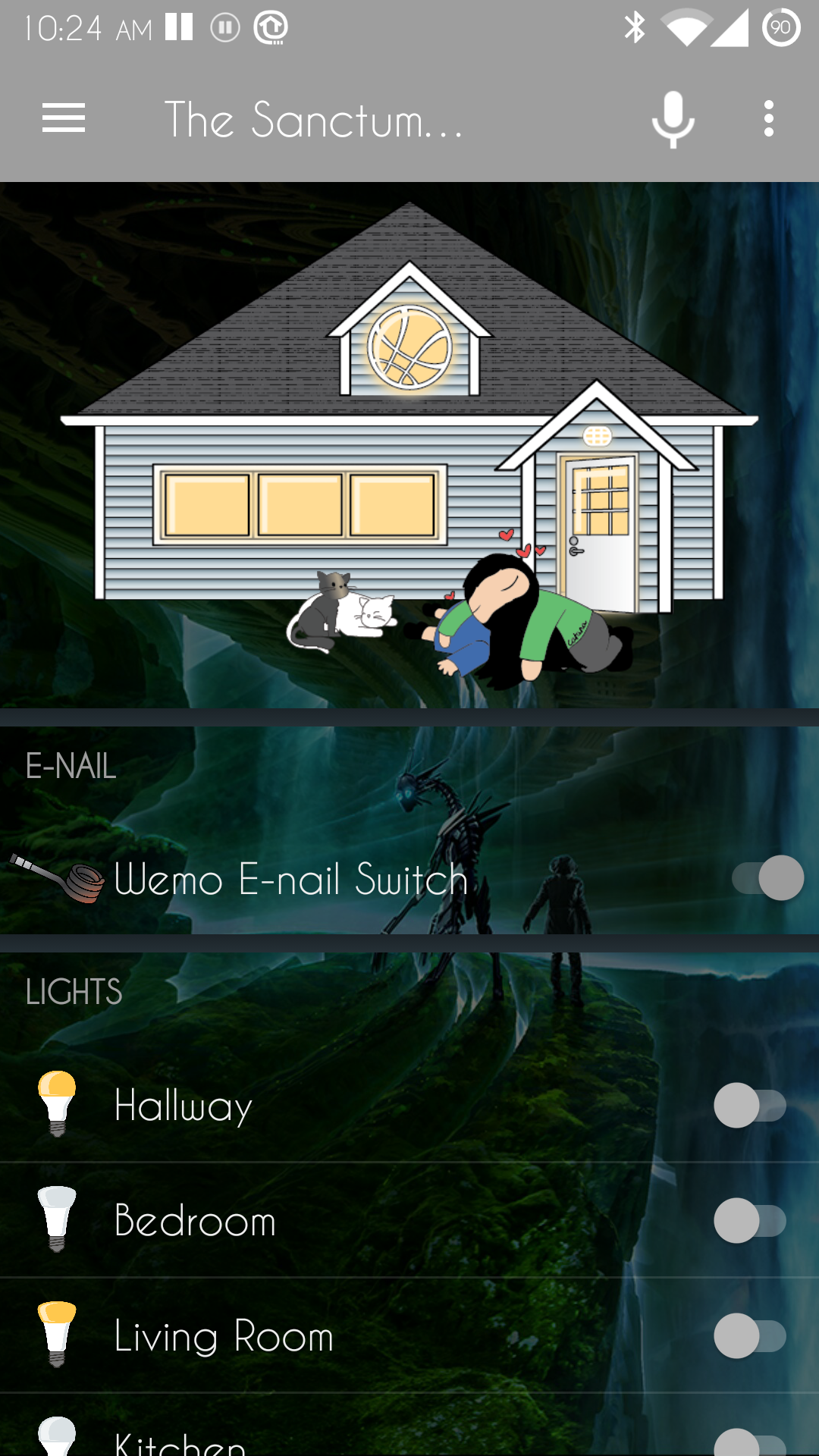
What is the issue here? I use image in my sitemap right now! only thing I found is that I have to use the png setting for icons instead of svg otherwise the app doesn't load my image item. But with png icons it displays as it does in basic UI! I just can't tell from these posts how images arn't supported atm.
Code from my sitemap
Frame {
        Image url="http://192.168.0.4:2842/static/whos_home/our_home-00.png" visibility=[Whos_Home==0]
        Image url="http://192.168.0.4:2842/static/whos_home/our_home-01.png" visibility=[Whos_Home==1]
        Image url="http://192.168.0.4:2842/static/whos_home/our_home-02.png" visibility=[Whos_Home==2]
        Image url="http://192.168.0.4:2842/static/whos_home/our_home-03.png" visibility=[Whos_Home==3]
        Image url="http://192.168.0.4:2842/static/whos_home/our_home-04.png" visibility=[Whos_Home==4]
        Image url="http://192.168.0.4:2842/static/whos_home/our_home-05.png" visibility=[Whos_Home==5]
        Image url="http://192.168.0.4:2842/static/whos_home/our_home-06.png" visibility=[Whos_Home==6]
        Image url="http://192.168.0.4:2842/static/whos_home/our_home-07.png" visibility=[Whos_Home==7]
        Image url="http://192.168.0.4:2842/static/whos_home/our_home-08.png" visibility=[Whos_Home==8]
    }
Image Showing as expected
 Dracrius
on 19 Oct 2017
Dracrius
on 19 Oct 2017
only thing I found is that I have to use the png setting for icons instead of svg otherwise the app doesn't load my image item.
Should be fixed in #372, comes with the new version.
mueller-ma
on 19 Oct 2017
So what is this about does openhab actually support an Image item definition in a .item file? I ask because I would of used such an item if it was listed in the Openhab docs but it wasn't last time I checked!
Dracrius
on 19 Oct 2017
Subject is the support of items of type Image, something missing until I created my PR.
lolodomo
on 19 Oct 2017
Good news: in fact, it is working well but I have to be patient and it takes sometimes more time for the image to be refreshed. Maybe it is due to emulator + the remote access through myopenhab.org.
Addtionally, my page contains several data like cover art, title, album and much more. I can see that showPage is called several times and so the REST API for the page is called several times. The first time the REST API is returning the old covert art and the next one the new covert art. It might be because the Sonos binding updates the covert art channel after other channels.
To be sure, I need to update my sitemap to have only one image channel in the page. In this case, I am expecting only one call to the REST API with the right picture returned.
So I will finish the code, remains a little thing to update to bypass the refresh parameter for image items.
lolodomo
on 19 Oct 2017
@Dracrius How did you change the background?
mueller-ma
on 29 Oct 2017
@mueller-ma It's because I'm on Cyanogenmod and use their Theme Engine and a transparent theme. It works for pretty much any app that doesn't implement it's own backgrounds.
Dracrius
on 29 Oct 2017
Related issues
 CrazyIvan359
·
13Comments
CrazyIvan359
·
13Comments
 Bryan76
·
8Comments
Bryan76
·
8Comments
 LinqLover
·
13Comments
LinqLover
·
13Comments
 FredericMa
·
10Comments
FredericMa
·
10Comments
 magd1978
·
10Comments
magd1978
·
10Comments