Openhab-addons: [mqtt] [homie] Did not receive mandatory topic value: homie/xxx/$name
Hello,
PROBLEM
homie device is showing in "inbox", after validation of the thing I get error message "Did not receive mandatory topic value: homie/relay1/$name".
Thing appears in things list but channels are not available. (that seams normal as it stops reading whats next on "$name" error)
after rebooting the homie device channels are available and everything is working fine.
_In other words my issue is that the homie device needs to be rebooted for OH item configuration._
CONFIG
I am running OH 2.5.3 and mqtt-binding 2.5.3.
Please note that I do not have this issue with OH 2.4.0 and mqtt-binding 2.4.0
DATA
my published topics from homie device:
_verification ok with online homie verificator._
"homie/relay1/$homie", "3.0", qos 1, retained true
"homie/relay1/$name", "relay1", qos 1, retained true
"homie/relay1/$nodes", "c1,c2", qos 1, retained true
"homie/relay1/$state", "init", qos 1, retained true
"homie/relay1/c1/$name", "c1", qos 1, retained true
"homie/relay1/c1/$type", "switch", qos 1, retained true
"homie/relay1/c1/$properties", "power", qos 1, retained true
"homie/relay1/c1/power/$name", "c1_power", qos 1, retained true
"homie/relay1/c1/power/$settable", "true", qos 1, retained true
"homie/relay1/c1/power/$datatype", "boolean", qos 1, retained true
"homie/relay1/c2/$name", "c2", qos 1, retained true
"homie/relay1/c2/$type", "switch", qos 1, retained true
"homie/relay1/c2/$properties", "power", qos 1, retained true
"homie/relay1/c2/power/$name", "c2_power", qos 1, retained true
"homie/relay1/c2/power/$settable", "true", qos 1, retained true
"homie/relay1/c2/power/$datatype", "boolean", qos 1, retained true
...some code for init then
"homie/relay1/c1/power", false, qos 1, retained true
"homie/relay1/c2/power", false, qos 1, retained true
"homie/relay1/$state", "ready", qos 1, retained true
LOGS
'mqtt:homie300:be9b4a80:relay1' changed from INITIALIZING to OFFLINE (COMMUNICATION_ERROR): java.lang.Exception: Did not receive mandatory topic value: homie/relay1/$name
 chipec84
All 103 comments
It seems OH subscribes to homie topics with QoS 0 (i see it in my broker log) but broker will deliver those topics very fast just all of them at once, so plenty of them won't be delivered actually.
I tried slow down sending topics from my homie implementation and it helped, but thaat not the caase I think.
I think, OH must subscribe to homie topics with QoS 1.
 andvikt
on 31 Mar 2020
andvikt
on 31 Mar 2020
Just to add some additional information with regards to the error in the issue title. Here are the relevant lines from the mosquitto log:
Add a new MQTT broker, Thing is discovered in the Inbox
1585662631: Received SUBSCRIBE from d29c0b95-6a52-426f-9180-01b36277c074
1585662631: +/+/$homie (QoS 1)
1585662631: d29c0b95-6a52-426f-9180-01b36277c074 1 +/+/$homie
1585662631: Sending SUBACK to d29c0b95-6a52-426f-9180-01b36277c074
1585662631: Sending PUBLISH to d29c0b95-6a52-426f-9180-01b36277c074 (d0, q0, r1, m0, 'homie/GFBlinds/$homie', ... (3 bytes))
1585662631: Received SUBSCRIBE from d29c0b95-6a52-426f-9180-01b36277c074
1585662631: homie/GFBlinds/$name (QoS 1)
1585662631: d29c0b95-6a52-426f-9180-01b36277c074 1 homie/GFBlinds/$name
1585662631: Sending SUBACK to d29c0b95-6a52-426f-9180-01b36277c074
1585662631: Sending PUBLISH to d29c0b95-6a52-426f-9180-01b36277c074 (d0, q0, r1, m0, 'homie/GFBlinds/$name', ... (12 bytes))
Add the device from the inbox. Since the subscription and publish to openhab was already done, the value is not resent. I would guess the binding expects to receive the value.
1585662647: Received SUBSCRIBE from d29c0b95-6a52-426f-9180-01b36277c074
1585662647: homie/GFBlinds/$homie (QoS 0)
1585662647: d29c0b95-6a52-426f-9180-01b36277c074 0 homie/GFBlinds/$homie
1585662647: Sending SUBACK to d29c0b95-6a52-426f-9180-01b36277c074
1585662647: Sending PUBLISH to d29c0b95-6a52-426f-9180-01b36277c074 (d0, q0, r1, m0, 'homie/GFBlinds/$homie', ... (3 bytes))
1585662647: Received SUBSCRIBE from d29c0b95-6a52-426f-9180-01b36277c074
1585662647: homie/GFBlinds/$state (QoS 0)
1585662647: d29c0b95-6a52-426f-9180-01b36277c074 0 homie/GFBlinds/$state
1585662647: Sending SUBACK to d29c0b95-6a52-426f-9180-01b36277c074
1585662647: Sending PUBLISH to d29c0b95-6a52-426f-9180-01b36277c074 (d0, q0, r1, m0, 'homie/GFBlinds/$state', ... (5 bytes))
1585662647: Received SUBSCRIBE from d29c0b95-6a52-426f-9180-01b36277c074
1585662647: homie/GFBlinds/$nodes (QoS 0)
1585662647: d29c0b95-6a52-426f-9180-01b36277c074 0 homie/GFBlinds/$nodes
1585662647: Sending SUBACK to d29c0b95-6a52-426f-9180-01b36277c074
1585662647: Sending PUBLISH to d29c0b95-6a52-426f-9180-01b36277c074 (d0, q0, r1, m0, 'homie/GFBlinds/$nodes', ... (39 bytes))
Re:second comment: In addition, I have also observed that not all of the properties are always added or are incomplete (e.g. name missing). If the device re-publishes the topics, this is usually populated correctly. Most likely this is not related issue to the original issue posted in the first comment.
 openha
on 31 Mar 2020
openha
on 31 Mar 2020
I know we do have a basic problem with the mqtt protocol.
Wenn the client receives a message, the 'retain' flag is only set, if the message was trasmitted to the client after a reconnect as a retained message. The first transmission of the message does not have the retained flag.
We have only one connection from openhab to the broker.
The discovery will have subscribe to a $name topic and get id delivered. But without the 'retained' indication.
After adding the component another subscription is issued for $name. But for the broker the subscription is from the same client and it will not retransmit the retained messages. Therefor they will never arrive.
I currently only see the solution to have induvidual connections to the broker. Which would mean a lot of code change and maintaining connection data (different client ids) in many places.....
 jochen314
on 31 Mar 2020
jochen314
on 31 Mar 2020
It is working fine in v2.4.0, what is different in the code for v2.5.3?
chipec84
on 31 Mar 2020
I currently only see the solution to have induvidual connections to the broker. Which would mean a lot of code change and maintaining connection data (different client ids) in many places.....
Would unsubscribing from the $name topic immediately after discovery work?
openha
on 31 Mar 2020
@chipec84 openhab-core changed the mqtt client library
@openha we do unsubscribe. my guess is, that there is more context stored on the connection.....
jochen314
on 31 Mar 2020
After adding the component another subscription is issued for $name. But for the broker the subscription is from the same client and it will not retransmit the retained messages. Therefor they will never arrive.
But how does it know the name of the thing when it is discovered? )
It seems that the most easy way is to have a homie namespace as a config parameter of a broker and to subscribe to all messages in it.
For ex, we have device with main topic myhome/mydevice/$homie. So why dont just subscribe to all myhome/# topics? With that approach we can store all the messages from myhome/# in some db and process them later without any need in retained resendings from the broker.
andvikt
on 31 Mar 2020
With that approach we can store all the messages from myhome/# in some db and process them later without any need in retained resendings from the broker.
But then we would treat all messages as retained, which is also wrong....
jochen314
on 31 Mar 2020
@chipec84 openhab-core changed the mqtt client library
@openha we do unsubscribe. my guess is, that there is more context stored on the connection.....
I rechecked and there is no unsubscribe entry for $name in the mosquitto log after discovery. I could find the unsubscribe code in the source, but looking at the mqtt logs, it seems it is not called.
openha
on 31 Mar 2020
I know we do have a basic problem with the mqtt protocol.
Wenn the client receives a message, the 'retain' flag is only set, if the message was trasmitted to the client after a reconnect as a retained message. The first transmission of the message does not have the retained flag.
We have only one connection from openhab to the broker.
The discovery will have subscribe to a $name topic and get id delivered. But without the 'retained' indication.
After adding the component another subscription is issued for $name. But for the broker the subscription is from the same client and it will not retransmit the retained messages. Therefor they will never arrive.
I currently only see the solution to have induvidual connections to the broker. Which would mean a lot of code change and maintaining connection data (different client ids) in many places.....
That does absolutely not sound logical when the same approach worked with another mqtt client.
All clients should handle the protocol in the same way or the client is just broken.
Does openhab use a clean session when it connects to the broker?
 RayBa82
on 1 Apr 2020
RayBa82
on 1 Apr 2020
hello, Anything new on this issue?
chipec84
on 28 Apr 2020
I have the same issue here, 6 devices with 10 channels each, can't configure them.
 labodj
on 15 May 2020
labodj
on 15 May 2020
Here the same. It is working if I reset my device but stops with the failure of missing name after some time. It got a lot better after I put a delay between sending the individual mqtt messages on the homie device(but still occurs sometimes) . However, this is only possible because I wrote the firmware myself. If this were commercial devices, this would not be an option.
 sebastianohl
on 15 May 2020
sebastianohl
on 15 May 2020
What delay did you put in between messages?
chipec84
on 16 May 2020
@sebastianohl a delay shouldn't be needed.
I believe the error is as @jochen314 describes. When the OpenHAB MQTT Client connects to the broker, it gets all existing MQTT Messages marked retain and those messages are marked with the retain flag True. Messages after the OpenHAB Client connects are received with the retain flag False even if it is set to True. At least this my understanding of [MQTT-3.3.1-9]
When a Homie device is added from the Inbox, why not create a new MQTT Client connection to the broker, receive all of the retained messages, create the OpenHAB Thing and then close the connection once the device is created? Use the original Client to handle all other MQTT message.
This would be easier than maintaining a database of MQTT Homie messages and searching it for messages related to a Homie device to get the settings.
 mjcumming
on 16 May 2020
mjcumming
on 16 May 2020
For sure putting a delay between the messages and give openhab time to process it is no solution. However, it could be a dirty fix for users who generate their own firmware.
I put 500ms between my MQTT messages and restart my EPS32 devices every 24h.
sebastianohl
on 18 May 2020
For sure putting a delay between the messages and give openhab time to process it is no solution. However, it could be a dirty fix for users who generate their own firmware.
I put 500ms between my MQTT messages and restart my EPS32 devices every 24h.
Another easy 'dirty' fix is to simply republish the $name value on a regular interval as if it is a heartbeat. Once OH gets the $name value again everything is good.
 baku104788
on 18 May 2020
baku104788
on 18 May 2020
@baku104788 I think this approach doesn't work with OpenHab 2.5.5
I intercept /homie/deviceName/$stats/uptime with node-red, for every message I receive in that topic i republish a message with payload=deviceName in /homie/deviceName/$name
(every 65 seconds)
Openhab is ignoring it, it always shows java.lang.Exception: Did not receive mandatory topic value: homie/deviceName/$name for some device.
Anyway even if the error spawns if the device is cofigured just one time I can control it, but IMHO this is a big flaw in OpenHab MQTT implementation...
labodj
on 18 May 2020
On 2.5.4 I can confirm that republishing $name works as @baku104788 described.
Interestingly, after publishing $name again BUT no other Homie messages ie nodes or properties OH correctly creates the Thing for the device and the correct Channels.
So, this doesn't make any sense to blame this on the retain flag and MQTT. I do not know Java but looking through the code there is a wait for an MQTT message with $name in it. Rather than waiting, the discovery code should check if it already has a $name message from that device and only wait if it does not.
mjcumming
on 19 May 2020
OMG, I think that I have figured out what the problem was! Sh*t, it was so simple...
PR on the way! :+1:
 bodiroga
on 21 May 2020
bodiroga
on 21 May 2020
Great! Looking forward to test it
sebastianohl
on 21 May 2020
Pull request accepted, awesome! Let's see if we can get a stable Homie (and MQTT in general) implementation in openHAB for 2.5.6, this project deserves it! :+1:
bodiroga
on 23 May 2020
I've upgraded OpenHAB to 2.5.6 today, but I still see the "Did not receive mandatory topic value" for some of my Things. I've checked if the topics are missing via mosquitto_sub but they are definitely there. Is there anything left to do, after upgrading to 2.5.6?
 Alpha200
on 23 Jun 2020
Alpha200
on 23 Jun 2020
It's happening to me too
labodj
on 23 Jun 2020
@Alpha200 and @labodj what devices are you connecting with (i.e. which Homie implementation)?
mjcumming
on 23 Jun 2020
This one
I have 6 devices, with up to 10 homie nodes each (459 total topics), some of them are recognized, some other not.
It's a random behavior, if I disable and re-enable MQTT broker inside openhab some random device it's well configured, some other give me "Did not receive mandatory topic value" error.
Device that are erroring out change randomly turning on and off openhab MQTT broker.
The needed topics ($name in this case) are all present and retained.
labodj
on 23 Jun 2020
I have the same issues with 15 homie devices and they all have a lot of properties, some about 20-30.
RayBa82
on 23 Jun 2020
I'm using several self implemented Homie Devices. They are all based on Homie 4.0.0, but I think that should not make any difference. Currently I'm using VerneMQ as my MQTT broker, but I had the issues with Mosquitto as well. I'm sure that the implementations are 100% correct.
I've exactly the same issues as @labodj has stated above.
Alpha200
on 23 Jun 2020
@bodiroga I am wondering if a better solution would be to have OH create a new connection to the broker using the $home/deviceid to subscribe when OH sees a $state ready message. That way OH will receive all topics on the broker related to that device. OH could then close that connection and use the existing connection for publishing/subscribing?
mjcumming
on 23 Jun 2020
Oh, boy, this is a nightmare... :cry:
Let's see if I can have a look at it over the following days, I'm so sorry guys! @J-N-K, @cpmeister or @cweitkamp, can you reopen this issue, please?
bodiroga
on 23 Jun 2020
@mjcumming, have you been enable to see the issue in the latest openHAB release? I have started a fresh openHAB container (2.5.6) and I have tried a Python script based on your Homie4 implementation, using the following code:
import time

from homie.device_dimmer import Device_Dimmer

mqtt_settings = {
    'MQTT_BROKER' : 'xxx.xxx.xxx.xxx',
    'MQTT_PORT' : 1883
}

class My_Dimmer(Device_Dimmer):

    def set_dimmer(self,percent):
        print('Received MQTT message to set the dimmer to {}. Must replace this method'.format(percent))
        super().set_dimmer(percent)


class DimmerFactory(object):

    def __init__(self):
        self.dimmers = []

    def create_dimmers(self, number):
        for n in range(number):
            self.dimmers.append(My_Dimmer(name='Test Dimmer {}'.format(n+1), mqtt_settings=mqtt_settings))

    def update_dimmers(self, value):
        for dimmer in self.dimmers:
            dimmer.update_dimmer(value)


if __name__ == "__main__":
    try:

        d_factory = DimmerFactory()
        d_factory.create_dimmers(20)

        while True:
            d_factory.update_dimmers(0)
            time.sleep(2)
            d_factory.update_dimmers(50)
            time.sleep(2)
            d_factory.update_dimmers(100)
            time.sleep(2)

    except (KeyboardInterrupt, SystemExit):
        print("Quitting.")
After importing the 20 homie devices, all of them are online and even after multiple restarts, I can't see the "Did not receive the mandatory topic value: homie/xxx/$name" message. Perhaps this dimmer devices are very simple? As far as I know, they have a single node with just one property: dimmer.
Is any of you able to create a test environment where the error is reproducible using @mjcumming's library? That would be really helpful :+1: Also, some questions for you (@Alpha200, @labodj, @RayBa82):
- What hardware are you using to run openHAB? A Raspberry Pi?
- Have you tried to delete your old things, restart openHAB and add them again? I'm not sure if that can make a difference, just guessing :wink:
- @Alpha200, do you also have many nodes and properties for each Homie device?
Thanks!
bodiroga
on 23 Jun 2020
@bodiroga with your fix, I do not see the error very often. It only happens on OH startup. Start up the above script and then start OH. That should reproduce it.
mjcumming
on 23 Jun 2020
@bodiroga
- I'm running openHab using a raspberry pi4 4gb running Raspberry pi os with docker managed by portainer
- I have 6 homie devices, with up to 10 nodes each, but they are all switches, so simple boolean nodes, nothing special
- I haven't tried to delete and reconfigure everything, it's a pain to reconfigure 60 switches 😆, I'm going to test it when I'll have time...
labodj
on 23 Jun 2020
I am running openHAB on a Intel NUC with i5 processor in a docker environment.
I test it always on a clean openhab installation. I deploy my configuration with ansible so this is done in a minute :-)
RayBa82
on 23 Jun 2020
@labodj do you only see this error on OpenHAB startup or is it on your Homie device startup?
mjcumming
on 23 Jun 2020
@mjcumming my homie devices are always up and should never reboot unless OTA firmware update or power outage, I notice the problem as soon as I enter openHab, restarted or not.
I'm uploading a video of the problem.
labodj
on 23 Jun 2020
@mjcumming
labodj
on 23 Jun 2020
can you reopen this issue, please?
Done.
 cweitkamp
on 23 Jun 2020
cweitkamp
on 23 Jun 2020
I'm using openHAB in a Docker environment as well.
Currently it is only one device that has this error sometimes. It has 7 nodes with one property each. All other nodes have fewer properties an nodes.
I've not tried to delete and an readd the devices. Disabling and enabling the Things has no effect though.
The problem occurs only on restarts for me as well. This is especially painful, because I'm using a continuous deployment setup that recreates the Docker container every night to keep it up to date.
Alpha200
on 24 Jun 2020
@labodj would you confirm which OH version you are on?
mjcumming
on 24 Jun 2020
@mjcumming 2.5.6
labodj
on 24 Jun 2020
I'm using openHAB in a Docker environment as well.
Currently it is only one device that has this error sometimes. It has 7 nodes with one property each. All other nodes have fewer properties an nodes.
I've not tried to delete and an readd the devices. Disabling and enabling the Things has no effect though.
The problem occurs only on restarts for me as well. This is especially painful, because I'm using a continuous deployment setup that recreates the Docker container every night to keep it up to date.
@Alpha200, the "thing" that @labodj is talking about is the MQTT broker thing. Not the actual Homie device thing.
For those with the error, need to make sure your are on the 2.5.6 release of OH.
mjcumming
on 24 Jun 2020
@labodj if you restart the Homie device(s), this brings them back online?
mjcumming
on 24 Jun 2020
@Alpha200, the "thing" that @labodj is talking about is the MQTT broker thing. Not the actual Homie device thing.
I tried it with both, the broker and the device things, but for me, only a full restart of openHAB resolves it eventually.
For those with the error, need to make sure your are on the 2.5.6 release of OH.
As I said, I'm using the 2.5.6 tag of the official Docker image and the UI overview shows "openHAB 2.5.6 Release Build".
On 2.5.4, a restart of the devices did the trick, but now on 2.5.6 I restarted the problematic device several times, but only after a restart of openHAB it worked. Once the devices are are loaded successfully, they will work without problems.
Alpha200
on 24 Jun 2020
For me it is always the same.
In a clean openhab install i need two starts of the homie devices.
- Start mosquitto
- Start openhab
- start homie devices
-> Not all homie devices are recognized with the "did not receive..." message - stop homie devices
- start homie devices
-> All devices are online
I did not check the behaviour with only restarting openhab in 2.5.6 but in 2.5.5 it was similar, with the difference that it always needed only one start of the homie devices to get them online.
RayBa82
on 24 Jun 2020
@labodj if you restart the Homie device(s), this brings them back online?
Not automatically, not always, it's random, I made a new video, it will explain the situation
labodj
on 24 Jun 2020
@labodj the video really helped understand.
@bodiroga when enabling and disabling the MQTT Broker thing I can cause the following dump in the log
`2020-06-25 10:33:47.905 [WARN ] [.transport.mqtt.MqttBrokerConnection] - Failed subscribing to topic homie/switch-2273856/$state
java.util.concurrent.CompletionException: java.util.NoSuchElementException
at java.util.concurrent.CompletableFuture.encodeThrowable(CompletableFuture.java:292) ~[?:1.8.0_252]

at java.util.concurrent.CompletableFuture.completeThrowable(CompletableFuture.java:308) ~[?:1.8.0_252]

at java.util.concurrent.CompletableFuture.uniApply(CompletableFuture.java:607) ~[?:1.8.0_252]

at java.util.concurrent.CompletableFuture$UniApply.tryFire(CompletableFuture.java:591) ~[?:1.8.0_252]

at java.util.concurrent.CompletableFuture.postComplete(CompletableFuture.java:488) ~[?:1.8.0_252]

at java.util.concurrent.CompletableFuture.completeExceptionally(CompletableFuture.java:1990) ~[?:1.8.0_252]

at com.hivemq.client.internal.mqtt.mqtt3.Mqtt3AsyncClientView.lambda$handleSubAck$0(Mqtt3AsyncClientView.java:64) ~[?:?]

at java.util.concurrent.CompletableFuture.uniWhenComplete(CompletableFuture.java:774) [?:1.8.0_252]

at java.util.concurrent.CompletableFuture$UniWhenComplete.tryFire(CompletableFuture.java:750) [?:1.8.0_252]

at java.util.concurrent.CompletableFuture.postComplete(CompletableFuture.java:488) [?:1.8.0_252]

at java.util.concurrent.CompletableFuture.completeExceptionally(CompletableFuture.java:1990) [?:1.8.0_252]

at com.hivemq.client.rx.FlowableWithSingle$SingleFutureSubscriber.onComplete(FlowableWithSingle.java:385) [bundleFile:?]

at com.hivemq.client.internal.rx.operators.FlowableWithSingleCombine$SplitSubscriber.onComplete(FlowableWithSingleCombine.java:183) [bundleFile:?]

at io.reactivex.internal.operators.flowable.FlowableObserveOn$BaseObserveOnSubscriber.checkTerminated(FlowableObserveOn.java:199) [bundleFile:?]

at io.reactivex.internal.operators.flowable.FlowableObserveOn$ObserveOnConditionalSubscriber.runAsync(FlowableObserveOn.java:641) [bundleFile:?]

at io.reactivex.internal.operators.flowable.FlowableObserveOn$BaseObserveOnSubscriber.run(FlowableObserveOn.java:176) [bundleFile:?]

at io.reactivex.internal.schedulers.ScheduledRunnable.run(ScheduledRunnable.java:66) [bundleFile:?]

at io.reactivex.internal.schedulers.ScheduledRunnable.call(ScheduledRunnable.java:57) [bundleFile:?]

at java.util.concurrent.FutureTask.run(FutureTask.java:266) [?:1.8.0_252]

at java.util.concurrent.ScheduledThreadPoolExecutor$ScheduledFutureTask.access$201(ScheduledThreadPoolExecutor.java:180) [?:1.8.0_252]

at java.util.concurrent.ScheduledThreadPoolExecutor$ScheduledFutureTask.run(ScheduledThreadPoolExecutor.java:293) [?:1.8.0_252]

at java.util.concurrent.ThreadPoolExecutor.runWorker(ThreadPoolExecutor.java:1149) [?:1.8.0_252]

at java.util.concurrent.ThreadPoolExecutor$Worker.run(ThreadPoolExecutor.java:624) [?:1.8.0_252]

at java.lang.Thread.run(Thread.java:748) [?:1.8.0_252]`
Thanks for all the information guys, I will open the Eclipse IDE and try to found the cause of the error :wink:
bodiroga
on 25 Jun 2020
Guys, one question before I leave this for today:
The Communication Error is always about the $name topic or do you also see thing status such as: Status: OFFLINE - COMMUNICATION_ERROR Did not receive all required topics?
From what I have seen, it seems that we have 2 different issues, and the root cause of one of them is probably https://github.com/openhab/openhab-addons/pull/7760/files . I was too optimistic with the 1000 milliseconds timeout :facepalm: But that short timeout will be responsible for the "Did not receive all required topics" error, not the one about the $name topic.
I have seen that type of error in my setup (with a big -423 topics- 'virtual' homie device created with @mjcumming's library), but have you? Or are all your problems related to $name?
Thanks for your help and best regards,
Aitor
bodiroga
on 26 Jun 2020
Yes, I have only seen error messages related to the $name topic.
Alpha200
on 26 Jun 2020
@bodiroga in my case, your prior fix has mostly solved my $name issues. However, I still see it. And a simple toggle of the enable/disable for the thing does not make the $name error go away. Eg.
2020-06-26 08:26:20.054 [hingStatusInfoChangedEvent] - 'mqtt:homie300:openhabmqtt:scene-17781' changed from OFFLINE (COMMUNICATION_ERROR): java.lang.Exception: Did not receive mandatory topic value: homie/scene-17781/$name to UNINITIALIZED
2020-06-26 08:26:20.100 [hingStatusInfoChangedEvent] - 'mqtt:homie300:openhabmqtt:scene-17781' changed from UNINITIALIZED to UNINITIALIZED (DISABLED)
2020-06-26 08:26:24.855 [hingStatusInfoChangedEvent] - 'mqtt:homie300:openhabmqtt:scene-17781' changed from UNINITIALIZED (DISABLED) to INITIALIZING
2020-06-26 08:26:25.386 [hingStatusInfoChangedEvent] - 'mqtt:homie300:openhabmqtt:scene-17781' changed from INITIALIZING to OFFLINE (COMMUNICATION_ERROR): java.lang.Exception: Did not receive mandatory topic value: homie/scene-17781/$name
2020-06-26 08:26:25.903 [me.event.ThingUpdatedEvent] - Thing 'mqtt:homie300:openhabmqtt:scene-17781' has been updated.
The $name for that device exists on the MQTT broker - so somehow OH is missing it.
I do not know Java but have looked at the underlying code. It looks to me that the code is relying on storing messages and then going back and looking for them after a new device is detected. I am not sure the logic works well.
I think a better approach would be for the discovery service, after seeing a $state - ready message, create a new connection to the broker with a filter to only receive messages from that device, and create things after the message stream from the new connection receives a $state - ready message. This takes advantage of the built in ordering of MQTT messages and removes the need for arbitrary timeouts, After the $status - ready is received, the new connection could be closed and processing of messages could be handled by the existing connection.
On that note, I found a bug in my Homie library where the $state ready message was sent before all nodes/properties are published. Fixed in 0.3.6 and published on pypi.
mjcumming
on 26 Jun 2020
Hi @mjcumming!
Yeah, I'm also able to reproduce the problem enabling and disabling the thing through Paper UI, but in my case I don't see it when openHAB is restarted. I do not understand why it happens, because the io.transport.mqtt library, with TRACE log level enabled, says that the subscription to the $name topic is removed after the discovery process, but after the disable/enable cycle, it also says that the subscription is already done, so it doesn't get the message. Deleting the $name subscription in the Homie300Discovery class has worked for me, and in fact it is not necessary, but I want to understand what is going on here. Anyway, I want to make more tests and inform @jochen314 about the situation, as he wrote some of the new subscription mechanism. I feel really bad for you guys, because I thought that this problem was fixed forever and here we are again :cry:
Your other proposal could work, but I fear to rewrite the whole logic and introduce new bugs, because we don't have any Homie maintainer after @davidgraeff left. And I really enjoy proposing some improvements or adding new features to the binding (and to MQTT in general), but my Java skills are not good enough to accomplish a complete rewrite of the binding. In fact, I think that the code is really good, we just need to fix this d*mm bug!
This takes advantage of the built in ordering of MQTT messages and removes the need for arbitrary timeouts
Are you sure about this? We can't assume that the $state message will be the last one to be received if all messages are retained, the order is not guaranteed.
Fixed in 0.3.6 and published on pypi.
Great, updating it right now!
bodiroga
on 26 Jun 2020
@bodiroga See https://docs.oasis-open.org/mqtt/mqtt/v3.1.1/mqtt-v3.1.1.html Section 4.1 for details on message ordering. So, I believe we can rely on this as a means to determine when a device has finished publishing all of its attributes/nodes/properties.
4.6 Message ordering
A Client MUST follow these rules when implementing the protocol flows defined elsewhere in this chapter:

When it re-sends any PUBLISH packets, it MUST re-send them in the order in which the original PUBLISH packets were sent (this applies to QoS 1 and QoS 2 messages) [MQTT-4.6.0-1]
It MUST send PUBACK packets in the order in which the corresponding PUBLISH packets were received (QoS 1 messages) [MQTT-4.6.0-2]
It MUST send PUBREC packets in the order in which the corresponding PUBLISH packets were received (QoS 2 messages) [MQTT-4.6.0-3]
It MUST send PUBREL packets in the order in which the corresponding PUBREC packets were received (QoS 2 messages) [MQTT-4.6.0-4]


A Server MUST by default treat each Topic as an "Ordered Topic". It MAY provide an administrative or other mechanism to allow one or more Topics to be treated as an "Unordered Topic" [MQTT-4.6.0-5].


When a Server processes a message that has been published to an Ordered Topic, it MUST follow the rules listed above when delivering messages to each of its subscribers. In addition it MUST send PUBLISH packets to consumers (for the same Topic and QoS) in the order that they were received from any given Client [MQTT-4.6.0-6].


Non normative comment

The rules listed above ensure that when a stream of messages is published and subscribed to with QoS 1, the final copy of each message received by the subscribers will be in the order that they were originally published in, but the possibility of message duplication could result in a re-send of an earlier message being received after one of its successor messages. For example a publisher might send messages in the order 1,2,3,4 and the subscriber might receive them in the order 1,2,3,2,3,4.


If both Client and Server make sure that no more than one message is “in-flight” at any one time (by not sending a message until its predecessor has been acknowledged), then no QoS 1 message will be received after any later one - for example a subscriber might receive them in the order 1,2,3,3,4 but not 1,2,3,2,3,4. Setting an in-flight window of 1 also means that order will be preserved even if the publisher sends a sequence of messages with different QoS levels on the same topic.
`
Ok @mjcumming, you are right :wink:
But sadly, I think that our best choice is to remove the $name subscription from the discovery process and keep the rest of the binding as it is. With that change, the name of the thing will be the Homie device id, instead of the device name, but I think that we can assume this small functionality loss. The thing name can be manually changed by the user and, after it is discovered for the first time, the value won't be overwritten.
There is another reason for this option: if to solve the problem we have to change something in transport.io.mqtt library, we will have to wait for openHAB 3.0, because right now the development for OHC (openHAB Core) 2.5.x is frozen, and all the changes go to the master branch. In fact, there have already been some changes related to this topic in the transport library (https://github.com/openhab/openhab-core/commit/cc3f1407bd70912908087e1e8d62dd19fe8733ff), done by @jochen314, but I don't know if they have any impact in the Homie binding.
I know that it is a workaround and not a proper solution, but I don't have the time nor the knowledge to dive more into the transport library, and I believe that the proposed solution can satisfy everyone :+1:
bodiroga
on 26 Jun 2020
@bodiroga - I get it. In theory it should work the way it is implemented.
mjcumming
on 27 Jun 2020
Hi guys!
The PR that contains the workaround described in my last message has been accepted and it should be available in the latest 2.5.8 snapshot. Is anyone able to test the new behaviour? I don't know if openHABian can be upgraded to the latest snapshot version, but it should be available as a Docker container.
Thank you for your help :crossed_fingers:
bodiroga
on 2 Aug 2020
Hi again guys! (@mjcumming, @Alpha200, @labodj, @RayBa82)
Now that openHAB 2.5.8 is out, can you confirm that the problem is solved? I have created a demo Homie device with 85 properties and 423 topics and I can't reproduce it anymore. Adding the Thing from the Inbox makes it appear as Online and the channels are created very fast. Disabling and enabling the Thing also works correctly, it goes to Online in a few milliseconds. :tada:
Can you confirm that we can leave this issue as closed? :crossed_fingers:
bodiroga
on 24 Aug 2020
Hello,
I've tried to update to 2.5.8.
Unfortunately, I've got an error java.lang.Exception: Did not receive mandatory topic value: tion-mqtt-node/hci0-fa-75-7f-24-ea-cb/$state. I think it's somewhat related to the current issue.
The value of this topic is ready with QoS 0 and retained true.
 OlegAndreych
on 24 Aug 2020
OlegAndreych
on 24 Aug 2020
@bodiroga I updated to 2.5.8 and everything is working as expected
labodj
on 25 Aug 2020
Hello,
I've tried to update to 2.5.8.
Unfortunately, I've got an errorjava.lang.Exception: Did not receive mandatory topic value: tion-mqtt-node/hci0-fa-75-7f-24-ea-cb/$state. I think it's somewhat related to the current issue.
The value of this topic isreadywith QoS0and retainedtrue.
Hi @OlegAndreych!
Thanks for you feedback!
One question: what type of Homie device are you using? How did you built it? ESP8266? ESP32? Python library? And how did you add it to openHAB? Did it appear in the Inbox after a discovery process? The small error message that you have posted suggests that you are using a somewhat strange MQTT topic hierarchy, because the base topic is not "homie" (yeah, I know that the convention does not force you to use it as the base topic, but at first it seems strange). If you could tell me what is your whole topic hierarchy, I could try to replicate your issue and fix it :wink:
bodiroga
on 26 Aug 2020
I'm not sure about the meaning of the 'type of Homie device are you using'. Hardware under control is TION 3S. It's controlled by a custom-built MQTT gateway via Bluetooth.
Custom-built gateway is a java app running on a raspberry pi. Homie part of the gateway is implemented with this library https://github.com/dschanoeh/homie-java.
I've tried to add the device to OpenHAB both manually and automatically via Inbox. The outcome was the same for both cases.
I can change the root topic's name to home in case it can help to investigate on this issue.
The topic hierarchy is:
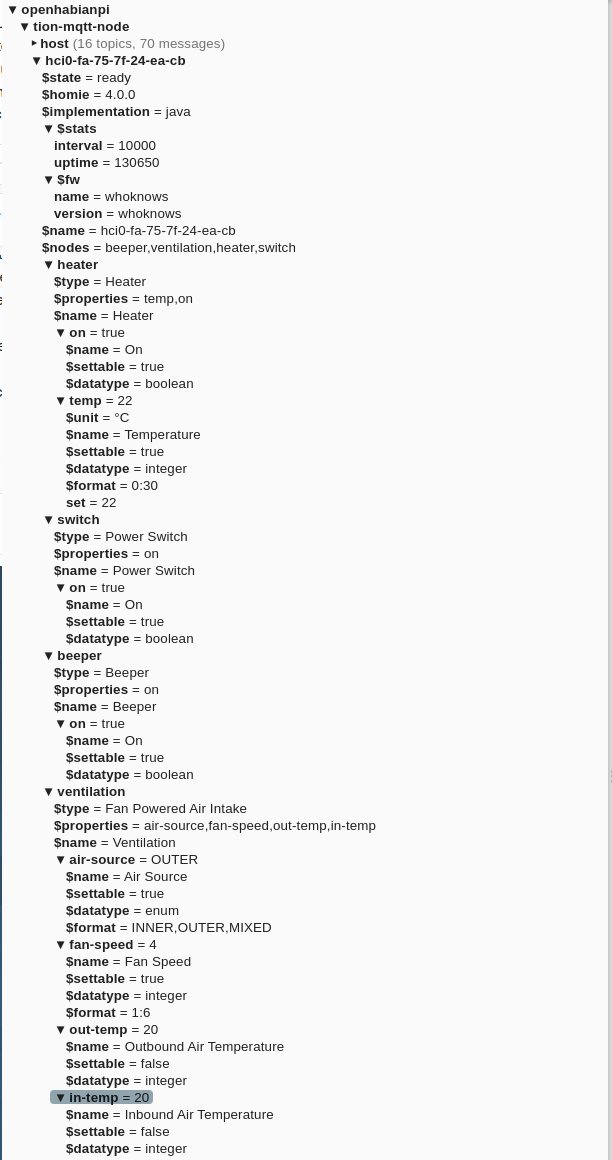
OlegAndreych
on 26 Aug 2020
I'm not sure about the meaning of the 'type of Homie device are you using'. Hardware under control is TION 3S. It's controlled by a custom-built MQTT gateway via Bluetooth.
Custom-built gateway is a java app running on a raspberry pi. Homie part of the gateway is implemented with this library https://github.com/dschanoeh/homie-java.
Ok, that is what I wanted to know, thanks! I didn't even know that there was a Java library for Homie, great!
I've tried to add the device to OpenHAB both manually and automatically via Inbox. The outcome was the same for both cases.
In both cases you get the Did not receive mandatory topic value: tion-mqtt-node/hci0-fa-75-7f-24-ea-cb/$state error message, right? One question: is this something that has appeared on openHAB 2.5.8? How were things going on openHAB 2.5.7? Having a look at your topic three I can't see anything wrong, but I will try to create a test device with the same structure (using Python) and see what happens. The truth is that I haven't seen that message before, so I don't know what is going on :confused:
Thanks @OlegAndreych!
bodiroga
on 26 Aug 2020
In both cases you get the Did not receive mandatory topic value: tion-mqtt-node/hci0-fa-75-7f-24-ea-cb/$state error message, right?
Yes, that's right.
One question: is this something that has appeared on openHAB 2.5.8? How were things going on openHAB 2.5.7?
There was an error in 2.5.7 with the same beginning, but I'm not sure about the topic (I don't remember). That is the reason I've subscribed to this issue.
OlegAndreych
on 27 Aug 2020
Looks like I am having my 'listener' links with the MQTT die. I have a single thing that is originated from my hubitat hub and I've noticed that some of the items don't update in OH when they change in MQTT. Any suggestions of how to get logging for you guys to see this? I've attached an example item config. Let me know if i'm missing something - I wrote the hubitat side myself. It used to work flawlessly and nothing on that side has changed. If I reboot OH things run smoothly again... for a while at least. I'm on OH 2.5.8
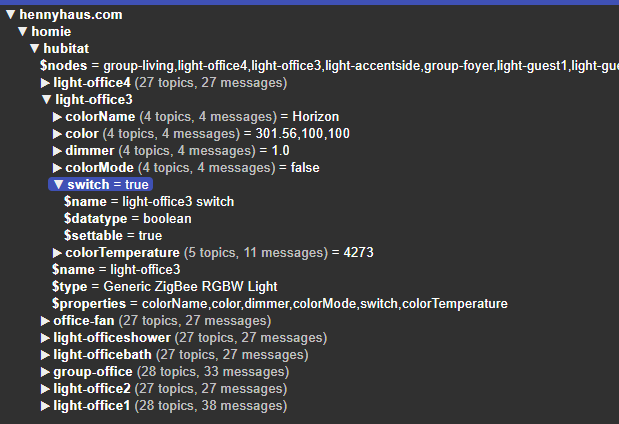
baku104788
on 28 Aug 2020
Hi @baku104788!
Can I ask you to open a new issue with your problem? It seems that it is not related to the one we are addressing here, so it's better to track it on its own :wink: If you could attach a debug log file to the new issue, it would be awesome. Have you seen any error message in the log file? As far as I know, there is nothing new related to the properties connection in the new version, so I don't know what the problem could be, but we will try to fix it!
bodiroga
on 28 Aug 2020
Hi @OlegAndreych!
I have created a clone of your device using @mjcumming's python library and I don't have any problem adding the device from the Inbox. No error messages, no "offline" status reports. Here you can see the code that I have used:
#!/usr/bin/env python

import time

from homie.device_base import Device_Base
from homie.node.node_base import Node_Base
from homie.node.property.property_enum import Property_Enum
from homie.node.property.property_integer import Property_Integer
from homie.node.property.property_switch import Property_Switch

mqtt_settings = {
    'MQTT_BROKER' : '192.168.10.100',
    'MQTT_PORT' : 1883
}

homie_settings = {
    "version": "4.0.0",
    "topic": "tion-mqtt-node",
    "fw_name": "whoknows",
    "fw_version": "whoknows",
    "update_interval": 60,
    "implementation": "java",
}


class BeeperNode(Node_Base):
    def __init__(self, device, id="beeper", name="Beeper", type="Beeper", retain=True, qos=1):
        super().__init__(device, id, name, type, retain, qos)

        self.add_property(Property_Switch(self, id="on", name="On", data_type="boolean", set_value=self.set_switch))

    def set_switch(self, value):
        print("BeeperNode -> on: '{}'".format(value))

class HeaterNode(Node_Base):
    def __init__(self, device, id="heater", name="Heater", type="Heater", retain=True, qos=1):
        super().__init__(device, id, name, type, retain, qos)

        self.add_property(Property_Switch(self, id="on", name="On", data_type="boolean", set_value=self.set_switch))
        self.add_property(Property_Integer(self, id="temp", name="Temperature", data_format="0:30", set_value=self.set_temp))

    def set_switch(self, value):
        print("HeaterNode -> on: '{}'".format(value))

    def set_temp(self, value):
        print("HeaterNode -> temp: '{}'".format(value))


class SwitchNode(Node_Base):
    def __init__(self, device, id="switch", name="Power Switch", type="Power Switch", retain=True, qos=1):
        super().__init__(device, id, name, type, retain, qos)

        self.add_property(Property_Switch(self, id="on", name="On", data_type="boolean", set_value=self.set_switch))

    def set_switch(self, value):
        print("SwitchNode -> on: '{}'".format(value))

class VentilationNode(Node_Base):
    def __init__(self, device, id="ventilation", name="Veltilation", type="Fan Powered Air Intake", retain=True, qos=1):
        super().__init__(device, id, name, type, retain, qos)

        self.add_property(Property_Enum(self, id="air-source", name="Air Source", data_format="INNER,OUTER,MIXED", set_value=self.set_source))
        self.add_property(Property_Integer(self, id="fan-speed", name="Fan Speed", data_format="1:6", set_value=self.set_speed))
        self.add_property(Property_Integer(self, id="out-temp", name="Outbound Air Temperature", settable=False))
        self.add_property(Property_Integer(self, id="in-temp", name="Inbound Air Temperature", settable=False))

    def set_speed(self, value):
        print("VentilationNode -> fan-speed: '{}'".format(value))

    def set_source(self, value):
        print("VentilationNode -> air-source: '{}'".format(value))


class TionController(Device_Base):
    def __init__(self, device_id=None, name=None, homie_settings=None, mqtt_settings=None):
        super().__init__(device_id, name, homie_settings, mqtt_settings)

        self.add_node(HeaterNode(self))
        self.add_node(SwitchNode(self))
        self.add_node(BeeperNode(self))
        self.add_node(VentilationNode(self))

        self.start()


if __name__ == "__main__":
    print("Starting Tion controller device...")
    tion_controler = TionController(device_id="hci0-fa-75-7f-24-ea-cb", name="hci0-fa-75-7f-24-ea-cb", homie_settings=homie_settings, mqtt_settings=mqtt_settings)

    while True:
        time.sleep(2)
I'm not sure what should be my next step, as I'm a little bit lost :confused: Where are your MQTT broker and openHAB system installed? Docker? Raspberry Pi? Are you using Mosquitto as your MQTT broker?
bodiroga
on 28 Aug 2020
Hi @baku104788!
Can I ask you to open a new issue with your problem? It seems that it is not related to the one we are addressing here, so it's better to track it on its own 😉 If you could attach a debug log file to the new issue, it would be awesome. Have you seen any error message in the log file? As far as I know, there is nothing new related to the properties connection in the new version, so I don't know what the problem could be, but we will try to fix it!
I can do a new issue - though I can say I also experience the thing going to offline / not all topics received. Additionally I’ve found that If disable and re-enable the Thing it will not come online unless I restart OH. As an aside - is there a list anywhere saying that all topics OH requires for homie devices?
baku104788
on 28 Aug 2020
@bodiroga
I have created a clone of your device using @mjcumming's python library and I don't have any problem
Anyway, thank you for this investigation.
Where are your MQTT broker and openHAB system installed?
MQTT broker and openHAB reside on the same RPi 3b+.
Are you using Mosquitto as your MQTT broker?
Yes.
I'm not sure what should be my next step, as I'm a little bit lost confused
I thought it would be easy to find a cause for this issue. It seems, that it's hard to reproduce. I'll debug the code myself since my installation is the only have this issue. I'll report results back and maybe ask for assistance in the investigation in case you are interested.
OlegAndreych
on 28 Aug 2020
I can do a new issue - though I can say I also experience the thing going to offline / not all topics received.
Which one is the missing topic? homie/xxx/$name? homie/xxx/$state? Did you create the Thing manually or using the discovery process?
Additionally I’ve found that If disable and re-enable the Thing it will not come online unless I restart OH.
Ummmm.. I have recently fixed that problem for Home Assistant devices, but Homie devices should behave correctly :confused:
As an aside - is there a list anywhere saying that all topics OH requires for homie devices?
Homie binding should be compatible with any device that follows the Homie 3 or Homie 4 convention, no additional topics are required. Which library are you using for your "Hubitat2Homie" gateway?
EDIT: Ouch! :man_facepalming: Having another look at your screenshot I have realized that you are missing some of the required device properties: $homie, $name and $state! @baku104788, your gateway doesn't follow the Homie 4 convention! I recommend using an existing Homie library to create your gateway :wink:
bodiroga
on 28 Aug 2020
Hi again @OlegAndreych!
In your first message you said that "The value of this topic is ready with QoS 0 and retained true", is there any option to send this message with QoS 1 as recommended by the Homie specification?
I'll report results back and maybe ask for assistance in the investigation in case you are interested.
Sure, don't hesitate to write new messages, you can also ping me in them :wink:
bodiroga
on 28 Aug 2020
I can do a new issue - though I can say I also experience the thing going to offline / not all topics received.
Which one is the missing topic?
homie/xxx/$name?homie/xxx/$state? Did you create the Thing manually or using the discovery process?Additionally I’ve found that If disable and re-enable the Thing it will not come online unless I restart OH.
Ummmm.. I have recently fixed that problem for Home Assistant devices, but Homie devices should behave correctly 😕
As an aside - is there a list anywhere saying that all topics OH requires for homie devices?
Homie binding should be compatible with any device that follows the Homie 3 or Homie 4 convention, no additional topics are required. Which library are you using for your "Hubitat2Homie" gateway?
EDIT: Ouch! 🤦♂️ Having another look at your screenshot I have realized that you are missing some of the required device properties: $homie, $name and $state! @baku104788, your gateway doesn't follow the Homie 4 convention! I recommend using an existing Homie library to create your gateway 😉
Thanks for the reply - there current is no 'hubitat2homie' gateway. That is why I needed to code this on my own. I realize the display I showed earlier didn't include my entire structure. I have a new screenshot showing the full level of device and node attributes. I followed the mandatory spec and included all required from the spec in addition to the optional of the $settable. I do want to ensure it was clear - this all worked 100% during the timeframe of the issue with the device $name as this issue references. It is only with this fix that things stopped working. Also I can confirm that I retain control over the items even now - it is only the subscriptions to some attributes that seem to die/get lost as the items don't get updated when they change over mqtt. I do not get any error other than after some time the thing goes into the state "Status: OFFLINE - COMMUNICATION_ERROR Did not receive all required topics" (mind you initially after reboot of OH the thing remains in 'online' state for some time while things are working. It leads me to believe that the subscriptions are somehow failing and eventually that causes it to realize it is missing required fields. Is there extra debug logging I can enable to try to get more info for you guys from the console? I really do want to work through this rather than just downgrading a few versions so things work again.
EDIT: I should add that I do know i have a TON of nodes on this device. I don't think this is an issue but is there a limitation that you guys are assuming for this? Also I want to note I have one other HOMIE device using the esp8266 homie libraries that has one node and it also experiences the same issue. After some time I will stop receiving updates to that item value. From looking at my logs I believe this thing too ends up in the 'did not receive all topics' state when things break. I'll need to look much closer on this thing as it isn't as noticeable - lights not doing what they should is very easy to catch vs a distance sensor that adjusts stereo settings based on the TV positioning :)
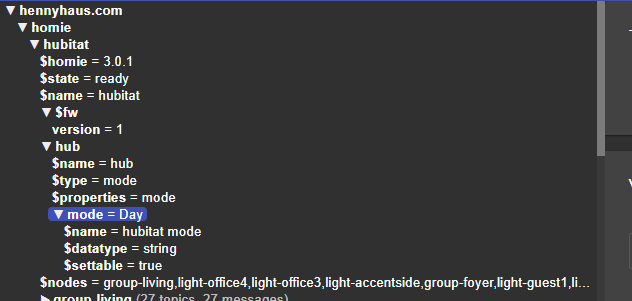
baku104788
on 28 Aug 2020
Thanks for your message @baku104788!
Yeah, I know that there is no "hubitat2homie gateway", that was the name I was giving to the code you have wrote :wink: I suppose that you are getting the information through the Hubitat gateway's REST API and you are converting it to Homie, right? I don't own that gateway, but your project looks interesting. Soooo offtopic, sorry.
Ok, so in your experience, things were going "ok" before openHAB 2.5.8 and the latest changes have made your implementation behave incorrectly. Some questions:
- Can you post your hardware setup? Where is openHAB running? Raspberry Pi? Are you using Mosquitto as your broker or the embedded broker (you shouldn't)?
- How did you solve the previous $name error? It seems, from your previous messages, that you were republishing the $name message every X minutes. Are you still doing it? How often? 1, 2, 5, 10, 30, 60,... minutes?
after some time the thing goes into the state.... Are you able to narrow down that time a little bit? 1, 2, 5, 10, 30, 60... minutes? You can have a look at the "events.log" file in your logs folder ("/var/log/openhab" by default) and search for "ThingStatusInfoChangedEvent" events. Something likecat events.log | grep "StatusInfoChangedEvent"should do it. Is that time similar to the republishing time? Just guessing... :thinking:- Can you confirm that the "Status: OFFLINE - COMMUNICATION_ERROR Did not receive all required topics" message and the fact that you items do not get updated are related? I mean, everytime you see that your items are not updated it is because the Thing is online? Or we cannot correlate both events?
- The "Status: OFFLINE - COMMUNICATION_ERROR Did not receive all required topics" message, as far as I know, can only appear when the Thing is initialized. Do you know if the connection to the broker also went down? Did the broker Thing went to Offline? You can use the events.log file to analyze that.
- What happens when you disable-enable the Thing 3-5 times in a row from Paper UI? Does it come back to Online all the times?
- When you say that you have TONS of nodes in the device, how many are there? Or, even better, how many topics are inside the Homie root topic? MQTT Explorer should show that message next to the "homie" topic.
Thanks for your help and best regards,
Aitor
bodiroga
on 28 Aug 2020
Comments below. Thank you so much for your help with this! _TLDR: I think my previous 'band-aid' of a $name republish every 30 seconds has been the culprit. Time will tell._
Thanks for your message @baku104788!
Yeah, I know that there is no "hubitat2homie gateway", that was the name I was giving to the code you have wrote 😉 I suppose that you are getting the information through the Hubitat gateway's REST API and you are converting it to Homie, right? I don't own that gateway, but your project looks interesting. Soooo offtopic, sorry.
No worries - I actually wrote this coding on the hubitat itself so I am the only one using this code. used it as a learning experience to get started with hubitat development basics. I had hoped to do something similar on the OH side but haven't found an easy/simple way to get started on that learning curve just yet. As such been leaving it to the professionals 😄
Ok, so in your experience, things were going "ok" before openHAB 2.5.8 and the latest changes have made your implementation behave incorrectly. Some questions:
1. Can you post your hardware setup? Where is openHAB running? Raspberry Pi? Are you using Mosquitto as your broker or the embedded broker (you shouldn't)?
- I am running this on Ubuntu 18.04. OH is installed from APT as well as mosquitto. FWIW my detailed hardware specs are as follows: Linux 4.15.0-112-generic on x86_64,| Intel(R) Xeon(R) CPU E3-1225 v5 @ 3.30GHz, 4 cores, 48 gb ram. Load average is around 1.3 (this is a combo/multipurpose - home automation, DVR, File/Media server, PVR - zoneminder server)
.
2. How did you solve the previous $name error? It seems, from your previous messages, that you were republishing the $name message every X minutes. Are you still doing it? How often? 1, 2, 5, 10, 30, 60,... minutes?This is a good point - I resolved the name issue by republishing it every 30 seconds. I will remove this since you have resolved this :)
3. `after some time the thing goes into the state...`. Are you able to narrow down that time a little bit? 1, 2, 5, 10, 30, 60... minutes? You can have a look at the "events.log" file in your logs folder ("/var/log/openhab" by default) and search for "ThingStatusInfoChangedEvent" events. Something like `cat events.log | grep "StatusInfoChangedEvent"` should do it. Is that time similar to the republishing time? Just guessing... 🤔*This is a good call - it looks like it had gone offline fairly quickly. I went ahead and removed my auto name republish (i'm getting a string feeling this 'fix' may have been this 'break' 😨 . so far after I restarted OH it has stayed online for the minutes I have spent writing this post. I will note that initially the item came up in the offline / missing required topics state but as soon as I disabled and re-enabled it came online and stayed that way. I've added a push notification should this thing change state in the future *
4. Can you confirm that the "Status: OFFLINE - COMMUNICATION_ERROR Did not receive all required topics" message and the fact that you items do not get updated are related? I mean, everytime you see that your items are not updated it is because the Thing is online? Or we cannot correlate both events?yeah I am 90% confident that the issues only occur once the thing goes into the 'offline - communication error' state
5. The "Status: OFFLINE - COMMUNICATION_ERROR Did not receive all required topics" message, as far as I know, can only appear when the Thing is initialized. Do you know if the connection to the broker also went down? Did the broker Thing went to Offline? You can use the events.log file to analyze that.The broker didn't go offline between my restart yesterday evening and this morning when I noticed the failure.
6. What happens when you disable-enable the Thing 3-5 times in a row from Paper UI? Does it come back to Online all the times?usually i've had difficulty getting it to come back online - and if i disable and try to re-enable the broker thing then it really never responded
7. When you say that you have TONS of nodes in the device, how many are there? Or, even better, how many topics are inside the Homie root topic? MQTT Explorer should show that message next to the "homie" topic.Homie root topic holds 2969 topics. That is 2 devices - one ESP8266 sensor that i have doing a single attribute of distance and then the hubitat which has a node for each hubitat device and then multiple properties(ie switch/dimmer/color) As far as hubitat goes I have 116 nodes under that device
EDIT - Fixed the picture... meant to do this one

Thanks for your help and best regards,
Aitor
baku104788
on 28 Aug 2020
As an update - you can see the 'lights' is the hubitat thing. After it came on from reboot I seem to have lost my subscribers? I have items that are starting to 'lose' their updates as evidenced by the logs.

baku104788
on 29 Aug 2020
Hi again Jared!
I had hoped to do something similar on the OH side but haven't found an easy/simple way to get started on that learning curve just yet. As such been leaving it to the professionals :smile:
Yeah, that's true, OH development has a very steep learning curve :disappointed:
- Wow. That hardware should be more than enough to run openHAB!
- Yes, you should remove it :wink:
- 'Fairly quickly' is something like milliseconds or seconds? Ummmm... at first the Thing was offline? That shouldn't happen, something is wrong here. We will fix it, don't worry.
- Ok, great, I would say that that is normal. We have to focus on the offline error message then.
- Fine, thanks!
- Ok, it seems that we have a problem with the device initialization.
- 2969 topics! Holly sh*t Jared, that's a lot! :rofl: Ok, perhaps we have a timeout issue, because the binding waits 15 seconds until all topics are processed. I will make some tests modifying my big test device and will see if it timeouts with 3000 topics.
I don't understand what should I see in your picture. It seems that openHAB is being shut down at that moment and that the binding is unsubscribing from the discovery topics, or isn't it?
bodiroga
on 29 Aug 2020
The picture is just the log as openHAB has been churning along on its own - I just start seeing messages like that about message subscriber. I feel like I have seen these messages in older OH versions and it didn’t have negative impact. So far everything has been working stable (I mostly will notice if switches stop updating. These CT items and powerwall items so far don’t matter. I’ll Keep watch and report back )
baku104788
on 29 Aug 2020
As an update - you can see the 'lights' is the hubitat thing. After it came on from reboot I seem to have lost my subscribers? I have items that are starting to 'lose' their updates as evidenced by the logs.
- What was rebooted? Your whole server? openHAB? The groovy script?
- So the Thing is online but you are seeing subscriptions that are lost?
I will dig into the "MessageSubscriber object hasn't been started" message :+1:
These CT items and powerwall items so far don’t matter
But they have stopped being updated, right?
bodiroga
on 29 Aug 2020
@bodiroga
In your first message you said that "The value of this topic is ready with QoS 0 and retained true", is there any option to send this message with QoS 1 as recommended by the Homie specification?
I've recompiled homie-java with explicitly setting the QoS on the sending part to the 1 and 2. Neither of them is affecting COMMUNICATION_ERROR in any way.
OlegAndreych
on 29 Aug 2020
@bodiroga
I've found out everything works fine when the device id is one character shorter than originally.
I didn't find out why though. Do you have any idea?
OlegAndreych
on 29 Aug 2020
@bodiroga
Oh, I think I have to mention earlier that I've also configured the device via Generic MQTT Thing. It works OK.
At first, I didn't use $state in this config. Now I've tried. Item never gets value for this topic (with the long name with dashes).
There's no errors in logs.
OlegAndreych
on 29 Aug 2020
As an update - you can see the 'lights' is the hubitat thing. After it came on from reboot I seem to have lost my subscribers? I have items that are starting to 'lose' their updates as evidenced by the logs.
1. What was rebooted? Your whole server? openHAB? The groovy script?Openhab server reboot always fixes the issue.. for a bit
2. So the Thing is online but you are seeing subscriptions that are lost?Yes thing status remains online
I will dig into the "MessageSubscriber object hasn't been started" message 👍
These CT items and powerwall items so far don’t matter
But they have stopped being updated, right?
I have update relating to the message subscriber error. It seems that the items that show me this error message are actually the items that remain working. I have a group bulbs and whenever they change status on hubitat I see OH put message subscriber errors on two of the bulbs. The crazy thing is that these are the bulbs that remain updating. It is the other two that do not receive the update. All of the bulbs process commands from OH correctly. it seems to be just an issue with the subscription. Hope that helps. Is there any extra binding error logging that I could turn on that may help?
Thanks - hope you have a wonderful day!
baku104788
on 29 Aug 2020
Guys, I will be out until monday, but I will answer your messages when I'm back, don't worry! :wink:
EDIT: Can I ask you to turn on debug logging for the Homie binding and report back a log file for the first 5 minutes after openHAB has been started? The easiest way to do that is using the Karaf console (you can access it through SSH) and typing the following command: log:set debug org.openhab.binding.mqtt.homie. After that, you can close the Karaf console session (type: logout), remove any previous log message (rm -r /var/log/openhab/*.log) and restart openHAB (sudo systemctl restart openhab). I'm mainly interested in the openhab.log log file, but you can also send me the events.log one. Thanks!
bodiroga
on 30 Aug 2020
Guys, I will be out until monday, but I will answer your messages when I'm back, don't worry! 😉
No problem, take your time. Thanks for your help!
OlegAndreych
on 30 Aug 2020
Hi @OlegAndreych and @baku104788!
Perhaps you didn't see it, but I edited my last message to ask you for more information :wink: Here you have what I added:
Can I ask you to turn on debug logging for the Homie binding and report back a log file for the first 5 minutes after openHAB has been started? The easiest way to do that is using the Karaf console (you can access it through SSH) and typing the following command: log:set debug org.openhab.binding.mqtt.homie. After that, you can close the Karaf console session (type: logout), remove any previous log message (rm -r /var/log/openhab/*.log) and restart openHAB (sudo systemctl restart openhab). I'm mainly interested in the openhab.log log file, but you can also send me the events.log one. Thanks!
bodiroga
on 31 Aug 2020
Hi @OlegAndreych and @baku104788!
Perhaps you didn't see it, but I edited my last message to ask you for more information 😉 Here you have what I added:
Can I ask you to turn on debug logging for the Homie binding and report back a log file for the first 5 minutes after openHAB has been started? The easiest way to do that is using the Karaf console (you can access it through SSH) and typing the following command: log:set debug org.openhab.binding.mqtt.homie. After that, you can close the Karaf console session (type: logout), remove any previous log message (rm -r /var/log/openhab/*.log) and restart openHAB (sudo systemctl restart openhab). I'm mainly interested in the openhab.log log file, but you can also send me the events.log one. Thanks!
Question relating to this - do you know how I can redirect just this binding log info out to its own file? I've wanted to do this type of directed logging for some time but never figured out how. Meanwhile - yesterday evening I started a project to remove legacy 1.x bindings from my setup so it may take me a bit before I get things cleaned back up enough to get this over to you
baku104788
on 31 Aug 2020
Well, I thought this addition wasn't for me.
Here are the logs.
logs.tar.gz
OlegAndreych
on 31 Aug 2020
here are the selected logs from my startup for the homie binding: (I've added in the lines from my 'thing' monitoring logging as well)
--OH START--
2020-08-31 15:14:08.814 [DEBUG] [e.internal.handler.HomieThingHandler] - About to initialize Homie device null
2020-08-31 15:14:08.827 [DEBUG] [e.internal.handler.HomieThingHandler] - About to start Homie device null
2020-08-31 15:14:08.978 [DEBUG] [e.internal.handler.HomieThingHandler] - Homie device TV Distance fully attached
2020-08-31 15:14:09.000 [DEBUG] [e.internal.handler.HomieThingHandler] - About to initialize Homie device null
2020-08-31 15:14:09.098 [DEBUG] [e.internal.handler.HomieThingHandler] - About to start Homie device null
2020-08-31 15:14:09.340 [DEBUG] [e.internal.handler.HomieThingHandler] - Homie device TV Distance fully attached
2020-08-31 15:14:09.890 [DEBUG] [e.internal.handler.HomieThingHandler] - Homie device hubitat fully attached
2020-08-31 15:14:14.009 [WARN ] [core.thing.internal.ThingManagerImpl] - Initializing handler for thing 'mqtt:homie300:7d0ef5b3:hubitat' takes more than 5000ms.
2020-08-31 15:14:27.176 [INFO ] [pse.smarthome.model.script.BROADCAST] - Hubitat status OFFLINE (COMMUNICATION_ERROR): Did not receive all required topics
--MANUAL THING DISABLE/RE-ENABLE--
2020-08-31 15:30:20.835 [DEBUG] [e.internal.handler.HomieThingHandler] - About to stop Homie device hubitat
2020-08-31 15:30:21.593 [DEBUG] [e.internal.handler.HomieThingHandler] - About to initialize Homie device null
2020-08-31 15:30:21.635 [DEBUG] [e.internal.handler.HomieThingHandler] - About to start Homie device null
2020-08-31 15:30:20.882 [INFO ] [pse.smarthome.model.script.BROADCAST] - Hubitat status UNINITIALIZED (DISABLED)
2020-08-31 15:30:21.592 [INFO ] [pse.smarthome.model.script.BROADCAST] - Hubitat status INITIALIZING
2020-08-31 15:30:21.941 [DEBUG] [e.internal.handler.HomieThingHandler] - Homie device hubitat fully attached
2020-08-31 15:30:22.169 [DEBUG] [e.internal.handler.HomieThingHandler] - Homie device hubitat fully attached
Let me know if you need any other info. One other thing - my $name on the esp8266 device is "TV Distance" while the homie device name is "tv-distance" in OH. is that ok? I noticed your other issue referenced that name must match the device now so wanted to ensure this wasn't causing issue
baku104788
on 31 Aug 2020
Hi @OlegAndreych and @baku104788!
Perhaps you didn't see it, but I edited my last message to ask you for more information wink Here you have what I added:Can I ask you to turn on debug logging for the Homie binding and report back a log file for the first 5 minutes after openHAB has been started? The easiest way to do that is using the Karaf console (you can access it through SSH) and typing the following command: log:set debug org.openhab.binding.mqtt.homie. After that, you can close the Karaf console session (type: logout), remove any previous log message (rm -r /var/log/openhab/*.log) and restart openHAB (sudo systemctl restart openhab). I'm mainly interested in the openhab.log log file, but you can also send me the events.log one. Thanks!
Question relating to this - do you know how I can redirect just this binding log info out to its own file? I've wanted to do this type of directed logging for some time but never figured out how. Meanwhile - yesterday evening I started a project to remove legacy 1.x bindings from my setup so it may take me a bit before I get things cleaned back up enough to get this over to you
Hi @baku104788!
Take a look here: https://community.openhab.org/t/log4j2-sample-config/33284
I hope that the example provided by Dim will be useful for you :wink:
bodiroga
on 1 Sep 2020
Hi @OlegAndreych!
Oh, I think I have to mention earlier that I've also configured the device via
Generic MQTT Thing. It works OK.At first, I didn't use
$statein this config. Now I've tried. Item never gets value for this topic (with the long name with dashes).
There's no errors in logs.
So:
- 'Generic MQTT Thing' with $state topic been used as availability topic works ok? Or only with the shorter name?
- 'Homie Thing' with shorter name behaves the same? Still getting the COMUNICATION_ERROR, right?
bodiroga
on 1 Sep 2020
@baku104788
2020-08-31 15:14:08.814 [DEBUG] [e.internal.handler.HomieThingHandler] - About to initialize Homie device null
2020-08-31 15:14:08.827 [DEBUG] [e.internal.handler.HomieThingHandler] - About to start Homie device null
2020-08-31 15:14:08.978 [DEBUG] [e.internal.handler.HomieThingHandler] - Homie device TV Distance fully attached
2020-08-31 15:14:09.000 [DEBUG] [e.internal.handler.HomieThingHandler] - About to initialize Homie device null
2020-08-31 15:14:09.098 [DEBUG] [e.internal.handler.HomieThingHandler] - About to start Homie device null
2020-08-31 15:14:09.340 [DEBUG] [e.internal.handler.HomieThingHandler] - Homie device TV Distance fully attached
2020-08-31 15:14:09.890 [DEBUG] [e.internal.handler.HomieThingHandler] - Homie device hubitat fully attached
2020-08-31 15:14:14.009 [WARN ] [core.thing.internal.ThingManagerImpl] - Initializing handler for thing 'mqtt:homie300:7d0ef5b3:hubitat' takes more than 5000ms.
2020-08-31 15:14:27.176 [INFO ] [pse.smarthome.model.script.BROADCAST] - Hubitat status OFFLINE (COMMUNICATION_ERROR): Did not receive all required topics
Ok, we clearly have a timeout error in the device initialization step, the binding is taking too much time processing the MQTT topic tree. One more question: does the ESP8266 device work fine? Anything wrong with it?
2020-08-31 15:30:20.835 [DEBUG] [e.internal.handler.HomieThingHandler] - About to stop Homie device hubitat
2020-08-31 15:30:21.593 [DEBUG] [e.internal.handler.HomieThingHandler] - About to initialize Homie device null
2020-08-31 15:30:21.635 [DEBUG] [e.internal.handler.HomieThingHandler] - About to start Homie device null
2020-08-31 15:30:20.882 [INFO ] [pse.smarthome.model.script.BROADCAST] - Hubitat status UNINITIALIZED (DISABLED)
2020-08-31 15:30:21.592 [INFO ] [pse.smarthome.model.script.BROADCAST] - Hubitat status INITIALIZING
2020-08-31 15:30:21.941 [DEBUG] [e.internal.handler.HomieThingHandler] - Homie device hubitat fully attached
2020-08-31 15:30:22.169 [DEBUG] [e.internal.handler.HomieThingHandler] - Homie device hubitat fully attached
Did the device get to the ONLINE state after this? You have shown the INITIALIZING message, but not the final result: ONLINE or OFFLINE.
Let me know if you need any other info. One other thing - my $name on the esp8266 device is "TV Distance" while the homie device name is "tv-distance" in OH. is that ok? I noticed your other issue referenced that name must match the device now so wanted to ensure this wasn't causing issue
Don't worry, it doesn't matter, it is allowed for the device name to be different from its identifier. As you have seen, the new version of the binding names the Thing with its identifier, not the name. That was the temporal workaround that we found to fix the $name topic error.
bodiroga
on 1 Sep 2020
@baku104788
2020-08-31 15:14:08.814 [DEBUG] [e.internal.handler.HomieThingHandler] - About to initialize Homie device null
2020-08-31 15:14:08.827 [DEBUG] [e.internal.handler.HomieThingHandler] - About to start Homie device null
2020-08-31 15:14:08.978 [DEBUG] [e.internal.handler.HomieThingHandler] - Homie device TV Distance fully attached
2020-08-31 15:14:09.000 [DEBUG] [e.internal.handler.HomieThingHandler] - About to initialize Homie device null
2020-08-31 15:14:09.098 [DEBUG] [e.internal.handler.HomieThingHandler] - About to start Homie device null
2020-08-31 15:14:09.340 [DEBUG] [e.internal.handler.HomieThingHandler] - Homie device TV Distance fully attached
2020-08-31 15:14:09.890 [DEBUG] [e.internal.handler.HomieThingHandler] - Homie device hubitat fully attached
2020-08-31 15:14:14.009 [WARN ] [core.thing.internal.ThingManagerImpl] - Initializing handler for thing 'mqtt:homie300:7d0ef5b3:hubitat' takes more than 5000ms.
2020-08-31 15:14:27.176 [INFO ] [pse.smarthome.model.script.BROADCAST] - Hubitat status OFFLINE (COMMUNICATION_ERROR): Did not receive all required topicsOk, we clearly have a timeout error in the device initialization step, the binding is taking too much time processing the MQTT topic tree. One more question: does the ESP8266 device work fine? Anything wrong with it?
2020-08-31 15:30:20.835 [DEBUG] [e.internal.handler.HomieThingHandler] - About to stop Homie device hubitat
2020-08-31 15:30:21.593 [DEBUG] [e.internal.handler.HomieThingHandler] - About to initialize Homie device null
2020-08-31 15:30:21.635 [DEBUG] [e.internal.handler.HomieThingHandler] - About to start Homie device null
2020-08-31 15:30:20.882 [INFO ] [pse.smarthome.model.script.BROADCAST] - Hubitat status UNINITIALIZED (DISABLED)
2020-08-31 15:30:21.592 [INFO ] [pse.smarthome.model.script.BROADCAST] - Hubitat status INITIALIZING
2020-08-31 15:30:21.941 [DEBUG] [e.internal.handler.HomieThingHandler] - Homie device hubitat fully attached
2020-08-31 15:30:22.169 [DEBUG] [e.internal.handler.HomieThingHandler] - Homie device hubitat fully attachedDid the device get to the ONLINE state after this? You have shown the INITIALIZING message, but not the final result: ONLINE or OFFLINE.
Let me know if you need any other info. One other thing - my $name on the esp8266 device is "TV Distance" while the homie device name is "tv-distance" in OH. is that ok? I noticed your other issue referenced that name must match the device now so wanted to ensure this wasn't causing issue
Don't worry, it doesn't matter, it is allowed for the device name to be different from its identifier. As you have seen, the new version of the binding names the Thing with its identifier, not the name. That was the temporal workaround that we found to fix the $name topic error.
The tv-distance thing has also stopped receiving updates as well when things break. I also should notate that the hubitat thing sometimes comes online successfully with no intervention after a restart - I’ve been restarting more as I’ve been getting rid of 1.x bindings / preparing to move to a dockerized install.
baku104788
on 1 Sep 2020
'Generic MQTT Thing' with $state topic been used as availability topic works ok? Or only with the shorter name?
I've configured it as a text channel, not the state channel. It doesn't update with the longer name (dash as the value) but updates with the shorter one.
'Homie Thing' with shorter name behaves the same? Still getting the COMUNICATION_ERROR, right?
No, 'Homie Thing' with the shorter name works OK at first glance. I didn't use it for a long time.
OlegAndreych
on 1 Sep 2020
No, 'Homie Thing' with the shorter name works OK at first glance. I didn't use it for a long time.
Hi @OlegAndreych!
How are things going with the shorter name? Does that fix the problem?
@baku104788, I've been trying to reproduce the COMUNICATION_ERROR for the last days, but I can't force it consistently and it's driving me nuts! :angry: I have created a device with 6013 topics and sometimes I get the error and other times it starts fine. Anyway, I still thing that we shouldn't create devices with soooo many nodes (mine has 350 nodes) and you should instead try to redefine your "hubitat2homie" software, creating a Homie device for each Hubitat device. Your use case is an edge case. I will keep trying, but I'm running out of ideas, sorry :disappointed:
bodiroga
on 3 Sep 2020
No, 'Homie Thing' with the shorter name works OK at first glance. I didn't use it for a long time.
Hi @OlegAndreych!
How are things going with the shorter name? Does that fix the problem?
@baku104788, I've been trying to reproduce the COMUNICATION_ERROR for the last days, but I can't force it consistently and it's driving me nuts! 😠 I have created a device with 6013 topics and sometimes I get the error and other times it starts fine. Anyway, I still thing that we shouldn't create devices with soooo many nodes (mine has 350 nodes) and you should instead try to redefine your "hubitat2homie" software, creating a Homie device for each Hubitat device. Your use case is an edge case. I will keep trying, but I'm running out of ideas, sorry 😞
I agree it is perplexing - I will say ultimately my configuration only comes down to about 55 or so nodes linked to the single homie devices. It is the subsequent channels within each of those that add up the topics quickly. I would caution against just tossing this as an edge case though because it is also possible to have this many topics with fewer nodes - assuming each node may have more attributes. Homie doesn't specify limitations as far as I know?
Is it perhaps a processing timeout that causes the thing to error out sometimes - I would also worry that this could impact smaller topic lists on lower powered OH devices? if it doesn't get through all of the mqtt messages fast enough it just kills and thinks it has failed? It does seem like that would be the case to me as mine has also been back and forth. (I admit I clearly know nothing of the inner workings here - just thinking out loud)
Either way - if we do go with the edge case / leave this as is - I would just suggest that we include documentation of this known issue for others that may stumble across this :) That way we can easily create an automated disable/re-enable if the thing goes into this failed state as a workaround. I can say that my devices have been working correctly now that I killed the name republish workaround. Seems that was the cause of the broken subscriptions.
baku104788
on 3 Sep 2020
Hi @baku104788!
I have created https://github.com/openhab/openhab-addons/pull/8390 to address the COMUNICATION_ERROR problem, as I finally figured out what the problem was :tada: I will now have a look at the MessageSubscribe object message, although I haven't been able to reproduce it with my 350 nodes and 1050 properties device (it is a simulated device, not a physical one, of course :rofl:). How many of your properties are linked to an item? What is the refresh rate of each property? 1, 5, 10, 30, 60, 120, 300... seconds?
I will also have a look at @OlegAndreych's problem, as I haven't forgotten about your error :wink:
bodiroga
on 3 Sep 2020
How are things going with the shorter name? Does that fix the problem?
Yes, but this solution is rather inconvenient.
I've got an idea. What if I'll assemble a stripped-down version of my "gateway service" so that you can try to reproduce an issue on your side?
OlegAndreych
on 6 Sep 2020
I've got an idea. What if I'll assemble a stripped-down version of my "gateway service" so that you can try to reproduce an issue on your side?
Yes, please, as I haven't been able to reproduce the error even with a much longer name such as "hci0-fa-75-7f-24-ea-cb-aa-aa-aa-aa-aa-aa-aa-aa-aa-aa-aa-aa-aa-aa" :disappointed:
bodiroga
on 7 Sep 2020
Well, surprisingly, I've found out that restarting the "gateway service" makes it "Online" without a "COMMUNICATION_ERROR" even with the long name of the device. But restarting the OpenHAB makes the error to occur again.
Even more, I cannot reproduce this with a stripped-down version of a gateway.
It seems like the issue is with the gateway, but topics and their values look perfectly fine in the MQTT Explorer.
OlegAndreych
on 8 Sep 2020
Seems like the issue with $state was because of concurrent Things. One is that I created with basic MQTT (as a workaround for the original issue), and another is created with Homie.
That is why any device name that is different from the original worked no matter what is started/restarted and when.
@bodiroga sorry for the inconvenience.
OlegAndreych
on 12 Sep 2020
Hi @OlegAndreych!
Don't worry, thanks for reporting back! So, the problem was that the Generic MQTT Thing was interfering with the Homie Thing, right? Sadly, you are probably correct in your analysis, because the underlying MQTT transport bundle has problems when dealing with multiple things subscribing to the same topics. I will try to have a look at it for OH3, but for now we will have to deal with it.
If you have any other problem, please, don't be afraid to open a new thread :+1:
bodiroga
on 13 Sep 2020
So, the problem was that the Generic MQTT Thing was interfering with the Homie Thing, right?
Yes, that is how it looks from the configuration standpoint. I didn't investigate the underlying code, though.
OlegAndreych
on 13 Sep 2020
@bodiroga sorry was busy last few months. Anything I can help with?
mjcumming
on 24 Sep 2020
Hi @mjcumming!
With the help of @baku104788, I discovered that there was a problem in the discovery process that could only be seen with very big Homie devices (thousands of topics), but that bug is already fixed in 2.5.9 thanks to https://github.com/openhab/openhab-addons/pull/8390. So I would say that any Homie device should work fine now with openHAB.
Thanks for your offer and if you catch any new bug, don't hesitate to open a new thread :wink:
Best regards,
Aitor
bodiroga
on 24 Sep 2020
Related issues
 gk4
·
3Comments
gk4
·
3Comments
 Ingenieur89
·
4Comments
Ingenieur89
·
4Comments
 IOOOTAlan
·
3Comments
IOOOTAlan
·
3Comments
 smyrman
·
4Comments
smyrman
·
4Comments
 pfink
·
4Comments
pfink
·
4Comments
Most helpful comment
Hi @mjcumming!
With the help of @baku104788, I discovered that there was a problem in the discovery process that could only be seen with very big Homie devices (thousands of topics), but that bug is already fixed in 2.5.9 thanks to https://github.com/openhab/openhab-addons/pull/8390. So I would say that any Homie device should work fine now with openHAB.
Thanks for your offer and if you catch any new bug, don't hesitate to open a new thread :wink:
Best regards,
Aitor