Openhab-addons: [homematic] When sending "UP" command to HmIP-BROLL rollershutter goes down
Expected Behavior
When sending the "UP" command to a HmIP-BROLL item, the rollershutter should go UP.
Current Behavior
When sending the "UP" command to a HmIP-BROLL item, the rollershutter is currently going DOWN.
When sending the "DOWN" command the rollershutter is going DOWN as well.
The issue and a possible workaround are described here as well:
https://community.openhab.org/t/homematic-shutters-hmip-broll-always-close-when-sending-command-up/78648
Your Environment
- Version used: openhab 2.4.0 and debmatic with Firmwareversion 3.47.15.33
 hosh0r
All 66 comments
I have the same issue with some newly bought HmIP-BROLLs. My RasperryMatic (3.47.18.20190918) is working correct, so seems to be related to OH/homeatic addon.
Is there something I can help to get this sorted? I have a spare BROLL that I can temporarily share.
Thanks much for your help.
 MrMontesa
on 27 Oct 2019
MrMontesa
on 27 Oct 2019
@kaikreuzer As you removed the binding: homematic label, do you thing this is not related to the binding and an issue with openhab itself? Did somebody tried the command with openhab 2.5?
 regnets
on 23 Jan 2020
regnets
on 23 Jan 2020
@regnets the binding-specific labels have been completely removed. Therefore it has been removed from this issue. It is sufficient to add the binding name in square brackets to the abstract.
 MHerbst
on 23 Jan 2020
MHerbst
on 23 Jan 2020
Any news on this one? I've experiencing exactly the same problem with latest OH2 (2.5.3-1) and RaspberryMatic (3.51.6.20200229). This is really annoying.
 nRaecheR
on 11 Apr 2020
nRaecheR
on 11 Apr 2020
I have started to understand how the roller shutter handling is working in the binding, but it is a bit difficult because I don't have this device. Therefore I would need your help.
First of all I would like to know whether all channels are correctly defined. Please open the thing definition in Paper UI. There should be at least two channels named Level (you may have to click on "Show More" to make them visible): one with ID homematic:...:3#LEVEL and one or more with homematic:...:4#LEVEL (and higher numbers).
The type of 3#LEVEL should be Number and the type of the other level channels Rollershutter. Is this assumption correct?
As a next step please create an item for 3#LEVEL, then move the rollershutter up and down and give me the displayed values for the Level item.
MHerbst
on 13 Apr 2020
Sure, I will help you.
The first assumptions are correct, there are LEVEL channels for 3 - 6. But 3#LEVEL (and all the others) aren't from Type "Number" but from Type "RollerShutter".
The value range is from 1 (open, bright) to 100 (closed, dark) when adding a RollerShutter item and read the value in PaperUI.
Hope this helps. Please tell me if you need more information like traces etc.
nRaecheR
on 13 Apr 2020
Correction, it seems the Level item has been resetted to 1 with the rollershutter still closed. Will add some logging output.
nRaecheR
on 13 Apr 2020
Okay, here the events.log output:
(Rollershutter is up, Key press on actor)
2020-04-13 12:29:50.766 [vent.ItemStateChangedEvent] - HmIPBRoTRLinksRollladen_3_Level changed from 1 to 2
2020-04-13 12:30:17.481 [vent.ItemStateChangedEvent] - HmIPBRoTRLinksRollladen_3_Level changed from 2 to 100
(Rollershutter is down, motor off)
No more changes this time, I'm a little puzzled why the first time it gets resetted to 1.
(Rollershutter is up, key press on actor)
2020-04-13 12:33:41.664 [vent.ItemStateChangedEvent] - HmIPBRoTRLinksRollladen_3_Level changed from 100 to 98
2020-04-13 12:34:09.723 [vent.ItemStateChangedEvent] - HmIPBRoTRLinksRollladen_3_Level changed from 98 to 1
(Rollershutter is up, motor off)
Tested it two more times, no changes except the initial value varies from 2 to 3 and after the UP key the initial event won't be triggered but the 100 to 1 will be.
nRaecheR
on 13 Apr 2020
I think the main problem is, that the new HmIP-BROLL have different channels than the HM-LC-Bl1PBU-FM.
old:
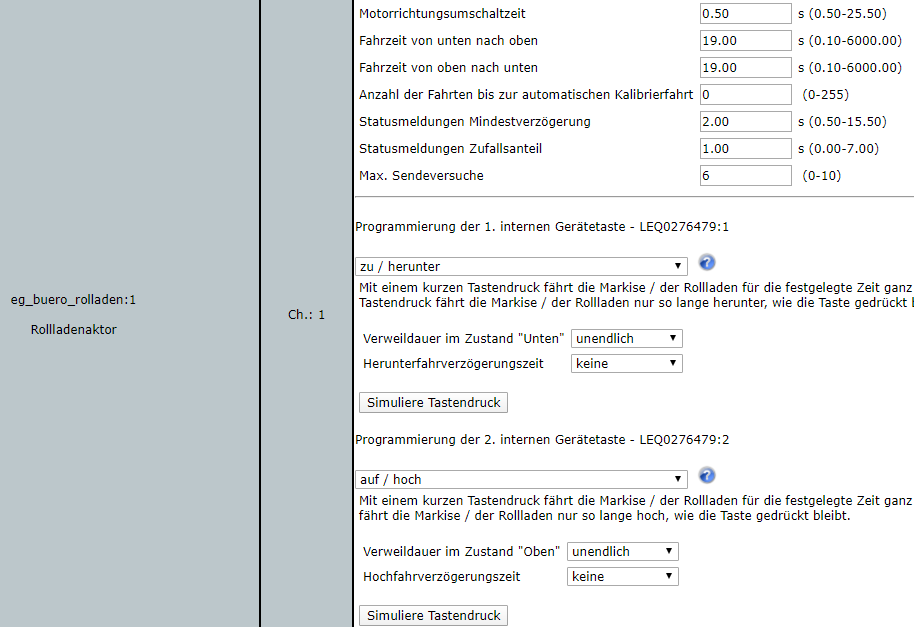
New BROLL:
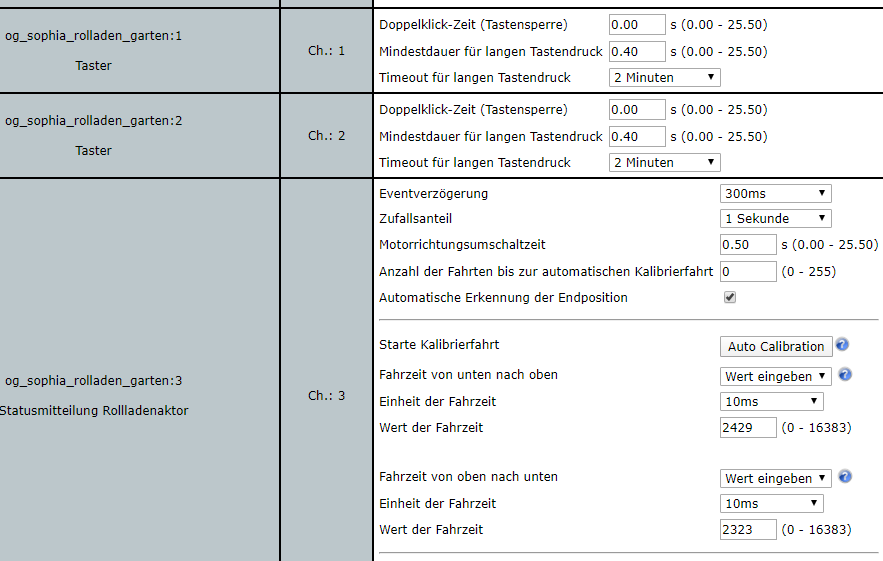
The device is just not supported for now, I guess. If you need debug logs or other stuff happy to help as well.
Thanks sebastian
MrMontesa
on 13 Apr 2020
@sebastian It is not a problem of the different channels. The Homematic binding does not even know about (most) devices. It detects the devices and then queries the CCU for the available data types and the channel groups. Based on this information the channels of the OH things are created. For some very special devices, there is additional coding.
For the rollershutters/blinds the binding checks the data point name (= LEVEL) and the group name. If both are the same but the device behaves differently, then the binding has got a problem.
The problem is the value of "LEVEL" for the BROLL devices the command UP means 0% and down 100%. But the binding has implemented it the other way round. Can you check the values of LEVEL for the HM-LC-Bl1PBU-FM device? What is the value for completely up resp. down. If the behavior is different for both devices it will be necessary to implement different behavior.
MHerbst
on 13 Apr 2020
Hey @MHerbst, I'm not quite sure if I understood what you need. Can you elaborate a bit more in detail?
This is what BROLL shows when pressing UP in BasicUI
2020-04-20 13:59:29.286 [ome.event.ItemCommandEvent] - Item 'og_sophia_rolladen_garten' received command UP
2020-04-20 13:59:29.295 [vent.ItemStateChangedEvent] - og_sophia_rolladen_garten changed from 51 to 0
2020-04-20 13:59:30.214 [vent.ItemStateChangedEvent] - og_sophia_rolladen_garten changed from 0 to 50
2020-04-20 13:59:43.304 [vent.ItemStateChangedEvent] - og_sophia_rolladen_garten changed from 50 to 1
This is what BROLL shows when sending 0 using Habpanel which is also meant to go UP, but actually rollershutter goes down.
2020-04-20 14:13:54.103 [ome.event.ItemCommandEvent] - Item 'og_sophia_rolladen_garten' received command 0
2020-04-20 14:13:54.108 [vent.ItemStateChangedEvent] - og_sophia_rolladen_garten changed from 38 to 0
2020-04-20 14:13:54.944 [vent.ItemStateChangedEvent] - og_sophia_rolladen_garten changed from 0 to 39
This is what HM-LC-Bl1PBU-FM received when pressing UP in BasicUI
2020-04-20 13:58:23.043 [ome.event.ItemCommandEvent] - Item 'og_sophia_rolladen_garage' received command UP
2020-04-20 13:58:23.066 [nt.ItemStatePredictedEvent] - og_sophia_rolladen_garage predicted to become UP
2020-04-20 13:58:23.081 [vent.ItemStateChangedEvent] - og_sophia_rolladen_garage changed from 56 to 0
2020-04-20 13:58:23.264 [vent.ItemStateChangedEvent] - og_sophia_rolladen_garage changed from 0 to 56
2020-04-20 13:58:42.404 [vent.ItemStateChangedEvent] - og_sophia_rolladen_garage changed from 56 to 0
btw: There was some rule howto make it work while binding behaves differently.
Thanks much
MrMontesa
on 20 Apr 2020
It seems that maybe the devices behave differently and that's what I mainly try to find out. Also the values 0 and 100 seem to have different meanings. For some devices 100 means completely down and for others completely up.
@MrMontesa From your last post I can't see what really happens if you press UP in Basic UI:
- what happens if you press UP in Basic UI on both devices? Are they going up or down?
- are the devices behaving differently or the same?
- HABPanel behaves probably different because UP and 0 are handled differently in the binding. If the UP command is sent there is an inversion of the value, but probably this is not done if you send a 0.
MHerbst
on 20 Apr 2020
Issues
First of all here the issues if I plainly use the level channels. Afterwards I explain the workaround. All mentioned issues apply for HmIP-FBL and HmIP-BBL.
Action: HmIP-FBL Rollshutter press down
Current behaviour: nothing happens
Expected behaviour: rollshutter move down
2020-06-03 12:39:34.315 [ome.event.ItemCommandEvent] - Item 'HmIP_FBL_Bedroom_Shutter_Oli_Debug' received command DOWN
2020-06-03 12:39:34.338 [nt.ItemStatePredictedEvent] - HmIP_FBL_Bedroom_Shutter_Oli_Debug predicted to become DOWN
2020-06-03 12:39:34.343 [vent.ItemStateChangedEvent] - HmIP_FBL_Bedroom_Shutter_Oli_Debug changed from 99 to 100
Action: HmIP-FBL Rollshutter press up
Current behaviour: nothing happens
Expected behaviour: rollshutter move up
2020-06-03 12:39:54.238 [ome.event.ItemCommandEvent] - Item 'HmIP_FBL_Bedroom_Shutter_Oli_Debug' received command UP
2020-06-03 12:39:54.260 [nt.ItemStatePredictedEvent] - HmIP_FBL_Bedroom_Shutter_Oli_Debug predicted to become UP
2020-06-03 12:39:54.267 [vent.ItemStateChangedEvent] - HmIP_FBL_Bedroom_Shutter_Oli_Debug changed from 100 to 0
Action: HmIP-FBL Rollshutter press stop while letting the shutters roll down via RaspberryMatic
Current behaviour: rollshutter move down
Expected behaviour: rollshutter stop
2020-06-03 12:40:30.133 [ome.event.ItemCommandEvent] - Item 'HmIP_FBL_Bedroom_Shutter_Oli_Debug' received command STOP
BasicUI visualization
The percentage values are reversed.
Current behaviour: 99% is closed
Expected behaviour: 99% is open
Configuration
item configuration
Rollershutter   HmIP_FBL_Bedroom_Shutter_Oli_Debug  "Rolladen Oliver [%d %%]"            <rollershutter>   (Bedroom, gShutter) {channel="homematic:HmIP-FBL:3014F711A0001F5A4993E04B:001397099C4272:4#LEVEL"}
Rollershutter   HmIP_BBL_KidsRoom_Shutter_Debug     "Rolladen KZ [%d %%]"                <rollershutter>   (KidsRoom, gShutter) {channel="homematic:HmIP-BBL:3014F711A0001F5A4993E04B:001357099606F5:4#LEVEL"}
sitemap configuration
sitemap goldich_home label="Goldich Home" {
    Frame label="Debug"{
        Default item=HmIP_FBL_Bedroom_Shutter_Oli_Debug
        Default item=HmIP_BBL_KidsRoom_Shutter_Debug
    }
}
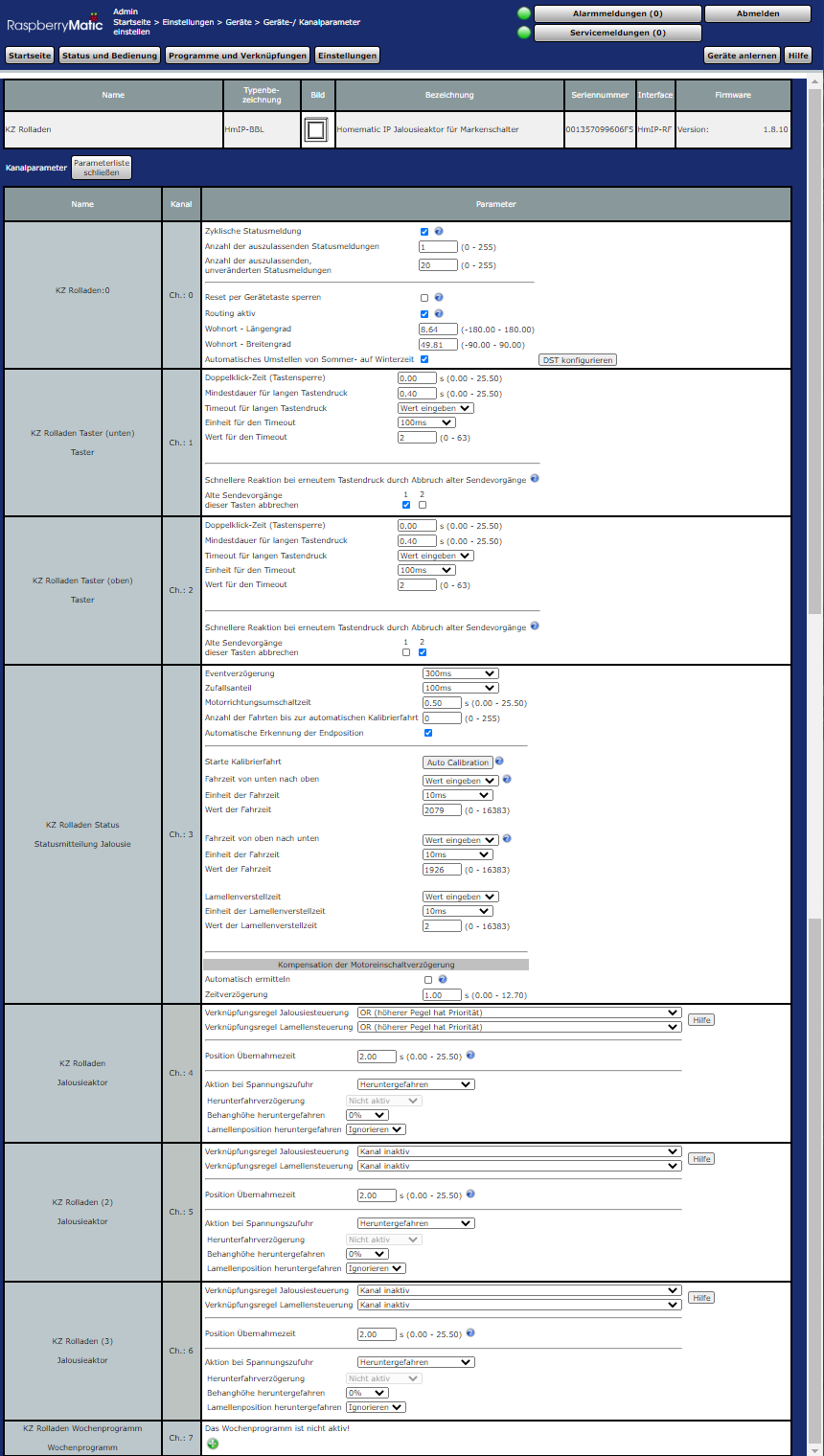
HmIP-BBL
PaperUI Channel (Blind Virtual Receiver)
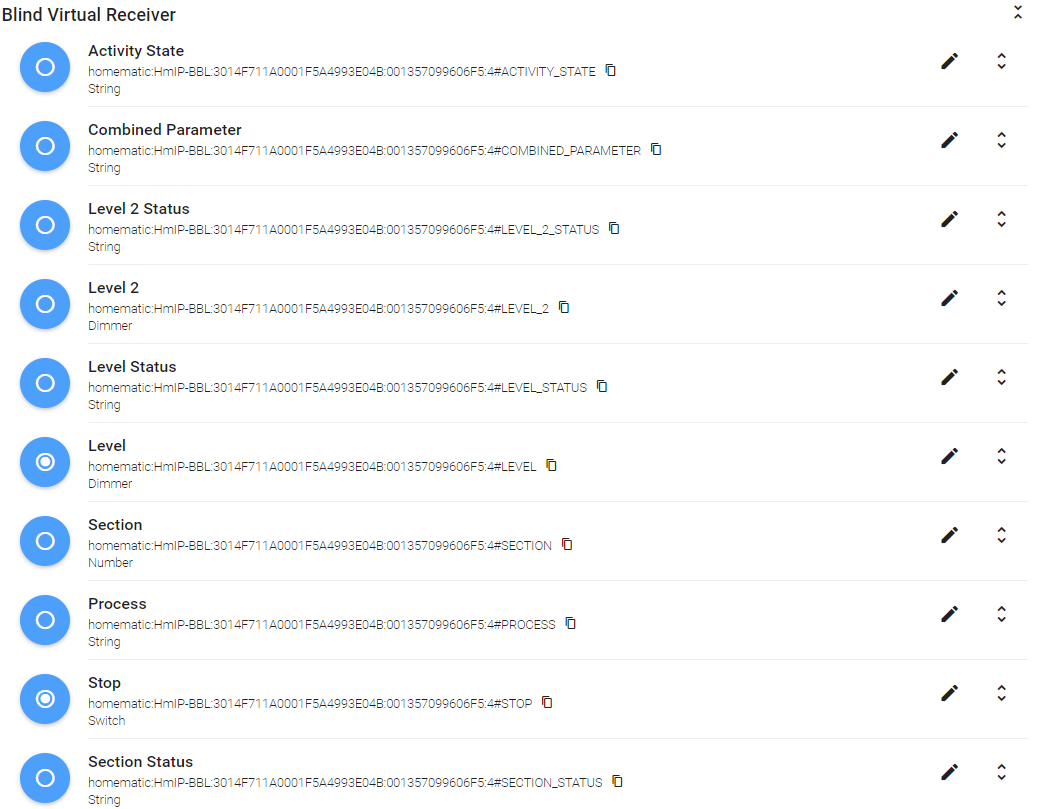
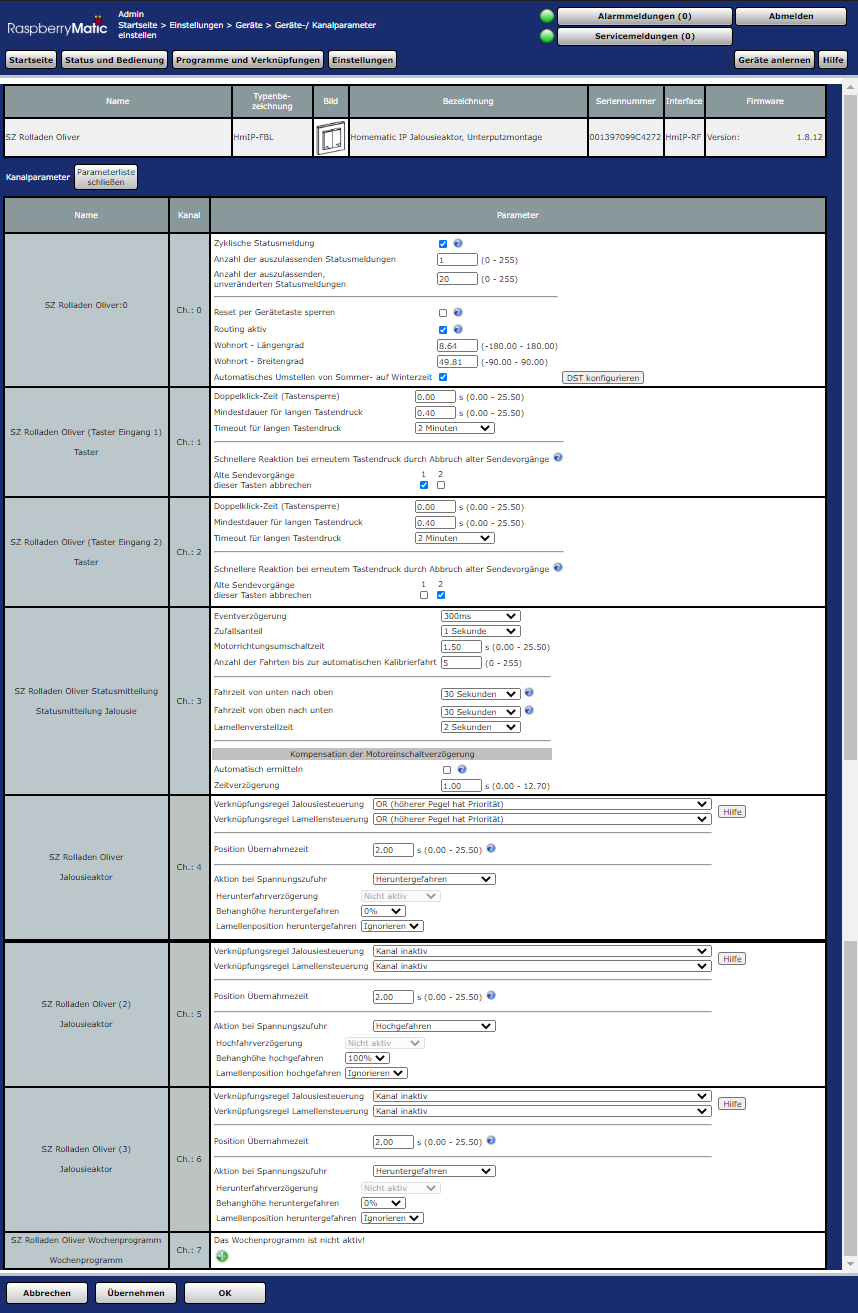
RaspberryMatic configuration
HmIP-FBL
PaperUI Channel (Blind Virtual Receiver)
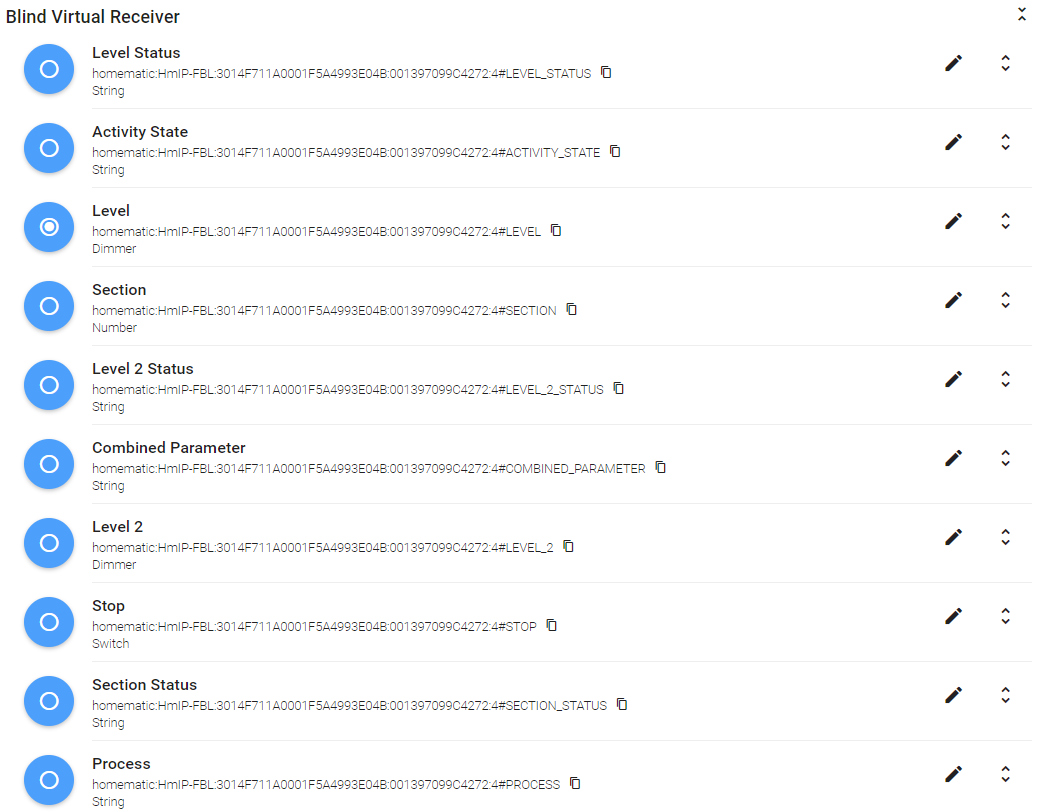
RaspberryMatic configuration
Workaround
There is a workaround posted https://community.openhab.org/t/homematic-shutters-hmip-broll-always-close-when-sending-command-up/78648/15?u=o.goldich that works partially for me. You can see there also my item configuration for the workaround. The shutters do not completely go up (99 is not 100) and the icons in the BasicUI are reversed.
Action: HmIP-FBL Rollshutter press down
Current behaviour: goes down but then goes up again a few percent
Expected behaviour: rollshutter move down completly
2020-06-03 12:48:41.099 [ome.event.ItemCommandEvent] - Item 'Bedroom_Shutter_Oli' received command DOWN
2020-06-03 12:48:41.110 [vent.ItemStateChangedEvent] - Bedroom_Shutter_Oli changed from 99 to 100
2020-06-03 12:48:41.125 [ome.event.ItemCommandEvent] - Item 'Bedroom_Shutter_OliControl' received command 1
2020-06-03 12:48:41.147 [nt.ItemStatePredictedEvent] - Bedroom_Shutter_OliControl predicted to become 1
2020-06-03 12:48:41.160 [vent.ItemStateChangedEvent] - Bedroom_Shutter_OliControl changed from 99 to 1
2020-06-03 12:48:41.860 [vent.ItemStateChangedEvent] - Bedroom_Shutter_OliControl changed from 1 to 99
2020-06-03 12:48:42.198 [vent.ItemStateChangedEvent] - Bedroom_Shutter_Oli changed from 100 to 99
2020-06-03 12:49:16.697 [vent.ItemStateChangedEvent] - Bedroom_Shutter_OliStatus changed from 99 to 0
2020-06-03 12:49:16.717 [GroupItemStateChangedEvent] - gShutter changed from 100 to 0 through Bedroom_Shutter_Oli
2020-06-03 12:49:16.720 [vent.ItemStateChangedEvent] - Bedroom_Shutter_Oli changed from 99 to 0
2020-06-03 12:49:21.096 [vent.ItemStateChangedEvent] - Bedroom_Shutter_OliStatus changed from 0 to 6
2020-06-03 12:49:21.111 [GroupItemStateChangedEvent] - gShutter changed from 0 to 100 through Bedroom_Shutter_Oli
2020-06-03 12:49:21.114 [vent.ItemStateChangedEvent] - Bedroom_Shutter_Oli changed from 0 to 6
2020-06-03 12:49:21.128 [vent.ItemStateChangedEvent] - Bedroom_Shutter_OliControl changed from 99 to 6
Action: HmIP-FBL Rollshutter press up
Current behaviour: rollshutter move up - works ;-)
Expected behaviour: rollshutter move up
2020-06-03 12:52:17.953 [ome.event.ItemCommandEvent] - Item 'Bedroom_Shutter_Oli' received command UP
2020-06-03 12:52:17.965 [vent.ItemStateChangedEvent] - Bedroom_Shutter_Oli changed from 6 to 0
2020-06-03 12:52:17.969 [GroupItemStateChangedEvent] - gShutter changed from 100 to 0 through Bedroom_Shutter_Oli
2020-06-03 12:52:17.997 [ome.event.ItemCommandEvent] - Item 'Bedroom_Shutter_OliControl' received command 99
2020-06-03 12:52:18.034 [nt.ItemStatePredictedEvent] - Bedroom_Shutter_OliControl predicted to become 99
2020-06-03 12:52:18.048 [vent.ItemStateChangedEvent] - Bedroom_Shutter_OliControl changed from 6 to 99
2020-06-03 12:52:18.240 [vent.ItemStateChangedEvent] - Bedroom_Shutter_OliControl changed from 99 to 6
2020-06-03 12:52:19.425 [GroupItemStateChangedEvent] - gShutter changed from 0 to 100 through Bedroom_Shutter_Oli
2020-06-03 12:52:19.430 [vent.ItemStateChangedEvent] - Bedroom_Shutter_Oli changed from 0 to 6
2020-06-03 12:52:50.720 [vent.ItemStateChangedEvent] - Bedroom_Shutter_OliStatus changed from 6 to 99
2020-06-03 12:52:50.740 [vent.ItemStateChangedEvent] - Bedroom_Shutter_Oli changed from 6 to 99
2020-06-03 12:52:50.757 [vent.ItemStateChangedEvent] - Bedroom_Shutter_OliControl changed from 6 to 99
Action: HmIP-FBL Rollshutter press stop
Current behaviour: rollshutter stop - works :-)
Expected behaviour: rollshutter stop
Your Environment
OpenHab Version 2.5.5-1
RaspberryMatic Version 3.51.6.20200420
 Goldich
on 3 Jun 2020
Goldich
on 3 Jun 2020
@Goldich The devices were not correctly detected as blinds/rollershutters. I have enhanced the binding and uploaded a test version to https://github.com/MHerbst/openhab-addons-test/blob/master/org.openhab.binding.homematic-2.5.6-SNAPSHOT.jar
To install it please proceed as follow:
- uninstall the Homematic binding
- stop openHAB
- clear the content of the cache folder
- copy the jar to the addons folder
- start openHAB new
After the restart, please remove the existing HmIP-FBL/BBL things a create them anew. If everything worked correctly, there should be a channel of type "rollershutter" that can be used to control the devices. If not please enable TRACE mode, recreate the things again, and post the openhab.log.
If there is a rollershutter channel please test with Paper UI whether up/down work as expected (or the other way round).
MHerbst
on 7 Jun 2020
@MHerbst i got your snapshot from #7762 - now the workaround from https://community.openhab.org/t/rollershutter-with-homematic-ip-hmip-hmipw-drbl4/85003 does not work anymore. i followed your instructions (delete and recreate thing) - i have a few channels of type Rollershutter but the #LEVEL of the "Blind Virtual Receiver" now only goes DOWN. If i send DOWN and UP it only goes down. before your update i used 99 for UP and 0 for DOWN, now only 1 works for UP - but STOP works now correctly.
Here are my Channels:
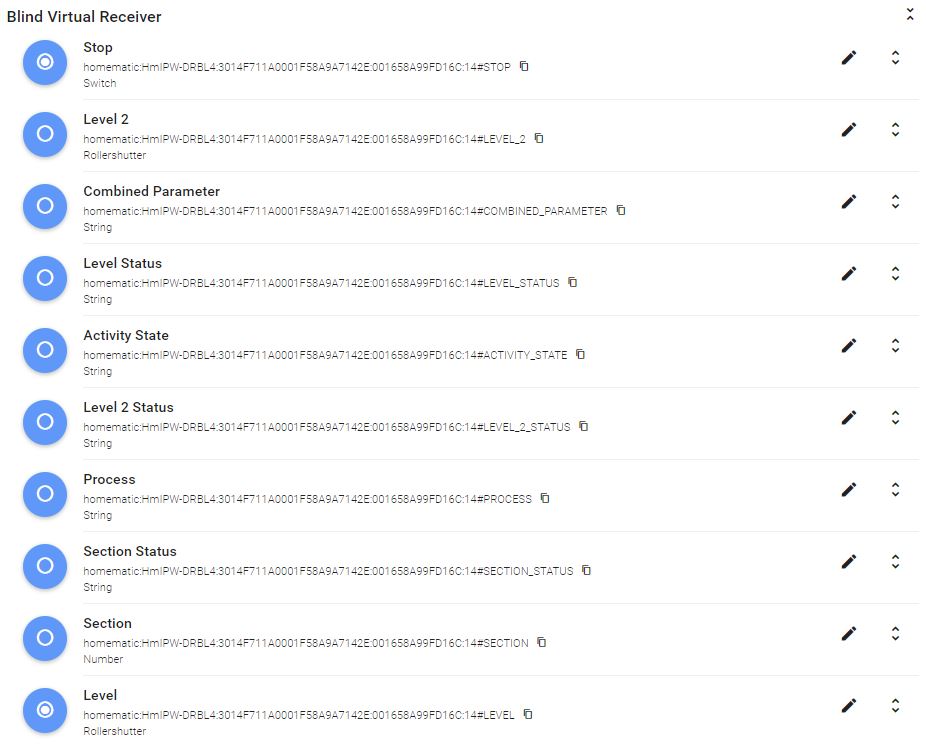
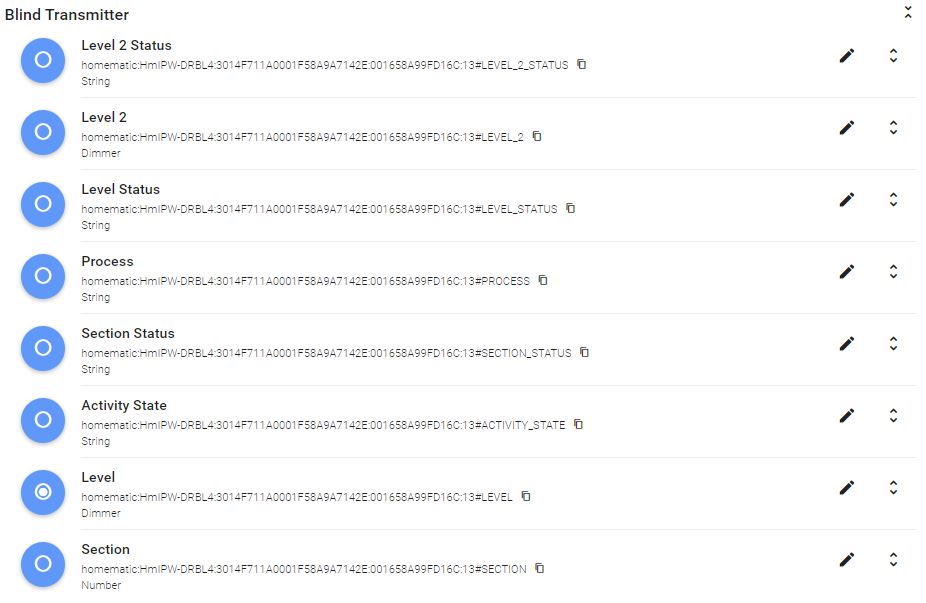
i have a HmIPW-DRBL4
 chrostek
on 10 Jun 2020
chrostek
on 10 Jun 2020
forgot the TRACE output that you requested:
chrostek
on 10 Jun 2020
@chrostek Can you try to control it via Paper UI? For the rollershutter you will see a special widget with up/down and stop button. Would be interesting whether this control works correctly.
MHerbst
on 10 Jun 2020
its the same with the widget:
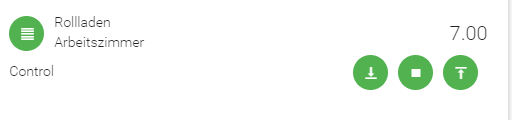
but i created the item in the config file - only the thing is created via paperui - is this a problem?
Rollershutter EG_Arbeitszimmer_Rollladen_2 "Rollladen Arbeitszimmer" <rollershutter> {channel="homematic:HmIPW-DRBL4:3014F711A0001F58A9A7142E:001658A99FD16C:14#LEVEL"}
chrostek
on 10 Jun 2020
@chrostek It doesn't matter how the item is defined. I define the items in the same way.
Important is the type "Rollershutter". Just to make sure that I understand it correctly:
- DOWN button does not work (no reaction or moving to the wrong direction?)
- UP button works as expected
- STOP button works
What happens if you enter a percentage value? Does this work as expected (e.g. also for values between 0 and 100).
MHerbst
on 10 Jun 2020
@MHerbst
DOWN button works as expected
UP button does the same as DOWN button
STOP button works as expected
Percentage value 1 works as UP
Percentage value 0 works as DOWN
Percentage value 99 works as DOWN (but a bit less down than 0)
Did not try other values yet
chrostek
on 11 Jun 2020
I'm having the same problem. A workaround working for me is setting the Switch in the sitemap as follows:
Switch item=Shutter4LEVEL mappings=[1="Up", STOP="Stop", 100="Down"].
A value of 0 is still not working with the patched jar.
 makkee
on 15 Jun 2020
makkee
on 15 Jun 2020
Just to be sure, not having working up and downs - at least for me is a real problem:
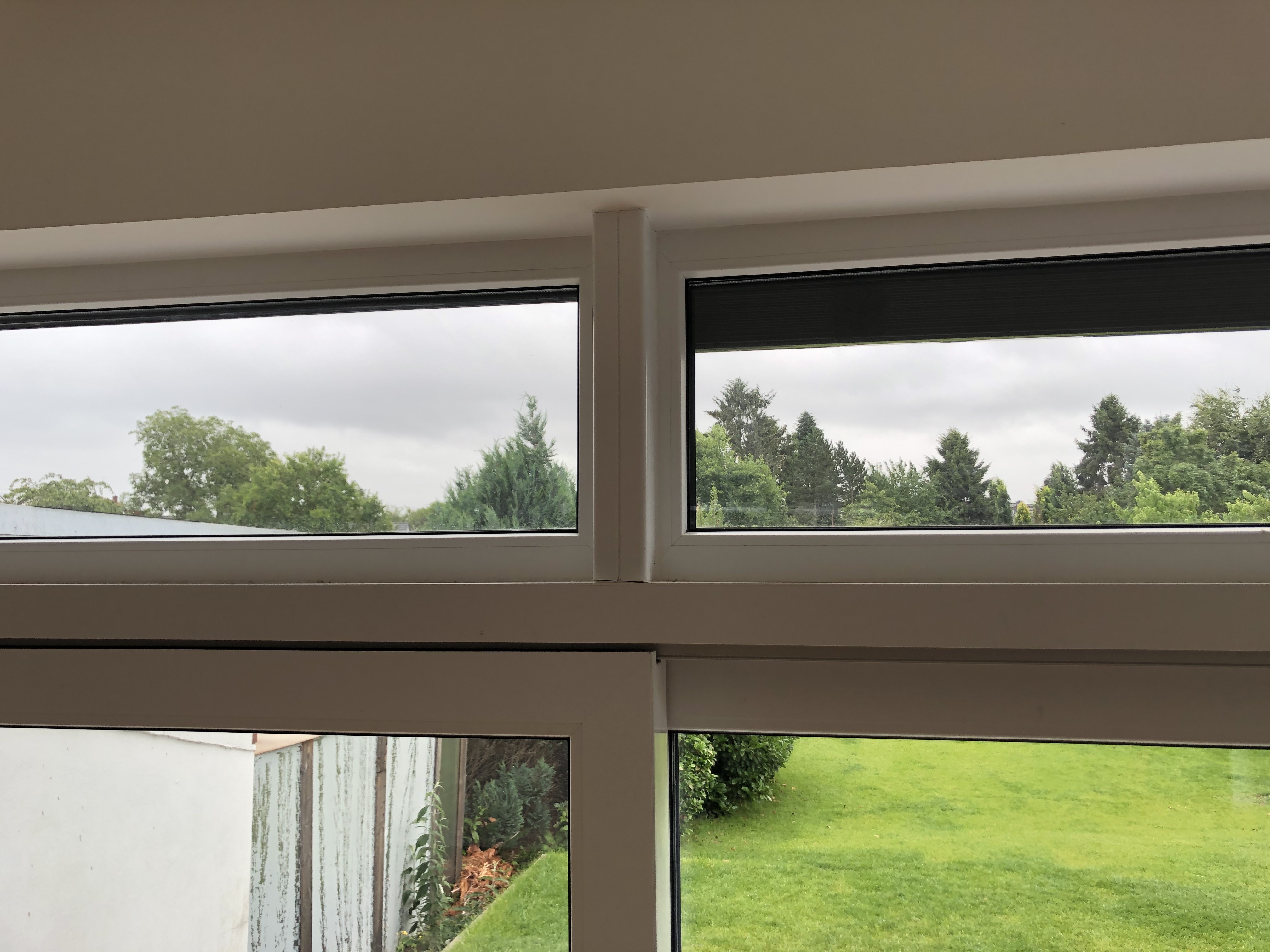
Only using Openhab I am not able to fully move my raffstores up. Just for comparison: left side moved up with Homematic, right side with Openhab Up=1. There is roughly a 10cm difference and it takes away a huge portion of my upper window.
 danst0
on 5 Jul 2020
danst0
on 5 Jul 2020
@danst0 Which device are you using? According to the Homematic device documentation the HM devices are using values between 0 and 1.01 for the position. The binding uses 1.00 for the max value and this may explain why it is completely open. I will try to create a test version of the binding today where I will try to solve problems with the rollershutters.
MHerbst
on 5 Jul 2020
@MHerbst Thank you very much! I am using HmIP-BBL to control the raffstores. I am using channel 4 to control up an down sending 99 for up and 1 for down.
The lower level is ok. However going up - as you can see - is critical.
danst0
on 5 Jul 2020
@danst0 @chrostek I have uploaded a test jar to https://github.com/MHerbst/openhab-addons-test/tree/master Please test whether it works better with this implementation. BTW: please make sure that the item is defined as "Rollershutter" and that no rules are trying to set the level. If it does not work as expected pleas turn DEBUG mode on and send me the logs (each you press UP or DOWN there will be a debug message starting with "Test UP" reps. "Test DOWN").
MHerbst
on 5 Jul 2020
@MHerbst i just tried it with your test jar and it is still only working down, but not up (where should i send full logs? email upload here?)
Tested on HmIP-BROLL
2020-07-05 19:15:02.160 [DEBUG] [ternal.handler.HomematicThingHandler] - Received command 'UP' for channel 'homematic:HmIP-BROLL:OEQ0310480:00111A4991E241:4#LEVEL'
2020-07-05 19:15:02.162 [DEBUG] [.converter.type.PercentTypeConverter] - Test UP: MAX: 1.01 / MIN: 0.0 / Value: 0.0
2020-07-05 19:15:02.163 [DEBUG] [ommunicator.AbstractHomematicGateway] - Sending datapoint '00111A4991E241:4#LEVEL' with value '1.01' to gateway with id 'OEQ0310480' using
2020-07-05 19:14:44.841 [DEBUG] [ternal.handler.HomematicThingHandler] - Received command 'DOWN' for channel 'homematic:HmIP-BROLL:OEQ0310480:00111A4991E241:4#LEVEL'
2020-07-05 19:14:44.843 [DEBUG] [.converter.type.PercentTypeConverter] - Test DOWN: MAX: 1.01 / MIN: 0.0 / Value: 100.0
2020-07-05 19:14:44.845 [DEBUG] [ommunicator.AbstractHomematicGateway] - Sending datapoint '00111A4991E241:4#LEVEL' with value '0.0' to gateway with id 'OEQ0310480' using
item config:
Rollershutter WohnzimmerRechtsRollladen "Wohnzimmer Rechts Rollladen [%d %%]" (gWohnzimmer, gRollladen) ["Switchable"] {channel="homematic:HmIP-BROLL:OEQ0310480:00111A4991E241:4#LEVEL"}
hope this helps
 krikk
on 5 Jul 2020
krikk
on 5 Jul 2020
@krikk Thanks for the log output. This is sufficient for me. The behavior is a bit strange. According to the Homematic Device documentation LEVEL can have values between 0 and 1.01. Can you check the display value for the device on the CCU? What percent value is displayed if you send the UP command via openHAB and what is display if you execute UP with the CCU? Maybe the correct value for up is 1 instead of 1.01.
MHerbst
on 5 Jul 2020
i just looked at the values ccu-historian is logging:
fully up:
HmIP-BROLL 00111A4991E241:3.LEVEL = 1
fully down:
HmIP-BROLL 00111A4991E241:3.LEVEL = 0
between for example: 0.965
never see any value of 1.01
krikk
on 5 Jul 2020
@krikk OK, I have uploaded a new test jar that uses a value of 1.0 for UP.
MHerbst
on 5 Jul 2020
it WORKS, a can go UP and DOWN via the buttons in paperUI :+1: 👏
krikk
on 5 Jul 2020
Good to hear this :-). Now it will be interesting whether it also works with other devices or whether it is necessary to define the max value depending on the device.
MHerbst
on 6 Jul 2020
@Goldich The devices were not correctly detected as blinds/rollershutters. I have enhanced the binding and uploaded a test version to https://github.com/MHerbst/openhab-addons-test/blob/master/org.openhab.binding.homematic-2.5.6-SNAPSHOT.jar
To install it please proceed as follow:
- uninstall the Homematic binding
- stop openHAB
- clear the content of the cache folder
- copy the jar to the addons folder
- start openHAB new
After the restart, please remove the existing HmIP-FBL/BBL things a create them anew. If everything worked correctly, there should be a channel of type "rollershutter" that can be used to control the devices. If not please enable TRACE mode, recreate the things again, and post the openhab.log.
If there is a rollershutter channel please test with Paper UI whether up/down work as expected (or the other way round).
@MHerbst Could you please add the code changes from this post in a current jar package? The latest one you provided is not detecting HmIP-FBL and HmIP-BBL as shutters. Sorry, that I didn't test earlier. My daughter was born and I had a change in priorities.
Goldich
on 6 Jul 2020
@danst0 @chrostek I have uploaded a test jar to https://github.com/MHerbst/openhab-addons-test/tree/master Please test whether it works better with this implementation. BTW: please make sure that the item is defined as "Rollershutter" and that no rules are trying to set the level. If it does not work as expected pleas turn DEBUG mode on and send me the logs (each you press UP or DOWN there will be a debug message starting with "Test UP" reps. "Test DOWN").
Thanks! My HmIPW-DRBL4 seems to work now. UP / DOWN / STOP do the right things.
But all other values do strange things.
1 is UP
0 is DOWN
0.1 - 0.7 is DOWN
0.8 - 0.9 is UP
i recreated the thing, i did not find any value that does some other thing than completely UP or DOWN
for 0.9 this is in the logs:
2020-07-07 17:59:28.106 [DEBUG] [ternal.handler.HomematicThingHandler] - Received command '0.9' for channel 'homematic:HmIPW-DRBL4:3014F711A0001F58A9A7142E:001658A99FD16C:14#LEVEL'
2020-07-07 17:59:28.107 [DEBUG] [ommunicator.AbstractHomematicGateway] - Sending datapoint '001658A99FD16C:14#LEVEL' with value '1.00091' to gateway with id '3014F711A0001F58A9A7142E' using rxMode 'DEFAULT'
if i try values between 0 and 100 this happens for 90:
2020-07-07 18:00:10.682 [DEBUG] [ternal.handler.HomematicThingHandler] - Received command '90' for channel 'homematic:HmIPW-DRBL4:3014F711A0001F58A9A7142E:001658A99FD16C:14#LEVEL'
2020-07-07 18:00:10.683 [DEBUG] [ommunicator.AbstractHomematicGateway] - Sending datapoint '001658A99FD16C:14#LEVEL' with value '0.10099999999999998' to gateway with id '3014F711A0001F58A9A7142E' using rxMode 'DEFAULT'
would be great, if you can fix this too
chrostek
on 7 Jul 2020
@chrostek What happens if you use a value of 90? I would expect that the blinds are 90% closed.
The rollershutter item type knows the special values UP/DOWN and also a discrete percentage value. That means values between 0 and 100 should work. For openHAB 90% means 90% closed.
As you can see in the debug message the value 90 is converted to a value between 0 and 1 (the Homematic devices expect double values between 0 and 1 for the level) before it is sent to the device. 90% is converted to 0.10 because for HM this then means 10% open.
MHerbst
on 7 Jul 2020
@goldich The link https://github.com/MHerbst/openhab-addons-test/tree/master points to a jar file that is based on the latest sources. You can verify it if you open the openHAB console and enter bundle:list | grep Homematic. You should see only one bundle with a version number of 2.5.7 and greater.
If you have defined your items with Paper UI you also would have to delete the thing and rediscover it. After that you should see a channel of type "rollershutter".
MHerbst
on 7 Jul 2020
@chrostek What happens if you use a value of 90? I would expect that the blinds are 90% closed.
The rollershutter item type knows the special values UP/DOWN and also a discrete percentage value. That means values between 0 and 100 should work. For openHAB 90% means 90% closed.
As you can see in the debug message the value 90 is converted to a value between 0 and 1 (the Homematic devices expect double values between 0 and 1 for the level) before it is sent to the device. 90% is converted to 0.10 because for HM this then means 10% open.
sorry - my fault - i configured the run-times for the blinds in the ccu just before the test - and it did not save my values - it used the default 90 seconds and so everything was up or down - it works with values between 0 and 100 - everything is fine :-)
Thanks!
chrostek
on 7 Jul 2020
Hello @MHerbst ,
I have checked and the console outputs 203 │ Active │ 80 │ 2.5.7.202007051807 │ openHAB Add-ons :: Bundles :: Homematic Binding. I have configured the items as text files and manage in PaperUI only Things.
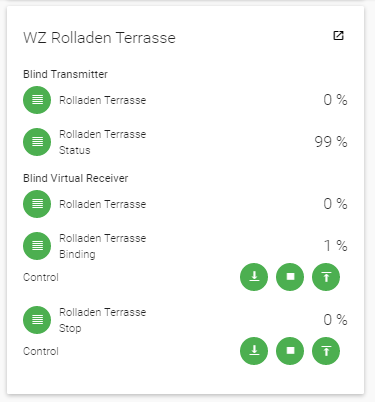
Here an example screenshot from PaperUI, so it looks like a shutter:
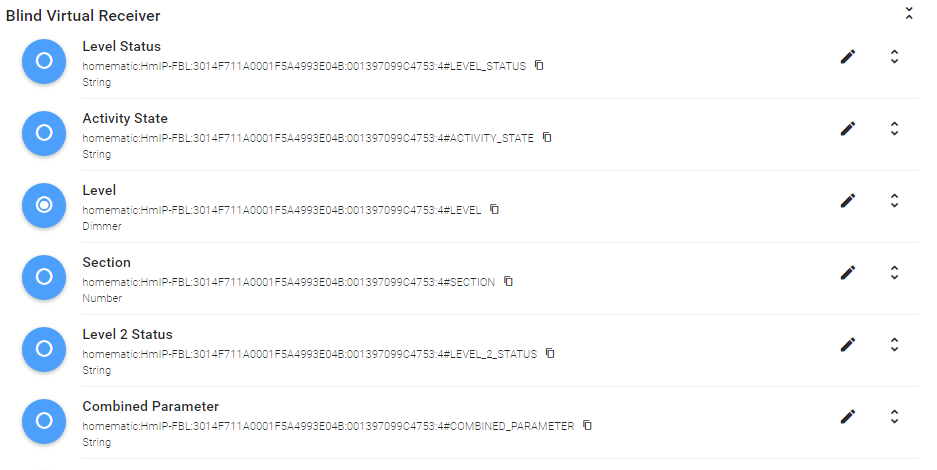
Here a condensed screenshot of the Thing. You can see that the LEVEL Channel is detected as Dimmer.
Right now nothing is working anymore if I deactivate my workaround rule. If I reactivate it, I have now up and down vice versa. So with 99 it goes down (but not entirely, it actually stops and goes back to 96) and with 1 it goes completly up. But this is completly controled via a Rule and not PaperUI.
Goldich
on 7 Jul 2020
@goldich The binding uses the channel name ("Blind Virtual Receiver") and datapoint name "Level") to derive a type. "Blind Virtual Receiver" was missing in the binding but I have added it.
Did you try to remove the thing and then run the autodiscovery in Paper UI to create it anew? The channel type can only change its type when a thing is newly created. If this does not help. If this does not help please remove the thing again and run the autodiscovery with log mode DEBUG enabled.
MHerbst
on 8 Jul 2020
Thank you for the hint. I forgot to remove the Things and rediscover them. They are detected and work more or less as expected now. Up goes Up, Down goes Down (but not entirely). When it should have gone down to 100 it went entirely down and then back to 94.
Thanks for the fix. My wife is finally happy. 😂
Goldich
on 8 Jul 2020
@goldich Good to hear that is working ... and that your wife is happy :-).
It is a bit strange that it is going up again. Can you enable the log mode DEBUG? Maybe we can see in the log why this happens.
MHerbst
on 9 Jul 2020
I've tested the beta version with my HMIP-Broll.
After installing
openhab> bundle:list |grep Homem
294 │ Active │  80 │ 2.5.7.202007111710      │ openHAB Add-ons :: Bundles :: Homematic Binding
and removing and re-adding the thing I had several Rollershutter items on different Homematic cannels.
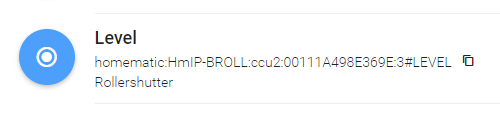
homematic:HmIP-BROLL:ccu2:11111A498E3111:3#LEVEL (Shutter Transmitter)
homematic:HmIP-BROLL:ccu2:11111A498E3111:4#LEVEL (Shutter Virtual Receiver)
homematic:HmIP-BROLL:ccu2:11111A498E3111:5#LEVEL (Shutter Virtual Receiver)
homematic:HmIP-BROLL:ccu2:11111A498E3111:6#LEVEL (Shutter Virtual Receiver)
Finally trying to control the rollershutter via PaperUI gave correct results in UP & DOWN, but level was not a value in percent but toggling between 1 and 100. Screeshot below shows upper HM shutter & lower is HmIP shutter:
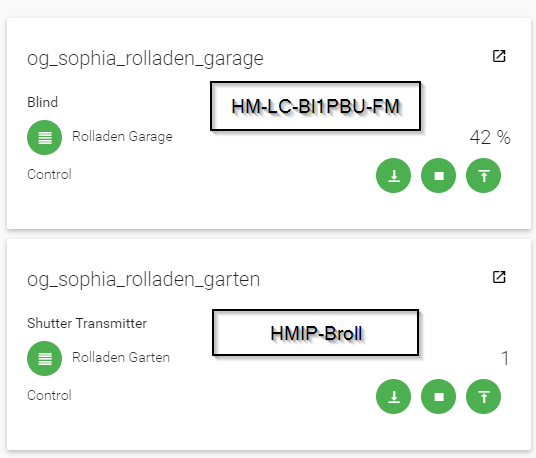
Any recommendation which channel is the correct one to use? And how to get the correct percentages?
Thanks much.
Sebastian
Edit:
I did a reboot and configured Homematic channel 4 for the rollershutter item and everything works as expected now:
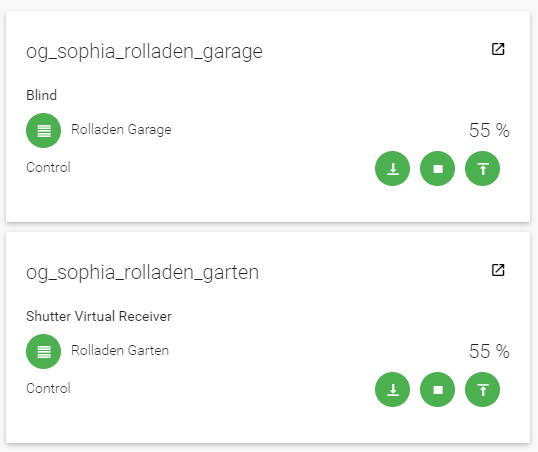
AWSOME!
MrMontesa
on 13 Jul 2020
@MrMontesa That's good news. I have seen that are several LEVEL data points in different channels but I also have no idea which one to use when. The manual does not help either.
MHerbst
on 13 Jul 2020
I can confirm that I don't need the workaround described in the issue text anymore after upgrading to the test version and following the instructions. However, if I use channel 4, the percentage is either 100 or 1. If I switch to channel 3, the percentages are shown correctly in the event.log, but after pressing "Stop" - either in PaperUI or BasicUI - you can see that the percentage is set to either 100 or 1 from its correct value. Right after switching to channel 3, PaperUI shows the correct percentage, but after pressing UP or DOWN, it is set to either 1 or 100.
// still channel 4
2020-07-14 20:34:21.489 [ome.event.ItemCommandEvent] - Item 'RollladenBad' received command DOWN
2020-07-14 20:34:21.492 [nt.ItemStatePredictedEvent] - RollladenBad predicted to become DOWN
2020-07-14 20:34:21.518 [vent.ItemStateChangedEvent] - RollladenBad changed from 1 to 100
2020-07-14 20:34:21.710 [vent.ItemStateChangedEvent] - RollladenBad changed from 100 to 1
2020-07-14 20:34:24.565 [ome.event.ItemCommandEvent] - Item 'RollladenBad' received command STOP
2020-07-14 20:34:24.833 [vent.ItemStateChangedEvent] - RollladenBad changed from 1 to 100
// switch to channel 3
2020-07-14 20:34:39.341 [.ItemChannelLinkAddedEvent] - Link 'RollladenBad-homematic:HmIP-BROLL:3014F711A061A7DA498FAB79:00111A49A1AC41:3#LEVEL' has been added.
2020-07-14 20:34:39.365 [vent.ItemStateChangedEvent] - RollladenBad changed from 100 to 16
2020-07-14 20:34:47.162 [ome.event.ItemCommandEvent] - Item 'RollladenBad' received command DOWN
2020-07-14 20:34:47.165 [nt.ItemStatePredictedEvent] - RollladenBad predicted to become DOWN
2020-07-14 20:34:47.196 [vent.ItemStateChangedEvent] - RollladenBad changed from 16 to 100
2020-07-14 20:34:47.857 [vent.ItemStateChangedEvent] - RollladenBad changed from 100 to 18
2020-07-14 20:34:47.903 [vent.ItemStateChangedEvent] - RollladenBad changed from 18 to 100
2020-07-14 20:34:50.316 [ome.event.ItemCommandEvent] - Item 'RollladenBad' received command STOP
2020-07-14 20:34:51.704 [vent.ItemStateChangedEvent] - RollladenBad changed from 100 to 31
2020-07-14 20:34:51.725 [vent.ItemStateChangedEvent] - RollladenBad changed from 31 to 100
In addition to the HmIP-BROLL things, I have one HmIP-BBL. Up and down is working correctly for the BBL (the percentages aren't shown correctly either), however, setting LEVEL_2 isn't working at all - neither using channel 3, nor 4, independent of whether it is defined as a Rollershutter or as a Dimmer. I should mention that I never got this working in openHAB so far.
Independent of whether I define the item to use channel 3 or 4, the openhab.log file says that the Datapoint is read-only (the log always mentions channel 3):
2020-07-14 20:43:58.487 [WARN ] [ommunicator.AbstractHomematicGateway] - Datapoint is readOnly, it is not published to the gateway with id '3014F711A061A7DA498FAB79': '00135A49A296E7:3#LEVEL_2'
2020-07-14 20:44:08.914 [WARN ] [ommunicator.AbstractHomematicGateway] - Datapoint is readOnly, it is not published to the gateway with id '3014F711A061A7DA498FAB79': '00135A49A296E7:3#LEVEL_2'
2020-07-14 20:47:14.368 [WARN ] [ommunicator.AbstractHomematicGateway] - Datapoint is readOnly, it is not published to the gateway with id '3014F711A061A7DA498FAB79': '00135A49A296E7:3#LEVEL_2'
If I control Level 2 using the Homematic (pivccu3) UI - or in this case the @Home app on an iOS device, event.log shows the change and it's working (the item was defined to use channel 4 when I did this):
2020-07-14 20:52:37.006 [vent.ItemStateChangedEvent] - JalousieWohnzimmerSeefrontLamellen changed from 1 to 61
2020-07-14 20:52:37.048 [vent.ItemStateChangedEvent] - JalousieWohnzimmerSeefrontLamellen changed from 61 to 1
2020-07-14 20:52:37.965 [vent.ItemStateChangedEvent] - JalousieWohnzimmerSeefrontLamellen changed from 1 to 43
2020-07-14 20:52:38.024 [vent.ItemStateChangedEvent] - JalousieWohnzimmerSeefrontLamellen changed from 43 to 57
It seems like LEVEL_2 is writeable, but I don't know whether on channel 3 or 4. How is it determined whether LEVEL_2 is read-only or read/write? Can this be changed? Or am I jumping to wrong conclusions here?
 johker01
on 14 Jul 2020
johker01
on 14 Jul 2020
Level 4 is for height and Level 2 for the orientation of the slates.
danst0
on 15 Jul 2020
@johker01 First of all please make sure that only one version of the binding is active (2.5.7). If you have created the things through Paper UI remove them and create them anew. The fix only works if the LEVEL channels are of type "rollershutter".
"Dimmer" will definitely not work.
Regarding the BROLL device everything is working correctly according to @MrMontesa.
For the BBL device I have checked the official documentation of the HmIP devices. LEVEL_2 is read only in channel 3. It can only be set in channel 4.
As @danst already mentioned the correct datapoint to set the height would be LEVEL of channel 4.
MHerbst
on 15 Jul 2020
Level 4 is for height and Level 2 for the orientation of the slates.
That's not completely right, at least for HmIP-BROLL. For these devices, you get 4 channels dealing with the level information:
- Channels 4, 5 and 6 can take a level setting each. You can define rules inside the device itself, how the set level is calculated (min, max, plus, minus, ...).
- What is calculated out of the aforementioned three channels, will be set by the actor and can be read from channel 3.
As far as I can see, the same applies for HmIP-BBL.
You can see the principle on page 12 and following of this presentation (German). It seems that's also the case for Homematic (not IP), but I can't confirm that myself.
@MHerbst I know I'm quite late, but if I can help further investigate, please let me know here or at OH forum. Gonna try your new release.
 just-grizzle
on 16 Jul 2020
just-grizzle
on 16 Jul 2020
@just-grizzle It's never too late to find and fix problems. I don't have these device so any help is welcome. As far as I can see from the comments that corrected implementation seems to work correct and I am planning to create a PR this weekend.
MHerbst
on 16 Jul 2020
It took me some time to understand the whole concept. It's handy if you want to program direct connection between two Homematic (IP) devices. But everyone else who just uses the devices and the CCU "as is" must be confused from it.
About the changes, I'll wait for the official release. Test jar did not start up for me:
2020-07-16 20:30:00.283 [WARN ] [org.apache.felix.fileinstall        ] - Error while starting bundle: file:/usr/share/openhab2/addons/org.openhab.binding.homematic-2.5.7-SNAPSHOT.jar
org.osgi.framework.BundleException: Could not resolve module: org.openhab.binding.homematic [203]
  Unresolved requirement: Import-Package: org.eclipse.smarthome.config.discovery.upnp

        at org.eclipse.osgi.container.Module.start(Module.java:444) ~[org.eclipse.osgi-3.12.100.jar:?]
        at org.eclipse.osgi.internal.framework.EquinoxBundle.start(EquinoxBundle.java:383) ~[org.eclipse.osgi-3.12.100.jar:?]
        at org.apache.felix.fileinstall.internal.DirectoryWatcher.startBundle(DirectoryWatcher.java:1260) [bundleFile:3.6.4]
        at org.apache.felix.fileinstall.internal.DirectoryWatcher.startBundles(DirectoryWatcher.java:1233) [bundleFile:3.6.4]
        at org.apache.felix.fileinstall.internal.DirectoryWatcher.startAllBundles(DirectoryWatcher.java:1221) [bundleFile:3.6.4]
        at org.apache.felix.fileinstall.internal.DirectoryWatcher.doProcess(DirectoryWatcher.java:515) [bundleFile:3.6.4]
        at org.apache.felix.fileinstall.internal.DirectoryWatcher.process(DirectoryWatcher.java:365) [bundleFile:3.6.4]
        at org.apache.felix.fileinstall.internal.DirectoryWatcher.run(DirectoryWatcher.java:316) [bundleFile:3.6.4]
Can't tell if it's a problem with my instance (but I think it is).
just-grizzle
on 16 Jul 2020
@just-grizzle this is only a warning... also had this with the test.jar... it still works...
krikk
on 16 Jul 2020
@just-grizzle I fixed that issue by executing feature:install openhab-transport-upnp in the console. I totally overlooked the log level WARN, which @krikk pointed out.
@MHerbst Thank you for getting back to me! I followed the instructions you provided in https://github.com/MHerbst/openhab-addons-test/tree/master. After that I removed all HmIP-BROLL and HmIP-BBL devices and then added them again by using the discovery mechanism in the inbox in PaperUI. Up and Down is working correctly now, so I'd say your fix is definitely working. However, the percentage is not working for me. That's always 1 or 100 although I see that the correct value is reported in events.log (https://github.com/openhab/openhab-addons/issues/6145#issuecomment-658354450).
The correct version is active:
openhab> bundle:list | grep -i homematic
 92 │ Active │  80 │ 2.5.7.202007111710      │ openHAB Add-ons :: Bundles :: Homematic Binding
Item definition:
Rollershutter JalousieWohnzimmerSeefront "Jalousie [%d %%]" { channel="homematic:HmIP-BBL:3014F711A061A7DA498FAB79:00135A49A296E7:4#LEVEL" }
Rollershutter JalousieWohnzimmerSeefrontLamellen "Jalousie (Lamellen) [%d %%]" { channel="homematic:HmIP-BBL:3014F711A061A7DA498FAB79:00135A49A296E7:4#LEVEL_2" }
Rollershutter RollladenBad "Rollladen [%d %%]" { channel="homematic:HmIP-BROLL:3014F711A061A7DA498FAB79:00111A49A1AC41:3#LEVEL" }
Rollershutter RollladenBuero "Rollladen [%d %%]" { channel="homematic:HmIP-BROLL:3014F711A061A7DA498FAB79:00111A49A1AC2F:3#LEVEL" }
Rollershutter RollladenKinderzimmer "Rollladen [%d %%]" { channel="homematic:HmIP-BROLL:3014F711A061A7DA498FAB79:00111A49A1AC2B:4#LEVEL" }
Rollershutter RollladenKuecheGehweg "Rollladen Gehweg [%d %%]" { channel="homematic:HmIP-BROLL:3014F711A061A7DA498FAB79:00111A49A1AC24:4#LEVEL" }
Rollershutter RollladenKuecheTerrasse "Rollladen Terrasse [%d %%]" { channel="homematic:HmIP-BROLL:3014F711A061A7DA498FAB79:00111A49A1AC2A:4#LEVEL" }
Rollershutter RollladenKuecheTheke "Rollladen Theke [%d %%]" { channel="homematic:HmIP-BROLL:3014F711A061A7DA498FAB79:00111A499A214C:4#LEVEL" }
Rollershutter RollladenSchlafzimmerGehweg "Rollladen Gehweg [%d %%]" { channel="homematic:HmIP-BROLL:3014F711A061A7DA498FAB79:00111A49A1AC5E:4#LEVEL" }
Rollershutter RollladenSchlafzimmerSpielplatz "Rollladen Spielplatz [%d %%]" { channel="homematic:HmIP-BROLL:3014F711A061A7DA498FAB79:00111A49A1AD17:4#LEVEL" }
Rollershutter RollladenWohnzimmerTerrassentuer "Rollladen Terrassentür [%d %%]" { channel="homematic:HmIP-BROLL:3014F711A061A7DA498FAB79:00111A499A2138:4#LEVEL" }
I tried switching from channel 4 to channel 3 as described here https://github.com/openhab/openhab-addons/issues/6145#issuecomment-657527145 and Up and Down is still working correctly, but the reported percentage is still wrong. I can always go back to using the proxy pattern outlined in the link in the issue description, but I had hoped to not need to do that anymore.
Regarding the LEVEL_2 issue I have with my HmIP-BBL: First of all, please let me know if I should continue this discussion in a separate issue or in the forum. Up and Down works as expected using LEVEL on channel 4. However, so far I didn't succeed changing the slate orientation ("Lamellenposition"). I tried LEVEL_2 on channels 3-6.
johker01
on 16 Jul 2020
@johker01 regarding the percentage problem: can enable the TRACE mode for the Homematic binding and then set different percentages like 10, 50, 60. And post the relevant parts of openhab.log.
I am not sure whether Rollerhutter will work for LEVEL_2. This looks more like a dimmer type. But probably you can get more help in the forum.
MHerbst
on 17 Jul 2020
I have corrected another issue for dimmer values and I would like to be sure that this correction does not break the fix for the rollershutter. It would be nice if someone could retest with the latest version from here: https://github.com/MHerbst/openhab-addons-test. If it is OK, I will create a PR.
MHerbst
on 19 Jul 2020
Finally got it up and running. What took me so long was that I thought there were general problems with communication between the CCU and the binding.
I deleted all my things (someone reading this hole topic carefully would have known that one must only re-teach the rollershutter things), After that I added everything again via auto discovery. And then my two test devices (a HmIP-BROLL and one HmIP-FSM16) stopped working. It took me until now to recognized, I "forgot" to add them back. As I'm sure, I clicked everything in the Paper UI Inbox, there maybe another malfunction regarding the auto discovery? Maybe some can confirm?
About the rollershutter fix itself: Worked at first try (HmIP-BROLL). I skipped using Paper UI, I have a sitemap on Basic UI for that.
Just saw your new upload, gonna give that a try as well.
I also noticed that the rollershutter icon in Basic UI always switches between fully open and fully closed. Edit: That is the case, if I manually stop the rollershutter by sending STOP command. If I enter percentage (e.g. via basic control in Paper UI), the icon is set correctly.
2020-07-19 12:49:44.052 [ome.event.ItemCommandEvent] - Item 'EZ_Rollladen_rechts_Hoehe' received command DOWN
2020-07-19 12:49:44.061 [nt.ItemStatePredictedEvent] - EZ_Rollladen_rechts_Hoehe predicted to become DOWN
2020-07-19 12:49:44.070 [vent.ItemStateChangedEvent] - EZ_Rollladen_rechts_Hoehe changed from 25 to 100
2020-07-19 12:49:44.239 [vent.ItemStateChangedEvent] - EZ_Rollladen_rechts_Hoehe changed from 100 to 25
2020-07-19 12:49:55.500 [ome.event.ItemCommandEvent] - Item 'EZ_Rollladen_rechts_Hoehe' received command STOP
2020-07-19 12:49:55.690 [vent.ItemStateChangedEvent] - EZ_Rollladen_rechts_Hoehe changed from 25 to 100
So I looked into the CCU UI and ... the "Actual value Blind level" is reported as 40% on channel 3. I use channel 4 for manual operation (and linking with OpenHAB) and that one is stuck at 0% (meaning fully closed).
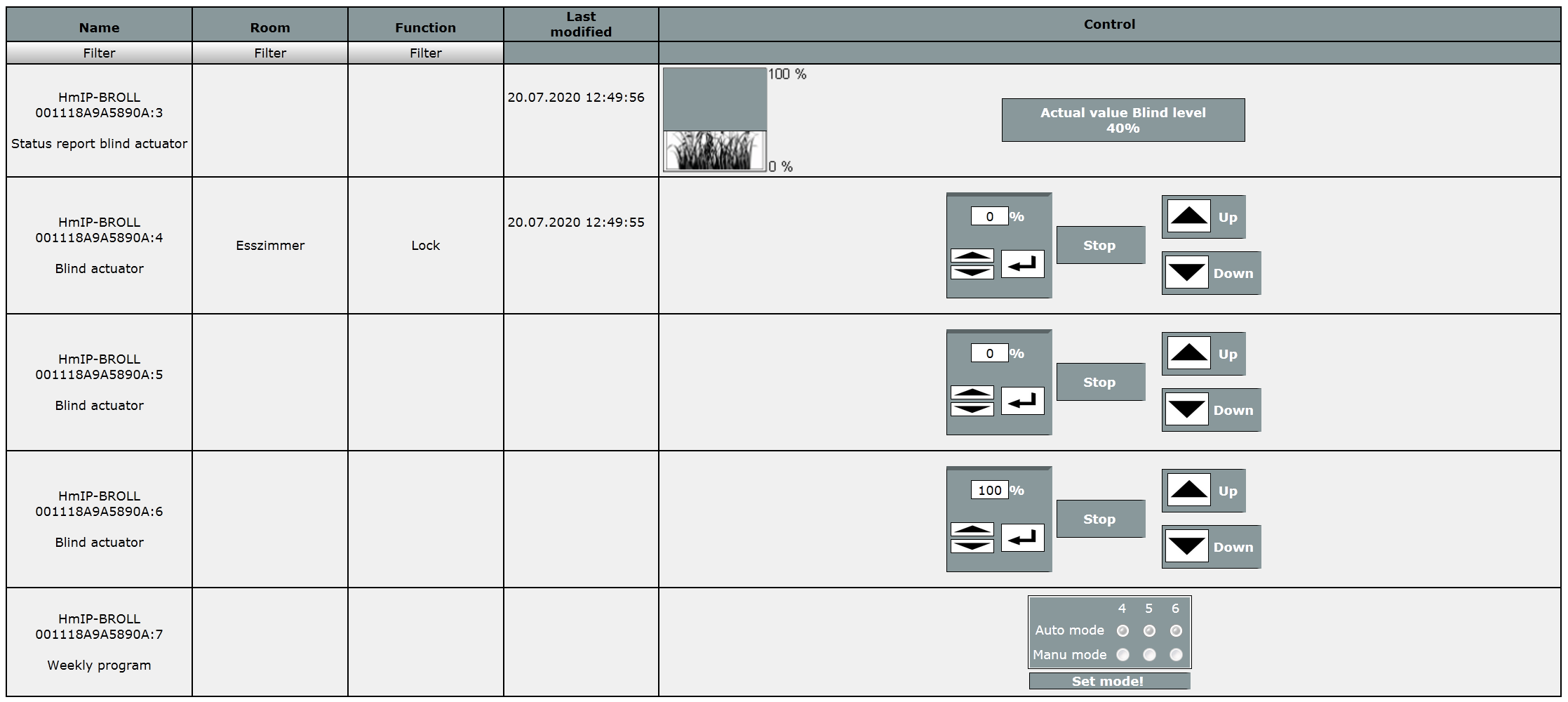
What's more, you can never really tell the real position from the virtual channels, that's what the report channel is used for. So it's a design decision whether to solve this via the binding or users have to get along with proxy items. But maybe that's to be discussed in a separate issue...
just-grizzle
on 20 Jul 2020
@just-grizzle Good to hear that is now also working in your installation :-)
Just saw your new upload, gonna give that a try as well.
That would be great. I have streamlined the code a bit and want to be sure that it has no negative effect on rollershutters.
But maybe that's to be discussed in a separate issue...
I would prefer this. To implement it, it would be necessary to add special coding for this device into the binding. Normal behaviour is that you only need one datapoint for the intended value and the current value (like the temperature for thermostats).
MHerbst
on 20 Jul 2020
@MHerbst I just installed the latest version you posted 3 days ago and followed the instructions. Furthermore, I removed and added all BROLL/BBL devices.
openhab> bundle:list|grep -i homematic
203 │ Active │  80 │ 2.5.7.202007191819      │ openHAB Add-ons :: Bundles :: Homematic Binding
However, the controls are not working anymore. Two BROLL devices used LEVEL on channel 3 which used to work, but now it's a read-only data point, so I switched to channel 4. That didn't work either. The same is true for my BBL device.
2020-07-22 18:32:28.533 [ome.event.ItemCommandEvent] - Item 'RollladenBad' received command UP
2020-07-22 18:32:28.575 [nt.ItemStatePredictedEvent] - RollladenBad predicted to become UP
2020-07-22 18:32:28.587 [vent.ItemStateChangedEvent] - RollladenBad changed from 100 to 0
2020-07-22 18:32:28.720 [vent.ItemStateChangedEvent] - RollladenBad changed from 0 to 100
...
2020-07-22 18:34:06.851 [ome.event.ItemCommandEvent] - Item 'JalousieWohnzimmerSeefront' received command UP
2020-07-22 18:34:06.902 [nt.ItemStatePredictedEvent] - JalousieWohnzimmerSeefront predicted to become UP
2020-07-22 18:34:06.916 [vent.ItemStateChangedEvent] - JalousieWohnzimmerSeefront changed from 100 to 0
2020-07-22 18:34:07.084 [vent.ItemStateChangedEvent] - JalousieWohnzimmerSeefront changed from 0 to 100
Let me know if you need more information or need a debug trace.
edit: I set the log level to TRACE and first pressed UP, then DOWN, then STOP in Basic UI, first for RollladenBuero, then for JalousieWohnzimmerSeefront.
openhab.zip
johker01
on 22 Jul 2020
@johker01 I have found it:
2020-07-22 18:47:38.468 [DEBUG] [ommunicator.AbstractHomematicGateway] - Sending datapoint '00111A49A1AC2F:4#LEVEL' with value '1.01' to gateway with id '3014F711A061A7DA498FAB79' using rxMode 'DEFAULT'
It seems that my last change is not completly correct :-( I have published a new test version. Can you test it with DEBUG log and post the content of the debug line starting with "GetCorrectValue:". Also UP and DOWN should work again.
BTW: Please also verify that the LEVEL channels in openHAB are really of type "rollershutter".
MHerbst
on 22 Jul 2020
UP and DOWN are working again. Thanks for that! :-)
pi@raspberrypi /var/log/openhab2 # grep 'GetCorrectValue:' openhab.log
2020-07-22 21:35:29.058 [DEBUG] [.converter.type.PercentTypeConverter] - GetCorrectValue: value 1.01  isIP: false  name: Rollladen Küche Terrasse
2020-07-22 21:35:29.301 [DEBUG] [.converter.type.PercentTypeConverter] - GetCorrectValue: value 1.01  isIP: false  name: Rollladen Küche Theke
2020-07-22 21:35:29.956 [DEBUG] [.converter.type.PercentTypeConverter] - GetCorrectValue: value 1.01  isIP: false  name: Rollladen Schlafzimmer Gehweg
2020-07-22 21:35:30.191 [DEBUG] [.converter.type.PercentTypeConverter] - GetCorrectValue: value 1.01  isIP: false  name: Rollladen Büro
2020-07-22 21:35:30.679 [DEBUG] [.converter.type.PercentTypeConverter] - GetCorrectValue: value 1.01  isIP: false  name: Rollladen Kinderzimmer
2020-07-22 21:35:32.273 [DEBUG] [.converter.type.PercentTypeConverter] - GetCorrectValue: value 1.01  isIP: false  name: Rollladen Wohnzimmer Terrassentür
2020-07-22 21:35:32.615 [DEBUG] [.converter.type.PercentTypeConverter] - GetCorrectValue: value 1.01  isIP: false  name: Rollladen Küche Gehweg
2020-07-22 21:35:33.030 [DEBUG] [.converter.type.PercentTypeConverter] - GetCorrectValue: value 1.01  isIP: false  name: Rollladen Bad
2020-07-22 21:35:34.004 [DEBUG] [.converter.type.PercentTypeConverter] - GetCorrectValue: value 1.01  isIP: false  name: Rollladen Schlafzimmer Spielplatz
2020-07-22 21:35:34.037 [DEBUG] [.converter.type.PercentTypeConverter] - GetCorrectValue: value 1.01  isIP: false  name: Jalousie Seefront
2020-07-22 21:35:34.089 [DEBUG] [.converter.type.PercentTypeConverter] - GetCorrectValue: value 1.01  isIP: false  name: Jalousie Seefront
2020-07-22 21:35:59.535 [DEBUG] [.converter.type.PercentTypeConverter] - GetCorrectValue: value 1.01  isIP: false  name: Rollladen Büro
2020-07-22 21:35:59.740 [DEBUG] [.converter.type.PercentTypeConverter] - GetCorrectValue: value 1.01  isIP: false  name: Rollladen Büro
2020-07-22 21:36:00.544 [DEBUG] [.converter.type.PercentTypeConverter] - GetCorrectValue: value 1.01  isIP: false  name: Rollladen Büro
2020-07-22 21:36:06.366 [DEBUG] [.converter.type.PercentTypeConverter] - GetCorrectValue: value 1.01  isIP: false  name: Rollladen Büro
2020-07-22 21:36:07.333 [DEBUG] [.converter.type.PercentTypeConverter] - GetCorrectValue: value 1.01  isIP: false  name: Rollladen Büro
2020-07-22 21:36:12.526 [DEBUG] [.converter.type.PercentTypeConverter] - GetCorrectValue: value 1.01  isIP: false  name: Rollladen Büro
2020-07-22 21:36:12.721 [DEBUG] [.converter.type.PercentTypeConverter] - GetCorrectValue: value 1.01  isIP: false  name: Rollladen Büro
2020-07-22 21:36:13.957 [DEBUG] [.converter.type.PercentTypeConverter] - GetCorrectValue: value 1.01  isIP: false  name: Rollladen Büro
2020-07-22 21:36:19.804 [DEBUG] [.converter.type.PercentTypeConverter] - GetCorrectValue: value 1.01  isIP: false  name: Rollladen Büro
All LEVEL channels are defined as "Rollershutter". See https://github.com/openhab/openhab-addons/issues/6145#issuecomment-659619651. In my sitemap, they are defined as "Switch" and are correctly displayed with up/stop/down buttons.
johker01
on 22 Jul 2020
@MHerbst Regarding https://github.com/openhab/openhab-addons/issues/6145#issuecomment-660079042:
When I change the percentage from e.g. 100 or 0 to a set value of 60, 90, 10 in PaperUI, that value is displayed correctly in the Rollershutter control and in BasicUI (it shows 61, 91, 11. I'm not sure whether this is an "off-by-one error" or whether this is a hardware limitation of the BBL/BROLL devices and/or my motors).
If ther Rollershutter is 100% closed and I click on UP and shortly after that on STOP, the percentage is displayed as 1 and not as the correct value. I'm having a little difficulty discerning which parts of the log are relevant to debug this, hence, I'm adding the complete openhab.log and events.log.
johker01
on 22 Jul 2020
it shows 61, 91, 11. I'm not sure whether this is an "off-by-one error" or whether this is a hardware limitation of the BBL/BROLL devices and/or my motors
This is a known problem and has to with my partially reverted modification. Will be fixes soon (I hope).
If ther Rollershutter is 100% closed and I click on UP and shortly after that on STOP, the percentage is displayed as 1 and not as the correct value. I'm having a little difficulty discerning which parts of the log are relevant to debug this, hence, I'm adding the complete openhab.log and events.log.
I will have a look into the logs. Maybe it is some sort of timing problem if the stop comes too fast.
MHerbst
on 23 Jul 2020
@johker01 The handling of the stop button the retrieval of the correct values seems to be a general problem with the different Rollershutter HM devices. There is also a corresponding post in the forum
Please also read the following posts including my reply.
MHerbst
on 25 Jul 2020
Just came along to tell you that 2.5.7.202007111710 works flawlessly since one and a half week. If I get some time over weekend, I will give your latest snapshot a try.
just-grizzle
on 30 Jul 2020
Tried to install 2.5.8.202007261510, but it seems to me, that it's got new requirements:
bundle:start 203
Error executing command: Error executing command on bundles:
        Error starting bundle 203: Could not resolve module: org.openhab.binding.homematic [203]
  Unresolved requirement: Import-Package: org.eclipse.smarthome.config.discovery.upnp
Yes, I saw, johker01 pointed out how to get around this - I wonder if it's really necessary. I'm quite sceptical when installing things I don't know what they're doing.
just-grizzle
on 1 Aug 2020
The dependency to upnp is nothing new. It is used to find the CCU automatically. There are quite a lot bindings using this service. If you install a binding via PaperUI it is installed automatically. It is interesting that you did not had this problem before. Maybe it is because a newer version of upnp has been merged on the meantime and the hm binding was built against this newer version.
MHerbst
on 1 Aug 2020
You've been right. I tried to go back to 2.5.7.202007111710, which worked before, but got the same error. Strange things happening. Added the UPNP-Feature and installed 2.5.8.202007261510 now. First test went fine.
just-grizzle
on 1 Aug 2020
Hi @MHerbst
I just changed my OpenHab via Openhabian to Snapshot in order to test the latest version. I have now 2.5.8.202008091007 installed and the roleshutter control UP not working anymore.
I have tested my HmIP-FBL. They are properly detected as Roleshutter, but the only go down and can stop. Upwards is not working in the stable, testing and snapshot version of the addon. I installed previously 2.5.7.202007051807 and everything was working fine.
When the roleshutters are up, they are shown in BasicUI as closed. In the logs they have the value 99.
I have no rules anymore installed that change any logic, since it has already worked as expected.
Goldich
on 9 Aug 2020
Hi @goldich
the snapshot version does not contain all necessary fixes. I have created a PR about a week ago that is waiting for review and merge. After the fixes have been merged they will be available in a snapshot build.
You could try to use the jar that I have published here: https://github.com/MHerbst/openhab-addons-test
MHerbst
on 10 Aug 2020
Related issues
 IOOOTAlan
·
3Comments
IOOOTAlan
·
3Comments
 LukasA83
·
5Comments
LukasA83
·
5Comments
 smyrman
·
4Comments
smyrman
·
4Comments
 Nikos78
·
5Comments
Nikos78
·
5Comments
 martinvw
·
5Comments
martinvw
·
5Comments