Openhab-addons: [homematic] Actual temperature only shows whole-numbers without decimal
When using the homematic binding with a ccu3, the Actual Temperature only shows whole numbers, like "21", although the webinterface shows "20.9".
The "Set Point Temperature" properly shows the correct decimal values like "21.0"
The XML-Api seems to be generally able to deliver this, since the app tinymatic shows the correct numbers, which uses the same I think?
 Catscrash
All 36 comments
With OP 2.4 and the latest Raspberrymatic version (similar to CCU3) the temperature values of all my devices look perfect.
Can you give us some more information about your configuration:
- openHAB version
- Homematic devices there the decimals are missing
 MHerbst
on 20 Sep 2019
MHerbst
on 20 Sep 2019
Hi @MHerbst, thanks for your answer, that gives me hope. I do have latest raspberrymatic as well. OpenHAB is version 2.5M2, but was previously 2.4 - both same issue.
The devices with issues are
- HmIP-WTH-2
- HmIP-STH
- HmIP-eTRV-C
- HmIP-eTRV-B
all have proper decimal SetPoint Temperature, but Actual Temperature is only an integer
When I configure the thing and add the item Actual Temperature it shows at Number:Dimensionless instead of Number:Temperature like the SetPoint Temperature does. When I manually switch to Number:Temperature it only shows -NaN as a result
Catscrash
on 20 Sep 2019
My devices are all "classic" devices and not HmIP devices. The binding generally seems to have some problems with some IP devices.
AFAIK the binding tries to detect the type automatically. This seems to fail for these devices.
Maybe one of the owners of this binding can help (ping @FStolte @gerrieg @mdicke2s). I will be on vacation for the next 2 weeks, but I can take care of it if nobody has taken care of the problem until then.
MHerbst
on 20 Sep 2019
thank you very much!
Catscrash
on 20 Sep 2019
interesting information (I hope) - I just bought a HmIP-STHO-A and this device does not have the issue. The Actual Temperature is recognized as "Number:Temperature" and has proper decimals.
I don't know where the difference to the other devices is... They are added the same way in the bridge
Catscrash
on 25 Sep 2019
I have the same issue as @Catscrash. Interestingly, not only if I change the item from the default Number:Dimensionless _after_ creation (and when it already worked) to Number:Temperature, -NaN is displayed, but also if I change it back to Number:Dimensionless.
To get it displaying the integer again, I have to delete the item and re-create it.
openHAB: 2.4.0
raspberrymatic: 3.47.18.20190918
HMIP-WTH: 2.2.0
 assert-not-singularity
on 8 Oct 2019
assert-not-singularity
on 8 Oct 2019
@assert-not-singularity yep, that's it here as well. Maybe @MHerbst can help us once he's back from vacation :-) I'm happy to provide logs or anything you need
Catscrash
on 9 Oct 2019
@Catscrash I will try to solve this problem but first I have to set-up a new development environment. I will definitely need a log file with trace information because I must see the information that are retrieved from the raspberrymatic.
According to the Homematic documentation SetPoint temperature and Actual temperature are defined identically.
MHerbst
on 10 Oct 2019
sure thing, I'm guessing I should set
log:set TRACE org.openhab.binding.homematic
right? and then I do what? Just wait a while until there has been transmitted some new data, or should I remove everything first and re-discover them?
thanks
Catscrash
on 10 Oct 2019
Alright @MHerbst I think I already have what you need.
This is the communication for a device that's not working properly:
2019-10-10 20:23:14.077 [DEBUG] [ommunicator.AbstractHomematicGateway] - Received new (Double) value '23.3' for '002018A99C0799:1#ACTUAL_TEMPERATURE' from gateway with id 'd1aaa2b8'
2019-10-10 20:23:14.078 [DEBUG] [ommunicator.AbstractHomematicGateway] - Received new (Double) value '23.3' for '002018A99C0799:1#ACTUAL_TEMPERATURE' from gateway with id '3014F711A0001F58A9A70AAC'
                        ACTUAL_TEMPERATURE
                        ACTUAL_TEMPERATURE_STATUS
The GUI only shows:
Actual Temperature 23
Now for the one that does work:
2019-10-10 20:24:31.535 [DEBUG] [ommunicator.AbstractHomematicGateway] - Received new (Double) value '15.2' for '0010D8A9909FCD:1#ACTUAL_TEMPERATURE' from gateway with id '3014F711A0001F58A9A70AAC'
2019-10-10 20:24:31.535 [DEBUG] [converter.type.AbstractTypeConverter] - Converting datapoint '0010D8A9909FCD:1#ACTUAL_TEMPERATURE' (dpType='FLOAT', dpUnit='°C', dpValue='15.2') with QuantityTypeConverter
2019-10-10 20:24:31.537 [DEBUG] [ommunicator.AbstractHomematicGateway] - Received new (Integer) value '0' for '0010D8A9909FCD:1#ACTUAL_TEMPERATURE_STATUS' from gateway with id '3014F711A0001F58A9A70AAC'
2019-10-10 20:24:31.537 [TRACE] [converter.type.AbstractTypeConverter] - Converting datapoint '0010D8A9909FCD:1#ACTUAL_TEMPERATURE_STATUS' (dpType='ENUM', dpUnit='null', dpValue='0') with StringTypeConverter
                        ACTUAL_TEMPERATURE
                        ACTUAL_TEMPERATURE_STATUS
Here the GUI says:
Actual Temperature 15.10 °C
Hope this helps?
Catscrash
on 10 Oct 2019
Which device is the working one?
It seems that for the first device no QuantityTypeConverter is used for ACTUAL_TEMPERATURE. This explains why Number:Temperature does not work.
I need to find out the reason.
MHerbst
on 10 Oct 2019
Working one is a HmIP-STHO-A
Catscrash
on 10 Oct 2019
@Catscrash I can see no apparent reason for this problem. So we have to dig a bit deeper:
- How did you define the items? In Paper UI or a text file?
- Can you check the channel definitions of the HmIP-WTH-2. How is ACTUAL_TEMPERATURE definied? I have got the non-IP version of the thermostats and here it looks as follows:
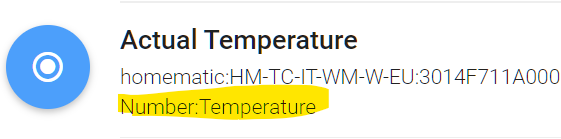
- Can you test with openHAB 2.5 M3 or even the latest SNAPSHOT?
- Please remove the HmIP-WTH-2 thing, stop openHAB, start openHAB and set log mode to TRACE, then re-discover and add the thing again. How does the Actural Temperature channel look like? If it does not work, please attache the log file. In this case I will have to find out how the channel definition is created.
MHerbst
on 11 Oct 2019
@MHerbst regarding questions 1) and 2) I can maybe assist you with since I experience the same issue as described above.
1) The problem occurred in my config using the Paper UI.
2) The definition itself is Number:Dimensionless for the Actual Temperature but Number:Temperature for the Set Point:
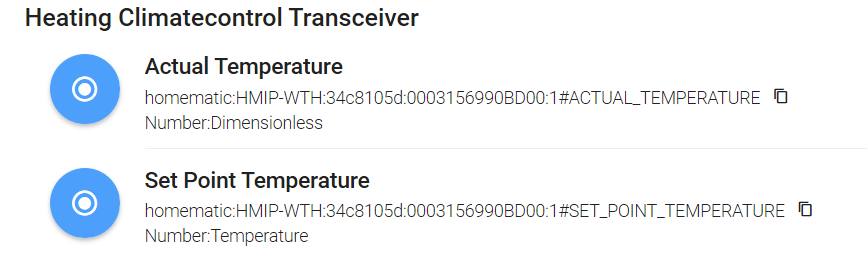
assert-not-singularity
on 11 Oct 2019
@MHerbst
- PaperUI
- What @assert-not-singularity said, looks exactly like that. Switching Actual Temperature to Number:Temperature by Hand results in "-NaN"
- no change with M3
- I have done that and attached it here, I hope this is the right extract :-)
thanks for your help!
Also interesting: REST API actually shows correct data (see picture)
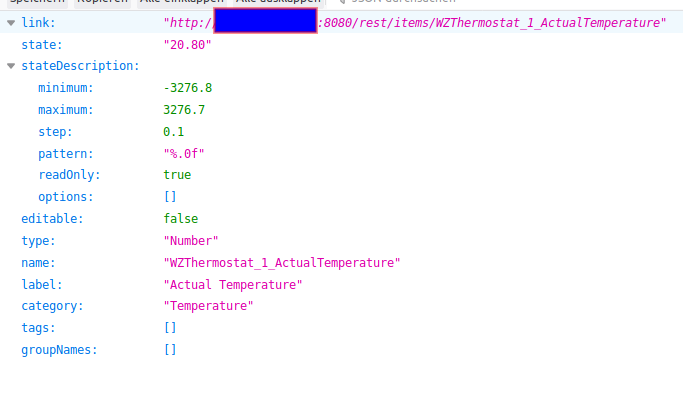
Catscrash
on 12 Oct 2019
Thanks for the information. I think the reason for the problem is the wrong channel type defined as Number:Dimensionless which then causes a wrong display. For my "old" thermostats the definition is OK, but they transmit the Actual Temperature on Homematic channel 2. Your devices are transmitting this value on Homematic channel 1. Maybe this is the reason why the derived type is wrong.
MHerbst
on 12 Oct 2019
Hmmm, wrong channel… In my setup, I have the channels of the HMIP-eTRV and the HM-WTH directly linked. If I remember correctly, it was 1->6, 2->5 and 3->3 (WTH to eTRV). Could this lead to this issue?
assert-not-singularity
on 12 Oct 2019
@Catscrash I think I need some more information from the log. Please proceed as follows.
- Reset the log settings for the Homematic binding to INFO
- In the openHAB console execute this command:
log:set TRACE org.openhab.binding.homematic.internal.communicator - Restart openHAB
In the openhab.log file please search for a message like this:
Loading metadata for device 'xxxx' of type 'HmIP-WTH-22'
If this does not appear please remove the thing and start a new discovery. The TRACE will contain the data point definition of all values provided by the HM devices.
MHerbst
on 12 Oct 2019
Hello @MHerbst, I try to complete some information here:
I followed your procedure and set the log level to INFO, then I set the log level for the binding which resulted in:
Logger                                              │ Level
────────────────────────────────────────────────────┼──────
ROOT                                                │ INFO
javax.jmdns                                         │ ERROR
org.apache.karaf.jaas.modules.audit                 │ INFO
org.apache.karaf.kar.internal.KarServiceImpl        │ ERROR
org.apache.karaf.shell.support                      │ OFF
org.apache.sshd                                     │ ERROR
org.eclipse.jetty.util.thread.ThreadPoolBudget      │ ERROR
org.eclipse.lsp4j                                   │ OFF
org.eclipse.smarthome                               │ INFO
org.jupnp                                           │ ERROR
org.openhab                                         │ INFO
org.openhab.binding.homematic.internal.communicator │ INFO
org.ops4j.pax.url.mvn.internal.AetherBasedResolver  │ ERROR
org.ops4j.pax.web.pax-web-runtime                   │ OFF
smarthome.event                                     │ INFO
smarthome.event.InboxUpdatedEvent                   │ ERROR
smarthome.event.ItemAddedEvent                      │ ERROR
smarthome.event.ItemRemovedEvent                    │ ERROR
smarthome.event.ItemStateEvent                      │ ERROR
smarthome.event.ThingAddedEvent                     │ ERROR
smarthome.event.ThingRemovedEvent                   │ ERROR
smarthome.event.ThingStatusInfoEvent                │ ERROR
I tried to find the line with Loading metadata … but there was none. So I removed the WTH and added it again. I linked the Items SetPointTemperature and ActualTemperature with its default values (Number:Temperature and Number:
22:34:57.165 [INFO ] [ome.event.ItemChannelLinkRemovedEvent] - Link 'homematic_HMIP_WTH_34c8105d_0003156990BD00_1_BOOST_TIME => homematic:HMIP-WTH:34c8105d:0003156990BD00:1#BOOST_TIME' has been removed.
22:34:57.180 [INFO ] [ome.event.ItemChannelLinkRemovedEvent] - Link 'homematic_HMIP_WTH_34c8105d_0003156990BD00_1_BOOST_MODE => homematic:HMIP-WTH:34c8105d:0003156990BD00:1#BOOST_MODE' has been removed.
22:34:57.184 [INFO ] [ome.event.ItemChannelLinkRemovedEvent] - Link 'homematic_HMIP_WTH_34c8105d_0003156990BD00_1_ACTIVE_PROFILE => homematic:HMIP-WTH:34c8105d:0003156990BD00:1#ACTIVE_PROFILE' has been removed.
22:34:57.211 [INFO ] [ome.event.ItemChannelLinkRemovedEvent] - Link 'homematic_HMIP_WTH_34c8105d_0003156990BD00_1_HUMIDITY => homematic:HMIP-WTH:34c8105d:0003156990BD00:1#HUMIDITY' has been removed.
22:36:02.781 [INFO ] [ig.discovery.internal.PersistentInbox] - Added new thing 'homematic:HMIP-WTH:34c8105d:0003156990BD00' to inbox.
22:36:02.782 [INFO ] [smarthome.event.InboxAddedEvent      ] - Discovery Result with UID 'homematic:HMIP-WTH:34c8105d:0003156990BD00' has been added.
22:36:04.719 [INFO ] [ing.homematic.internal.misc.MiscUtils] - Datapoint name '${sysVarAlarmZone1}' contains invalid characters, new Datapoint name '__sysVarAlarmZone1_'
22:36:04.723 [INFO ] [ing.homematic.internal.misc.MiscUtils] - Datapoint name '${sysVarPresence}' contains invalid characters, new Datapoint name '__sysVarPresence_'
22:37:32.789 [INFO ] [smarthome.event.InboxRemovedEvent    ] - Discovery Result with UID 'homematic:HMIP-WTH:34c8105d:0003156990BD00' has been removed.
22:37:32.850 [INFO ] [ome.event.ThingStatusInfoChangedEvent] - 'homematic:HMIP-WTH:34c8105d:0003156990BD00' changed from UNINITIALIZED to INITIALIZING
22:37:33.122 [INFO ] [ome.event.ThingStatusInfoChangedEvent] - 'homematic:HMIP-WTH:34c8105d:0003156990BD00' changed from INITIALIZING to ONLINE
22:37:33.232 [INFO ] [smarthome.event.ThingUpdatedEvent    ] - Thing 'homematic:HMIP-WTH:34c8105d:0003156990BD00' has been updated.
22:37:33.758 [INFO ] [smarthome.event.ThingUpdatedEvent    ] - Thing 'homematic:HMIP-WTH:34c8105d:0003156990BD00' has been updated.
22:38:33.674 [INFO ] [thome.event.ItemChannelLinkAddedEvent] - Link 'Wandthermostat_1_SetPointTemperature-homematic:HMIP-WTH:34c8105d:0003156990BD00:1#SET_POINT_TEMPERATURE' has been added.
22:38:33.682 [INFO ] [smarthome.event.ItemStateChangedEvent] - Wandthermostat_1_SetPointTemperature changed from NULL to 17.00 °C
22:38:38.061 [INFO ] [org.quartz.core.QuartzScheduler      ] - Scheduler openHAB-job-scheduler_$_NON_CLUSTERED started.
22:38:47.972 [INFO ] [thome.event.ItemChannelLinkAddedEvent] - Link 'Wandthermostat_1_ActualTemperature-homematic:HMIP-WTH:34c8105d:0003156990BD00:1#ACTUAL_TEMPERATURE' has been added.
22:38:47.975 [INFO ] [smarthome.event.ItemStateChangedEvent] - Wandthermostat_1_ActualTemperature changed from NULL to 21.20
At this point, actual temperature from the WTH was displayed as integer in the control view.
Afterwards, I changed the item to Number:Temperature again:
22:38:52.385 [INFO ] [org.quartz.core.QuartzScheduler      ] - Scheduler openHAB-job-scheduler_$_NON_CLUSTERED started.
22:39:09.123 [INFO ] [ome.event.ItemChannelLinkRemovedEvent] - Link 'Wandthermostat_1_ActualTemperature => homematic:HMIP-WTH:34c8105d:0003156990BD00:1#ACTUAL_TEMPERATURE' has been removed.
22:39:14.936 [WARN ] [nternal.handler.HomematicThingHandler] - Channel not found for datapoint '000393C99B5707:1#QUICK_VETO_TIME'
22:39:24.834 [INFO ] [smarthome.event.ItemUpdatedEvent     ] - Item 'Wandthermostat_1_ActualTemperature' has been updated.
22:39:25.482 [INFO ] [thome.event.ItemChannelLinkAddedEvent] - Link 'Wandthermostat_1_ActualTemperature-homematic:HMIP-WTH:34c8105d:0003156990BD00:1#ACTUAL_TEMPERATURE' has been added.
22:39:25.486 [INFO ] [smarthome.event.ItemStateChangedEvent] - Wandthermostat_1_ActualTemperature changed from NULL to 21.2 °C
22:39:29.832 [INFO ] [org.quartz.core.QuartzScheduler      ] - Scheduler openHAB-job-scheduler_$_NON_CLUSTERED started.
22:40:11.292 [INFO ] [smarthome.event.ItemUpdatedEvent     ] - Item 'Wandthermostat_1_ActualTemperature' has been updated.
22:40:16.291 [INFO ] [org.quartz.core.QuartzScheduler      ] - Scheduler openHAB-job-scheduler_$_NON_CLUSTERED started.
22:42:43.575 [INFO ] [smarthome.event.ItemStateChangedEvent] - Wandthermostat_1_ActualTemperature changed from NULL to 21.2 °C
Now, the control view shows -NaN again.
If you need further information, please let me know!
assert-not-singularity
on 23 Oct 2019
@assert-not-singularity Sorry, I made a mistake in my lasting post. Please set the log level for org.openhab.binding.homematic.internal.communicator to TRACE and repeat step 3 and following.
I will try to create a test version of the add-on this weekend. If necessary I will also add some additional trace coding.
MHerbst
on 23 Oct 2019
@MHerbst No problem, I've got a few logs for you:
assert-not-singularity
on 23 Oct 2019
@assert-not-singularity This is really quite a mess. Some temperature data points have a correct unit of °C, others (incl. ACTUAL_TEMPERATURE) have a unit of "null". I am thinking of a different method for deriving the channel type by using the data point names.
MHerbst
on 26 Oct 2019
@MHerbst Thanks for taking care.
This issue actually is a showstopper for upgrading OpenHAB to 2.5 as soon as it was released for me. Currently I'm running 2.5.0.M4 with a Homematic 2._4_.0.M5 as a workaround for Issue [Homematic] Can't convert type QuantityType with value to FLOAT #6612
Unfortunately the old binding stopped working with either 2.5.0.M5 or M6. Without that binding I can't set the temperature in my HM-CC-RT-DN valves anymore.
Any chance to get this fixed for 2.5.0 release?
Thanks so much
 lhurt
on 5 Dec 2019
lhurt
on 5 Dec 2019
I have an idea for a fallback that is based on data point names. Will try to implement at least a version for testing the solution this weekend.
MHerbst
on 6 Dec 2019
@lhurt Can you try version 2.5 M6 with the 2.5 M6 version of the binding? I have tested it with the HM-CC-RT-DN valve in a fresh installation and everything was fine. Because of the changes in the binding it may be necessary to remove the thing and rediscover it again. If there is a problem please check the SET_TEMPERATURE channel. What is the type of this channel? It should be Number:Temperature. This is one of the channels where the unit is normally detected correctly.
MHerbst
on 7 Dec 2019
@MHerbst Thanks for the info. Will give it a try. Did try it already but only deleted and recreated the SET_TEMPERATURE item. Didn't recreate the whole thing.
Will report back with the results.
lhurt
on 7 Dec 2019
@MHerbst Thank you very much. That did the trick with 2.5.0.RC1. And its so cool that I just had to recreate the thing and could leave the items as is. They were automatically relinked to the thing.
Thank you very much. This really gave me a headache and now the ugly workaround is history.
lhurt
on 12 Dec 2019
@lhut thanks for the feedback. Good, that it's working again.
MHerbst
on 12 Dec 2019
Tested it with the 2.5.0 release version and it looks good now. Thanks, @MHerbst for fixing this one!
Edit: There is still one minor issue: After deleting and re-adding all Homematic IP things, the standard type for the actual temperature still isn't Number:Temperature.

But when creating a custom link overwriting the default Number to Number:Temperature it works. I did not try creating an item using the simple mode, so there could still be display problems, I guess.
assert-not-singularity
on 28 Dec 2019
Hmm I have expected that all temperatures would get the correct type. But maybe something is missing. Can you enable DEBUG mode and re-add a thing? I would like to see whether the log contains at least message like "No unit information found ..." for these channels.
I will check the coding again and probably provide a PR for it (but not before the end of next week).
MHerbst
on 28 Dec 2019
I can't get Paper UI to display decimal format and a unit, even if I set the manually created item to Number:Temperature.
Tried to get some logs, hope this is enough. (openHAB 2.5.0 in docker on Synology, latest RaspberryMatic)
2020-01-10 19:53:40.958 [TRACE] [ommunicator.AbstractHomematicGateway] -     HmDatapoint[name=ACTUAL_TEMPERATURE,value=<null>,defaultValue=0.0,type=FLOAT,minValue=-3276.8,maxValue=3276.7,step=<null>,options=<null>,readOnly=true,readable=true,unit=<null>,description=ACTUAL_TEMPERATURE,info=<null>,paramsetType=VALUES,virtual=false,trigger=false]
...
2020-01-10 19:53:46.453 [TRACE] [converter.type.AbstractTypeConverter] - Converting datapoint '000A9A499F003E:1#ACTUAL_TEMPERATURE' (dpType='FLOAT', dpUnit='null', dpValue='22.5') with DecimalTypeConverter
Response from the relevant XML API call:
<member><name>ACTUAL_TEMPERATURE</name><value><double>22.5</double></value></member>
Tested with these devices:
- HmIP-eTRV-2
- HmIP-WTH-2
 oRRs
on 10 Jan 2020
oRRs
on 10 Jan 2020
The reason for this problem is (in my opinion) a bug Homematic. As you can see in the HmDatapoint log information, the CCU does not return a valid unit valid. Therefore the channel is defined as Number:Dimensionless. instead of Number:Temperature. I am trying to bypass this problem but the first implementationion was not completely correct.
MHerbst
on 11 Jan 2020
Hi,
I know the ticket is closed buy I'm always getting:
2020-02-08 16:43:50.172 [WARN ] [ternal.handler.HomematicThingHandler] - Can't convert type QuantityType with value '24.5 °C' to FLOAT value with DecimalTypeConverter for 'LEQ0581399:4#SET_TEMPERATURE', please check the item type and the commands in your scripts
with Openhab 2.5.1 and Homegear - is this a problem of Homegear then?
 solars
on 8 Feb 2020
solars
on 8 Feb 2020
Hi @solars ,
I am not sure whether it is a Homegear problem. First of all please check the type of the "Set Temperature" channel. It should be Number:Temperature. Then you should check the type of the item definitions. Does this problem occurs in a rule or generally when you try to set a temperature?
If the channel type is not a temperature it can be a problem of Homegear and it could probably be solved with the patch for this issue (it is not contained in 2.5.1).
MHerbst
on 8 Feb 2020
@MHerbst thanks a lot for the answer.
I didn't add the definition myself in the files, but let OH create the Things/Items automatically.
The problem occurs generally if I want to set the temperature through paper ui, directly on the Set Temperature item.
Set Temperature seems to be number only:

Is this wrong?
If the patch helps, how can I apply/use it if I use the 2.5.1 docker image of Openhab?
solars
on 9 Feb 2020
I have got the same device but I normally set the temperature via a connected wall thermostat. For the wall thermostat the channel type is correctly defined with "Number:Temperature". With the patch for this issue it will be set to the same type also for this channel. I was ablle to set a new temperature via this channel.
You can download the binding containing the patch from the Artifactory repository https://openhab.jfrog.io/openhab/webapp/#/builds/openHAB2.5.x-Addons/45/1581313143364/published%20/org.openhab.addons.bundles:org.openhab.binding.homematic:2.5.2-SNAPSHOT
Unfortunately, I don't have any experience with the docker image, but the general procedure to install a snapshot build of an add-on is the following:
- uninstall the binding
- stop openHAB
- clear the cache directory
- copy the binding's jar file to the addons folder
- start openHAB (the binding should be loaded from the addons folder)
- remote the thing and rediscover it.
I don't know whether this is possible with the docker image
MHerbst
on 10 Feb 2020
Related issues
 martinvw
·
5Comments
martinvw
·
5Comments
 pfink
·
4Comments
pfink
·
4Comments
 smyrman
·
4Comments
smyrman
·
4Comments
 Nikos78
·
5Comments
Nikos78
·
5Comments
 bennybubble
·
4Comments
bennybubble
·
4Comments
Most helpful comment
The reason for this problem is (in my opinion) a bug Homematic. As you can see in the HmDatapoint log information, the CCU does not return a valid unit valid. Therefore the channel is defined as Number:Dimensionless. instead of Number:Temperature. I am trying to bypass this problem but the first implementationion was not completely correct.