Openhab-addons: [mqtt] publishMQTT action stops functioning
Expected Behavior
Continued publishing of Mqtt messages.
Current Behavior
After upgrading 2.4 and switching to MQTT 2 I recreated the event-bus like behaviour with the following rule:
rule “Publish item changes”
when
Member of gTemperature changed
then
var state = “”
if (triggeringItem.state != null) {
state = triggeringItem.state.toString
val actions = getActions(“mqtt”,“mqtt:broker:myBroker”)
actions.publishMQTT("/myserver/"+triggeringItem.name+"/state",state)
logInfo(“log”, "publish: " + triggeringItem.name + " " + state)
}
end
While this rule works as expected it stops functioning after several hours and throws an error like: MQTT publish to
The rule creates maximum 20 messages per minute so the load isn't that high.
I tried this on 2 different OpenHAB setups (one RPI 3b and one a more powerful VM) and same result.
Other users have reported similar behaviour.
Possible Solution
David Graeff suggested that this is related to the new publishMQTT action itself and that this might not be stress tested yet.
Steps to Reproduce
- Create a rule as above which gets triggered frequently
- Wait a few hours (max 24 hours)
Your Environment
openhab 2.4 release
raspian jessie and ubuntu 16.04
 911rgt
All 23 comments
Please use the Eclipse SmartHome issue tracker for reporting MQTT Binding related issues. That's the repository where the MQTT Binding source code is maintained. Thanks.
 cweitkamp
on 2 Jan 2019
cweitkamp
on 2 Jan 2019
This issue should be reopened as MQTT binding is no longer developed in ESH repository.
 pavel-kamaev
on 19 Mar 2019
pavel-kamaev
on 19 Mar 2019
I have the same problem here.
Worked around it with a Icinga event_command (sudo -u openhab ssh -p 8101 openhab@localhost 'bundle:restart 211') while 211 is the "Eclipse SmartHome MQTT Binding" and the Icinga is trying to get some data from a specific mqtt topic.
Can be done within openHAB, too.
 gbeine
on 24 Apr 2019
gbeine
on 24 Apr 2019
Is this openHAB 2.4 only? Although it's the most recent "release" version, that version is not supported by me, only OH 2.5 snapshots.
 davidgraeff
on 24 Apr 2019
davidgraeff
on 24 Apr 2019
Is this openHAB 2.4 only? Although it's the most recent "release" version, that version is not supported by me, only OH 2.5 snapshots.
It's openHAB 2.4 in my case.
Nevertheless, in the other bug report is written, that the issue still arises in OH 2.5M1.
gbeine
on 25 Apr 2019
Just wanted to add that i was able to reproduce this in 2.5M1. Is there a specific snapshot that is stable with a potential fix that needs to be tested? Happy to test and debug where needed.
 volfan6415
on 19 May 2019
volfan6415
on 19 May 2019
Is there a fix or a decent workaround for this? Getting the same after a few hours, exceptionally frustrating.
 chimeranzl
on 28 May 2019
chimeranzl
on 28 May 2019
It's definitely not on the Mqtt binding side. It's a core problem.
Can anybody test periodic usage of script actions with other bindings? Maybe the mqtt-actions code has a defect.
davidgraeff
on 28 May 2019
Testing with Exec binding (is it suitable?):
Thing exec:command:test_actions [command="/usr/bin/test_actions.sh", interval=1, timeout=5, autorun=true
test_actions.sh:
#!/bin/bash

date +%s >> /tmp/test_unixdate
Testing with Exec binding (is it suitable?):
Thing exec:command:test_actions [command="/usr/bin/test_actions.sh", interval=1, timeout=5, autorun=truetest_actions.sh:
#!/bin/bash

date +%s >> /tmp/test_unixdate
No, this test is wrong.
What bindings provide purely software actions like sending email or posting to MQTT topics in OH 2.4?
pavel-kamaev
on 30 May 2019
Is there a fix or a decent workaround for this? Getting the same after a few hours, exceptionally frustrating.
I've worked around this problem with the following way:
separate MQTT bridge for publishing and receiving (the problem addresses only publishing), so that I have a
Bridge mqtt:broker:publish [...]{}create a script to restart this bridge:
#!/bin/bash
sudo -u openhab ssh -p 8101 openhab@localhost 'things disable mqtt:broker:publish'
sudo -u openhab ssh -p 8101 openhab@localhost 'things enable mqtt:broker:publish'
echo $?
create a NRPE command to execute this script (I've a Icinga on another host, so NRPE is not essential, it can be done with Icinga directly if it runs on the same host)
command[restart_openhab_mqtt]=/etc/nagios/scripts/restart-openhab-mqtton the Icinga I've installed the check-mqtt from jpmens/check-mqtt
Command definition:
object CheckCommand "check_mqtt" {
  import "plugin-check-command"

  command = [ PluginLocalDir + "/check_mqtt" ] //constants.conf -> const PluginDir

  arguments = {
    "-H" = "$mqtt_host$"
    "-u" = "$mqtt_user$"
    "-p" = "$mqtt_password$"
    "-P" = "$mqtt_port$"
    "-a" = "$mqtt_cafile$"
    "-c" = "$mqtt_certfile$"
    "-k" = "$mqtt_keyfile$"
    "-t" = "$mqtt_topic$"
    "-m" = {
      set_if = "$mqtt_max$"
      value = "$mqtt_max$"
    }

    "-l" = "$mqtt_payload$"
    "-v" = "$mqtt_value$"
    "-o" = "$mqtt_operator$"

    "-r" = {
      set_if = "$mqtt_readonly$"
      description = "Don't write."
    }
    "-n" = {
      set_if = "$mqtt_insecure$"
      description = "suppress TLS hostname check"
    }
  }
}
Restart event
object EventCommand "restart_openhab_mqtt" {
  command = "/etc/icinga2/scripts/restart-openhab-mqtt.sh"
}
Service definition
apply Service "openhab-mqtt" {
  import "generic-service"

  check_command = "check_mqtt"

  display_name = "openHAB: MQTT"

  event_command = "restart_openhab_mqtt"

  assign where (host.address || host.address6) && len(host.vars.services) > 0 && "openhab" in host.vars.services
}
Host definition
object Host "home.beine.hassio" {
  import "host-home"
  import "host-raspberrypi"

  vars.services += [ "mqtt", "openhab" ]

...

  vars.mqtt_host = "openhab"
  vars.mqtt_port = 1883
  vars.mqtt_user = "monitor"
  vars.mqtt_password = "topsecret"
  vars.mqtt_topic = "home/values/#"
  vars.mqtt_max = 30
  vars.mqtt_readonly = true
}
Using this, Icinga checks for MQTT activity on the openhab host every 5min.
It there is no activity for 30 seconds, the restart script will be triggered.
It is not how I want it to work, but it re-animates the publishing service.
gbeine
on 30 May 2019
I can't reproduce it in snapshot 51603.
In 2.4 it can be reproduced with some stress testing:
- Create rule which triggers on item update. This rule publishes MQTT message which updates item state. This will trigger rule again.
- Flood MQTT broker with same MQTT message.
Configuration:
Thing exec:command:test_actions [command="/usr/bin/test_actions.sh", interval=1, timeout=5, autorun=true]

mqtt:broker:mosquitto [ host="localhost", secure=false ]

Thing mqtt:topic:test_00 (mqtt:broker:mosquitto) {
        Channels:
                Type switch : sw0 "SW0" [ stateTopic="test_00/state", commandTopic="test_00/command", on="ON", off="OFF" ]
}
Switch test_sw_0 "Test switch 0" <heating> {
        channel="mqtt:topic:test_00:sw0"
}
rule "test 02"
when
        Item test_sw_0 received update
then
        val actions = getActions("mqtt","mqtt:broker:mosquitto")
        if (test_sw_0.state == OFF)
                actions.publishMQTT("test_00/state","ON")
        else
                actions.publishMQTT("test_00/state","OFF")
end
- Trigger the rule for the first time:
mosquitto_pub -h localhost -t "test_00/state" -m "OFF" - This will lead to failed publish:
while [ 1 ]; do mosquitto_pub -h localhost -t "test_00/state" -m "ON"; done
pavel-kamaev
on 30 May 2019
Since 2.4 a lot of things have been refactored and fixed in the mqtt binding. I doubt someone will fix problems in the old code if it's working in the new code.
 J-N-K
on 30 May 2019
J-N-K
on 30 May 2019
I will add an integration test that stress tests the action for 30 seconds. That increases the overall build time of the distro, but at least we can be sure that a decent amount of messages (I expect 100 messages / second) will pass through.
I do not see any timing related issue (eg that the action will stop working after x days or x hours), but more a race condition / deadlock happening at some point.
davidgraeff
on 30 May 2019
I would suspect it has something to do with the rate at which the action is called, as I personally use it in a rule that is called every 15 seconds or so to update kWH for a power meter reader I made. The action publishes to 3 different items at each 15 second interval. Perhaps it’s caused by a memory leak where a variable is not cleaned up properly, as it does run fine for the first few hours.
chimeranzl
on 30 May 2019
@davidgraeff a nice workaround would be to have the binding turn the broker offline when the Mqtt publishes start failing. Then the reset binding command could be called via a rule that watches for the binding to go offline with the specific issue. I know the binding starts logging mqtt publish failed events so an update thing status command following the logging entry wouldn’t be hard to add, right?
At least for me all that has to be reset is the eclipse-smarthome-mqtt-transport bundle at which point the events start flowing in again.
volfan6415
on 4 Jun 2019
a nice workaround would be to have the binding turn the broker offline
The binding already pulls itself off if a transmission fails. That's why I suspect that the faulty code is in the Action part.
davidgraeff
on 4 Jun 2019
Is this the current version of the binding? Because i am not seeing the broker thing go offline when the publish status fails and i am using the binding in 2.5.M1.
log entry from right now
Line 46317: 2019-06-04 10:19:07.144 [WARN ] [home.binding.mqtt.action.MQTTActions] - MQTT publish to homeassistant/binary_sensor/Zachary/state failed!
However i did notice that all of my other MQTT things went offline with the status of:
Status: OFFLINE - COMMUNICATION_ERROR Too many publishes in progress (32202)
Resetting the transport bundle brought everything back online and messages resumed. I would have thought that the main broker thing would have also gone offline.
volfan6415
on 4 Jun 2019
It's not an openHAB problem: https://github.com/eclipse/paho.mqtt.java/issues/551
Apparently a race condition bug in the paho library if messages with QOS>0 are send let the inflight message value increase over time (although the MQTT server acknowledged those). After a certain time the inflight window is exhaused and the library denies to queue any more messages.
Because Eclipse paho is a really bad maintained MQTT library full of bugs, memory leaks, legacy code and technical debts (check the Issue list), we might need to change to another library like https://www.hivemq.com/blog/mqtt-client-library-enyclopedia-hivemq-mqtt-client/ for example.
davidgraeff
on 4 Jun 2019
Hi @davidgraeff, first of all, thanks for all the great work! This binding is amazing, it has made my whole openHAB/MQTT setup so much simpler.
I was just about to open another bug report for this, but I believe I’m seeing the exact same issue as described above.
However, I’d like to point that I’m also seeing this bug with QOS > 0:
Bridge mqtt:broker:homeserver [ host="homeserver", secure=false, qos=0, retainMessages=true ]
{
// …
I actually hit this bug quite frequently. When the following rule is triggered, there is a good chance that one ore more items are set to OFFLINE - COMMUNICATION_ERROR afterwards:
rule "Turn off all lights when leaving apartment"
when
    Item Presence changed
then
    if (Presence.state == OFF) {
        sendCommand(Guinness_Lampe, OFF)
        sendCommand(Wohnzimmer_Licht, OFF)
        sendCommand(Wohnzimmer_Media, OFF)
        sendCommand(Wohnzimmer_Computer, OFF)
        // 7 more
    }
end
So as a result, some lights randomly remain on when I leave my apartment. Interestingly though, shortly after and without restarting the binding, they can then receive subsequent publishes. They will work just fine, despite the respective thing being shown as OFFLINE:
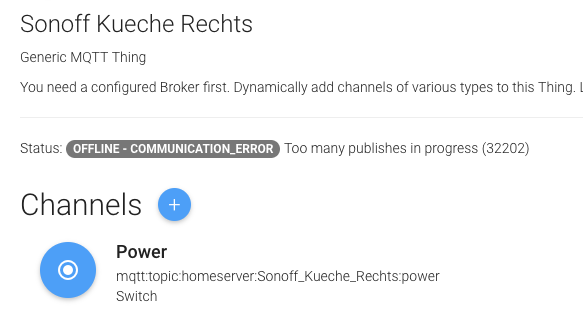
In fact, this particular item _can_ communicate, it apparently has just missed a single update.
I hope this helps. I’m also happy to do further testing.
 aaronk6
on 4 Jun 2019
aaronk6
on 4 Jun 2019
I actually hit this bug quite frequently. When the following rule is triggered, there is a good chance that one ore more items are set to OFFLINE - COMMUNICATION_ERROR afterwards:
Actually I never have set any useful value to the inflight / maximum queued messages at any time configuration. I think the default is 10. So if you send a lot of messages in rapid succession, you might exhaust that inflight window / the message queue as well even with qos=0.
I'm unsure how to proceed here. I suggest to
- change the mqtt library to counteract on the qos>0 issue
- and use an inflight window value of maybe 1000 and issue a warning when the queue fills up to like 75%.
Why did it work in mqtt OH1
Because paho was used in synchronous mode. The calling thread (the script thread most of the time) was blocked until sending of the message was completed (and acknowledged by the MQTT server if qos>0).
This is different now, the library is used in an asynchronous mode. Messages are queued and the calling thread is informed at a later time when sending has been completed. That allows the scripting thread and other openHAB threads to continue their tasks instead of waiting for an MQTT broker.
davidgraeff
on 4 Jun 2019
Thanks for the insights!
Actually I never have set any useful value to the inflight / maximum queued messages at any time configuration. I think the default is 10. So if you send a lot of messages in rapid succession, you might exhaust that inflight window / the message queue as well even with qos=0.
Yeah, I think that’s what’s happening here. To work around this, I have added 250 ms delays between the sendCommands which indeed fixes the issue (using this for a week now and no errors since).
change the mqtt library to counteract on the qos>0 issue
That would be great. I’d love to use a qos value higher than 0 to make the communication as reliable as possible. I’m not an expert in this field, but to me the HiveMQ library looks good.
and use an inflight window value of maybe 1000 and issue a warning when the queue fills up to like 75%.
Sounds good. A value of 1000 seems reasonably high, even for advanced use-cases. Or make it configurable on the bridge?
aaronk6
on 10 Jun 2019
inflight messages have been increased by https://github.com/openhab/openhab-core/pull/970
J-N-K
on 25 Aug 2019
Related issues
 bennybubble
·
4Comments
bennybubble
·
4Comments
 UrsusS
·
5Comments
UrsusS
·
5Comments
 Nikos78
·
5Comments
Nikos78
·
5Comments
 smyrman
·
4Comments
smyrman
·
4Comments
 DanielMalmgren
·
5Comments
DanielMalmgren
·
5Comments
Most helpful comment
It's not an openHAB problem: https://github.com/eclipse/paho.mqtt.java/issues/551
Apparently a race condition bug in the paho library if messages with QOS>0 are send let the inflight message value increase over time (although the MQTT server acknowledged those). After a certain time the inflight window is exhaused and the library denies to queue any more messages.
Because Eclipse paho is a really bad maintained MQTT library full of bugs, memory leaks, legacy code and technical debts (check the Issue list), we might need to change to another library like https://www.hivemq.com/blog/mqtt-client-library-enyclopedia-hivemq-mqtt-client/ for example.