Openhab-addons: [amazondashbutton] Improve logging and discovery filtering
@OLibutzki @BClark09
I've received two Dash Buttons and wanted to test them. The binding is not able to discover them. Upon browsing the sourcecode I found this part: https://github.com/openhab/openhab2-addons/blob/master/addons/binding/org.openhab.binding.amazondashbutton/src/main/java/org/openhab/binding/amazondashbutton/internal/discovery/AmazonDashButtonDiscoveryService.java#L59-L73
The MACs of my new devices are:
- FC:A6:67:0C:A1:C7
- FC:A6:67:96:F8:AE
They are not covered by your list. I feel that the approach chosen will always fail with new devices. Any other options?
The binding does not generate any log messages during the manual discovery, which is not reinsuring and could be improved. If I didn't check the source code, I wouldn't have known where my test failed (could just as well be a wrongly configured pcap).
At this point I defined a thing manually via configuration file - that's what I was going to do after the discovery process. The definition (this is missing from the README):
Thing amazondashbutton:dashbutton:desperados [ mac="FC:A6:67:0C:A1:C7", pcapNetworkInterfaceName="eth0" ]
The behavior of the binding is suspicious from this point forward:
2017-07-09 16:52:13.962 [ChannelTriggeredEvent     ] - amazondashbutton:dashbutton:desperados:press triggered
2017-07-09 16:52:19.960 [ChannelTriggeredEvent     ] - amazondashbutton:dashbutton:desperados:press triggered
2017-07-09 16:52:24.971 [ChannelTriggeredEvent     ] - amazondashbutton:dashbutton:desperados:press triggered
2017-07-09 16:52:30.463 [ChannelTriggeredEvent     ] - amazondashbutton:dashbutton:desperados:press triggered
2017-07-09 16:52:48.361 [ChannelTriggeredEvent     ] - amazondashbutton:dashbutton:desperados:press triggered
2017-07-09 16:52:55.031 [ChannelTriggeredEvent     ] - amazondashbutton:dashbutton:desperados:press triggered
2017-07-09 16:53:13.962 [ChannelTriggeredEvent     ] - amazondashbutton:dashbutton:desperados:press triggered
2017-07-09 16:53:19.960 [ChannelTriggeredEvent     ] - amazondashbutton:dashbutton:desperados:press triggered
All of these triggered messages are generated without me pressing the button once.
@OLibutzki what do you think? It feels like the discovery process needs to be improved/generalized, logging could receive a few additons and the evaluation of "pressed" events seems to be too trigger-happy.
Thanks for all your work!
 ThomDietrich
All 51 comments
I am having similar problems with two of my dash buttons and I totally agree.
It is hard to debug here without any log messages.
Feel free to mention me if help in testing is needed.
 Confectrician
on 11 Jul 2017
Confectrician
on 11 Jul 2017
I have a feeling that the list of MAC address cannot be generalised. It's a sudden drop from being a dash button detector to a general ARP sniffer binding.
That said, these expectations need to be set properly. The readme says that automatic detection isn't supported but it'd be many users first instinct. I think that an example image of the manual setup should be included, as well as @ThomDietrich's example above.
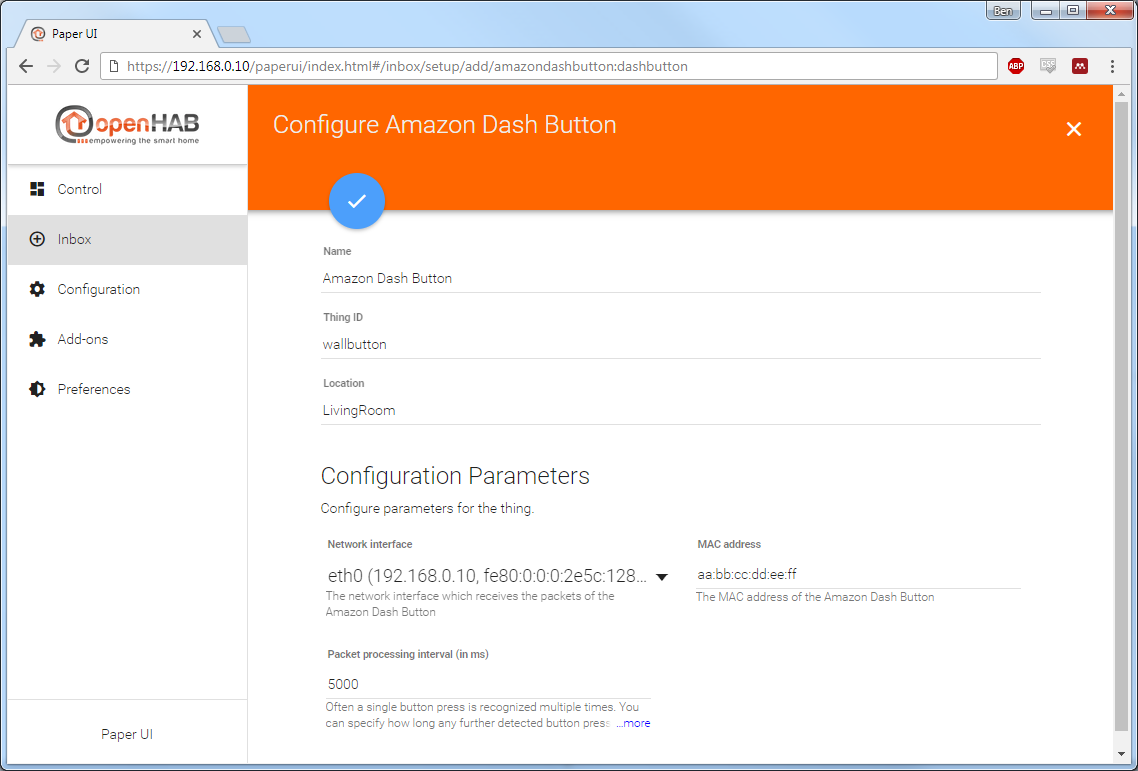
@ThomDietrich, your bug may be related to having no timer setting?
 BClark09
on 11 Jul 2017
BClark09
on 11 Jul 2017
Hey @BClark09,
I was expecting this parameter to have a default value. I've added the parameter to my config but I'm still seeing the above behavior. :( The whole situation is far from ideal. I have 9 dash buttons lying around waiting to be useful :)
The readme says that automatic detection isn't supported but it'd be many users first instinct.
I don't know if this a big issue, manual discovery is provided by many bindings. I would refrain from including screenshots (that will soon be outdated) of general processes to individual binding readmes.
It's a sudden drop from being a dash button detector to a general ARP sniffer binding.
I know what you mean. However as long as this is a manually triggered discovery it is not running all the time. Instead of matching the MAC one could do some more sophisticated analysis for characteristic dash button packages among the first x packages received from one device...!? wdyt?
@Confectrician are you seeing the same error messages?
ThomDietrich
on 11 Jul 2017
Hi everyone,
the background discovery has been disabled as I did not find a way to distinguish a Dash Button and an Echo or Fire TV. This led to a lot of false positives as the MAC vendor prefix is not assign to a device type exclusivly. A Dash buttons might have the same vendor prefix as an Echo.
I wanted to support (explicitly triggered) discovery anyway and the only way I found was to check for the MAC address. Of course there might be fals positives as well, but it's less likely as the time frame is restricted to the scanning period.
I'm afraid we always have to add those new MAC vendor prefixes from time to time. If anyone has an idea how to identify a Dash button unambiguously, feel free to contribute this hint!
Anyway, I think adding the thing manually is a pretty good workaround, isn't it? You just have to find out your device's MAC address.
Concerning the logging: Consider that there are a lot of ARP requests around in your network, so the log might be bloated, but those ignored ARP requests are already logged (using the TRACE log level).
 OLibutzki
on 11 Jul 2017
OLibutzki
on 11 Jul 2017
@OLibutzki Thanks for your answer!
I don't see the background discovery as an essential piece here. Manually triggered discovery is totally fine for me, especially in light of the pcap scanning impact.
I've not looked at the packages myself but did you analyze the traffic generated by the dash button, sure enough there should be some info we can parse for?
Adding the thing manually is a good workaround... it's not even a workaround if you are used to do so as I am... The problem is that this is not working :fearful: please see my comments from before. Any idea what could be the issue and how it can be fixed?
Concerning the logging: My comments were not related solely to the ARP requests. Your binding doesn't produce the right amount of logging lines and makes it pretty hard to troubleshoot my or any future problem. Ignored ARP requests should for example not be logged to TRACE. In my opinion these should go to DEBUG in general and INFO during discovery. Other events should also be logged to help during discovery and during manual thing definition. I would be thankful if you could look into this.
Thanks, Thomas
ThomDietrich
on 12 Jul 2017
@OLibutzki I've tracked down the incorrect "pressed" events. They were the result of not correctly defined MAC addresses (parameter name mac instead of macAddress). Still that shouldn't result in random events generated... Maybe a few checks and error messages for parameters would help.
Please understand my comments as constructive hints and let's strive for an improved binding! 😃
Please let me know if you need more info or help testing 👌
ThomDietrich
on 17 Jul 2017
They were the result of not correctly defined MAC addresses (parameter name mac instead of macAddress).
I can confirm that behaviour, since i have copied your thing code above for testing my setup here.
I want to write down here, that i am also interested in testing an helping out, where possible. :)
Confectrician
on 17 Jul 2017
@OLibutzki any news? Just to be clear: I'm currently not able to use any of the 8 dash buttons catching dust in my apartment 😢
ThomDietrich
on 2 Aug 2017
Isn't it possible to detect the dash button while the button is actually pressed? So the readme would be like "Start the discovery process in PaperUI and press the button of your DashButton to make it discover-able".
 davidgraeff
on 3 Aug 2017
davidgraeff
on 3 Aug 2017
The README includes something like it already: http://docs.openhab.org/addons/bindings/amazondashbutton/readme.html#discovery
ThomDietrich
on 3 Aug 2017
@OLibutzki not wanting to be pushy but I'm still a sitting duck, waiting for help. It would be amazing to get some feedback if you will be able to improve the binding in the near future. I do sadly not really have the time to do any development work myself right now...
ThomDietrich
on 29 Aug 2017
Hi @ThomDietrich,
unfortunately my time is rare as well. I don't think I will work on the binding in the next couple of weeks. Some weeks ago I just quickly checked the problem and it occurred with my Dash buttons as well.
Unfortunately I did not understand quickly what's going wrong, so I need some time to investigate further.
If anyone finds some time, it would be great. I will try to give as much support as possible.
OLibutzki
on 30 Aug 2017
That's okay, that's how live plays sometimes :) We can work with this answer.
Does any of the others want to dig into the issue? @Confectrician this would be the perfect place as a first binding development experience 😃
ThomDietrich
on 30 Aug 2017
For now (and with now i mean short term) it would be a good workaround to expand the prefix string Set with new known prefixes.
On long term, a improved discovery or a better method on keeping this list up to date would be needed.
But i have no experience with that arp request stuff.
Confectrician
on 31 Aug 2017
Extending the list and fine-tuning the logging would be more than enough for now. Nothing critical but enough to get acquainted with the development process. Sooo Soooo wdyt? 😺
ThomDietrich
on 31 Aug 2017
You can add :
68:54:FD:
18:74:2E:
 fab33
on 21 Sep 2017
fab33
on 21 Sep 2017
@ThomDietrich does this close the issue for you?
 martinvw
on 22 Sep 2017
martinvw
on 22 Sep 2017
Not quite. The PR was merely a small fix. The binding still behaves a bit unreliable and some errors need to be handled and logged. I'd also like to improve on the idea of a MAC list because as @fab33 made clear, the current solution is not going to work in the long run. I've updated the issue title accordingly.
I'm still hoping for someone to jump in as I'd rather not add another project to my todo list. :/
ThomDietrich
on 24 Sep 2017
Can you also please add:
b4:7c:9c
68:37:e9
 Celaeno1
on 16 Oct 2017
Celaeno1
on 16 Oct 2017
when I start arping in terminal and push the button, it only detects two times the mac adress of the button.
May be that is a way to filter:
start the detection, look for mac adresses, that appear two times and only two times.
 ktams
on 16 Oct 2017
ktams
on 16 Oct 2017
@OLibutzki @ktams You can compare this twice detected MAC-ADDRESS or only mac prefix with one of these following APIs:
https://api.macvendors.com/68:37:e9
or
https://macvendors.co/api/vendorname/68:37:e9
That's it....
Celaeno1
on 16 Oct 2017
That's it....
Nope, unfortunately not.
https://api.macvendors.com/44:65:0D
Is an example from my Fire TV Stick, which shouldn't be added as a Dash Button obviously.
Confectrician
on 16 Oct 2017
@confectrician Is your FireTv Stick answering to the ARP request with exactly 2 times telling its mac-address, too?
Celaeno1
on 17 Oct 2017
@Celaeno1
It doesn't seem seem to be answering exakt two times.
It doesn't seem to answer even one time, so i cant reproduce the difficulties mentioned above.
Sry for being to fast with my answer here.
I tried pressing a dash button too during discovery.
There was one time it answered 2 times and one time it answered 4 times.
That confused me a bit and i tried pressing it several times again.
In fact i had about 20 cases, where exactly 2 answers were submitted.
So this could be really a good approach for the discovery.
Confectrician
on 17 Oct 2017
@Confectrician Sounds good. Now, we only have to find a developer who has time for doing that...
Celaeno1
on 17 Oct 2017
A good documentation will be fine too. Actually it's not explain how to configure dashbutton with things and items files.
fab33
on 17 Oct 2017
@Celaeno1 we could use that API, but it's not assured that the OpenHAB runtime has internet access, so we still need a static list in order to fallback.
@Confectrician The approach of checking for two ARP request answers sounds unreliable somehow. I would like to know if there are more users who can confirm that in contrast to other Amazon devices the Dash button answers exactly two times. If so, we could add this in the binding.
OLibutzki
on 17 Oct 2017
Hi @OLibutzki,
The initial idea of the "2answers" thingy came from ktams.
So currently, we are 2 users. Maybe we should start a thread in the community to test this behavior.
@ThomDietrich:
Regarding to this discussion, you own several Dash Buttons too, maybe you could test this behavior as well.
And ofc the comment about that API has a good point.
Since openHAB doesn't need an internet connection by explicit design, we should keep that fact in mind too.
Confectrician
on 17 Oct 2017
I also don't think the "2answers" solution alone is any better than the limited mac address list solution.
It should be possible to filter packages based on the actual content.
Yes I am seeing two packages. These are identified as LLC (0x000081f5) and are exactly 60byte long, data payload always starts with 0x8000. Tested with eight dash buttons.
@OLibutzki any idea?
ThomDietrich
on 17 Oct 2017
@ThomDietrich I second this. Can you provide a unified way how to sniff those packages? Using this manual users could check there content and we could collect all the results in order to find similarities.
OLibutzki
on 18 Oct 2017
Good idea. I'm currently not home so sadly can't verify the below. I went with Wireshark on my Windows PC to do the analysis.
- Install wireshark, start
- Select the right interface (Ethernet, Wifi,...)
- Start the capturing process (packages should pop up)
- Add a filter to only show LLC packages
- Press the dash button and verify the content against the data given above
Regarding 4: Someone please post the filter rule Wireshark uses for that
Everyone: Please test with your devices and compare your findings
To actually be useful we also need to compare this data to LLC packages by other devices.
In the end I'm still wondering how far we have to push this. The manual discovery is only active when the user initiates it. Do we really need to filter out rigorously?
ThomDietrich
on 18 Oct 2017
Someone please post the filter rule Wireshark uses for that
Simply:
I have 3 dash buttons which have battery power atm. As with @ThomDietrich, LLC, control field: 0x81f5, exactly 60byte long, data payload always starts with 0x8000.
Alas, every other WiFi device matches the above criteria. Different types of devices, and brands etc.
BClark09
on 19 Oct 2017
I was afraid of that. After all LLC is handled on the lowest level and probably not especially implemented.
And with that we are back at the question above: It should be enough to filter for LLC packages during the manual discovery process (no mac filter needed). After all those should be not too many during that time.
Yet another option would be to not rely on the LLC packages for discovery. A few packages down the trail there are nice informative TCP/IP packages aimed at amazon servers.
ThomDietrich
on 19 Oct 2017
@ThomDietrich Just filtering LLC packages should be trivial.
Anyway, @BClark09 did you investigate the whole package? There are no differences between a Dash button and any other device?
OLibutzki
on 19 Oct 2017
Im afraid I didn't capture any TCP packets since I don't let it get as far as the amazon server. Both ARP and LLC wise they're all indistinguishable.
BClark09
on 19 Oct 2017
I'm just trying with 2 recents Dash button and I can't see any llc packet
only dhcp request and arp.
fab33
on 19 Oct 2017
As I see, there will be not a quick solution. Therefore, it would be useful to first update the following file:
AmazonDashButtonDiscoveryService.java
please add:
68:54:FD
18:74:2E
B4:7C:9C
68:37:E9
Then please update documentation (link) , how to manually add a Dash Button.
Please note that there are many new users, possibly beginners, of the Dash Button. They easily could get confused...
After this, there will be more time to think about a new detection mechanism.
Celaeno1
on 20 Oct 2017
I agree with you @Celaeno1
@OLibutzki will you do us the honors?
ThomDietrich
on 20 Oct 2017
Then please update documentation (link) , how to manually add a Dash Button.
We should also consider putting in a note there to use this issue (with link) for reporting new mac adresses, since there could be unknown prefixes we dont know yet.
Confectrician
on 20 Oct 2017
We should strive for a fix of the underlying issue. Let's wait for @OLibutzki's answer, wether or not he'd have the time for that...
ThomDietrich
on 20 Oct 2017
If it's desired to keep a mac list, then I'd argue that the full set of Amazon Technologies MAC codes get added. This list is found in IEEE in an OUI text file: http://standards-oui.ieee.org/oui.txt
:~ $ curl -s http://standards-oui.ieee.org/oui.txt | awk -F"[- ]+" '/hex.*Amazon Tech/ { printf "%s:%s:%s\n", $1, $2, $3 }'
F0:D2:F1
88:71:E5
FC:A1:83
F0:27:2D
74:C2:46
68:37:E9
78:E1:03
38:F7:3D
50:DC:E7
A0:02:DC
0C:47:C9
74:75:48
AC:63:BE
FC:A6:67
18:74:2E
00:FC:8B
FC:65:DE
6C:56:97
44:65:0D
50:F5:DA
68:54:FD
40:B4:CD
84:D6:D0
34:D2:70
B4:7C:9C
We just should keep in mind, that this list also contains prefixex for other device type like the FireTv (Stick) for example.
44:65:0D -> Is the prefix from my FTV Stick for example.
I dont know if this has an negative impact, but wanted to mention it.
Confectrician
on 20 Oct 2017
My 'Amazon Echo' has 40:B4:CD as mac prefix...
Celaeno1
on 20 Oct 2017
As long as we are talking manual discovery, meaning an on-demand-discovery initiated in the user frontend, all of these factors do not really matter because a user simply has to select the device that is discovered shortly after pressing the button.
If the goal is to support automatic background discovery, we need to look at more specific TCP/IP packages to reliably identify Dash buttons based on behavior rather than MAC.
My opinion, am I missing something here?
ThomDietrich
on 20 Oct 2017
Maybe this could help:
It's in german:
http://hypfer.de/blog/2016/09/02/amazon-dash-button-zweckentfremden-ohne-arp-1n/
Celaeno1
on 20 Oct 2017
If the goal is to support automatic background discovery, we need to look at more specific TCP/IP packages to reliably identify Dash buttons based on behavior rather than MAC.
Exactly!
Maybe this could help:
It's in german:
http://hypfer.de/blog/2016/09/02/amazon-dash-button-zweckentfremden-ohne-arp-1n/
In my opinion that's hard to achieve with an openHAB binding.
It would be better to have an external "Dash button endpoint" which triggers openHAB via its REST API.
As you might have noticed I created a pull request and added als the MAC adress prefixes posted by @BClark09.
OLibutzki
on 20 Oct 2017
Happy that we are on the same page there! Do see any free time coming your way to attend to the discussed changes (automatic discovery and logging)?
ThomDietrich
on 20 Oct 2017
I merged this PR, but please continue the fine tuning and documentation of this process :-)
martinvw
on 21 Oct 2017
@ThomDietrich I am still not sure how to solve the problem. In my opinion redirecting the request to another machine makes sense. Maybe someone could think about integrating this in myopenHAB... So you just need to tell your nameserver to use myopenhab instead of the Amazon server. An myopenhab does the magic to notify my openHAB instance.
OLibutzki
on 24 Oct 2017
Seem to be fixed. Please reopen if not so. Dashbuttons are also EOL.
davidgraeff
on 18 Mar 2019
@davidgraeff Yes, Amazon no longer sells Dashbuttons... but there are still tons of them for sale elsewhere. In any case, many people still use the ones they have or have as spares.
 meingraham
on 18 Mar 2019
meingraham
on 18 Mar 2019
Related issues
 DanielMalmgren
·
5Comments
DanielMalmgren
·
5Comments
 openPhiL
·
5Comments
openPhiL
·
5Comments
 mjcumming
·
5Comments
mjcumming
·
5Comments
 kubawolanin
·
4Comments
kubawolanin
·
4Comments
 trailblazer2006
·
6Comments
trailblazer2006
·
6Comments
Most helpful comment
As long as we are talking manual discovery, meaning an on-demand-discovery initiated in the user frontend, all of these factors do not really matter because a user simply has to select the device that is discovered shortly after pressing the button.
If the goal is to support automatic background discovery, we need to look at more specific TCP/IP packages to reliably identify Dash buttons based on behavior rather than MAC.
My opinion, am I missing something here?