Openfoodnetwork: Metric weight and several volume units not displayed on Variant Unit Scale
Description
First reported here: https://github.com/openfoodfoundation/openfoodnetwork/issues/6304#issuecomment-744696263
The UI is not displaying the most of the selected options on Variant Unit Scale, under product edit page /admin/products/<product_name>/edit. For example, for weight and volume products. It works for items, imperial units and mL.
Expected Behavior
The selection on the dropdown should be displayed in the UI, for all units supported by the instance.
Actual Behaviour
The selection is only appearing on the Variant Unit Scale dropdown for:
- oz
- lb
- mL
The dropdown selection appears blank for all other units.
Steps to Reproduce
As super admin:
- Make sure you have all unit types selected in
admin/general_settings/edit-> Available Units
As admin:
- Visit
/admin/products/<product_name>/edit - Select an option on Variant Unit Scale on the dropdown, and click Update.
- See the blank dropdown.
- Repeat for other units.
Animated Gif/Screenshot

Workaround
One can check the variant unit scale for a given product on /products.
Severity
This is more extensive than initially thought - at least s3?
Your Environment
- Version used: v3.6.0
- Browser name and version: Firefox 86
- Operating System and version (desktop or mobile): Desktop Ubuntu 20.04
Possible Fix
Added this spec as pass criteria #7183 (approval pending).
 filipefurtad0
All 10 comments
VariantUnitManager.variantUnitOptions() (used to set the options of the select input element) returns:
[
    [
        "Weight (g)",
        "weight_1"
    ],
    [
        "Weight (oz)",
        "weight_28.35"
    ],
    [
        "Weight (lb)",
        "weight_453.6"
    ],
    [
        "Weight (kg)",
        "weight_1000"
    ],
    [
        "Weight (T)",
        "weight_1000000"
    ],
    [
        "Volume (mL)",
        "volume_0.001"
    ],
    [
        "Volume (L)",
        "volume_1"
    ],
    [
        "Volume (kL)",
        "volume_1000"
    ],
    [
        "Items",
        "items"
    ]
]
and $scope.variant_unit_with_scale is equal to weight_1.0
Notice the difference between weight_1.0 and weight_1: the select2 couldn't initialize to the right value inside the options.
 jibees
on 13 Apr 2021
jibees
on 13 Apr 2021
Not sure this one is relevant (removing trailing .0 characters), but _it works_:
--- a/app/assets/javascripts/admin/products/controllers/edit_units_controller.js.coffee
+++ b/app/assets/javascripts/admin/products/controllers/edit_units_controller.js.coffee
@@ -9,7 +9,7 @@ angular.module("admin.products").controller "editUnitsCtrl", ($scope, VariantUni
   if $scope.product.variant_unit == 'items'
     $scope.variant_unit_with_scale = 'items'
   else
-    $scope.variant_unit_with_scale = $scope.product.variant_unit + '_' + $scope.product.variant_unit_scale
+    $scope.variant_unit_with_scale = $scope.product.variant_unit + '_' + $scope.product.variant_unit_scale.replace(/\.0$/, '');

   $scope.setFields = ->
     if $scope.variant_unit_with_scale == 'items'
Still not working with Items: this is another problem, and it seems that it is not saved at all (maybe more serious) until the VARIANT UNIT NAME field is filled in (and it is not marked as mandatory).
jibees
on 13 Apr 2021
Re. Items field.
If I delete the content of the VARIANT UNIT NAME field to make it blank, it doesn't save anything:
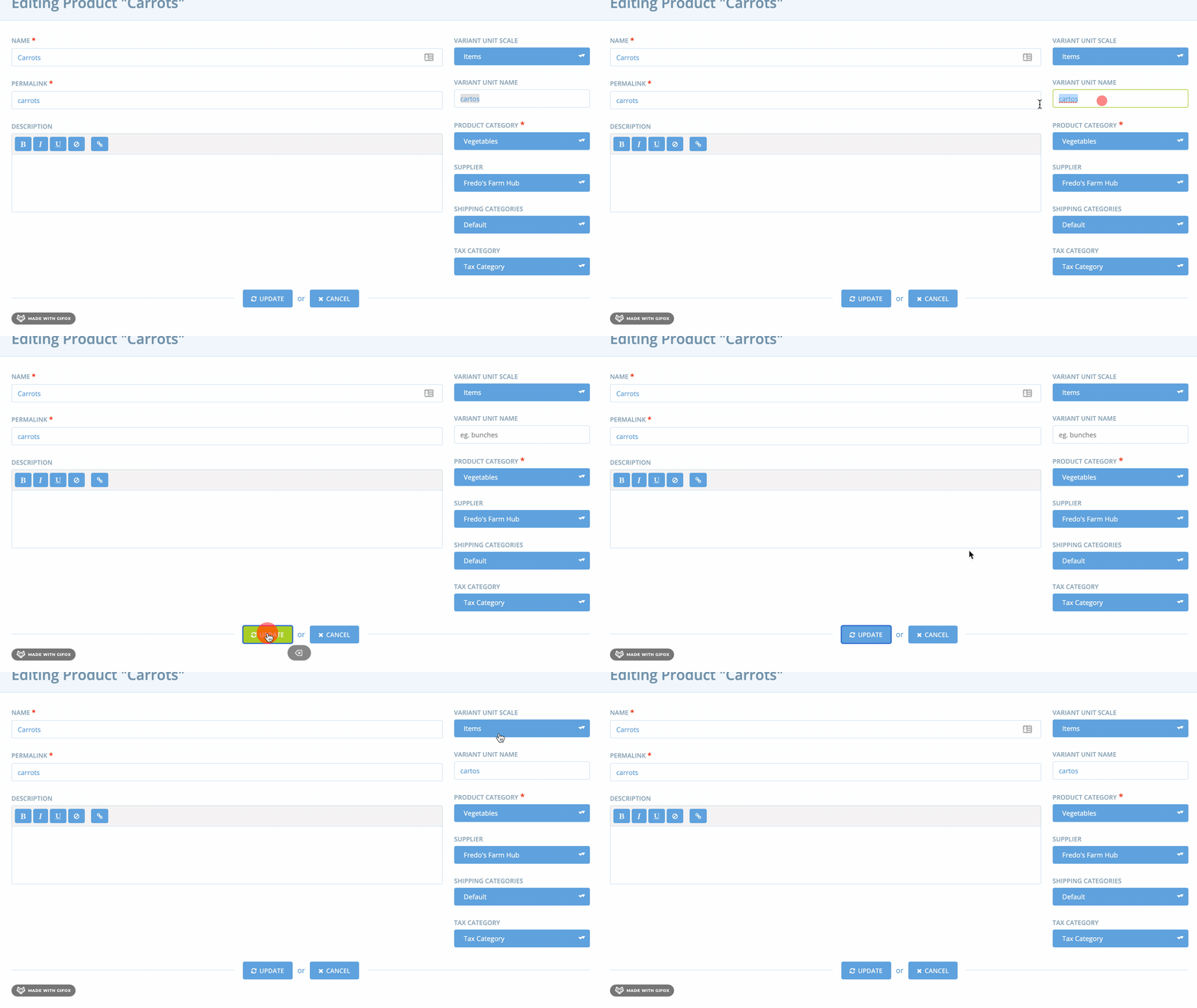
jibees
on 13 Apr 2021
Great investigation @jibees :clap:
Yes, I've checked your changes locally and it works: the spec passes and the UI behaves as expected.
But I agree, on Items the story is a bit different: variant_unit_name is mandatory for items, so it does not make any changes because it failing this validation. This is the current behavior for this page: if a validation fails, no warning is displayed. (see also this related issue -> #7170).
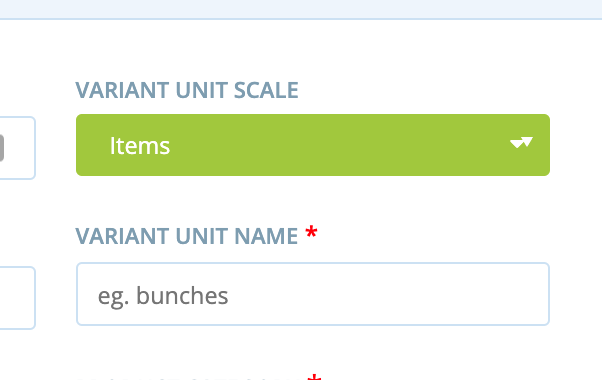
An improvement could be to display an error to the customer - informing why the changes are not saved - as already happens in the /products page, for the same operation:

filipefurtad0
on 13 Apr 2021
An improvement could be to display an error to the customer - informing why the changes are not saved - as already happens in the
/productspage, for the same operation:
And also mark the field as require, like this:
jibees
on 13 Apr 2021
Yes, I think that would be ideal :+1:
filipefurtad0
on 13 Apr 2021
Ok as the _Items issue_ will be adressed by #7170, I only focus on all other field (and not this particular case) on this issue.
Thanks @filipefurtad0 🙏
jibees
on 13 Apr 2021
Totally agree with focusing on the other units other than Items @jibees
Also, I think this PR #7349 may contribute to guard against potential errors introduced by empty variant_unit_name :+1:
Ping @andrewpbrett .
filipefurtad0
on 13 Apr 2021
Nice investigating @jibees :)
I think that PR #7349 would unfortunately be unrelated in helping to address this - it's actually the variant_unit_scale being populated for "Item" variants that it deals with.
 andrewpbrett
on 14 Apr 2021
andrewpbrett
on 14 Apr 2021
Oh, nevermind, I see what's going on now. It is the _scale field that we're dealing with here as well. I'm still not sure that the PR #7349 will make much of a difference, but after I review https://github.com/openfoodfoundation/openfoodnetwork/pull/7404 I'll know for sure :)
andrewpbrett
on 14 Apr 2021
Related issues
 HugsDaniel
·
3Comments
HugsDaniel
·
3Comments
 sauloperez
·
3Comments
sauloperez
·
3Comments
 RachL
·
3Comments
RachL
·
3Comments
 kristinalim
·
3Comments
filipefurtad0
·
3Comments
kristinalim
·
3Comments
filipefurtad0
·
3Comments
Most helpful comment
VariantUnitManager.variantUnitOptions()(used to set the options of the select input element) returns:and
$scope.variant_unit_with_scaleis equal toweight_1.0Notice the difference between
weight_1.0andweight_1: theselect2couldn't initialize to the right value inside the options.