Openfoodnetwork: Group Buy order management displays incorrectly (kg) or not at all (items)
Description
When managing orders that are set to "Group Buy", the hub manager needs to see the the minimum and maximum amount a customer would buy in order to put together an order. When the hub manager has group Buy orders and goes to bulk order management for group buys, the manager can't see it. This makes the Group Buy function essentially worthless for a hub manager putting together large orders.
Only metric or "items" have ever been available on this screen - imperial measures were never added to it.
Expected Behavior
The hub manager should be able to see the aggregate minimum and maximum order sizes so that they can manage orders to make complete cases (for instance)
Actual Behaviour
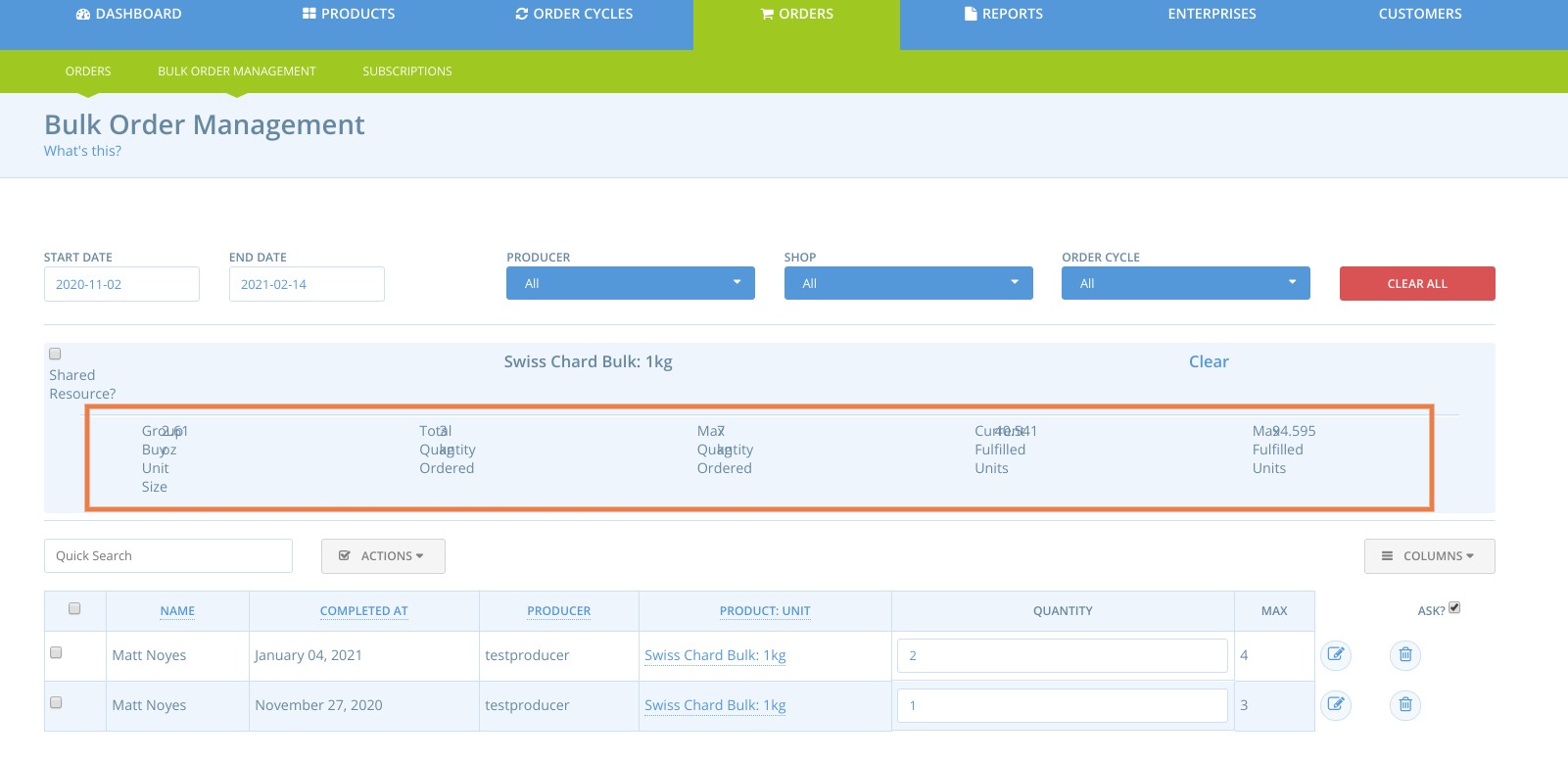
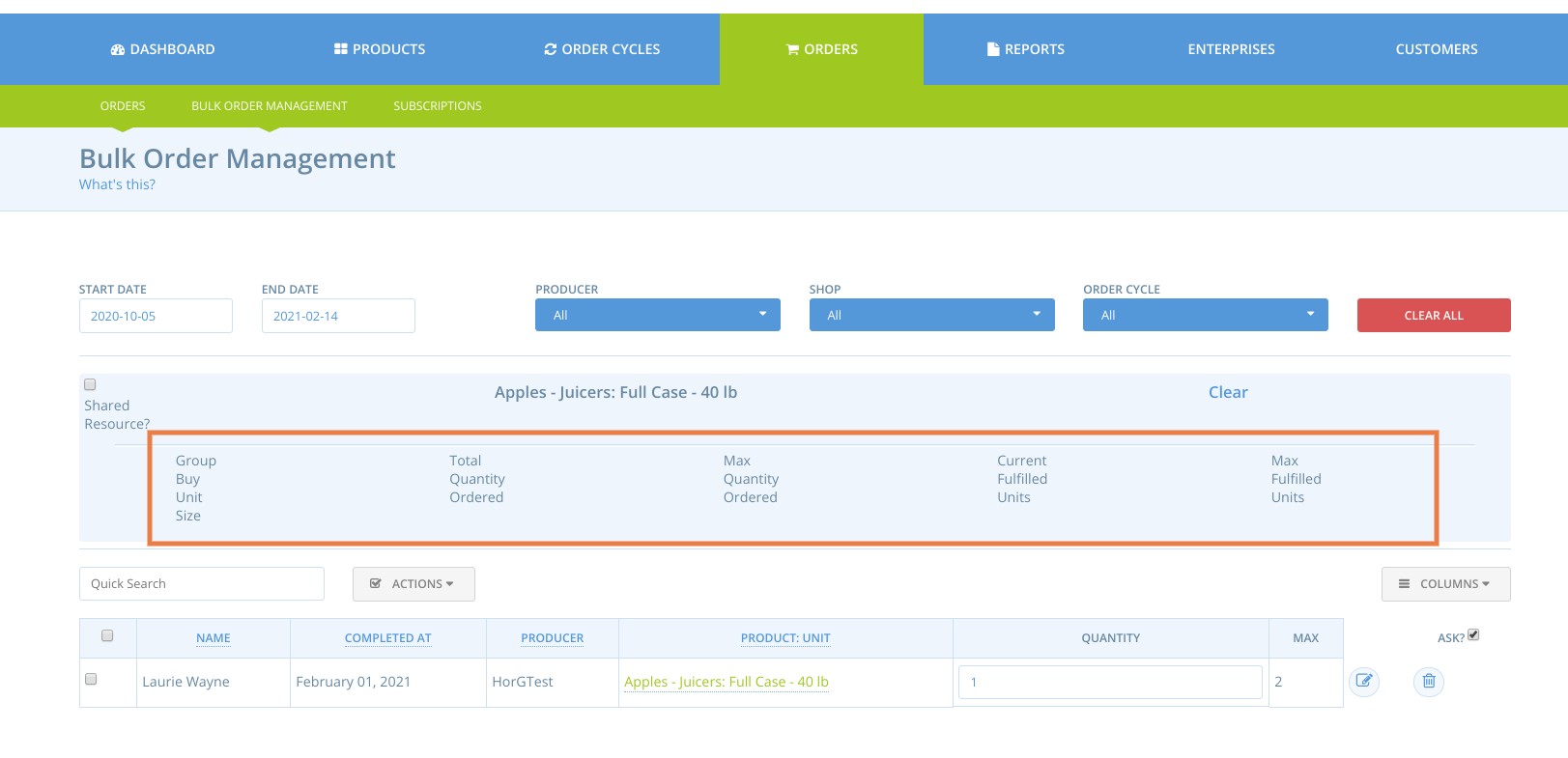
If the product unit is kg, the display is garbled and illegible (overwrites other text?). If the product unit is items, no data is displayed. If the product unit is pounds. no data is displayed.
Steps to Reproduce
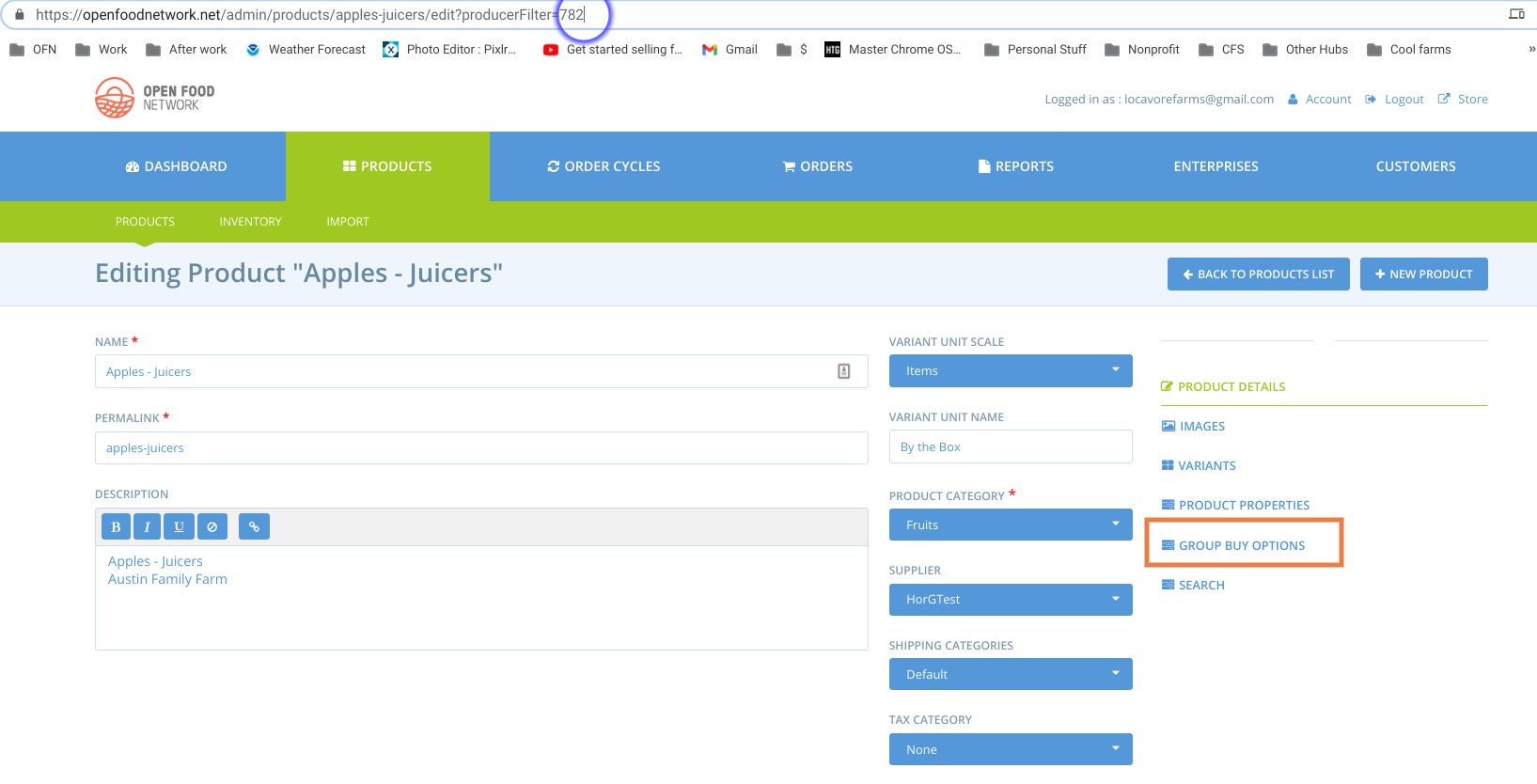
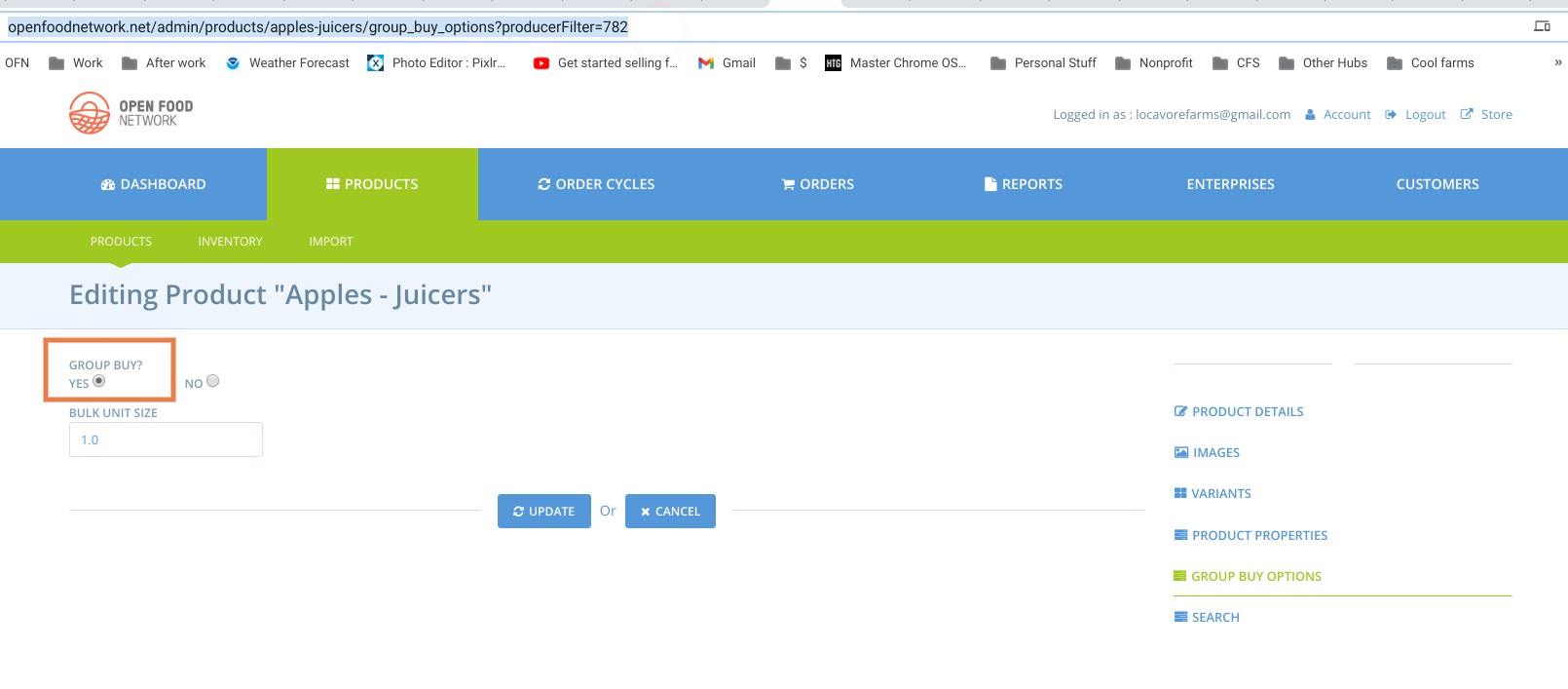
- Edit a product and set the "group buy" switch on that product
- Add product to order cycle, create order for product that is a min/max range
- Close order cycle and go to admin -> orders -> bulk order management
- Click on product and tick the "shared resource" box (or don't, it doesn't make a difference)
If product is in kilograms, display for management/adjustment of quantities is not readable. If product unit is items, nothing is displayed to manage.
Animated Gif/Screenshot
If product is in kilograms, display for management/adjustment of quantities is not readable:
If product unit is items, nothing is displayed to manage:
Workaround
Since neither kilograms nor items displays, there is no workaround. Ideally for this hub, items would be available as these are most relevant to them.
Severity
bug-s2: a non-critical feature is broken, no workaround
Your Environment
- Chrome on Chromebook and Android. Firefox on Windows 10
- Operating System and version (desktop or mobile):
Possible Fix
 lauriewayne
All 21 comments
Am I correct in that this will be fixed by #6865 @filipefurtad0 @jibees ?
 sigmundpetersen
on 15 Feb 2021
sigmundpetersen
on 15 Feb 2021
Yes, #6865 will addresses display issues, causing the overlapping text :+1:
But it will not address other issues described in this issue, regarding that i) Items are not displaying any information, and that ii) imperial measures were not yet implemented.
So, maybe we keep this issue open and downgrade severity, after #6865 is merged? What do you think @sigmundpetersen @jibees ?
 filipefurtad0
on 15 Feb 2021
filipefurtad0
on 15 Feb 2021
we keep this issue open
@filipefurtad0 : And edit the description, taking into account that a part has already been addressed.
 jibees
on 15 Feb 2021
jibees
on 15 Feb 2021
I'm afraid the remaining tasks are new features? In that case I think this should be open on discourse as wishlist and not github? Or did I miss something with the item part @filipefurtad0 ?
 RachL
on 15 Feb 2021
RachL
on 15 Feb 2021
According to @tschumilas the "items" unit used to work so maybe this is a bug? I understand that imperial measures would be a new feature (and would not be a super high priority).
Dang it! Sorry I put two different issues in one!
lauriewayne
on 15 Feb 2021
@RachL @lauriewayne , I assumed - perhaps incorrectly... - that we would treat both cases (Items and imperial units not working) as bugs, since we support group buy for these two units, since PR #5888 (which introduced Imperial units).
I tried to observe reproduce this, but seems to work on a staging server for a lb units product - (sorry for the ugly overlap), but values seem to be displayed and updated:

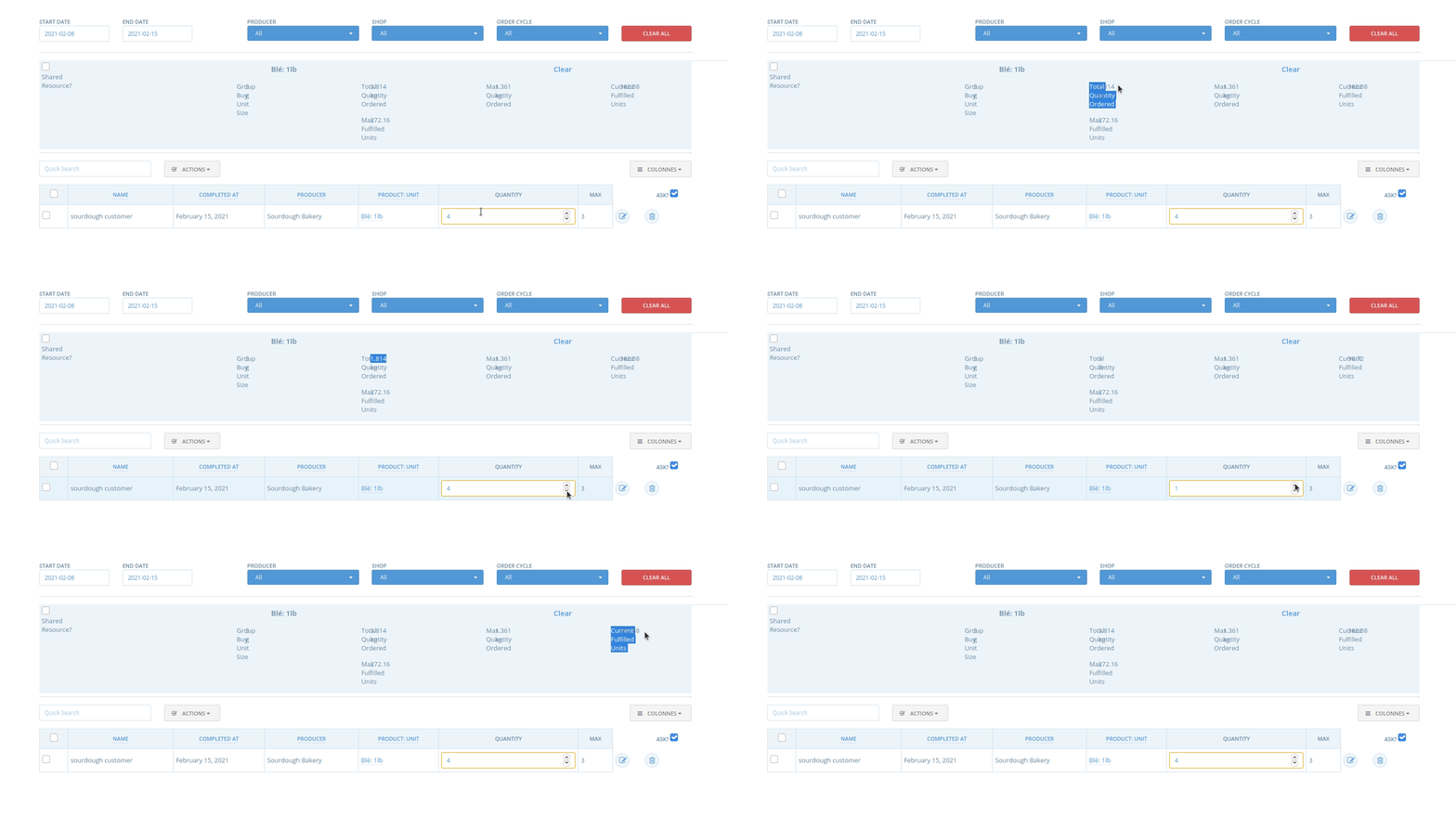
In the same staging server I did observe it not working for Items; so maybe this depends on other factors? I'm not sure, but there have been some reports of missing info from this page, like issue #6855. Maybe this issue is related?
filipefurtad0
on 15 Feb 2021
@filipefurtad0 BOM was left out of the imperial unit work on purpose see https://community.openfoodnetwork.org/t/product-curation-meeting-25-notes-november-2nd-2020/2115/5?u=rachel. So it cannot be considered as a bug at this stage. As for item I wonder as well. Let's discuss it during delivery train tonight to be sure on the severity for items.
RachL
on 15 Feb 2021
Thanks for pointing that out! :+1:
filipefurtad0
on 15 Feb 2021
Very strange - I have not been able to get the BOM of 'items' to work with several different enterpises. It is an established feature (described in the user guide) - so if its not working, its a bug. Let me try again and see if I can figure out other parameters that might be messing it up. (Its been a few months since I've had a user ask for help with it)
 tschumilas
on 16 Feb 2021
tschumilas
on 16 Feb 2021
Given the low number of people noticing this issue so far, I would be up to keep it as an s3, and if we get more feedback bump it as an s2.
What do others think?
RachL
on 16 Feb 2021
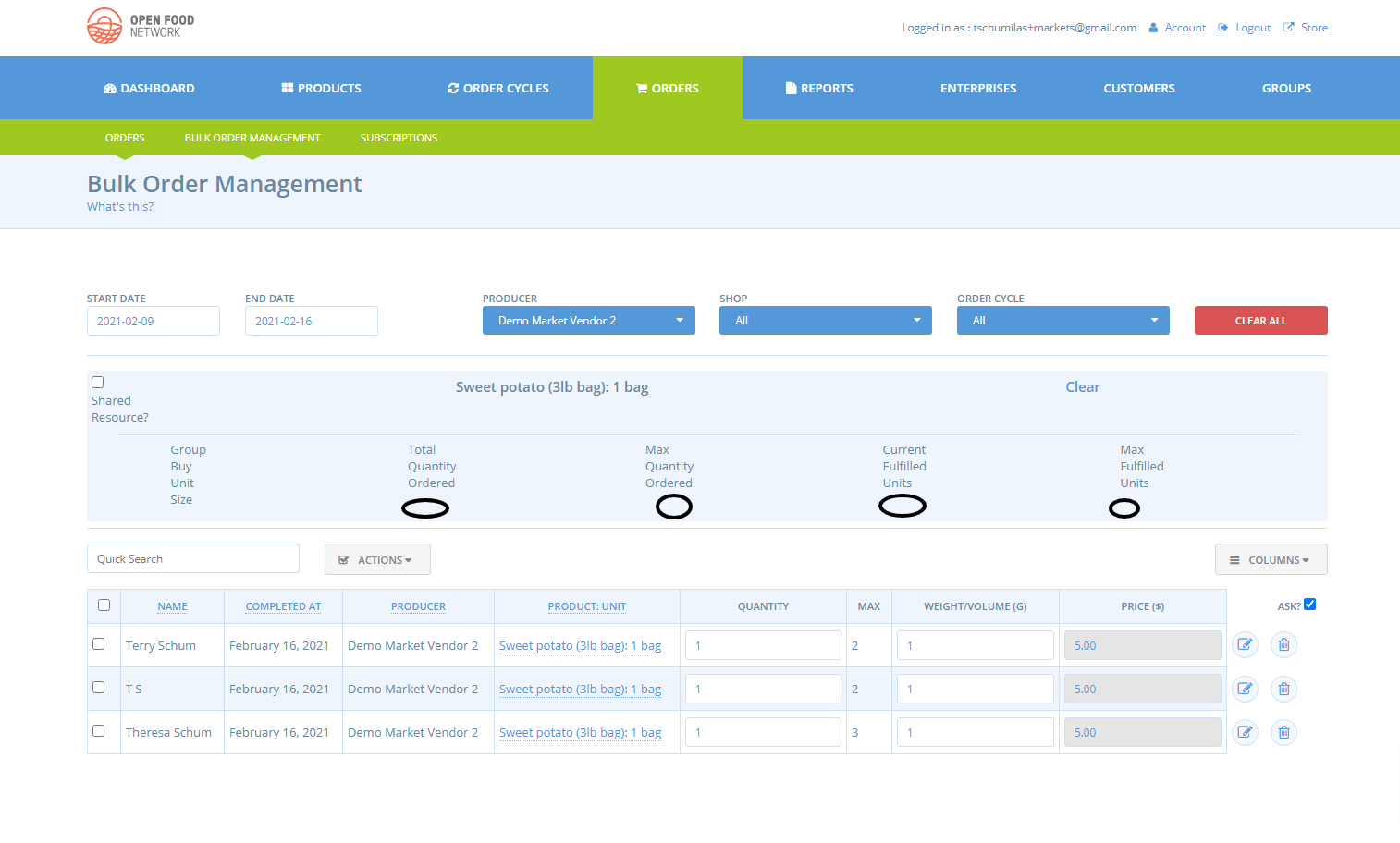
SO just tested this again on OFN-CAN for 'item' type products - result below. Definately doesn't work. Did the bulk buy for an 'item' type work on staging testing @filipefurtad0 ? Here 2 hubs have asked about it - but that was over a month ago and I haven't heard more grumbles. Its an s2, its described in the user guide, and it doesn't work as per the user guide, and it used to work (not sure when it stopped). There is no workaround but its not a critical feature. At least thats my thought. Do we want to divide S2s into S2 with grumbling, and S2 with no grumbling? (only half joking - you know what I'm saying - we have things to do where there is a lot of grumbling....)
tschumilas
on 16 Feb 2021
There is a large hub/buying club here (tens or hundreds of producers in their list) who is considering OFN and has been looking at it for a while, and this might be a showstopper for them. I can ask if it is (because walking away and signing up for another platform is a more common form of grumbling).
lauriewayne
on 16 Feb 2021
Is there a chance that the item type not displaying could be caused by the display bug in #6833? Hidden in some way?
@filipefurtad0 @jibees has this case been tested on PR #6865? Is it worth staging this first and just testing this specific case to confirm?
sigmundpetersen
on 16 Feb 2021
Its a good thought @sigmundpetersen . It works fine except that the numbers under the bulk buy headings aren't showing. But user can adjust the quantities... In fact, at first I thought I had missed something in transifex.... but I don't think its that.
tschumilas
on 16 Feb 2021
Yes, it could be that something is happening in the UI @sigmundpetersen I just had a look by staging #6865. Below, left side, before fixing the UI, right side after fixing it.
I creating some products (Items, kg, lbs), allowing the bulk buy option and placing some orders. The video shows this the bulk order edit page for Items and Kg:
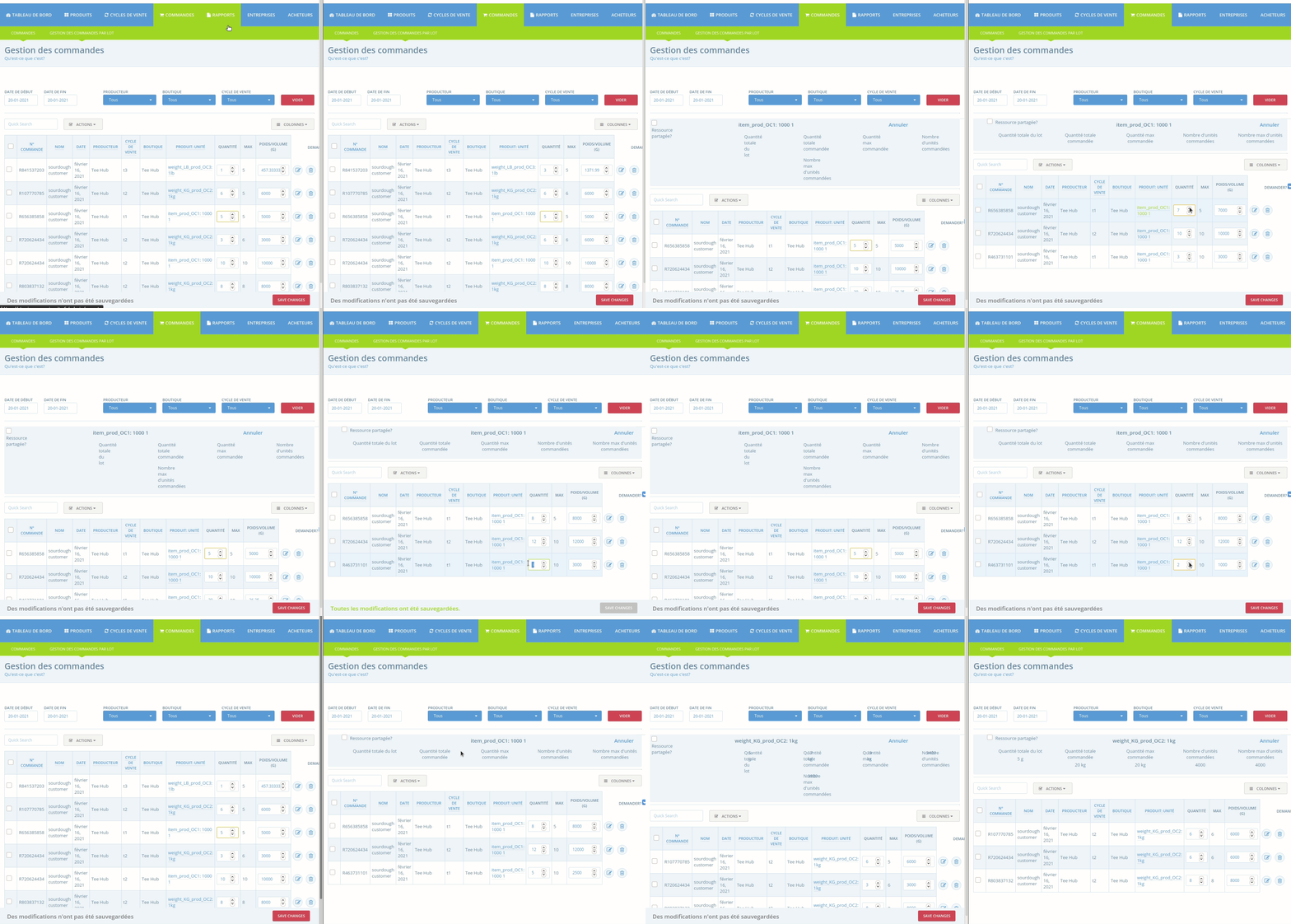
I would split this feature in two parts:
i) the board which is toggled, when clicking a given item: this should display information on the order, for that unit
ii) the arrows, which allow make changes to that order; showing the max. value for that order
For Items
i) the board is toggled, but no info is displayed on the buy headings -> I have never seen this info being displayed here (but maybe it was, at some point)
ii) it's possible to make changes, and change the conversion factor to weight, for example, setting 1 Item to weight 500g; the max. value for that order is shown
For Kg
both i) and ii) work :+1: (and I think for pounds, as well)
I understand what you mention about the user guide @tschumilas, users need to be able to rely on it. But in this case, I don't think the feature is really broken. I think making the changes works as expected, but the fact that no info is displayed, makes this more difficult. I'd rather say this is an S3, based on this. Am I missing an additional use of the numbers displayed on the board?
filipefurtad0
on 16 Feb 2021
From the user guide (https://guide.openfoodnetwork.org/basic-features/products-1/group-buy-for-bulk-ordering):

?
sigmundpetersen
on 17 Feb 2021
OMG - is that a change to the guide? I went through this feature in the user guide a month or so ago and I didn't see this notice - must have missed it. I am sure that bulk buy for items WAS working at one point in time - I used it in my own food hub (but thats 2 years ago or more). But if we don't consider it a currently supported feature (as in the current user guide description), then I guess both the bulk buy per imperial weight, and the bulk buy per item product types are considered wishlist items. I'm sorry - if I had realized that we weren't supporting it right now, I wouldn't have brought the issue this far. Apologies for not seeing this in the user guide.
tschumilas
on 17 Feb 2021
Interesting, thanks @sigmundpetersen - I totally missed that line as well...
So, yeah, let's close this @sigmundpetersen @RachL also as #6865 is now tested/merged, and will be on the next release.
filipefurtad0
on 18 Feb 2021
yes another great reason to
lauriewayne
on 28 Feb 2021
So the issue: apply bulk buy to 'item' type products - needs to be a wishlist item. @lauriewayne - I think it was one of your users that raised this - do you want to create a wishlist item for it in Discourse?
tschumilas
on 28 Feb 2021
@tschumilas Yes I do! I have never done that before so I am excited to try!
lauriewayne
on 1 Mar 2021
Related issues
 lin-d-hop
·
3Comments
filipefurtad0
·
3Comments
lin-d-hop
·
3Comments
filipefurtad0
·
3Comments
 sauloperez
·
3Comments
filipefurtad0
·
3Comments
sauloperez
·
3Comments
filipefurtad0
·
3Comments
 kirstenalarsen
·
3Comments
kirstenalarsen
·
3Comments
Most helpful comment
yes another great reason to