Openfoodnetwork: Multi-session shopping: broken account due to lingering items in the cart
Description
A small variation in the test-cases proposed for #5905 (see steps to reproduce) leads to a broken account and cart state, which blocks the customer's account for shopping actions.
Expected Behavior
It should be possible to perform the usual actions on a the customer account (editing cart, checking-out, changing shop), after certain shopping on different sessions, with different cart states.
Actual Behaviour
After reaching the above described state, the customer:
- cannot edit the cart
cannot proceed to checkout
Attempting redirects to the homepage.cannot navigate to another shop (which would empty the cart)
Attempting leads to permissions error 422 (aka., the grumpy cat).
Steps to Reproduce
- As guest user, go to a shop and add items to the cart. (session 1)
- Open a different browser (or a private window or a different device) and repeat the previous step (session 2)
- The two carts should be persisted and independent.
- Proceed to check out - you will be prompted to login
- Log in with the same accounts, on each session
- You should now be on checkout screen. Do the carts retain the initial placed items? -> As of writing, they don't: cart from session 2 contains items from session 1 as well.
- On session 1, try to navigate back to the cart. -> You should get redirected to the homepage.
- On session 2, try to check out -> checkout should be broken (an error displays).
- Navigating away to the homepage leaves the account in a lingering state: cart editing/checking out/changing shops does not work in this state.
Animated Gif/Screenshot
The grumpy cat, seen when trying to change shop:
https://user-images.githubusercontent.com/49817236/90792797-d74fea80-e302-11ea-8214-b5cfdd226e8f.png
Workaround
Visiting the original shop page (/shop), and:
- removing the all items manually will lead to an empty cart, and solve the issue.
- choosing another OC on that shop (if available) should empty the cart as well
Severity
Proposing S4: it's an edge case and there are workarounds
Your Environment
- Version used: v3.2.3
- Browser name and version: Firefox 79
- Operating System and version (desktop or mobile): Ubuntu 20.04
Possible Fix
 filipefurtad0
All 17 comments
I wonder if #5905 makes this issue more common with more users with multiple active/current orders. In #5905 we delete a line of code that destroys current orders that are not the one in the current session. This may lead to more occurences of this issue.
I am tempted to move this to S2 even at least to get the initial investigation done.
Because we can reproduce it, it should be easy to tackle it.
The bottom line is that we may need to destroy the parallel order (re-add the code in #5905) BUT what do we do if one (or BOTH!?) of those orders have failed payments? (we cant allow #5897 to happen again)
So, I vote S2 here.
 luisramos0
on 21 Aug 2020
luisramos0
on 21 Aug 2020
Agreed on S2 at least for investigating it :+1:
 Matt-Yorkley
on 21 Aug 2020
Matt-Yorkley
on 21 Aug 2020
Hi @luisramos0 and @Matt-Yorkley,
I tested further scenarios which could lead to this "blockage", ex., when:
- log-in occurs on the /shop page
- log-in occurs on the /cart page
- log-in occurs when attempting to checkout
Then, other variations include:
- session 1 attempts to check-out
- session 2 attempts to check-out
There are other variations here (example, same cart vs. different carts on sessions 1 and 2) which makes testing quite tricky here.
It seems quite clear that this bug is not introduced by the #5905, but I've found at least one situation where the user is really irreversibly blocked and no workarounds seem to work. I can't reproduce it but it does seem that PR makes this issue more severe.
filipefurtad0
on 24 Aug 2020
it does seem that #5905 may make this issue more severe.
hi Filipe, I said this before based on the code. Did you see anything that actually supports this theory?
Sent from my iPhone
On 24 Aug 2020, at 18:28, filipefurtad0 notifications@github.com wrote:
Hi @luisramos0 and @Matt-Yorkley,
I tested further scenarios which could lead to this "blockage", ex., when:
log-in occurs on the /shop page
log-in occurs on the /cart page
log-in occurs when attempting to checkout
Then, other variations include:session 1 attempts to check-out
session 2 attempts to check-out
There are other variations here (example, same cart vs. different carts on sessions 1 and 2) which makes testing quite tricky here.It seems quite clear that this bug is not introduced by the #5905, but I've found at least one situation where the user is really irreversibly blocked and no workarounds seem to work. I can't reproduce it but it does seem that #5905 may make this issue more severe.
—
You are receiving this because you were mentioned.
Reply to this email directly, view it on GitHub, or unsubscribe.
luisramos0
on 24 Aug 2020
Yes Luís,
based on that hypothesis I pursued more tests as mentioned, and found out that while the outcomes were mostly similar to what is described in "Actual behaviour" above, there is one situation (which unfortunately I was unable to reproduce) in which no workaround works, which means, the user is "irreversibly" blocked - this was observed after merging PR #5905. I can share the account credentials if needed.
Before merging this PR the user gets blocked as well with these test cases, but the workarounds described on this issue seem to work, which means it is possible to "unblock" the user.
filipefurtad0
on 25 Aug 2020
ok :+1: thanks for clarifying.
it's a good sign that you cant reproduce it but we need to have a look at this, maybe a dev should try to reproduce it and try to find what is causing the problem.
luisramos0
on 25 Aug 2020
The "blocked" account should have 99 items in the cart:
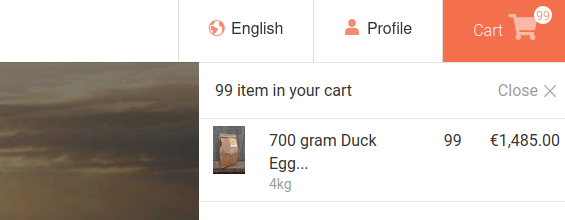
As admin, I tried to find this order by searching incomplete orders in the cart state, but it does not show up in there - so I have no order number for this. Maybe there is something standing out in the DB? The user is <myemailaddress>[email protected], at staging-FR.
filipefurtad0
on 25 Aug 2020
there are 121 orders in staging FR with that email but none with 99 items... I cant find it. maybe we need to repeat and look at the DB immediately after. A simple page load with that user may be changing the cart.
luisramos0
on 31 Aug 2020
True @luisramos0 , I've checked that user and it was now unblocked - I believe due an OC having closed, in the meantime. But I've seem to have managed to break it again :tada:
This "broken-state" can be reproduced by having items from different order cycles (same shop), on session 1 and 2. So, if:
As a hub
- set up two order cycles, with the same or different items (does not seem to play a role)
As a guest-user, open two different sessions (ex. different browsers):
- open session 1 inserts 5x items in the cart, from order cycle A
- open session 2 inserts 5x different items in a cart, from order cycle B
Now, we should continue on step 4. (as above):
- Click on the cart, and click Proceed to check out - you will be prompted to login
- Log in with the same account, on each session You should now be on checkout screen on both sessions. Note that the cart on session 2 will contain items from session 1 as well. In this case, items from different order cycles (!!!)
- On session 1, try to check out -> checkout should be broken (an error displays).
- On session 1, try to edit the the cart. -> You should get redirected to the homepage.
- On session 2, try to check out -> checkout should be broken (an error displays). Trying to edit the cart redirects the user to the homepage, and in the "broken state"
Error 422 appears when visiting the original shop, because there are two open order cycles and the user's cart contains items from both. Error appears as well when visiting any other shop, hence the broken state. The only way to "free" the user is, as an enterprise manager, to close one of the order cycles, or to wait till this happens.

In both staging-FR and -UK there are two users at this state, with 10 items in the cart each:
<myemailaddress>[email protected](FR) // fricandoc123<myemailaddress>[email protected](UK) // haciendac123
Additionally, there is this:
If you skip step 7, then the user on session 2 is (!!!) able to check out (step 8) - note that he has items from different order cycles, in one cart, so I think this can be a critical issue indeed.
filipefurtad0
on 31 Aug 2020
Just found out in katuma-staging (i.e. previous to PR #5905) that a user can get "stuck" as well if the order cycle which contained the lingering items closes in the meantime. This confirms that the bad side of this bug (getting irreversibly stuck as a customer) is not introduced by PR #5958
In summary, this happens with:
- two open OCs - workarounds don't work
- one open OC - workarounds described in this issue work.
- no open OC - workarounds don't work
filipefurtad0
on 31 Aug 2020
@filipefurtad0 I cannot replicate this locally with sample data. It actually works well where I can have one session shopping on one OC and another session on another OC.
I can see in staging FR that the Duck eggs are on both OCs, we do have code that sees if the current OC sells the items already in the cart even if from another OC. Maybe that code is being used?
luisramos0
on 1 Sep 2020
I can replicate this in staging FR in the fricando shop.
I can confirm I see items from different order cycles in the cart but I am redirected to the cart page where I see the product as undisponible and I can simply click on the delete button and then checkout.
luisramos0
on 1 Sep 2020
I am testing the case where there are two OCs in stagingFR fricando shop.
I dont think we are seeing the same thing, I do get the cart with items from both OCs but I always get either redirected to the cart page where I can delete the unavailable item by pressing the trash bin button or in other cases I am redirected to home page and the cart is emptied.
So, I cant really find the bug: all I see is that an item from a parallel session gets introduced to the current session and breaks checkout but I always get redirected to home page with empty cart or redirected to the cart page where I can remove the item and checkout.
luisramos0
on 1 Sep 2020
I now logged in to staging FR with your test user and I was redirected to the cart page where the item was clearly flagged as unavailable. I deleted the item from the cart and I managed to checkout: R137816312.
luisramos0
on 1 Sep 2020
Hey @luisramos0 ,
Thanks for checking all these cases.
Replying to your messages:
1:
I cannot replicate this locally with sample data. It actually works well where I can have one session shopping on one OC and
another session on another OC.
Yes, it does work well - I can't replicate this bug on my local system either.
2:
I can confirm I see items from different order cycles in the cart
This would be on session 2, right? Session 1 only contains it's own items.
but I am redirected to the cart page where I see the product as undisponible and I can simply click on the delete button and then checkout.
Before checking out on session 2: did you i) try to checkout on session 1 and ii) after observing the error, click on the cart (on session 1)? (step 7) I believe this is the step where the magic happens, and blocks both sessions.
3:
From your description it sounds like you might be skipping step 7. I have now opened two fresh browsers and was able to "block" accounts on this way. I'll record a video and post it in the following comments.
4:
I'm rather surprised by this finding! I just logged in with different browsers to the broken account on staging-UK, and all is as before... Also tried with browserstack on a Mac on the latest Safari (see video 1) Can't do really anything much as a customer, on the <myemail>[email protected] account... I would expect that the same would have happened on staging-fr.

filipefurtad0
on 1 Sep 2020
The video files are too big... I'll try to send them to you @luisramos0, via DM, on Slack.
filipefurtad0
on 1 Sep 2020
I think we can close this issue now, as this appears to be solved by PR #5987.
Ping @luisramos0 and @sigmundpetersen.
filipefurtad0
on 7 Sep 2020
Related issues
 HugsDaniel
·
3Comments
HugsDaniel
·
3Comments
 kirstenalarsen
·
3Comments
kirstenalarsen
·
3Comments
 shen-sat
·
3Comments
shen-sat
·
3Comments
kirstenalarsen
·
3Comments
shen-sat
·
3Comments
shen-sat
·
3Comments
kirstenalarsen
·
3Comments
Most helpful comment
I think we can close this issue now, as this appears to be solved by PR #5987.
Ping @luisramos0 and @sigmundpetersen.