Openfoodnetwork: Bulk Edit Products page search categories not visually resetting with clear filter button
Description
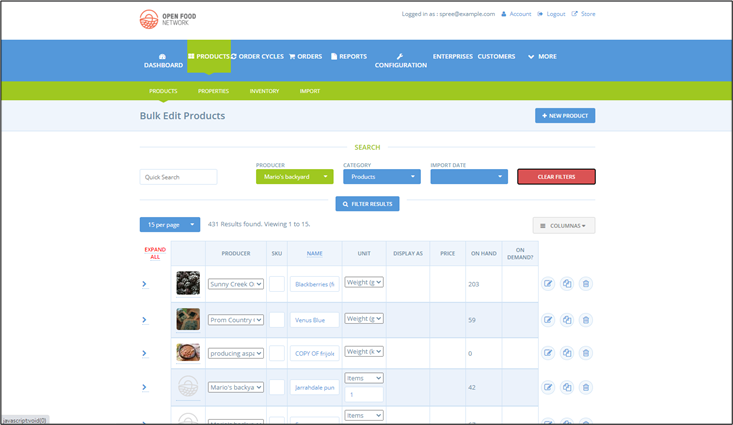
When clicking the clear filter button on the Bulk Edit Products page, any filters applied remain visually active, although they don't affect the subsequent searches. This may cause confusion to the user who has selected to clear the previous filters.
Expected Behavior
All filters should show in their inactive state - nothing selected.
Actual Behaviour
Any filter previously selected remains visually active, although not functionally.
Steps to Reproduce
- Login as Admin>Accounts>Products>Bulk Edit Products
- Add a product into search (or leave blank)
- Apply filters (producer/category/import date)
- Click clear filters button
- Filter remains in its previous state, appears active
Animated Gif/Screenshot

Workaround
This is a visual bug, it doesn't affect subsequent searches.
Severity
bug-s4
Your Environment
- Version used: https://staging.katuma.org/
- Browser name and version: Chrome Version 83.0.4103.97 (Official Build) (64-bit)
- Operating System and version (desktop or mobile): Windows 10 desktop
Possible Fix
 JenRSmith
All 2 comments
Hi @JenRSmith ,
Thank you for adding this issue!
I ran into this as well, while testing another PR. I think it can lead to misleading search results, if a search is performed after clearing filters. For example, adding to the Steps to Reproduce you described above:
- Add an Import Date
- Press Filter Results
One sees that what is visually displayed in the filters is not being considered when performing a new search. It's easy to end up with:
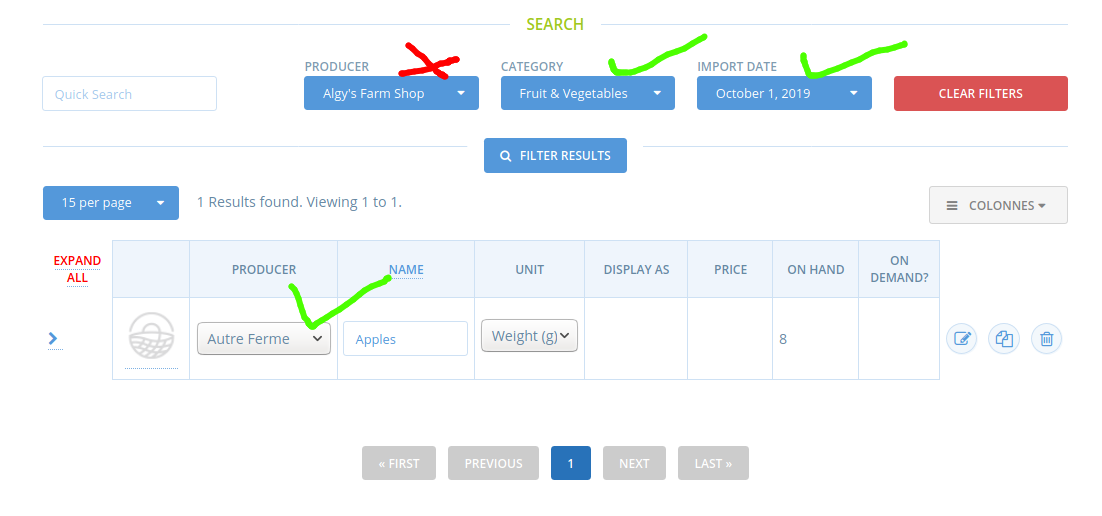
It's also possible to reach less obvious but wrong search results, like in this case, in which the Category column needs to be added for this to spot that something is not right:
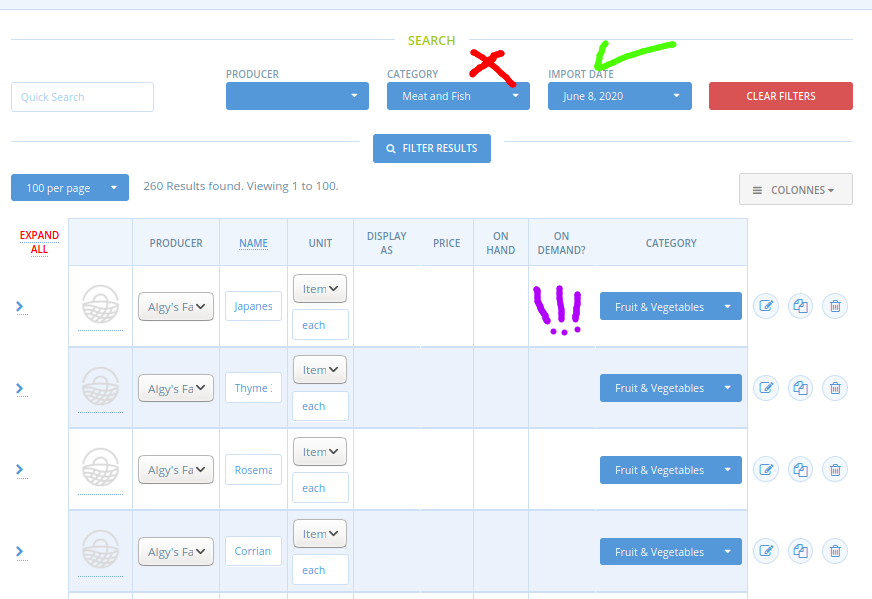
Perhaps this makes it a bug-s3?
 filipefurtad0
on 26 Jun 2020
filipefurtad0
on 26 Jun 2020
yeah, I agree s3
This must be a little js tweak, I am going to mark it as good first issue.
Also, I see this in multiple staging servers, but I cant replicate this locally with sample data...
 luisramos0
on 26 Jun 2020
luisramos0
on 26 Jun 2020
Related issues
 sauloperez
·
3Comments
sauloperez
·
3Comments
 shen-sat
·
3Comments
shen-sat
·
3Comments
 Matt-Yorkley
·
3Comments
shen-sat
·
3Comments
Matt-Yorkley
·
3Comments
shen-sat
·
3Comments
 RachL
·
3Comments
RachL
·
3Comments