Openfoodnetwork: Closed shop message showing instead of Home message on closed shop
Description
This Hub is closed
The closed shop message is showing in the Home tab as well as the Shop tab


Confirmed that the Hub does have a Home tab message, which I would think should be showing?

Expected Behavior
I am not sure of the proposed design for this, and apologies @yukoosawa and @daniellemoorhead if I am misunderstanding something.
As a 'normal person' I would expect that I can see the Home message at all times, whether the shop is open or closed
I am open to whether I also see the Closed Shop message on both Home and Shop, or just Shop (as previously)
Actual Behaviour
I see the closed shop message on both Home and Shop
I cannot see the Home message at all
Steps to Reproduce
- Find or create a Shop with a Home message
- Find or make that Shop 'Closed'
- Note that home message cannot be seen
Until Monday here's an example - https://openfoodnetwork.org.au/wangaratta-farmers-market-hub/shop#/shop
Workaround
?? Open the shop? I don't think that's really acceptable as there are reasons why the shop is closed
Severity
I think it could be S2 - depending on how much work people have put into their Home messages and how important it is for them to be seen at all times
Your Environment
MAC OS Chrome
 kirstenalarsen
All 15 comments
:-( this was a requirement here: https://github.com/openfoodfoundation/openfoodnetwork/issues/4573 (see last checkbox)
 luisramos0
on 22 May 2020
luisramos0
on 22 May 2020
Just posting here from slack: I think this was intentional and the workaround to this issue is to let users copy whatever info they want from their open shop message to their closed shop message.
The home tab shows the "closed shop message" when thee shop is closed.
luisramos0
on 22 May 2020
happy to close it if we can get an update to the user guide - will post
kirstenalarsen
on 22 May 2020
I'd appreciate an update to the user guide - and it makes me thing I might do a translation because its not really like a home page at all - is it? Its more a space about information about the store. so - not sure what we should call that button. It would be great if someone who gets this could update user guide.
 tschumilas
on 23 May 2020
tschumilas
on 23 May 2020
User guide is updated, closing this.
 daniellemoorhead
on 25 May 2020
daniellemoorhead
on 25 May 2020
From @Erioldoesdesign in a discussion I raised in Slack about re-opening this issue:
If I’m a shopper and I land on the home tab, maybe theres some lovely info about the hub, what food they stock, socials, pictures etc. and now I’m really, really excited to shop there. Then I click the shop tab and…it’s closed. I could have spent 5ish minutes reading that info and getting excited only to not be able to shop there because they have no order cycles open. So I believe the rationale of having the close message in home is to avoid shoppers bouncing in this scenario.
My suggestion would be to have both the regular home message (which is missing) and have the orders are closed message, though arguably if orders are closed, will shoppers read that lovely info? My hypothesis is not really or at least that lovely info is affected by open/closed. So my ideal solution would be to make ‘orders are closed’ message less overpowering and scary on the home tab and keep the lovely info from the hub and then a bigger, more obvious message in shop so people get a balance.
 emilyjeanrogers
on 24 Sep 2020
emilyjeanrogers
on 24 Sep 2020
Currently the content for the Home tab doesn't display when there are no Open Order Cycles. Instead, the closed shop message is repeated in the Home tab, as well as in the Shop Tab. Enterprises use the Home Tab for general information about their business or operations. It doesn't make sense to make this information invisible when the shop is closed.
I'd like to propose that instead of replacing the Home Content with Closed Shop content when there are no Order Cycles, we include a short 'Orders are Closed' message above the Home information, so customers arriving here are aware that they can't place orders, but can still read the basic information about the shop.
emilyjeanrogers
on 24 Sep 2020
Hello @emilyjeanrogers
I tagged this as enhacement, I think it's a papercut.
It's still very vague what needs to be done here. I wonder if the appropriate place for this is discourse (I think we want papercuts to land on GH with very specific requirements after the discussions have been finished). Actually this looks like a very good candidate for the new design pipe that is being planned.
luisramos0
on 24 Sep 2020
@emilyjeanrogers Deffo a good candidate for design pipe but we're yet to figure out 'prioritisation' of these small design-y things in the pipe because well...there's a backlog of design needs too! haha....
I would say this is papercut territory if the:
'a short 'Orders are Closed' message above the Home information, so customers arriving here are aware that they can't place orders, but can still read the basic information about the shop.'
uses existing visual styles for text and doesn't need any new CSS/FE styling etc. It's potentially even 'good first issue' or 'hacktoberfest' territory (but deferring to @luisramos0 or another dev for confirmation) I'm happy as designer to defer to a FE dev's best judgement on how to display this text but also flagging that a visual would probably help a FE dev understand the proposed solution better.
 Erioldoesdesign
on 24 Sep 2020
Erioldoesdesign
on 24 Sep 2020
I think this original issue is outdated.
"Actual Behaviour . I see the closed shop message on both Home and Shop"
Currently, if the shop is closed, the shop tab does not appear, only the home tab with the header saying the shop is closed and the "closed message" configured.
If hubs want to show something nice they can copy all the nice things from their "home message" to the "closed shop message".
I am going to close this issue, I think it's very confusing to work on top of things that are outdated.
@emilyjeanrogers can you please open a new papercut issue clearly describing what is the change requested?
There some details necessary: are you suggesting showing the shop tab again even if the shop is closed? Are you suggesting merging "home message" and "closed shop message" in the home tab if the shop is closed? Are you suggesting changing the shop is closed warning on the top of the home tab page?
luisramos0
on 24 Sep 2020
@emilyjeanrogers just a comment on:
Enterprises use the Home Tab for general information about their business or operations
It's not always true that the current home message is relevant when the shop is closed.
In FR we still have a lot of shops that continue to use it as before ie a field to inform on stuff related to the current open OC. Especially a lot of them still use it to inform the customer on how to order with the website. E.g. : https://www.coopcircuits.fr/terravie-safran/shop
This info is completely irrelevant when the shop is closed. Yet those hubs refuse to remove it as their customers really need it. But if this message stays when the shop is closed, it does not make sense anymore.
 RachL
on 24 Sep 2020
RachL
on 24 Sep 2020
@emilyjeanrogers @Erioldoesdesign I'd suggest that questions around the functionality implemented as part of the shopping experience should be reviewed and recommendations made for how to improve once the work is complete. There are a lot of things that could be improved (Order cycles and how we communicate about them to users who don't think in this way also being one of those things), and the home tab is DEFINITELY one of those. It opens up a huge opportunity in terms of specials, news, delivery details, etc etc. Yuko had started conceptually thinking about this however it wasn't in scope for this first phase.
So, beyond this initial UX work we've done perhaps we take the approach of doing a design review of the changes to determine recommendations for further work, based off input from local instances and probably (I'd like to say definitely, but that's @Erioldoesdesign's call) also some user testing. And then off the back of that testing where we've validated what works well, what hasn't quite been solved, and what new problems have been introduced, we can look to create few enhancements and bigger wishlist items (e.g. optimising the home tab) that can be created and prioritised.
Seems like a lovely way to close off this work :)
daniellemoorhead
on 25 Sep 2020
Currently, if the shop is closed, the shop tab does not appear, only the home tab with the header saying the shop is closed and the "closed message" configured.
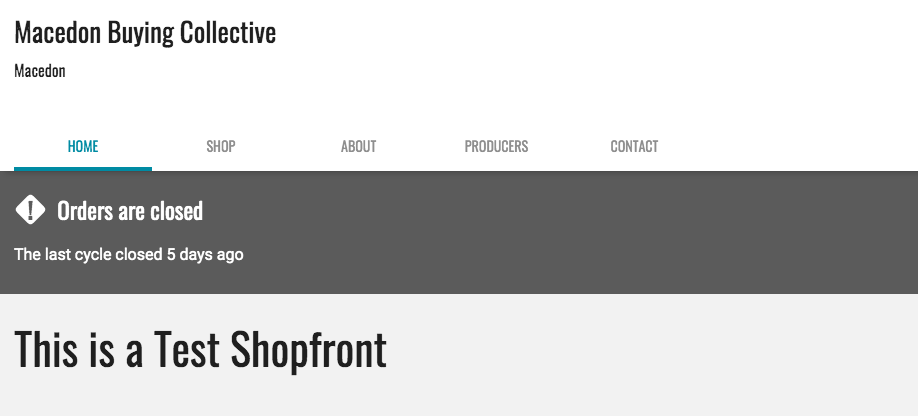
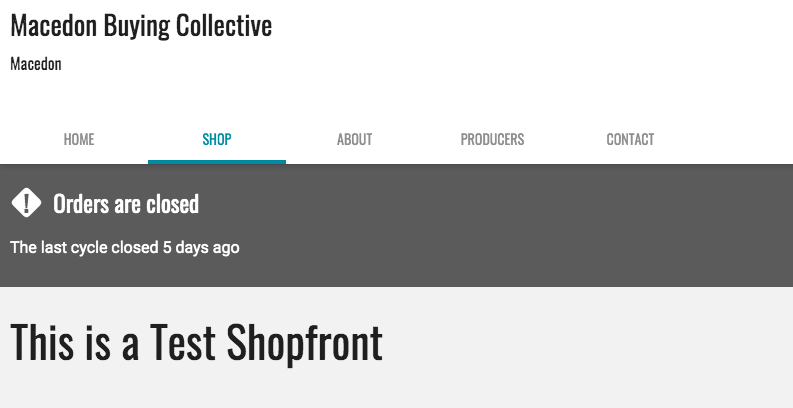
@luisramos0 I am definitely seeing both Home and Shop tabs showing with identical content (Shopfront Closed Message) when the shop is closed. See screen grabs below.
Are you saying this is not what should be happening?
emilyjeanrogers
on 29 Sep 2020
We have customers in AU with very different usage to what @RachL describes for FR. Whereas displaying the Home message in a closed shopfront is a problem for FR customers, we have directed our AU customers to create their home page content based on what is written in the prompt text ie. in the field where you enter the Home content:
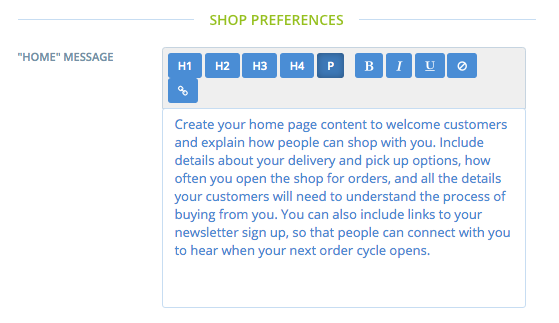
So we still have a conflict between how we ask enterprises to engage with the home tab in the platform (use it to tell customers when your order cycles open) and the actual behaviour of the home tab (not visible unless order cycles are open).
For now, perhaps the missing piece of the puzzle is to adjust the prompt text in Admin to reflect the new behaviour. Is this done with translations or dev time? @luisramos0 ?
If we can do this, as well as further updates to the UG to more clearly reiterate behaviour then we at least we're giving consistent instructions, and asking customers to copy paste Home content into Shopfront Closed is a clunky but OK workaround. The message will still appear twice, which is odd and a bit confusing - but we can live with it for a while!
As @tschumilas noted above it may also be worth using a translation to rename the 'Home' tab - I noticed the screen shot in the UG has this tab as 'Notices'. We may want to look at doing this in Aus too @kirstenalarsen
emilyjeanrogers
on 29 Sep 2020
@emilyjeanrogers all translation keys you've mentionned can be found on transifex :+1:
RachL
on 29 Sep 2020
Related issues
 sauloperez
·
3Comments
sauloperez
·
3Comments
 shen-sat
·
3Comments
shen-sat
·
3Comments
 filipefurtad0
·
3Comments
filipefurtad0
·
3Comments
 sstead
·
4Comments
kirstenalarsen
·
3Comments
sstead
·
4Comments
kirstenalarsen
·
3Comments
Most helpful comment
@emilyjeanrogers @Erioldoesdesign I'd suggest that questions around the functionality implemented as part of the shopping experience should be reviewed and recommendations made for how to improve once the work is complete. There are a lot of things that could be improved (Order cycles and how we communicate about them to users who don't think in this way also being one of those things), and the home tab is DEFINITELY one of those. It opens up a huge opportunity in terms of specials, news, delivery details, etc etc. Yuko had started conceptually thinking about this however it wasn't in scope for this first phase.
So, beyond this initial UX work we've done perhaps we take the approach of doing a design review of the changes to determine recommendations for further work, based off input from local instances and probably (I'd like to say definitely, but that's @Erioldoesdesign's call) also some user testing. And then off the back of that testing where we've validated what works well, what hasn't quite been solved, and what new problems have been introduced, we can look to create few enhancements and bigger wishlist items (e.g. optimising the home tab) that can be created and prioritised.
Seems like a lovely way to close off this work :)