Openfoodnetwork: Order cycle selector appears to but DOESN'T select OC and no products load
Description
I went to a new shop with multiple order cycles. This was the first time I had ever been to this shop (was checking out new users from our shop listing).
I selected my order cycle from the dropdown on the homepage. Then I went to the Shop page. The OC selector was still red and the OC selected in it was in italics. When I clicked on it it showed me the list in normal italic font, but any order cycle I selected, it just stayed red and showed the OC in italics
No products would load, no matter which one i changed it to
With new element, I didn't initially notice the red / blue thing and started an email to the user suggesting that they had forgotten to put products in outgoing or something. But then I checked through their setup and was very perplexed, OC ok, stock on hand for the products etc.
I went back to the shop, reloaded the page, and VOILA the order cycle selected and products appeared
I now cannot replicate this. When I load in incognito windows or other browsers all is fine. I strongly suspect it is connected to #5080

Expected Behavior
When I select an order cycle, the box should turn blue and the products should load in the shop page
Actual Behaviour
Box stays red, 'selected' order cycle shows in italics, is not properly selected / no products load
Steps to Reproduce
I can't :( Somehow my browser now knows what to do
Others could try loading this shop in Chrome (version below) and see if they can replicate https://openfoodnetwork.org.au/pacdon-park/shop#/shop

Animated Gif/Screenshot
Workaround
Reload the page or use different browser
Severity
S2 - if user doesn't ask for help they likely won't reload the page and therefore won't be able to place order
Your Environment
MACOS Mojave 10.14.4
Chrome
Desktop
Possible Fix
Perhaps connected to https://github.com/openfoodfoundation/openfoodnetwork/#workspaces/dev-pipe-54b840c6a249c8781446d4b2/board?labels=bug-s2&repos=6257856
 kirstenalarsen
All 21 comments
I saw this issue as well.
It happened on Sole of Discretion shopfront. I didn't report it as it seems to just go away and I didn't have enough information to report a bug.... I just hoped it had fixed itself.
Agree that this seems likely to be related to #5080
 lin-d-hop
on 29 Mar 2020
lin-d-hop
on 29 Mar 2020
I also had this happened the other day, and couldn't replicate so I thought it was a fleeting thing - thanks for posting. It happened to me twice - first went to the shop, big ugly red box, went away from the shop and changed something - went back to the shop to check the changes, and voila it changed to blue right before my eyes. I'm not sure if I closed the shop browser in between though, or if I closed the window and re-opened?
 tschumilas
on 29 Mar 2020
tschumilas
on 29 Mar 2020
I have found that when I first go to a shopfront with multiple OCs, the box is red, not blue. I scroll down to find all the OCs . I see them all, and when I select one, the red box changes to a blue box.
Whats with the persistant red box? It doesn't want to leave!
tschumilas
on 29 Mar 2020
@kirstenalarsen reloading the page fixed it in your case?
This does sound like #5080
 Matt-Yorkley
on 29 Mar 2020
Matt-Yorkley
on 29 Mar 2020
ah, this S2 was in "all the things", I missed it. Thanks @sigmundpetersen and @sauloperez for the ping :+1:
 luisramos0
on 1 Apr 2020
luisramos0
on 1 Apr 2020
5121 may fix #5080 and this one.
And if it doesnt we now have bugsnagJS to get alerts about it.
I dont see what else we can do now.
I'd close this issue with #5121 and reopen if it happens again after #5121 is live.
luisramos0
on 1 Apr 2020
I have just had this happen again. This time I am in firefox. I am not getting a JS alert
I have selected an order cycle and this is what it looks like - the box has not turned to Blue and it is still italic
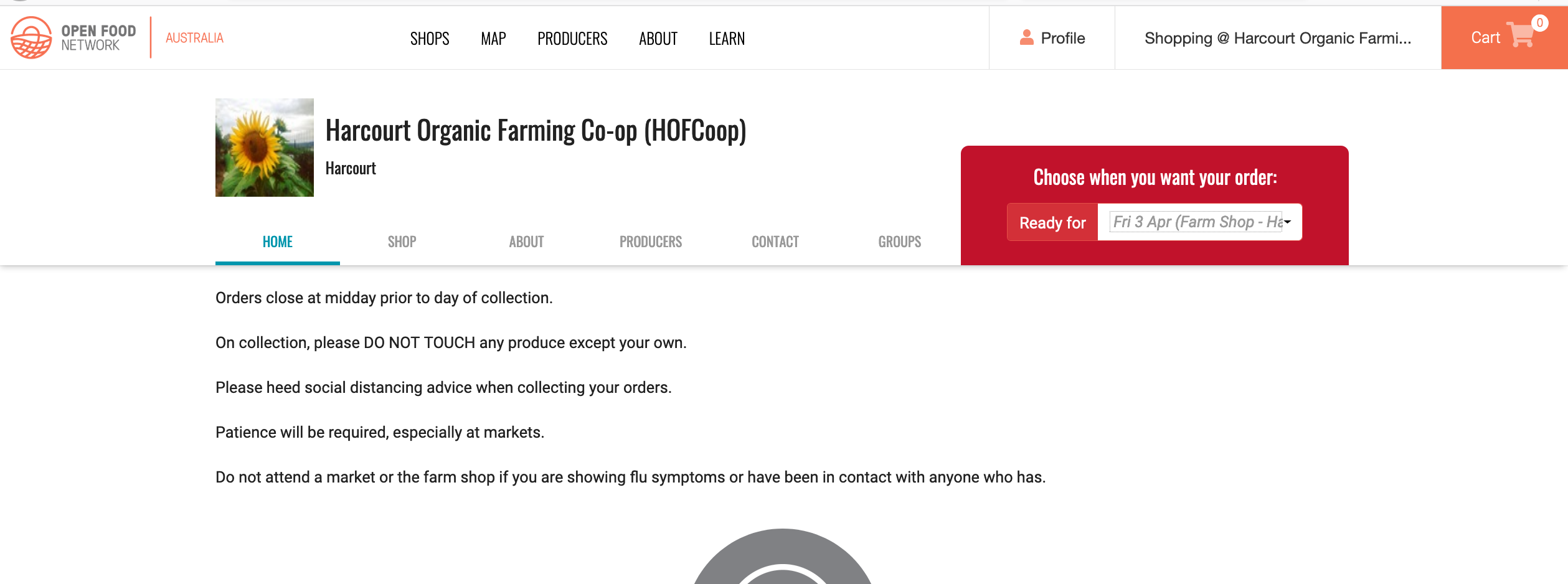
I go to the shop and it's like this
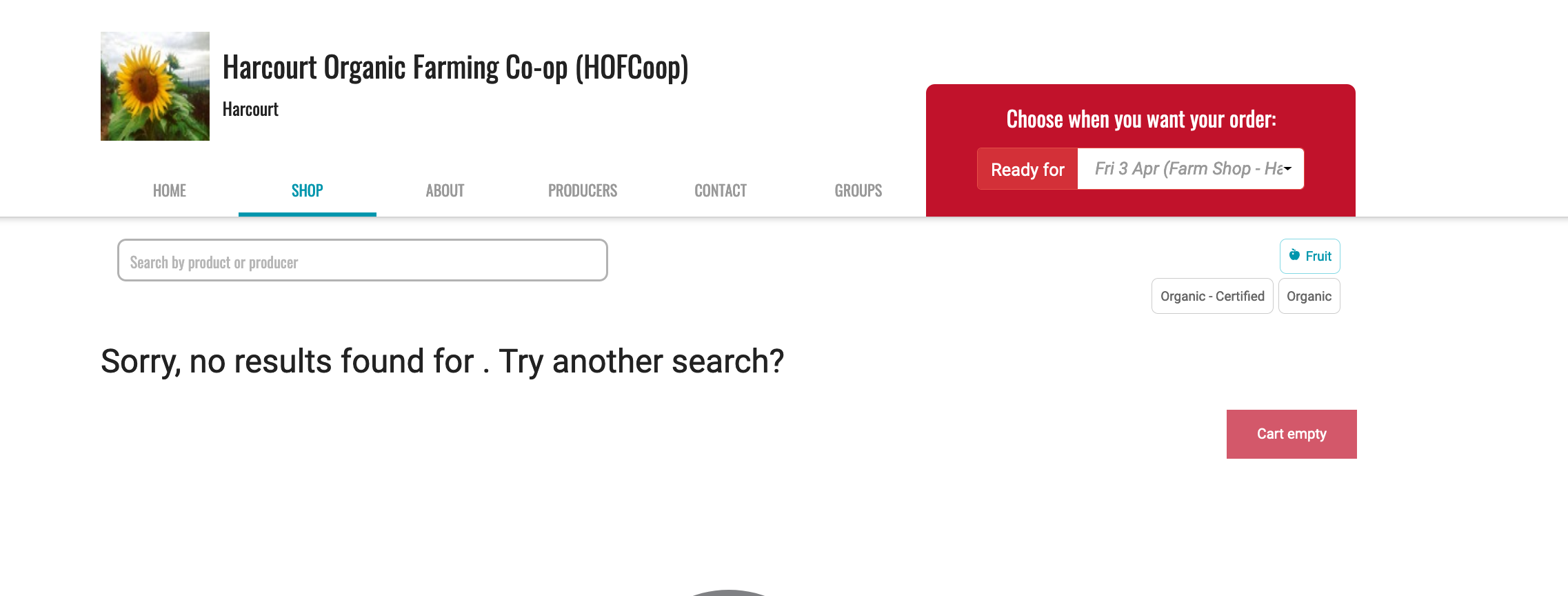
This is what i see in Developer Tools Network
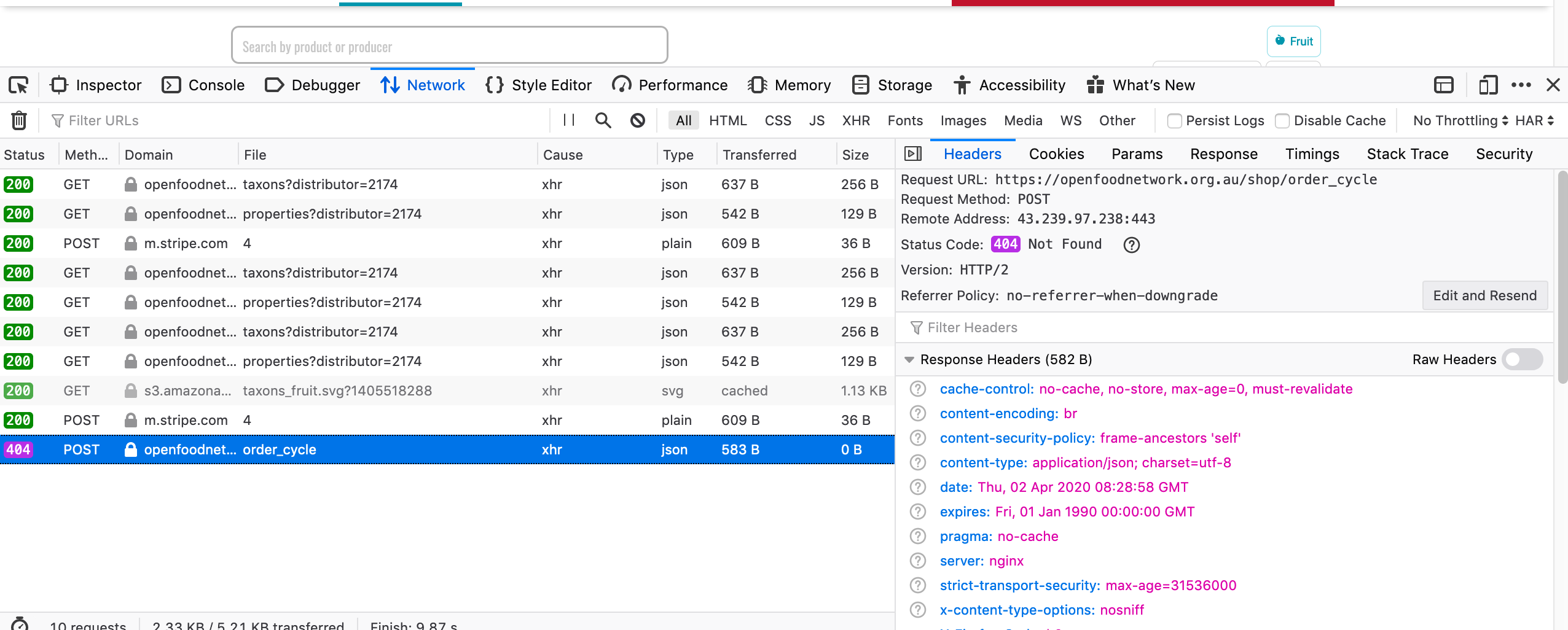
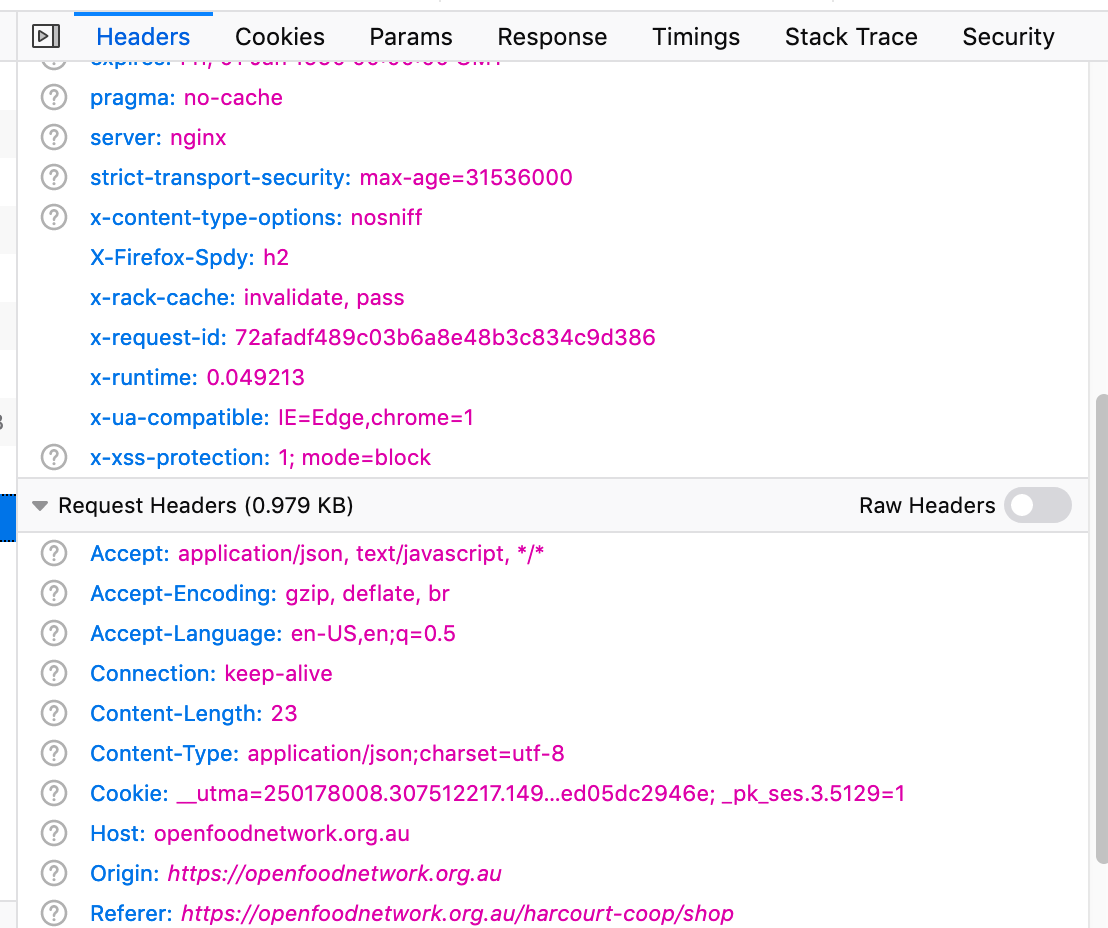

Is anyone online that would like me to screenshare and tell me what else we can look for before I reload the page? @luisramos0 @Matt-Yorkley ?
kirstenalarsen
on 2 Apr 2020
can also wait and see if #5121 makes it go away, just alerted because bugsnag is not telling me about it
kirstenalarsen
on 2 Apr 2020
that was quite a lot of data @kirstenalarsen but I'm just missing the data from the Params tab to investigate that particular order cycle :see_no_evil: . I can check the logs tomorrow and see if I can find your request.
A possible explanation I found for that 404 Not Found is that _the OC you selected could not be found among the active ones where Harcourt Organic is the distributor_. :point_down:
Is there any chance some of those OC preconditions were not true right when you checked @kirstenalarsen ?
 sauloperez
on 2 Apr 2020
sauloperez
on 2 Apr 2020
yeah, seeing the 404 and the code above, this is not related to JS or 5080...
I add some thoughts: an active OC is an OC with order_cycles.orders_open_at before NOW and order_cycles.orders_close_at after NOW.
I wonder what happens if the page is loaded before the OC close time and the OC is selected after the OC closing time :-) That would be one possible explanation.
Re Harcourt I see 2 OCs in the DB. This is the closing date of one of them: 2020-04-02 01:00:00
and this OC was updated at 2020-04-01 20:51:05
These are UTC times.
You last post was at 2020-04-02 07:54:49
luisramos0
on 3 Apr 2020
that sounds reasonable and the only reason. In any case, I'd like to quickly implement an error message to inform this. As a user, it can be very frustrating to see that selector grayed out and no other indication.
sauloperez
on 3 Apr 2020
I am a little perplexed by the oc opening closing times thing but is hard for me to confirm now as i no longer have it open. I really don't think that would be it as this has happened to me a few times and reloading the page has worked - including (in this case) all three ocs. Seems unlikely that I have managed to chance on this timing error on two different shops at two totally different times and both times been able to reload the page to sort it out?
kirstenalarsen
on 6 Apr 2020
certainly, that reload fixing things is very weird :thinking: It'll need another look.
sauloperez
on 8 Apr 2020
I think this deserves another look. There might be something else we are missing (HTTP caching?). Moving back to Dev Ready as other more urgent priorities are keeping me busy. Feel free to close it you think otherwise.
sauloperez
on 20 Apr 2020
I could spend some time investigating this now but it's a month old. Any other occurrences @kirstenalarsen ?
Maybe we can downgrade to S3 based on the fact it's not happening to a lot of people and there's a workaround (reload the page)?
luisramos0
on 27 Apr 2020
I think ok to make this back to s3 until we see it again. There is a risk that will take a while for us to see it again and it's still just lurking and losing customers for people, but I see that without more data we're stuck. So if/when I see it again I need to check that:
a) an order cycle hasn't closed between page load and selection
b) include screenshot of the data from the PARAMS tab
kirstenalarsen
on 27 Apr 2020
won't change the label on it - can agree in delivery train tonight
kirstenalarsen
on 27 Apr 2020
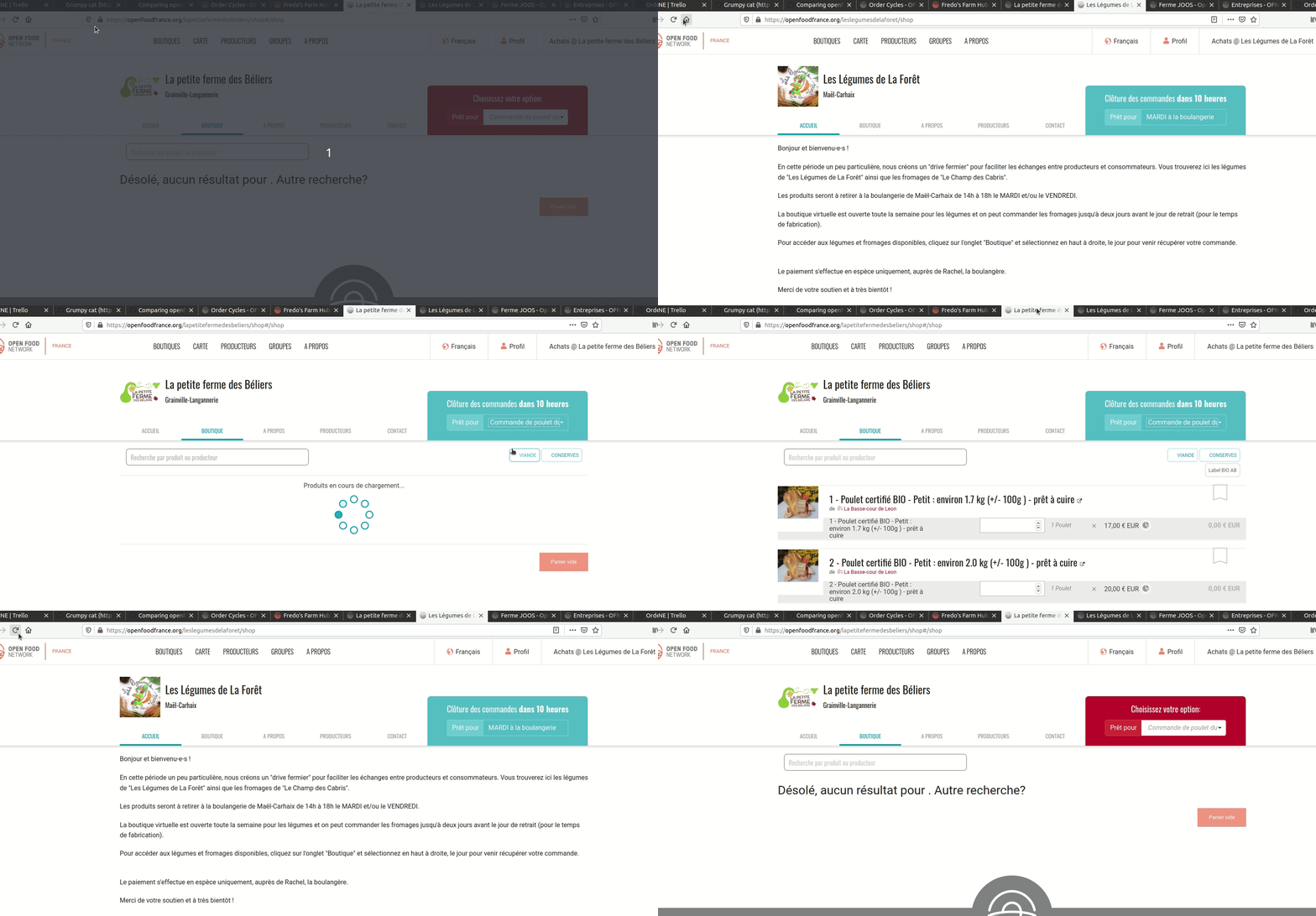
hey, while investigating #5340 I found the source of this bug and I can replicate it :tada:
The trick is to open different shops in different tabs (do we support shopping in multiple shops at the same time?). This explains why it keeps happening to you @kirstenalarsen I am sure as a power user you open multiple shopfronts on different tabs at the same time :-)
I found this by going to /shops and opening shops with "open in new tab", if you do this for a shop with multiple OCs and then any other shop, you will see this bug in the first shop when you go to its tab without refreshing the page.
In FR live, go tohttps://openfoodfrance.org/shops#/
- open shop "La petite ferme des Béliers" with "open link in new tab"
- open any shop in the same way, for example, "Les Légumes de La Forêt "
- go to the tab where the shop "La petite ferme des Béliers" is and see the bug
This can also be accomplished by opening the shops in two tabs and following a particular sequence of page refreshes as this video shows:
luisramos0
on 15 May 2020
this is where the 404 comes from:
https://github.com/openfoodfoundation/openfoodnetwork/blob/5c7541e63d4939d3c5e68242e05bffe83bee9c75/app/controllers/shop_controller.rb#L17
The OC of the shop is sent to the server but the current_distributor on the server is the other shop...
One possible solution here will be to make the angular code send the distributor id together with the OC id so that on the server we can validate the two and return the correct data.
luisramos0
on 15 May 2020
Nice work detective @luis! that'd be it - yes i have multiple shops in multiple tabs all the time, and I regularly open a bunch as 'open in new tab' from the shops page. Pretty unlikely that normal people do this, which is probably why it's only been reported by instance managers rather than users. So I think can stay s3
kirstenalarsen
on 15 May 2020
(btw @kirstenalarsen I think that's another Luis you tagged there) 🙂
 sigmundpetersen
on 15 May 2020
sigmundpetersen
on 15 May 2020
Related issues
 kristinalim
·
3Comments
Matt-Yorkley
·
3Comments
sauloperez
·
3Comments
kristinalim
·
3Comments
Matt-Yorkley
·
3Comments
sauloperez
·
3Comments
 filipefurtad0
·
3Comments
sauloperez
·
3Comments
filipefurtad0
·
3Comments
sauloperez
·
3Comments
Most helpful comment
that sounds reasonable and the only reason. In any case, I'd like to quickly implement an error message to inform this. As a user, it can be very frustrating to see that selector grayed out and no other indication.