Openfoodnetwork: User can not connect or create account
Description
I got several users in the past day with the same patern:
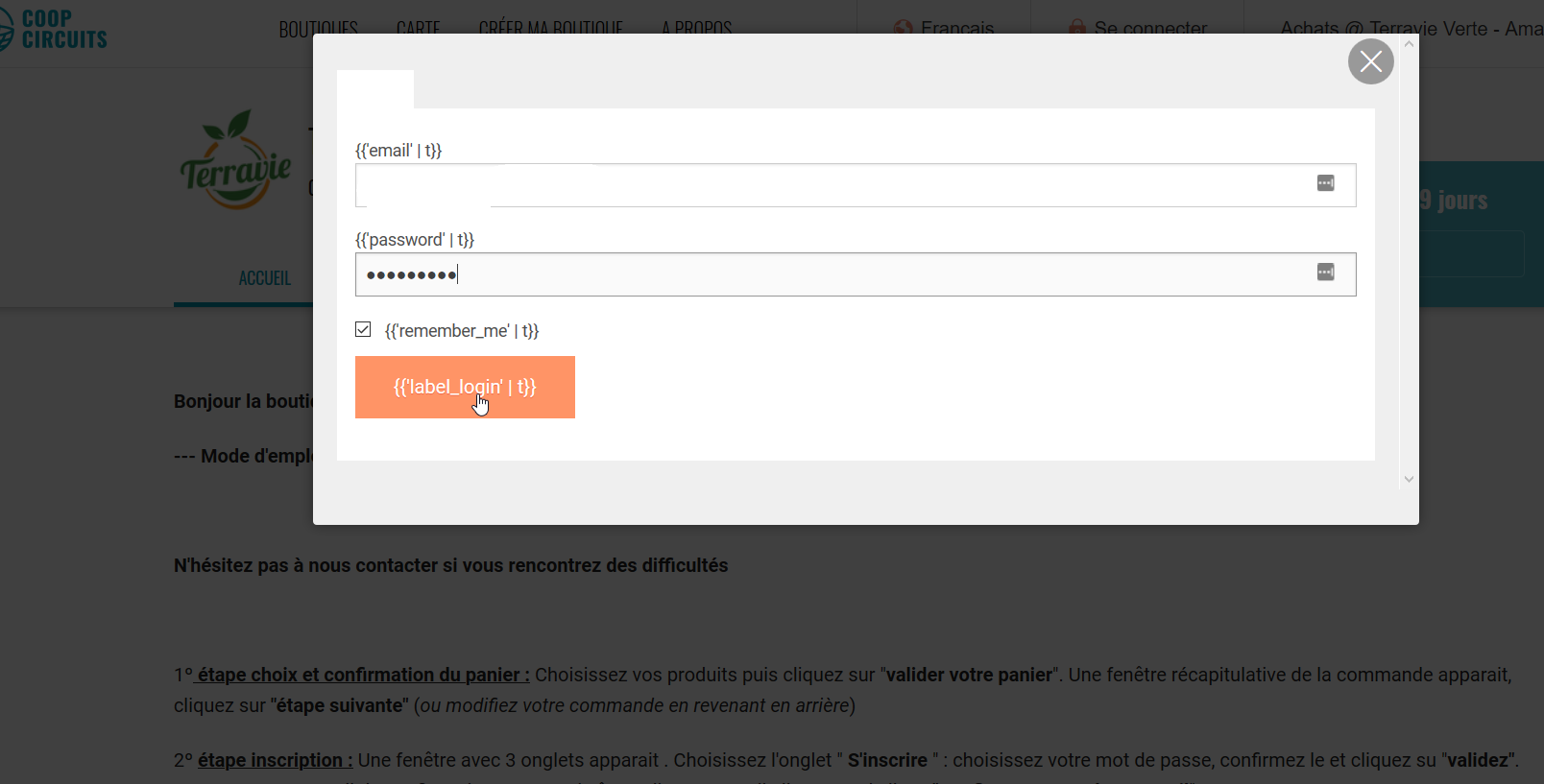
They go to the platform (recurrent user or new one) and they see this:
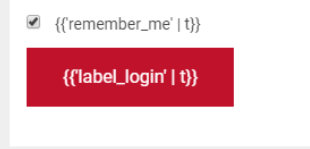
The red button does not work.
A Ctrl+R fixes the display but the red button still does not work for them. This is the console of a user on the latest Chrome:
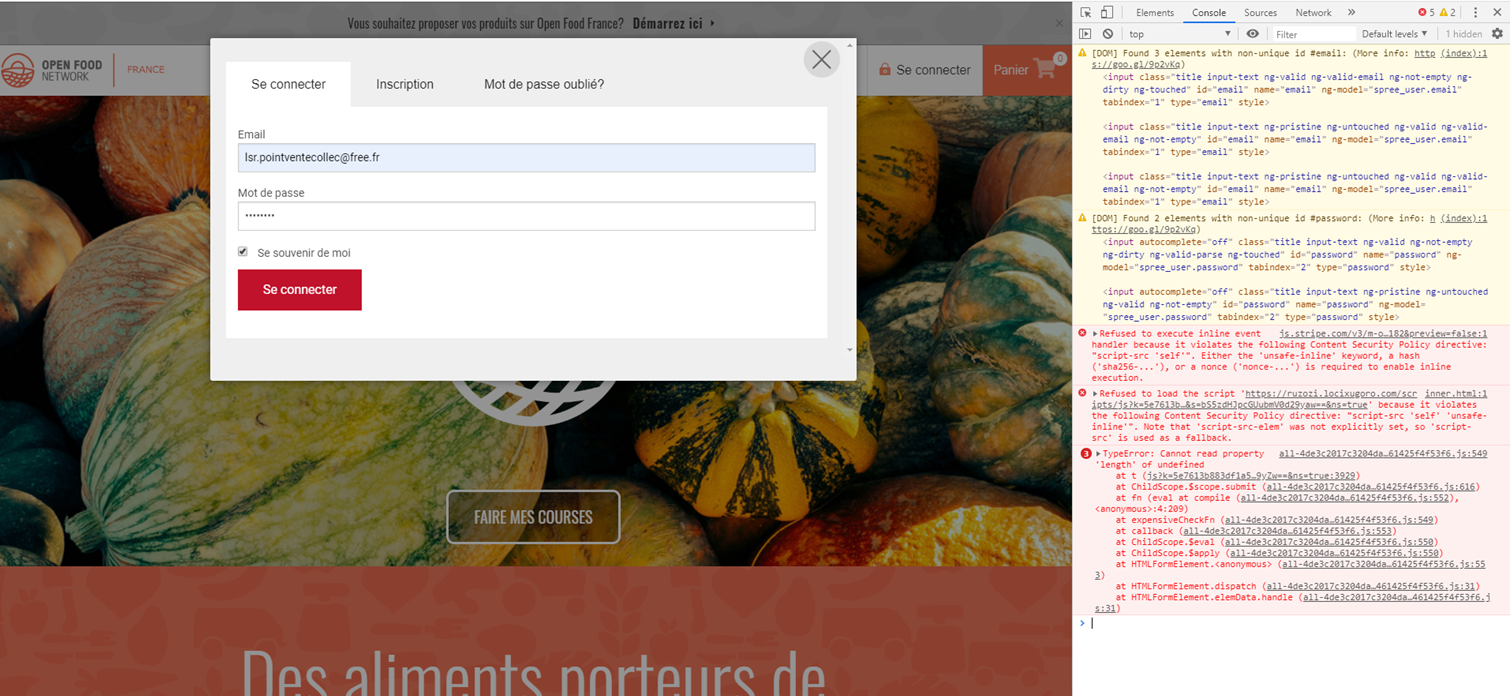
I'm putting s2 even if there is a workaround because I'm afraid we are loosing new customers without knowing it (not everyone contact us)
Steps to Reproduce
??
Workaround
I unblocked user so far in 2 ways:
- using their phone if they are customers
- downloading another browser if they are an enterprise
Severity
bug-s2: a non-critical feature is broken, no workaround
Your Environment
- Version used: v2.8
- Browser name and version: Chrome
- Operating System and version (desktop or mobile): Desktop
Possible Fix
 RachL
RachL
All 46 comments
UK have also had a report of a user not being able to sign up. Clicking the red button did nothing.
The user reported using the most up to date version of Firefox (they were tech saavy enough to check their version).
Definitely an s2.
 lin-d-hop
on 26 Mar 2020
lin-d-hop
on 26 Mar 2020
Ok, so we're checking one issue related to browser extensions injecting javascript in a suspicious way for two French users, but we have similar reports from UK and AUS as well.
I can't replicate this in any browsers myself.
This could be caused at any time by our third-party javascript dependencies failing to load for any reason, namely the Google maps and Stripe javascript we load from external sources. If there's an issue there (poor network connection on the user side, some availability issue with connecting to those servers, etc) then the above detailed issue will definitely happen, the rest of our javascript will break. I have seen this once or twice in dev environment when my internet connection was cutting out.
 Matt-Yorkley
on 26 Mar 2020
Matt-Yorkley
on 26 Mar 2020
did you notice the first js error is a stripe error Matt? Content-Security-Policy
It doesnt look like a network speed issue, does it?
I see some pages where people add a CSP meta to the html to allow for this cases (unsafe-inline).
I wonder why is this happening only for some people? could be browser and its version?
on another line, one issue coming out of this could be "make the website work even if maps and stripe URLs are totally down". should be an easy one and increase reliability of the webapp I think.
 luisramos0
on 26 Mar 2020
luisramos0
on 26 Mar 2020
Just adding comment here that we had reports of this in Aus too. I also think I experienced the problem of 'not working red button' on the edit cart page, I swear I had to click the continue button 3-4 times before it worked . . but it was late and I dismissed it
 kirstenalarsen
on 26 Mar 2020
kirstenalarsen
on 26 Mar 2020
 lin-d-hop
on 27 Mar 2020
lin-d-hop
on 27 Mar 2020
on another line, one issue coming out of this could be "make the website work even if maps and stripe URLs are totally down"
Nice idea!
RachL
on 27 Mar 2020
on another line, one issue coming out of this could be "make the website work even if maps and stripe URLs are totally down"
Yeah this would be really great. Been on my mind for a while!
Given the state of the internet is this worth discussing as a preemptive priority?
lin-d-hop
on 27 Mar 2020
If it's not too much work, that would be awesome. It's a really brittle weakpoint.
Matt-Yorkley
on 27 Mar 2020
Shall we make a spike issue?
lin-d-hop
on 27 Mar 2020
Content-Security-Policy... I see some pages where people add a CSP meta to the html to allow for this cases (unsafe-inline).
I did investigate that a bit. With Content-Security-Policy in relation to blocking scripts, the server itself has to pass the browser an optional whitelist, and we're not doing that (you can check the headers). We probably should add that whitelisting at some point, but I think it will require removing all inline scripts from every page on the site, and a _lot_ of careful testing as various things will break.
Matt-Yorkley
on 27 Mar 2020
It would help to have more data on specific browser versions from these reports. If a new browser has started enforcing some brutal new script-blocking rules we may be in trouble, but I haven't found anything yet to indicate that that's the case...
Matt-Yorkley
on 27 Mar 2020
I suspect its more like to be antivirus software/plugin doing that
lin-d-hop
on 27 Mar 2020
Mine are all on latest Chrome version. I'm still awaiting feedback with removing some extensions.
What troubles me is that is happens also for customer who orders regularly, like every week. Suddenly they have the problem...
RachL
on 27 Mar 2020
Another report on Chrome latest version. The shopper was successful with IE.
lin-d-hop
on 28 Mar 2020
awaiting info
kirstenalarsen
on 29 Mar 2020
A new bit of information from a longstanding Hub that has multiple customers experiencing this inability to login (can't change password
He reckons most of them are people 'coming out of the woodwork' as in they logged in a long time ago and are just reappearing now that they're worried about starving - and have decided a local food system is a good idea after all.
This made me wonder - could it be some 'not quite correct' thing in the data migration when we introduced email confirmation? I can't check this because the system sees them as confirmed so I can't resend a confirmation request. Just a pondering from his observation combined with mine
kirstenalarsen
on 29 Mar 2020
@kirstenalarsen Based on the fact that people can do this on one browser and experience the problem on another browser I think it is unlikely in any way related to email confirmations.
Did you find out which browsers did and did not work?
Seems to be like a problem with javascript failing to load.... which I am wondering if it is related to insane internet load at the moment..
lin-d-hop
on 29 Mar 2020
I wonder if what you are experiencing @kirstenalarsen isn't another issue, because he is mentionning a blanck page. In my cases the login button just does not work. You click on it and nothing happens.
Also, it is the same for the create new enterprise button: in these cases it is for sure not an old account :(
RachL
on 29 Mar 2020
here is newest info
He is using Windows 10 and the latest Chrome. Also used Edge.
He originally tried to log in with his original user name and password [email protected] Computer said no. He then reset the password and put in a new password with the same user name. Maybe it sort of let him log in but this seems to be where he got into the loop thing in the shop (kept asking him to log in, could not check out even as a guest)..
So he tried to log in again tonight with his email and the new password. Computer said no. Then he logged in with his user name and old password - computer said yes.
kirstenalarsen
on 29 Mar 2020
Okay, I've got some potentially relevant data based on the "old users that haven't logged in for a long time" angle:
irb(main):006:0> Spree::User.where(spree_api_key: nil).count
   (7.7ms)  SELECT COUNT(*) FROM "spree_users" WHERE "spree_users"."spree_api_key" IS NULL
=> 3916
irb(main):007:0> Spree::User.where('spree_users.last_sign_in_at > ? AND spree_users.spree_api_key = ?', 3.years.ago, nil).count
   (0.8ms)  SELECT COUNT(*) FROM "spree_users" WHERE (spree_users.last_sign_in_at > '2017-03-29 11:43:13.906959' AND spree_users.spree_api_key = NULL)
=> 0
Recent users have API keys set by default, really old users don't...
Matt-Yorkley
on 29 Mar 2020
what does that mean @Matt-Yorkley - could it be something easy to fix? Do I need to make this S1?
kirstenalarsen
on 29 Mar 2020
I'm making this S1. People being unable to login is not acceptable :(
kirstenalarsen
on 29 Mar 2020
on home page we have header:
"content-security-policy | frame-ancestors 'none'"
on shops page we have
"content-security-policy | frame-ancestors 'self'"
Because our CSP headers are slightly different in different pages (homepage vs shop page) it could be relevant in what page the user is when they try to login.
I am not sure yet what exactly this HTTP header is doing but there's a cross here saying IE doesnt implement this security header (it ignores it):
https://developer.mozilla.org/en-US/docs/Web/HTTP/Headers/Content-Security-Policy/frame-ancestors
and Lynne said: "The shopper was successful with IE."
The theory would be that something goes wrong with the CSP settings that break stripe javascript code and that breaks OFN's javascipt code.
I'll investigate this tomorrow.
luisramos0
on 29 Mar 2020
I'll be back on Tuesday, but I think the next steps are:
- make sure the site still works if Google maps and Stripe javascript fail to load
- investigate possible issues with; users that haven't logged in for a long time not having API keys set, or users that haven't logged in since email confirmation was added
I've unassigned myself for now, so anyone can pick this up.
Matt-Yorkley
on 29 Mar 2020
@Matt-Yorkley There is a little bug in your second query:
Spree::User.where('spree_users.last_sign_in_at > ? AND spree_users.spree_api_key = ?', 3.years.ago, nil).count
This well generate where spree_api_key = null which is always false.
Spree::User.where('spree_users.last_sign_in_at > ? AND spree_users.spree_api_key is null', 3.years.ago).count
=> 1619

Spree::User.where('spree_users.last_sign_in_at > ? AND spree_users.spree_api_key is not null', 3.years.ago).count
=> 2717

Spree::User.where('last_sign_in_at is not null and spree_users.spree_api_key is null').order(:last_sign_in_at).last.last_sign_in_at
=> Tue, 06 Aug 2019 18:37:01 AEST +10:00

Spree::User.where('spree_users.spree_api_key is null').order(:created_at).last.created_at
=> Thu, 27 Feb 2020 22:22:59 AEDT +11:00
I would conclude from this that newly created users don't have an api key but that all users who logged in after August 2019 all have an api key.
 mkllnk
on 30 Mar 2020
mkllnk
on 30 Mar 2020
I looked into the case @kirstenalarsen mentioned. I'm not sure if the user knew what they were doing. It's a very old account. Created in 2015 and a password reset link was also sent in 2015 but not used. The last old login was in 2017 and we introduced email validation in 2018.
Then they logged in twice yesterday but no password reset had been triggered. I don't know how a user can believe to reset the password but it actually didn't happen. Maybe they have another email address and got confused?
All this is probably very different to the original reported problem of Stripe Javascript crashing our page. But if the page crashed and buttons didn't work then that would explain some confusion.
mkllnk
on 30 Mar 2020
@luisramos0 Some facts for our investigation:
- Rachel's screenshot shows the home page.
- The home page and the shop pages send
content-security-policy: frame-ancestors 'none'. - Only embedded shops alter the content-security-policy when embedded.
- The error refers to
script-src 'self'which is not in our code. - Stripe sets a lot of policies:
content-security-policy: default-src 'self';
connect-src 'self' https://api.stripe.com https://errors.stripe.com;
script-src 'self';
style-src 'self' 'unsafe-inline'; frame-src 'self';
img-src 'self' https://q.stripe.com; font-src data: https:;
media-src 'none'; object-src 'self';
I conclude that something is violating Stripe's security policy. Matt's suggestion, it could be a plugin, sounds reasonable. An unrelated example of this kind of issue: https://github.com/reduxjs/redux-devtools/issues/380
It's even possible that these people have a malicious plugin installed and Stripe's security policy is just doing its thing.
mkllnk
on 30 Mar 2020
I think we should set up a Bugsnag JS project. It's every easy. Create the project in Bugsnag and include the key like this in the layout:
<% if Rails.env.staging? || Rails.env.production? %>
  <script
    src="//d2wy8f7a9ursnm.cloudfront.net/bugsnag-2.min.js"
    data-apikey="4b8......09d7b79ffd">
  </script>
<% end %>
Rachel's screenshot mentions that Stripe is blocking a script from ruzozi.locixugoro.com. Searching for locixugoro brings up French sites about suspected scam. Visiting locixugoro.com prompts to install a browser plugin without any explanation. At least in this one case we can say that a browser plugin is trying to do something that looks very suspicious.
Working on making our site work even when Stripe fails sounds like a good idea in general. But it would be even better to detect that Stripe fails and show some kind of notification which prompts to switch browsers or uninstall plugins.
In any case, @RachL can you follow up with these people and make sure that they are safe? There are probably less secure payment gateways out there and we don't want this plugin to steal credit card details in other online shops.
mkllnk
on 30 Mar 2020
Re. the password reset not being triggered would be consistent with what he said - he tried to change the password but it didn't work, and that's why his old password was still there - pushing the button didn't do anything. Same with the person who doesn't have a user - he couldn't sign up.
So the bugsnag thing you're suggesting would tell us when this happens so we can see how often it is? in which case YES PLEASE
I am not agreeing user error because some of the people reporting this are not tech-deficient. Tess is familar with OFN and other platforms and she totally watched someone getting completely stuck
The other reason I'm pretty sure about this is because remember after the last deploy @mkllnk who I hit a panic button saying we had bug in the deploy - was because I couldn't login. I had a similar experience to what people are describing and managed to get through it and convinced myself it was my mistake. But now I think perhaps it wasn't
The malicious plugin theory is interesting and hopeful - would also explain why they're ok in other browsers. Could we get some kind of warning that pops up when it happens?
kirstenalarsen
on 30 Mar 2020
Bugsnag js sounds good :+1:
I just realised I forgot to add you to the private Slack channel we had for this.
The first screenshot we had suggested malicious browser extensions, but I don't think that can explain all the cases.
Matt-Yorkley
on 30 Mar 2020
Ok so for one of my users, deactivating the extension Fenetre Mailto helped her to be able to use Chrome again in order to login.
It is a plugin you can find on the chrome store, I have no idea what kind of validation the chrome store has: https://chrome.google.com/webstore/detail/fenetre-mailto/gepijnnkhnilemhhacebnhcndgogkamc?hl=en
RachL
on 30 Mar 2020
It's possible the domain we found might be hosting a malicious version of that plugin, designed to look like it. I'd recommend avoiding it either way...
Matt-Yorkley
on 30 Mar 2020
interesting Maikel:
"The home page and the shop pages send content-security-policy: frame-ancestors 'none'. Only embedded shops alter the content-security-policy when embedded."
Loading https://openfoodfrance.org/microbrasserie-de-la-roche-aigue/shop
I see "content-security-policy: frame-ancestors 'self'"
Anyway, I think the theory that a browser plugin can break stripe's or our own CSP is valid.
We should be able to let the user (or us through logs or bugsnag) know this is broken.
"add-ons and extensions in browsers cause CSP violations" and it looks like tools like report URI will let you know when/how/whom.
I dont think we should go for a tool like this now but we can certainly try to add some logging.
If we agree we dont want to do js logging to our server but instead directly to bugsnag (I am not sure but you guys seem to agree :+1:), the task is to detect these cases and make sure a bugsnag alert is generated.
For this we need to replicate this problem in some way, maybe try to install a browser plugin that violates stripes CSP and make sure the alert is sent to bugsnag.
luisramos0
on 30 Mar 2020
@Matt-Yorkley @luisramos0 There is another possibility of failures I've been thinking about. Rachel and Kirsten mentioned that it worked after a reload of the page and then they forgot about it. Could it be that some pages or scripts are cached when they shouldn't?
Rails has a nice way of putting a checksum in the asset file names and referencing that. So I'm not sure how this is possible but I remember that Luis mentioned something about new translations not being included at some point. Did that get solved? Different problem? Can you imagine a way that a browser would cache the home page which then references an old and non-existing js-file?
@luisramos0 I'm really surprised about the header you are seeing. I did this:
curl -v https://openfoodfrance.org/microbrasserie-de-la-roche-aigue/shop > /dev/null
...
< content-security-policy: frame-ancestors 'none'
< cache-control: no-cache, no-store, max-age=0, must-revalidate
< pragma: no-cache
< expires: Fri, 01 Jan 1990 00:00:00 GMT
...
And the code looks like self is only set when EmbeddedPageService#embed! is called.
https://github.com/openfoodfoundation/openfoodnetwork/blob/940423acfc50600dd07e769533c7f5f0de252c07/app/services/embedded_page_service.rb#L51-L54
```
mkllnk
on 31 Mar 2020
Luis' idea to use https://report-uri.com/ looks good. The free plan allows 10,000 reports. The busiest sites have less than 50,000 page views. So if less than 20% of customers have bad plugins, we could capture them all. We should create an account for each instance though to not reach the quota. Maybe let's start with one instance and see how many reports come through.
mkllnk
on 31 Mar 2020
Another thought: fetching Javascript from external domains could be failing due to DNS resolution problems (which we know have been happening this week) as per this issue: https://github.com/openfoodfoundation/openfoodnetwork/issues/5111
Matt-Yorkley
on 31 Mar 2020
The translations problem was #4328 and it was due to assets not being compiled if JS was not changed in that release, only translations. Assets clean fixed the problem: https://github.com/openfoodfoundation/ofn-install/pull/538/files
luisramos0
on 1 Apr 2020
we have strong evidence that #5121 will fix a major JS error (when google maps JS code fails to load): some of the very first alerts on bugsnagJS had "google not defined".
I'd close this issue with #5121 and reopen if we have new reports after #5121 is live.
luisramos0
on 1 Apr 2020
Okay, #5121 fixes the problem where all our Angular breaks if the google maps js fails to load.
It doesn't address the root cause though, which is: google maps js (and possibly stripe js) are regularly failing to load. We haven't got to the bottom of why that is happening, and we will still have related issues it if it continues (although they'll be much less severe after #5121).
Matt-Yorkley
on 2 Apr 2020
Do we close this now or put prod test label and test after next deploy?
 sigmundpetersen
on 3 Apr 2020
sigmundpetersen
on 3 Apr 2020
There's nothing we can verify after the release so not a prod-test.
I think we have fixed the S1 because the login issues will not happen again. We will continue having problems in maps if google maps fails.
I'd say we should close this for now and re-open (or even create separate issue as this one is already very long) if there are new reports after the next release.
If anyone wants to proceed differently with this issue please go ahead :+1:
luisramos0
on 3 Apr 2020
@luisramos0 @Matt-Yorkley I have a new report of this issue by a customer using Chrome an Explorer. Bother are his browsers that he is using regularly. When using Firefox (which he had to install to test) everything works fine.
I will ask for extensions. Anything else I should look for? Can we found something in the logs now or we don't have more info for this type of errors?
RachL
on 31 Aug 2020
it's a long story here, what do you mean by "this issue"? Do they see "label_login"? What url are they using? Did they login before on that browser? when was last successful login? Can you try and get the content of their browser console like in the description of this isssue?
luisramos0
on 31 Aug 2020
@luisramos0
what do you mean by "this issue"?
the original issue we are commenting on here. In detail:
Do they see "label_login"?
yes. that's the screenshot I've got:
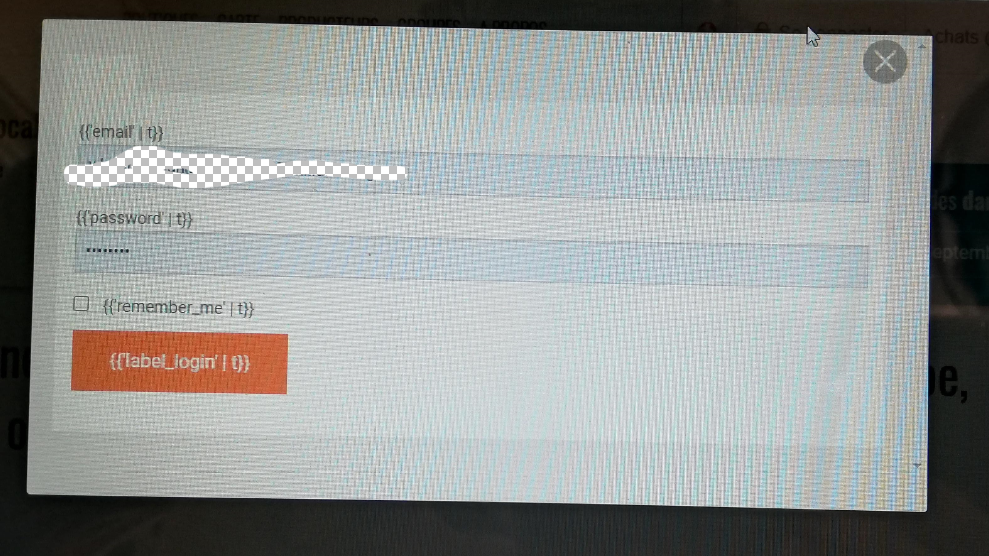
I'm waiting to see if a cache clear solved the translation problem.
What url are they using?
https://openfoodfrance.org/au-local/shop#/login
Did they login before on that browser? when was last successful login?
Yes Chrome is their default browser. They ordered in June with that browser, no problem. When they came back in August, they saw the problem.
Can you try and get the content of their browser console like in the description of this issue?
I gave out an explanation on how to do it, but I doubt I will have feedbacks... it's a customer that does not know how to use video conference tools, so I cannot do a screenshare with him to go step by step on how to do it.
RachL
on 1 Sep 2020
Another one, Firefox this time... still trying to fetch info... super hard :(
RachL
on 3 Oct 2020
Related issues
 HugsDaniel
·
3Comments
HugsDaniel
·
3Comments
 filipefurtad0
·
3Comments
filipefurtad0
·
3Comments
 andrewpbrett
·
3Comments
RachL
·
3Comments
kirstenalarsen
·
3Comments
andrewpbrett
·
3Comments
RachL
·
3Comments
kirstenalarsen
·
3Comments
Most helpful comment
I'm making this S1. People being unable to login is not acceptable :(