Openfoodnetwork: Can't access edit order 'payments' tab if order has been cancelled (or resumed)
Description
I cancelled an order. I expected there to be an automatic stripe refund (wishful thinking? did this ever used to exist?) but there wasn't. So I went in to edit the order and try and refund from the payments tab, as per user guide
Expected Behavior
I should be able to edit an order, go to the payments tab and refund (or do other actions)
Actual Behaviour
I can't access the 'Edit Order' payment tab. At first I thought it was just for cancelled orders, but then I resumed the order and I still can't access it.
I just keep getting told "Please fill in customer info" but as far as I can see it is all filled in


It seems to be ok for other orders, so perhaps is something that is triggered by an order 'cancellation', but it then is impossible to refund the order if we can't access the payments tab.
So it seems that I can't cancel and refund an order?
Steps to Reproduce
- Create an order and pay by Stripe
- Cancel the order
- Edit the order, select payments tab (intending to generate refund)
See error, and get stuck on customer details tab
Animated Gif/Screenshot
Workaround
Severity
Your Environment
- Version used:
- Browser name and version:
- Operating System and version (desktop or mobile):
Possible Fix
 kirstenalarsen
All 15 comments
Thanks for posting this. FYI - I wonder if we created this when we deleted 'resumed' orders. People might remember - maybe a month or so ago - I think we deleted them because we couldn't figure out why someone would resume an order. Maybe this is why - if an order is cancelled before payment is reconciled, the user should be able to resume that order to process a refund. (But - it makes me wonder, why isn't a refund automatically processed when an order is cancelled?)
 tschumilas
on 19 Mar 2020
tschumilas
on 19 Mar 2020
I'm not sure I agree this is s3. If a user is trying to manage orders in OFN, they need to be able to refund cancelled orders. There is no workaround - the user has to manually refund outside of OFN, and then the customer's OFN account is inaccurate. I'd vote for s2.
tschumilas
on 23 Mar 2020
can this be classed as a potential papercut issue?
 lbwright22
on 20 Apr 2020
lbwright22
on 20 Apr 2020
 lbwright22
on 20 Apr 2020
lbwright22
on 20 Apr 2020
Can you please clarify the details for "I can't access the 'Edit Order' payment tab." _before_ you resume the order? What exactly happens?
I dont understand why this is not an S2.
 luisramos0
on 27 Apr 2020
luisramos0
on 27 Apr 2020
This is the way OFN has worked for as long as I remember.
The workaround is to log into Stripe and refund the order on the hubs behalf.
I'm not clear on the proposed fix:
- To make reactivating an order work again?
- To make the payments tab functional on cancelled orders?
 lin-d-hop
on 27 Apr 2020
lin-d-hop
on 27 Apr 2020
I think that the proposed fix is either:
- make the payments tab functional on cancelled and resumed orders
OR - automatically refund credit card payment when the order is cancelled
I would be happy with either. The second one is perhaps more complex - potentially leading to different behaviour in stripe vs other payment methods; and still needing a login to stripe to take the payment again if the order is cancelled by accident, so on balance I'd probably lean towards 2.
I don't think it's ok that a Hub cannot refund a cancelled order for themselves without asking an instance manager
kirstenalarsen
on 28 Apr 2020
@luisramos0 i think the answer to your question is described above - you try to click on the Payments tab but it just keeps taking you to the Customer Details tab
kirstenalarsen
on 28 Apr 2020
ok :+1: thanks!
So we keep it S3 and agree the solution is option 2 :+1:
luisramos0
on 28 Apr 2020
Aligned with option 2 as I think we have somewhere an issue to issue credit in bulk.
In the future, I think I would explore automatic refund if the customer was cancelling the order. But let's see with more user feedback if this is needed!
 RachL
on 29 Apr 2020
RachL
on 29 Apr 2020
The new "Actions" menu also doesn't work for cancelled orders - nothing happens on click.
 emilyjeanrogers
on 3 Sep 2020
emilyjeanrogers
on 3 Sep 2020
That will be a problem between html and angular related to linksDropdown. I dont think the solution will be related to the solution of the original issue here, maybe it should be on a separate issue?
luisramos0
on 3 Sep 2020
Even if you manually refund an order as in the workaround above, it is not possible to change the payment status from 'Credit Owing' to 'Paid' or 0. This is confusing.
Testing below to narrow down what is actually happening now #5270 is fixed.
Customer places and order and the payment is recorded.

customer view:
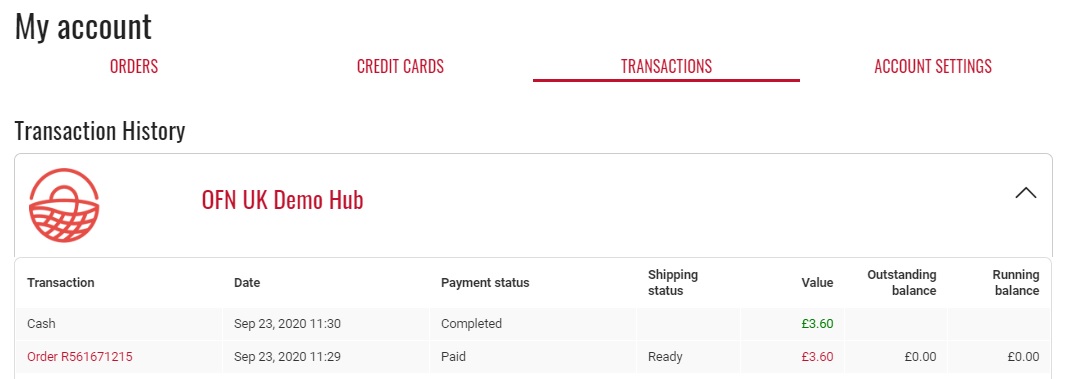
Order is cancelled. No refund issued prior to cancellation.

Under Customer Transaction history the transaction no longer appears even though no refund has been noted on the system:
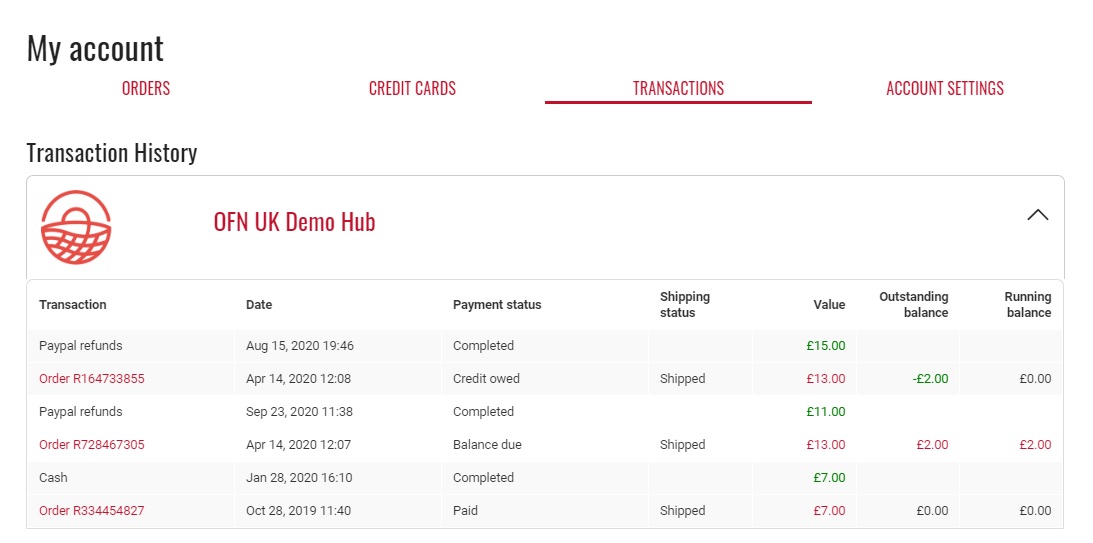
In Payment Method Reports, the cancelled order does not contribute to the customer's balance even though it is noted under listing orders as 'credit owing'.Removing items from the cancelled order does not change the payment status

lbwright22
on 23 Sep 2020
I was able to reproduce this issue and implemented the simpler of the two options ("make the payments tab functional on cancelled and resumed orders") in #6982.
When I tested this, I can now access the Payments tab for a canceled order with a completed payment and void the payment. Is that a sufficient solution?
 andrewpbrett
on 2 Mar 2021
andrewpbrett
on 2 Mar 2021
@andrewpbrett I think it's a good option 👍
RachL
on 2 Mar 2021
Related issues
 kristinalim
·
3Comments
kristinalim
·
3Comments
 Matt-Yorkley
·
3Comments
kirstenalarsen
·
3Comments
Matt-Yorkley
·
3Comments
kirstenalarsen
·
3Comments
 filipefurtad0
·
3Comments
filipefurtad0
·
3Comments
filipefurtad0
·
3Comments
filipefurtad0
·
3Comments