Openfoodnetwork: Cannot clone order cycle - grumpy cat
Description
A user in Australia is trying to clone an order cycle. They are getting a grumpy cat (see below). This is the 'old' error message screen that should have been replaced with the snail. So it suggests that we are touching some weird part of the code?
They have now sent a follow up email saying that "After the message with the cat picture. It does show a copy of the order cycle but it only has 73 variants and not the 521 variants that the Master order cycle contains."
I have asked whether they can think of any other clues, and also for the name of the order cycle.
I have just tried cloning 3719 Master, and replicated. This is what dev tools look like - fails really fast!

Expected Behavior
OC should be cloned
Actual Behaviour
Grumpy cat and incomplete OC created
Steps to Reproduce
- Go to Aus prod
- Clone 3719 Master OC, or it seems any OC as Food Connect manager
I have tried in another hub and it seems ok
Context
User clones their order cycles to get shops open for the week. This needs to be done in next hour. Working on a workaround but pretty stressful
Severity
S1 - cloning order cycles is a critical feature for many users, especially with this many products
 kirstenalarsen
All 37 comments
I think there was a corrresponding bugsnag report for this. And I wonder if it is caused by the same as in #3649 ?
 sigmundpetersen
on 3 Sep 2019
sigmundpetersen
on 3 Sep 2019
does bugsnag hint anything useful @sigmundpetersen that i could suggest to the user? i.e. data modification that we could try?
kirstenalarsen
on 3 Sep 2019
This is the error on Bugsnag: https://app.bugsnag.com/yaycode/openfoodnetwork/errors/5d6e0cea515cda0019383763
 kristinalim
on 3 Sep 2019
kristinalim
on 3 Sep 2019
that is gobbledegock to me! any hint of which variant i could look at?
kirstenalarsen
on 3 Sep 2019
Sorry - I'm actually looking for it right now, @kirstenalarsen.
kristinalim
on 3 Sep 2019
yes Kristen, could be related to #3649
and could be related to the change in #3896
must be some data error, the data is in an inconsistent state for some reason.
the error comes from this validation:
https://github.com/openfoodfoundation/openfoodnetwork/blob/c516d40d4abc2acaae5ad73564ad3593f3ed4515/app/models/spree/variant_decorator.rb#L27-L29
 luisramos0
on 3 Sep 2019
luisramos0
on 3 Sep 2019
we delete unit_description if product.variant_unit is 'items'
so it could be that variant_unit is items but the unit_value is not set.
we can check the db for this.
luisramos0
on 3 Sep 2019
I believe it is the same that we had in France here: https://github.com/openfoodfoundation/openfoodnetwork/issues/3729
This hub changed product from weight to items when we still had the bug where you couldn't do this change. He deleted all these products and re-created them with the correct unit and it has fixed the problem for them.
I don't know if in this case they have made the same thing @kirstenalarsen ?
 RachL
on 3 Sep 2019
RachL
on 3 Sep 2019
68 supplier enterprises on these "3719" OCs 🙈
these are the products with variant_unit = items and no unit_value:
Dishwash Liquid, Tangerine - 20L
Dog Food Ethically Farmed Chicken
Dog Food Ethically Farmed Pork
Dog Food Free-Range, Grass Fed Beef
Paddywhack Beef Strips Dog Treats
Pork Skin Strips Dog Treats
Rockmelons - 2nds
I think we can manually fix these ones immediately and verify the cloning works then create a PR to clean up the data everywhere.
luisramos0
on 3 Sep 2019
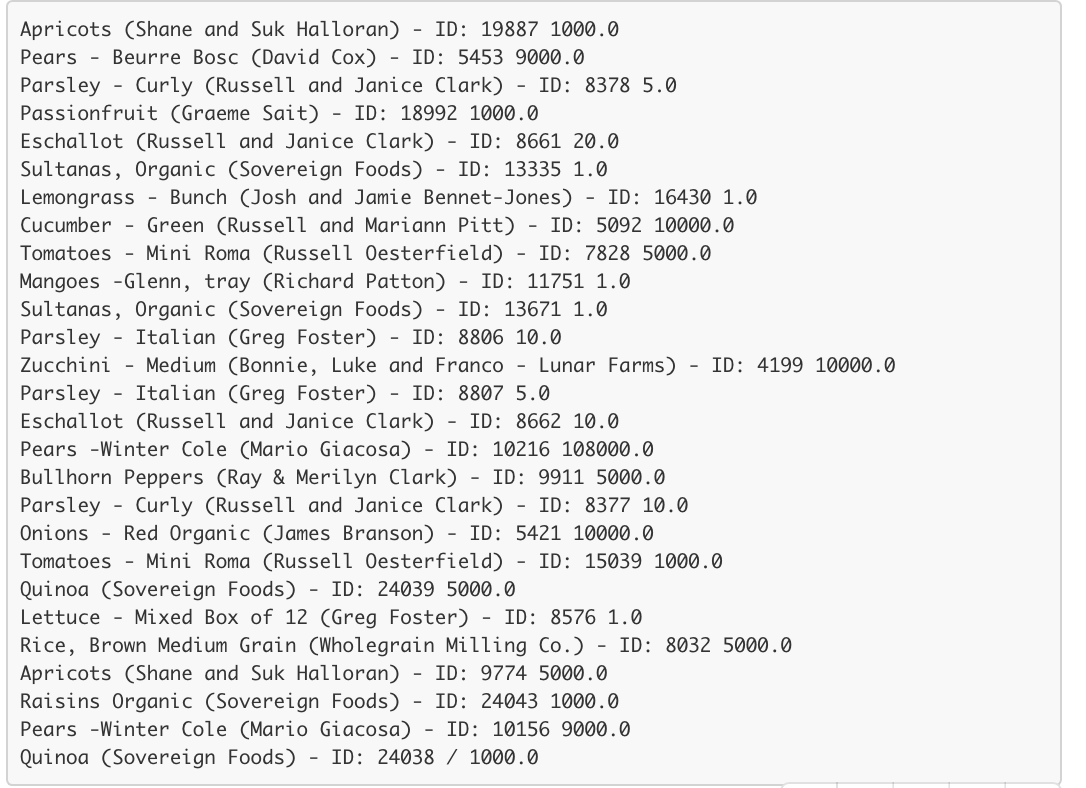
ok i'm checking these ones. We had sorted out some sultanas which allowed it to clone, but only put 496 products in instead of 523. The missing products are these . . anyone see a pattern?
kirstenalarsen
on 3 Sep 2019
I dont think it's about that list, that list is just the list of products that are after the problematic variant.
luisramos0
on 3 Sep 2019
ok, it now seems ok. They have opened the shop and sent out the email. F@##@V sultanas. Can we upgrade #3649 to S2? Thanks everyone, especially @kristinalim and @sigmundpetersen who once again wins the speedy speedy immediate response award! Thanks everyone :)
kirstenalarsen
on 3 Sep 2019
3649 is not causing this, it's legacy data from before #3896
luisramos0
on 3 Sep 2019
so if we fixed it by filling in the unit of the problematic product have we made a new future problem?
kirstenalarsen
on 3 Sep 2019
@luisramos0 Are you looking at OC 3844?
Documenting here...
I ran this code to get the list of variants that would fail that particular validation:
invalid_variants = []
order_cycle.exchanges.each do |exchange|
  exchange.variants.each do |variant|
    invalid_variants << variant if v.unit_description.blank? && v.product.variant_unit.present? && v.unit_value.nil?
  end
end
For that OC, it resulted only to Sultanas, Organic. It seems it's possible to simply set the unit value for the variants in the Bulk Edit Products page - no issues, which @kirstenalarsen did. It allowed the OC to be cloned. So, if you are right @luisramos0 we need to check production for this data.
The list of variants which @kirstenalarsen posted above were missing in one of the attempts to clone to OC after unit value has been set. This also needs to be checked.
kristinalim
on 3 Sep 2019
This issue has been linked to an error in Bugsnag
ActiveRecord::RecordInvalid in admin/order_cycles#clone
 mkllnk
on 3 Sep 2019
mkllnk
on 3 Sep 2019
Before we start working on the data migration, let's please create an issue to add the necessary DB-level constraints to avoid this to happen again. Data it's our most valuable asset.
 sauloperez
on 3 Sep 2019
sauloperez
on 3 Sep 2019
I don't exactly understand this . . can someone confirm that it is correct to communicate this to the user "This was not your fault and there is nothing you need to change. There was an incompatibility between one pre-existing product that you had and a change that was made to the code. There was only one occurrence of this in your data, which has now been manually fixed. We are checking for and fixing data across the system."
kirstenalarsen
on 4 Sep 2019
@kirstenalarsen is this one still an s1?
RachL
on 5 Sep 2019
We have had this reported in UK. I suspect it is the same issue but I may be wrong.
@luisramos0 and @kristinalim Is there a query I can run to try and identify the culprit variants?
 lin-d-hop
on 26 Sep 2019
lin-d-hop
on 26 Sep 2019
it is a occurence of 4216, you need to add a unit_Desc or unit_value to product “Jam, Raspberry & Elderflower”
(I used Kristinas code above to find it 👍 )
luisramos0
on 26 Sep 2019
we have decided that we dont want to add a db constraint for this: see #4351 for details.
I have checked all instances and there are no variants with this problem anywhere, we have a rails level condition that verifies that this doesnt happen again.
So, I think we can close this issue as it will not happen again.
IF we find it happens again we will need to investigate.
luisramos0
on 1 Nov 2019
This has happened again in UK:
User: Cultivate Oxfordfordshire LTD
OC: Oct 31st to Nov 5th
lin-d-hop
on 5 Nov 2019
after investigation we found that this is not a null unit_Description, it's an empty one...
and we also confirmed this cannot be created with lasted versions of OFN, it's old data.
So, we need to find this new case with empty unit_description and fix the data in all databases.
instead of
select * from spree_products p, spree_variants v where v.product_id = p.id and p.variant_unit is not null and v.unit_value is null and v.unit_description is null;
we have to do
select * from spree_products p, spree_variants v where v.product_id = p.id and p.variant_unit is not null and v.unit_value is null and v.unit_description = '';
luisramos0
on 5 Nov 2019
I was picking this one up again to finish it (clean up old database data) and I found a recent case in Canada:

I cannot replicate this but this product is from May 2019. I dont understand how this is possible.
@tschumilas any clue how to replicate this?
It's a variant with empty "unit" in the bulk product edit page and empty "unit description" in the variants edit page (if you click edit on the variant's line).
luisramos0
on 25 Nov 2019
we agreed today on the delivery train catch up that we would clean up the DB data and close this issue until/if this happens again.
I found and cleaned 1 entry in Canada, 2 in UK and 150 very old entries in AU. All sorted now.
Closing.
luisramos0
on 26 Nov 2019
Heya,
Same problem happening today for enterprise 201591
Bugsnag: https://app.bugsnag.com/yaycode/openfoodnetwork-uk/errors/5e9dcbdd13f0c30017883ad5?filters[event.since][0]=30d&filters[error.status][0]=open
Just need a little help to find the culprit variant. I ran the queries Luis posted above and both return no results. Not really sure how to track the culprit variant down,....
lin-d-hop
on 4 Jul 2020
OCs for that enterprise are now fixed. There were some data inconsistencies with 18 variants, which all had unit_value: nil. On 6 of them the variant's product's variant_unit was items, and on the other 12 it was weight.
I found the Rails console easier than direct SQL for debugging this, eg:
oc = OrderCycle.find(20159)
oc.variants.select{|v| v.unit_value.nil?}
oc.variants.select{|v| v.unit_value.nil? && v.product.variant_unit == 'items'}
oc.variants.select{|v| v.unit_value.nil? && v.product.variant_unit != 'items'}

etc...
 Matt-Yorkley
on 4 Jul 2020
Matt-Yorkley
on 4 Jul 2020
Thanks Matt!
Happy to close this again now.
lin-d-hop
on 4 Jul 2020
I'd guess this data inconsistency was introduced by the user playing around in the UI, possibly changing from weight to items and back to weight? It indicates it's possible to break variants, so we should probably investigate this sooner or later...
Matt-Yorkley
on 4 Jul 2020
Yep, it is 100% possible to break variants. We've known this for a while. Fortunately it seems to be rare enough and easy enough to fix the problems when they pop up... but that has made us complacent.
lin-d-hop
on 4 Jul 2020
Let keep this open as a S3? or maybe open a new one with something more specific?
luisramos0
on 4 Jul 2020
I would say new and specific...
lin-d-hop
on 4 Jul 2020
Reopening this issue.
Occurred today for enterprise 201948 in the UK (Alcester Country Market) and order cycles Friday 13th November and 20th/21st November.
 lbwright22
on 10 Nov 2020
lbwright22
on 10 Nov 2020
Same thing as last time, lots of inconsistent data in variants :face_with_head_bandage:
Matt-Yorkley
on 11 Nov 2020
@lbwright22 it should be fixed now
Matt-Yorkley
on 11 Nov 2020
Closing at the bug is better (though imperfectly) captured in #6368
lin-d-hop
on 11 Nov 2020
Related issues
Matt-Yorkley
·
3Comments
 filipefurtad0
·
3Comments
filipefurtad0
·
3Comments
 sstead
·
4Comments
sstead
·
4Comments
 andrewpbrett
·
3Comments
filipefurtad0
·
3Comments
andrewpbrett
·
3Comments
filipefurtad0
·
3Comments