Openfoodnetwork: Two orders for the same (last) limited stock 'on hand' item are processed and stock set to -1
I am testing #3925 in V2. It appears that the previous problematic behaviour has gone (yay) but we have a new problem - it is allowing backorders and I can't turn that off?
I have one cheese in stock

I have two customers who have both placed cheese in the cart, set payment to Stripe / credit card and hit the 'Place Order Now' button at the same time.
Now, instead of both payments being taken but one order disappearing, both payments are taken and BOTH orders are processed.

So I have two successfully completed orders

And I have a stock level of -1

NB. If I now reload the shop, the cheese is still there even though there is no stock. Suggesting that 'show out-of-stock items' is set to yes :( If i put this into my cart I get immediately notified that I can't buy it - and some weird behaviour (that I will document if needed)
Description
In V1 I had a Configuration option as super-admin to set 'Inventory Settings', which I/Aus instance and I think most (all?) other instances have set to NOT show out-of-stock items or Allow Backorders. When this was accidentally left checked (allowing backorders) people had problems.
I can no longer see this option in my Configuration panel in V2. I recall some discussions about this and am not surprised that the option is gone. I am concerned that perhaps the default has been set the wrong way in its absence? We NEED to disallow backorders as without it OFN stock management basically disappears for anyone not using 'on demand', which is any small farmer / hub working with small farmers . .
Similarly with showing out-of-stock items - the default on this has been no, and using stock management to zero to ensure products aren't in the shop front is widespread if not standard behaviour in OFN users. Without this, they would have to manage all product availability via order cycles, which is unworkable
I am not sure if this is a bug, or if a decision was taken to do it this way? I am pretty concerned about it though - this would be a major loss of functionality for many of our users, likely making OFN un-useable for them.
Expected Behavior
If there is only one item in stock, it is only sold to one Customer. The other Customer is told "Sorry this item is out of stock" and can remove from cart and then place order
[If an item is out of stock, it is not shown in the Shopfront.]
Actual Behavior
The item is sold twice. There is no notification to either Customer or Hub. Hub would need to monitor all products / variants to see which ones have gone negative and them amend all the relevant orders, process refunds etc as there will not be enough stock to fulfil the orders.
Steps to Reproduce
As above
- Create product with 1 in stock, put it in order cycle, open shop
- Two customers place item in cart
- Two customers hit Place Order Now at the same time
NB. I tested this with Stripe / credit card . . haven't replicated with other payment methods - suspect it would be exactly the same as the problem is in the inventory handling rather than the payment. Can check / confirm this if needed - Both orders are processed, both payments are taken, no notification
Animated Gif/Screenshot
See screenshots above
Context
I think that this change of setting nullifies OFN stock management in a major way. I don't think we can deploy to Aus until it is fixed. Curious about if / whether this affects other instances in the same way? Surely our users aren't the only ones that actually use stock levels?
Severity
?? I'd be calling this S1 for Aus - ability to manage stock is a critical feature
Perhaps could argue S3 if they use order cycles to manage stock, but I really can't see that that is workable for most
Your Environment
MACOS
Possible Fix
Change the default inventory settings to how they have always / most commonly been set i.e.
Allow Backorders - NO
Show out-of-stock items in shop - NO
 kirstenalarsen
All 22 comments
NB. there is some stock management happening in the case where I now go back to the shop page. The on hand for cheese is -1; the shop shows it as available, but it won't let me add to cart and confusingly changes listing it show -1 and shows price as -$1. I can proceed to order other items, check-out etc and it isn't messing up my cart. But will definitely confuse people
http://recordit.co/SNGy32uESg
kirstenalarsen
on 8 Jul 2019
I have now found and checked back through this discussion - https://community.openfoodnetwork.org/t/what-to-do-with-backorders-and-on-demand-after-spree-got-rid-of-on-demand/1445/20
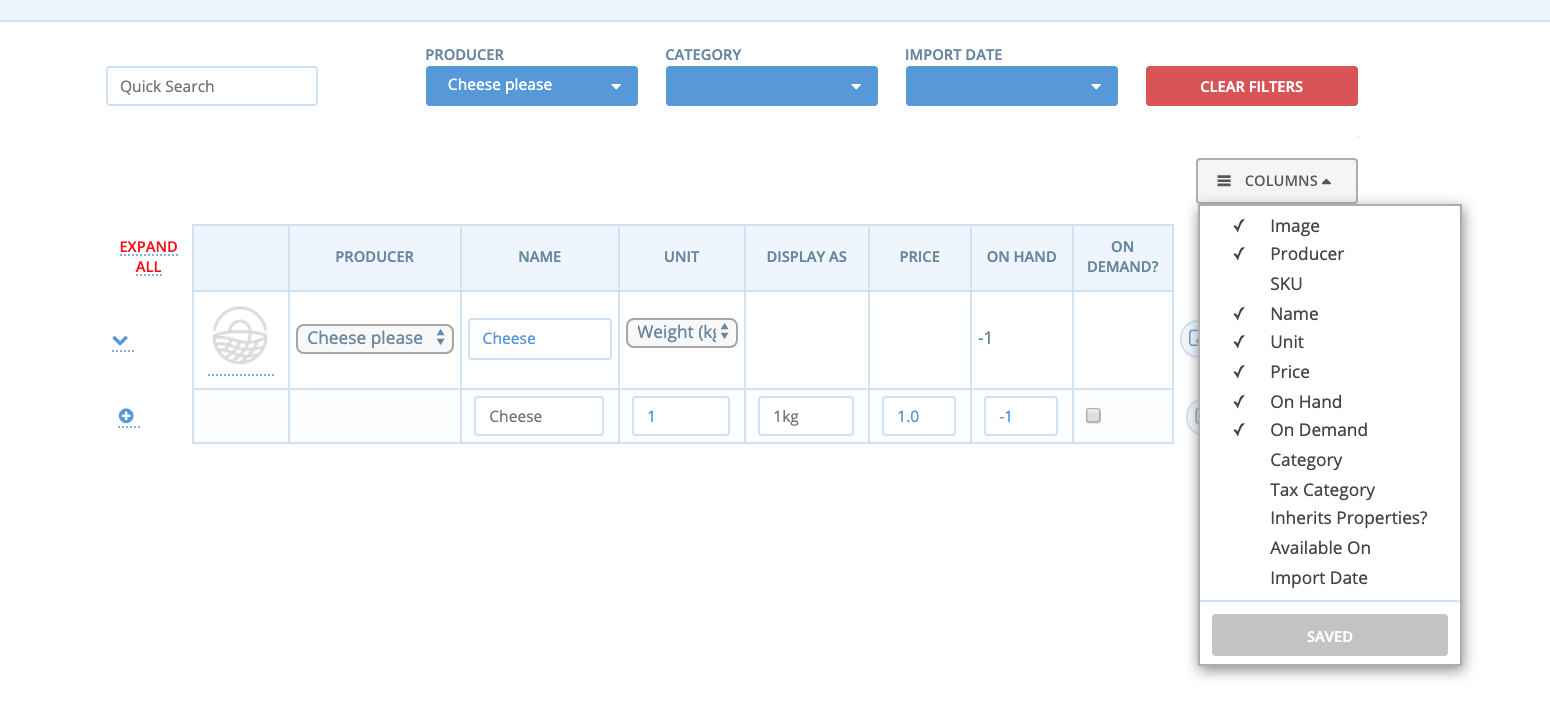
I am not sure if I am following completely. It doesn't look to me like what was discussed here has been implemented? This is what my products page looks like i.e. I have not set on-demand, so the stock level SHOULD be preventing backorders?
@myriamboure @luisramos0 @tschumilas
kirstenalarsen
on 8 Jul 2019
NB. there is also a roll-out consideration re. how this is done i.e. even if it would work if the variants that need stock management have a particular setting I don't think its really feasible to ask users to go and change a setting on every variant in order to make the system work the same as is was before?
I'm really hoping this is a thing where I am just misunderstanding something :)
kirstenalarsen
on 8 Jul 2019
Hi @kirstenalarsen
Agreed Behaviour
In terms of backoffice behaviour, the only difference is the disappearance of the "inventory settings", the stock should be managed and backorders are only accepted if the item is on_demand. backorderable and on_demand are now synonyms in OFN.
The other difference from v1, and you can see negative stock levels, is that when the item is on on_demand, the on_hand value is still updated and goes into negatives. To see this you need for example to:
- set on_hand to 0
- set item to on_demand
- add some quantity of that item to an order
- unset on_demand
- check that on_hand value is negative
Now that we are here: do you see a problem in this behaviour?
(this was mentioned in the v2 release notes under Stock Logic)
Problem
Regarding your problem, I am sure this is related to your very good test of buying the same item at the same time through different users. The stock management is working and was tested as normal: if on_hand is 1, one user will be able to buy it and all other users will see out of stock.
Checkout page
We need to ensure that after that item is sold, the checkout page reacts immediately to all other users (showing out of stock). From what you are saying it looks the checkout page does behave correctly, but not immediately because you were able to buy the 1 extra item...
Shopfront
Did you say the item is still showing on the product list in the shopfront?
After the last item is bought by another user, this is how the shopfront should behave:
- you have the item in the cart: you will see a pop up after a few seconds of the checkout and the shopfront line will be disabled
- you do not have the item in the cart but you reload the page: the shopfront line should disappear
- you do not have the item in the cart and you do not reload the page: you will still be able to click the plus sign and try to add the item to the cart, that's when the pop up will show
Problem only with sImultaneous checkout?
So, first, "it is allowing backorders and I can't turn that off?"
let's clarify what do you mean by this sentence? Did you manage to place backorders consistently or did you get that case only when checking out simultaneous from different accounts?
 luisramos0
on 8 Jul 2019
luisramos0
on 8 Jul 2019
I will try to clarify this issue a bit more.
- The problem is not the backorder setting. Backorders is off for limited stock items. It's basically the same logic as before. The only exception is the concurrent checkout bug.
- The concurrent checkout bug is inherent to Spree's checkout logic. It checks stock, then does the payment and then finalises the stock. If the stock changes between checking and finalising, we get incorrect behaviour. In v1 the order would either disappear or (after my patch) be incomplete and paid. In v2 the stock becomes negative.
- For this bug it doesn't help to update any page faster. During the whole time the two people are in their cart or on the checkout page the item is still available. And even when they click on checkout, the item is still available. It's a race condition where two people check stock (still available), both pay for the same item and when it comes to grabbing it, there's a conflict.
- The only solution to this is locking / reserving stock early.
- There is a separate bug that items with negative stock still show in the shopfront even though you can't buy them.
About the locking solution: We don't want to limit the checkout to only one person at a time. That would be very slow. Locking more specifically is more complicated. Maybe we can start off with a simple solution and then make it more complex over time.
- We limited the amount of total concurrent requests from 6 to 3 and have reduced the conflicts.
- We could synchronise on enterprise level so that only one person can check out in a shop at a time. This would solve our problem but is not perfect. On one hand it's block even when people are checking out different items that are not in conflict. And on the other hand it's not preventing the same item from one producer being sold through two different shops. This is only a problem if the stock is managed by the producer and not in a shop's inventory.
- We could synchronise on variants which means that only one cart with a certain variant can check out at the same time. This is a bit complicated because we would obtain multiple locks for each variant in the cart and we have to be careful to avoid dead locks (e.g. obtain locks in order of variant id). And this would also make people wait when a variant is sold through multiple shops, even if they have different stock management.
- The perfect system for this problem would be to synchronise on the stock level entry. But since we have stock saved either in variant overrides or in stock items, this is a bit complicated. It would only make users wait when their cart is affected by another checkout. It would be easier to implement if we had re-implemented variant overrides to use the same stock logic as other variants. This is also a consideration in the network feature.
The other idea would be to reserve stock early, before the payment. If the payment fails, we release the stock again. But this isn't that easy either. We would need to do these steps in separate transactions. Otherwise the whole thing is invisible to other checkouts at the same time. And we need to change or re-implement Spree's checkout logic to add these steps. In some cases, we are already resetting an order (after failed Paypal payment) and that fails from time to time. Just saying that similar work caused problems in the past.
 mkllnk
on 9 Jul 2019
mkllnk
on 9 Jul 2019
Just noting that this is not (at first look) what is causing @tschumilas issue with items at 0 in reports. My two conflicted orders above both appear as orders and in the report

kirstenalarsen
on 9 Jul 2019
re. what to do about this . . I think what I'm reaching is
- create a separate issue for items appearing in shopfront when in -ve stock (when they are not set to on demand) #4021
- IF we can confirm that this is only happening in this specific case of a tied checkout, usually connected to a Stripe payment, I am wondering whether a suitable solution would actually just be to specifically notify the Hub? So that they know there needs to be an adjustment / refund? It's not ideal, but from perspective of where we were at with NAF it would be much better re. reputation and irritated customers? And the actions we've already taken seem to have reduced the occurrence of the problem? hmmmm. not convinced - but most of the other things you've suggested @mkllnk sound quite complex / expensive? I could float this with NAF and see what they think?
kirstenalarsen
on 9 Jul 2019
re. what to do about this . . I think what I'm reaching is
- create a separate issue for items appearing in shopfront when in -ve stock (when they are not set to on demand)
- IF we can confirm that this is only happening in this specific case of a tied checkout, usually connected to a Stripe payment, I am wondering whether a suitable solution would actually just be to specifically notify the Hub? So that they know there needs to be an adjustment / refund? It's not ideal, but from perspective of where we were at with NAF it would be much better re. reputation and irritated customers? And the actions we've already taken seem to have reduced the occurrence of the problem? hmmmm. not convinced - but most of the other things you've suggested @mkllnk sound quite complex / expensive? I could float this with NAF and see what they think?
kirstenalarsen
on 9 Jul 2019
@luisramos0 - confirmed that agreed behaviour as outlined above. Yes I'm ok with that . . now that I understand it. I think we might have some issues getting our users across it.
Have updated the title of the issue to better reflect the problem
kirstenalarsen
on 9 Jul 2019
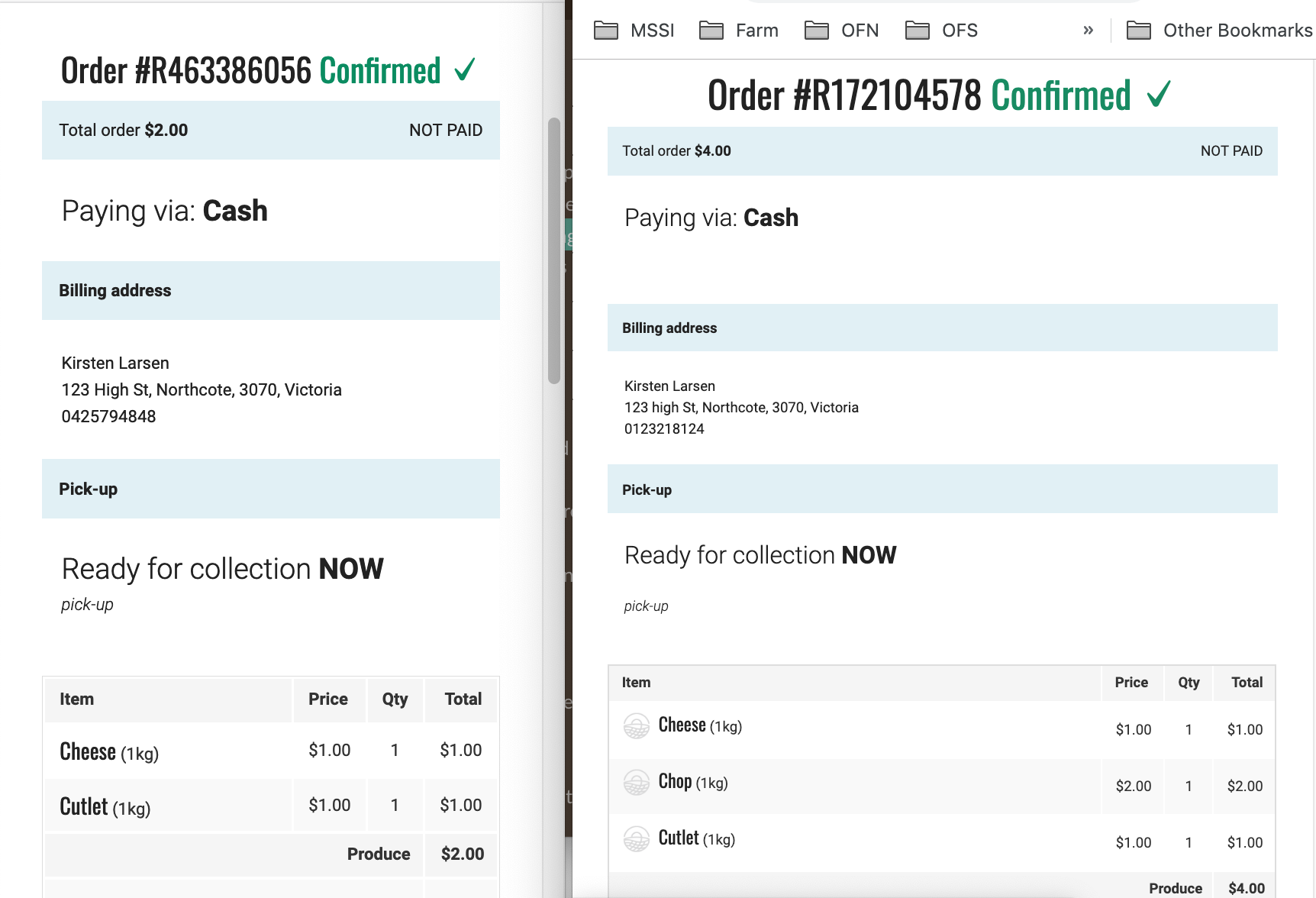
ok - don't know if this helps or hinders things but I have just confirmed that I can replicate the behaviour with a cash payment method . . so it's not just the delay of sending off to Stripe to process the payment.
kirstenalarsen
on 9 Jul 2019
Wow, super speed Kirsten. The woman who clicks faster than her stock logic.

mkllnk
on 9 Jul 2019
@mkllnk I think that "reserve stock early" is the best approach. Basically because messing with OrderInventory and the callbacks will be very painful.
The solution that comes to my mind is: instead of reserving stock itself we create a parallel lock specific to checkout where we log reserves (with variant/override and quantity). The stock_lock_service.
At the head of checkout_controller we would use this stock_lock_service.
First: this service would create a private stock_reserve of it's own, keeping track of the reserves, basically variant/overrides, quantity and timestamp.
Second: this service would use order.line_items.sufficient_stock? with a quantity that takes not only the quantity that's in the order but also what's in the reserve for the requested variant/override. If there is a reserve and the quantity requested is insufficient because of the reserve, it will wait a bit and then proceed or fail.
This service will have to be called from order.finalize to delete reserves and also have a batch to clear up reserves with more than 5 minutes for example.
I think this is not a quick fix but would make for a neat and scalable stock reserve solution that would be very well separated from all the rest of the code.
What do you think?
luisramos0
on 9 Jul 2019
@luisramos0
"reserve stock early" is the best approach
What do you think?
I'm not sure. I really like your clean modelling approach. But we have two problems here:
- Two processes access the same resource at the same time.
- Two processes are in their own transactions and don't see each other.
I think with your approach you create a separate space that could be easier to lock and synchronise. But we still need to solve the two problems above with transactions and locking.
And I'm worried that we are replicating stock logic and storage. So you can have a ReservedStock entry for a variant or a variant override. But the override may not override the stock in which case we need to store the ReservedStock against the variant. And when you change the variant, you need to update the ReservedStock table? This could become a nightmare.
Locking on database level is made for exactly this problem. The database has it's own logic and data model to represent locks internally and I think it would be good if we can rely on that.
My currently preferred way would be to lock on variant level. And we ignore any overrides for the locking. That means it's locking a little bit too much when there are stock overrides in multiple shops at the same time but that's better than not locking enough. And we could fine-tune that later if it's a problem.
Imagine cart 1 with variant 1, 2, 3, 5 and cart 2 with variant 2, 3, 4. It doesn't matter through which shops these variants are sold. When it comes to the checkout, there are roughly two scenarios:
- Cart 1 is slightly earlier than cart 2.
- Cart 1 locks variant 1.
- Cart 2 locks variant 2.
- Cart 1 tries to lock variant 2 but has to wait.
- Cart 2 locks variant 3 and 4.
- Cart 2 checks stock and checks out. Done, commit and release.
- Cart 1 gets lock on variant 2 and checks stock which may be zero now.
Scenario 2:
- Cart 1 is earlier than cart 2.
- Cart 1 locks variant 1.
- Cart 1 locks variant 2.
- Cart 2 tries to lock variant 2 but has to wait.
- Cart 1 locks variant 3 and 5.
- Cart 1 checks stock and checks out. Done, commit and release.
- Cart 2 gets lock on variant 2 and checks stock which may be zero now.
When locking variants in a defined order (by id) we avoid dead locks. Reading should still be possible during that process. We need write locks.
If we implemented your idea, Luis, we would still need to do all this, it's just that we would do it on the ReservedStock rows instead of the Variant rows. The benefit would be that it's more isolated and could affect less of the rest of the system. But therefore we can have all the other problems I mentioned above. And there is a new problem. If a variant hasn't been checked out lately, there is now ReservedStock row yet. Two processes would try to create that row in two different transactions, not seeing each other. We would need to lock the whole table or we end up with a duplication problem again. I guess that's what happened in #3924. I don't think it's worth it.
Do you have more insight on your solution that would solve these problems and make it simpler?
mkllnk
on 10 Jul 2019
all right. I am not sure it was clear from my explanation that these reserves are all very short lived and destroyed by a cron if present after lets say 5 minutes of their creation. You will never need to update these reserves, only destroy them if abandoned for some reason.
My solution doesn't specify (yet) how to solve the problem of locking (creating/managing the reserves), it just designed the solution, the locking will go inside the service. The problems you are raising will be solved inside the stock_lock_service or maybe better name stock_reserve_service.
Also, with overrides, we are not reserving against stock levels (like 90 ou 80 in the example above), we are reserving quantities only (10 in the example above). We don't need to worry how the overrides stock is managed, we will just rely on variant.can_supply? which is then handled by the variant_override code through variant_stock.rb.
I dont think your last problem is valid in my proposal, each reserve is a separate row. A reserve is a reserve of a quantity for a given variant or override. When a new thread is coming to the service it just queries all reserves of its variant or override and creates its own reserves if quantity is still available.
So, the problems you are listing will all be solved in the thread-safe code inside this service.
I'll give it a try here and we can work from this. I am not sure about the locking code but I meant "pessimistic lock at reserves table level just while the reserves are verified and created"
stock_reserve_service
  def reserve_stock(order)
    StockReserve.transaction do
      lock!

      order.line_item.each do |line_item|
        quantity_to_verify = line_item.quantity + get_reserved_quantity(order.distributor, line_item.variant)
        OpenFoodNetwork::ScopeVariantToHub.new(order.distributor).scope(variant)
        if variant.can_supply?(quantity_to_verify)
          reserve_stock( order.distributor, variant, line_item.quantity, timestamp)
        else
          # flag out_of_stock, fail checkout
        end
      end

      save!
  end
end
order.finalize will call a method like clear_reserves and as you mentioned, clear_reserves will be called as well from the backoffice when stock is updated.
luisramos0
on 10 Jul 2019
we probably should get one more dev into this, ping @sauloperez @Matt-Yorkley @kristinalim
luisramos0
on 12 Jul 2019
I'd been wondering this week if we needed some sort of queuing system for order processing.
I think reserving the stock early sounds like a good approach. :+1:
 Matt-Yorkley
on 12 Jul 2019
Matt-Yorkley
on 12 Jul 2019
I am not sure it was clear from my explanation that these reserves are all very short lived and destroyed by a cron if present after lets say 5 minutes of their creation. You will never need to update these reserves, only destroy them if abandoned for some reason.
That was clear to me. But if we ignore these short-lived entries for other updates, we can still have race conditions. They would be very unlikely though.
I think that whatever solution we go with, we will need locking. And locking can solve the problem on it's own. That's why I would try that. Maybe we have to go into spikes to see which walls we are really hitting?
mkllnk
on 18 Jul 2019
Is this really an S2 and the top current priority? Am I right in thinking two users have to order at exactly the same time, and this bug has not been reported by any users or seen on a live server?
Matt-Yorkley
on 18 Jul 2019
Matt, I raised the same question on slack
@kirstenalarsen was checking with users again and report back.
yeah, this was seen in production: the negative stock.
I think this is an S2 as the workaround is to inform the hub manager and then she needs to adjust the orders: pretty bad.
But, I think we all agree we dont want to spend too much time on this one now, so I am moving it to S3 so it's clear this is not something we will address now.
@kirstenalarsen please update us and please move to S2 if you think this needs to be addressed now.
luisramos0
on 18 Jul 2019
Yes, we do see this in production. It became better after reducing the unicorn worker count again.
It's a small farm with limited stock and most of it sells out. And I guess that they send an email around when the order cycle opens. So everybody jumps on it and tries to buy as long as it's in stock.
mkllnk
on 23 Jul 2019
@mkllnk all we need to do for this is the display error when it happens (pref. coloured band at top) - North Arm Farms have confirmed they're fine, actually really happy, with that
kirstenalarsen
on 6 Aug 2019
I was wondering how we test this issue in our automated specs. And I think we need to run two threads running CheckoutController#update at the same time. We would need breakpoints to synchronise the threads and make sure they execute in the right order. The fork_break seems to be the way to go. There are some nice examples how to use it:
mkllnk
on 8 Aug 2019
Related issues
 kristinalim
·
3Comments
kristinalim
·
3Comments
 andrewpbrett
·
3Comments
andrewpbrett
·
3Comments
 sauloperez
·
3Comments
sauloperez
·
3Comments
sauloperez
·
3Comments
sauloperez
·
3Comments
 HugsDaniel
·
3Comments
HugsDaniel
·
3Comments
Most helpful comment
Wow, super speed Kirsten. The woman who clicks faster than her stock logic.