Openfoodnetwork: Confirm SSL Certs are autorenewing on all OFN-Install servers
Description
There seems to be some confusion about SSL certs.
Today Belgium's expired.
France still have a bunch of manual reminders to renew theirs on a regular basis.
With OFN Install and Let'sEncrypt certs should regularly autorenew meaning an end to all expired SSL certs. And this, quite simply, is a marvellous thing!
Expected Behavior
All OFN Install instances should have autorenewing SSL certs
Actual Behavior
Most instances are unclear as to whether this is working or not.
Steps to Reproduce
- Wait some months
- Everything burns when your cert expires
Animated Gif/Screenshot
Context
Severity
bug-s3: a feature is broken but there is a workaround
Server Checklist
[x] UK
[ ] FR
[ ] DE
[x] ES
[ ] US
[x] BE
(non OFN-install servers not included in the above list but possibly should be?)
 lin-d-hop
All 24 comments
Certbot adds a systemd timer (cron job alternative) which can be checked out running sudo systemctl list-timers. For Katuma this returns:
NEXT                          LEFT          LAST                         PASSED       UNIT                         ACTIVATES
(...)
mar 2019-05-28 20:45:05 UTC   10h left      mar 2019-05-28 03:42:09 UTC  6h ago       certbot.timer                certbot.service
(...)
Turns out BE has the appropriate timer as well
NEXT                          LEFT          LAST                          PASSED       UNIT                         ACTIVATES
(...)
Tue 2019-05-28 16:16:28 CEST  4h 27min left Tue 2019-05-28 10:42:00 CEST  1h 7min ago  certbot.timer                certbot.service
 sauloperez
on 28 May 2019
sauloperez
on 28 May 2019
UK has a timer as well but the logs don't look good
2019-05-28 00:38:37,542:WARNING:certbot.renewal:
Traceback (most recent call last):
  File "/usr/lib/python3/dist-packages/certbot/renewal.py", line 64, in _reconstitute
    renewal_candidate = storage.RenewableCert(full_path, config)
  File "/usr/lib/python3/dist-packages/certbot/storage.py", line 460, in __init__
    self._check_symlinks()
  File "/usr/lib/python3/dist-packages/certbot/storage.py", line 519, in _check_symlinks
    "expected {0} to be a symlink".format(link))
certbot.errors.CertStorageError: expected /etc/letsencrypt/live/openfoodnetwork.org.uk/cert.pem to be a symlink
2019-05-28 00:38:37,542:WARNING:certbot.renewal:Renewal configuration file /etc/letsencrypt/renewal/openfoodnetwork.org.uk.conf is broken. Skipping.
2019-05-28 00:38:37,543:DEBUG:certbot.renewal:Traceback was:
Traceback (most recent call last):
  File "/usr/lib/python3/dist-packages/certbot/renewal.py", line 64, in _reconstitute
    renewal_candidate = storage.RenewableCert(full_path, config)
  File "/usr/lib/python3/dist-packages/certbot/storage.py", line 460, in __init__
    self._check_symlinks()
  File "/usr/lib/python3/dist-packages/certbot/storage.py", line 519, in _check_symlinks
    "expected {0} to be a symlink".format(link))
certbot.errors.CertStorageError: expected /etc/letsencrypt/live/openfoodnetwork.org.uk/cert.pem to be a symlink

2019-05-28 00:38:37,543:DEBUG:certbot.log:Exiting abnormally:
Traceback (most recent call last):
  File "/usr/bin/certbot", line 11, in <module>
    load_entry_point('certbot==0.28.0', 'console_scripts', 'certbot')()
  File "/usr/lib/python3/dist-packages/certbot/main.py", line 1340, in main
    return config.func(config, plugins)
  File "/usr/lib/python3/dist-packages/certbot/main.py", line 1247, in renew
    renewal.handle_renewal_request(config)
  File "/usr/lib/python3/dist-packages/certbot/renewal.py", line 455, in handle_renewal_request
    len(renew_failures), len(parse_failures)))
certbot.errors.Error: 0 renew failure(s), 2 parse failure(s)
But the site is working. cc @Matt-Yorkley
sauloperez
on 28 May 2019
But does it only have the timer now because Luis fixed it this morning?
Lets do this:
- [ ] Check all production servers to find any that aren't auto-renewing
- [ ] Check the auto-renew commands for Certbot
- [ ] Make sure ofn-install configures auto-renew when provisioning
 Matt-Yorkley
on 28 May 2019
Matt-Yorkley
on 28 May 2019
Now I understand why they check/renew the certs manually in FR
2019-05-28 06:59:29,567:ERROR:certbot.renewal:All renewal attempts failed. The following certs could not be renewed:
2019-05-28 06:59:29,568:ERROR:certbot.renewal:  /etc/letsencrypt/live/prod.openfoodfrance.org/fullchain.pem (failure)
2019-05-28 06:59:29,568:DEBUG:certbot.log:Exiting abnormally:
Traceback (most recent call last):
  File "/usr/bin/certbot", line 11, in <module>
    load_entry_point('certbot==0.28.0', 'console_scripts', 'certbot')()
  File "/usr/lib/python3/dist-packages/certbot/main.py", line 1340, in main
    return config.func(config, plugins)
  File "/usr/lib/python3/dist-packages/certbot/main.py", line 1247, in renew
    renewal.handle_renewal_request(config)
  File "/usr/lib/python3/dist-packages/certbot/renewal.py", line 455, in handle_renewal_request
    len(renew_failures), len(parse_failures)))
certbot.errors.Error: 1 renew failure(s), 0 parse failure(s)
Make sure ofn-install configures auto-renew when provisioning
AFAIK that's something certbot does when being installed.
sauloperez
on 28 May 2019
Ok, so the issue with France is that the domain changed, but we don't force any updates? So because there was a cert present on the server, the settings weren't touched when the domain changed from prod.openfoodfrance.org to www.openfoodfrance.org?
Matt-Yorkley
on 28 May 2019
We should take a look at this as well: https://github.com/openfoodfoundation/ofn-install/issues/392
Matt-Yorkley
on 28 May 2019
Moving it back to the Sysadmin backlog because I can't work on it right now (and it's an S3). We just did an exploration to understand the extent of the problem.
sauloperez
on 29 May 2019
@sauloperez yes if it is an s3 we need to treat it like the others. OFN install issues are now prioritize with the others OFN issues, so unless we consider this s2, I don't think anyone should pick it up right now. There are other stuff before.
 RachL
on 29 May 2019
RachL
on 29 May 2019
ERROR:certbot.renewal: ... prod.openfoodfrance.org ...
I made a PR to the coopdevs certbot repo today to allow for updating certificates where the details are no longer correct, it'll really help with these issues.
Matt-Yorkley
on 21 Jun 2019
The Canadian server failed to update its certificate. So I checked all the servers again:
ssh ofn-admin@ofn-de "sudo certbot renew --dry-run"
- au: Still had the old certificate of the global website. That needed modifying but now it's fine.
- de: All good. :heavy_check_mark:
- be: All working but there are two certificates, one ending in
-0001. Where does that come from? Should we delete it? - fr: The main cert is good but the old
prod2.open...needed deleting. Done. - es: All good. :heavy_check_mark:
- uk: The main certificate seems fine. But two old ones need deleting. One of them has brackets in the domain name:
[uwww.openfoodnetwork.org.uk]Matt, over to you. - ca: Manually fixed the config.
- us: All good. :heavy_check_mark:
In theory, certificates are renewed automatically. In practice, things break for various reasons. There is nothing we can do to prevent it from breaking. But, we can check our servers for certificates that will expire soon so that we can act before they expire.
That said, I couldn't find such an option in HappyApps. We do have that option in Wormly though:
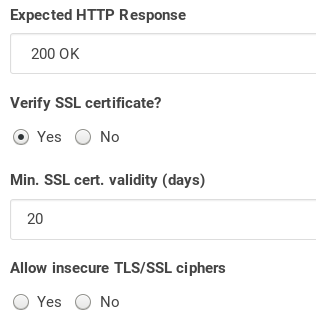
Should we create certificate checks for every server in Wormly? Are there other contenders, free like HappyApps but with more checks? If we set up our own metrics server, it may already come with that or we can implement it:
openssl s_client -connect openfoodnetwork.org:443 2>/dev/null | openssl x509 -noout -enddate
 mkllnk
on 14 Aug 2019
mkllnk
on 14 Aug 2019
if you fixed most of the servers I'm not sure I'd add any check. It feels like it would defeat the purpose of autorenewal so I prefer to focus on making that work for the remaining ones.
I haven't been bugged by this in Katuma in ages so I see no reason for other servers to not behave the same way.
sauloperez
on 4 Sep 2019
I have a PR open to update the coopdevs certbot role which I think can help with this...
Matt-Yorkley
on 4 Sep 2019
I just had to renew BE's certificate manually because the site was broken. We need to check this again.
sauloperez
on 25 Nov 2019
Hot tip: you can use ansible ad-hoc commands to check these things across all servers at once, in the format: ansible <server group> -u <remote user> -a <command> (in the ofn-install directory).
Example: ansible all-prod -u ofn-admin -a "sudo certbot certificates"
Matt-Yorkley
on 26 Nov 2019
First of all, it's really bad that most servers didn't have any monitoring for expiring certificates. The ability to check the expiry date of a certificate has been one reason for me stay with Wormly and not transition to Happy Apps. Three servers were covered already but I added the rest to our Wormly monitoring as well. The account is in Bitwarden.
- [x] Australia
- [x] Belgium
- [x] Germany
- [x] Spain
- [x] France
- [x] UK
- [x] Canada
- [x] US
The #devops-notifications Slack channel will be notified 20 days before a certificate expires.
mkllnk
on 5 Dec 2019
I ran ansible all-prod -u ofn-admin -a "sudo certbot certificates" as Matt suggested. Thank you!
I found an invalid certificate on the Australian server:
  Certificate Name: www2.openfoodnetwork.org-0001
    Domains: www2.openfoodnetwork.org
    Expiry Date: 2020-01-11 07:05:55+00:00 (VALID: 37 days)
    Certificate Path: /etc/letsencrypt/live/www2.openfoodnetwork.org-0001/fullchain.pem
    Private Key Path: /etc/letsencrypt/live/www2.openfoodnetwork.org-0001/privkey.pem
  Certificate Name: www2.openfoodnetwork.org
    Domains: www2.openfoodnetwork.org global.openfoodnetwork.org openfoodnetwork.org www.openfoodnetwork.org
    Expiry Date: 2019-10-13 12:11:51+00:00 (INVALID: EXPIRED)
    Certificate Path: /etc/letsencrypt/live/www2.openfoodnetwork.org/fullchain.pem
    Private Key Path: /etc/letsencrypt/live/www2.openfoodnetwork.org/privkey.pem
I will fix those.
And also an invalid config in the UK:
Renewal configuration file /etc/letsencrypt/renewal/[uwww.openfoodnetwork.org.uk].conf produced an unexpected error: expected /etc/letsencrypt/live/[uwww.openfoodnetwork.org.uk]/cert.pem to be a symlink. Skipping.
Renewal configuration file /etc/letsencrypt/renewal/openfoodnetwork.org.uk.conf produced an unexpected error: expected /etc/letsencrypt/live/openfoodnetwork.org.uk/cert.pem to be a symlink. Skipping.
@Matt-Yorkley Can we delete those two invalid configs?
mkllnk
on 5 Dec 2019
I noticed that the two config files
www2.openfoodnetwork.org.confandwww2.openfoodnetwork.org-0001.conf
were created by different certbot versions. The first file was created in July by certbot 0.35.1 and the the -0001 file was created in October by certbot 0.31.0 which is installed right now. That is confusing. Did we have another PPA at some point that provided 0.35.1? The Ubuntu original version is 0.27.0. Anyway, it looks like our certbot got downgraded at some point and maybe the older certbot created its own -0001 file to work with and is now ignoring the original? Just a guess.
Once we move to Ubuntu 18, I hope that we can get rid of the certbot-nginx role and just use the Ubuntu sources. That should simplify the setup and config and be less prone to errors.
Two days ago, certbot 1.0 was released. I hope that the new version will put an end to these incompatibilities and we will have a stable config once we get to that version.
mkllnk
on 5 Dec 2019
Once we move to Ubuntu 18, I hope that we can get rid of the certbot-nginx role and just use the Ubuntu sources. That should simplify the setup and config and be less prone to errors.
watch out, certbot nginx does something more than that :point_right: https://github.com/coopdevs/certbot_nginx
sauloperez
on 5 Dec 2019
nice work @mkllnk
shall we move this to test ready and put a dev-test label so another dev will have a look OR shall we just close it?
 luisramos0
on 5 Dec 2019
luisramos0
on 5 Dec 2019
@Matt-Yorkley Can we delete those two invalid configs?
I've just removed those two invalid configs after double-checking the details. :+1:
Matt-Yorkley
on 6 Dec 2019
@sauloperez certbot_nginx is installing the nginx plugin, right? It looks like it's available in the Ubuntu repository now: https://packages.ubuntu.com/bionic/python-certbot-nginx
Is there anything else the Ansible role does?
mkllnk
on 10 Dec 2019
It looks like it's available in the Ubuntu repository now
Yep, that's what it installs in https://github.com/coopdevs/certbot_nginx/blob/8525161c859f043675f39f21a8d5d6f8113eeba2/tasks/main.yml#L12-L15
Is there anything else the Ansible role does?
It actually deals with the certificate creation in https://github.com/coopdevs/certbot_nginx/blob/master/tasks/certificate.yml and we plan to make it a bit wiser. Don't hesitate to open any issue in that repo @mkllnk .
sauloperez
on 12 Dec 2019
I think that we tested this sufficiently now. And we have monitoring set up. I would close it.
mkllnk
on 20 Dec 2019
Related issues
 myriamboure
·
3Comments
myriamboure
·
3Comments
 kristinalim
·
3Comments
Matt-Yorkley
·
3Comments
kristinalim
·
3Comments
Matt-Yorkley
·
3Comments
 andrewpbrett
·
3Comments
andrewpbrett
·
3Comments
 filipefurtad0
·
3Comments
filipefurtad0
·
3Comments
Most helpful comment
First of all, it's really bad that most servers didn't have any monitoring for expiring certificates. The ability to check the expiry date of a certificate has been one reason for me stay with Wormly and not transition to Happy Apps. Three servers were covered already but I added the rest to our Wormly monitoring as well. The account is in Bitwarden.
The #devops-notifications Slack channel will be notified 20 days before a certificate expires.