Openfoodnetwork: When switching between OCs in a shop with multiple OCs, the 'next order closing' count is not updating correctly.
Description
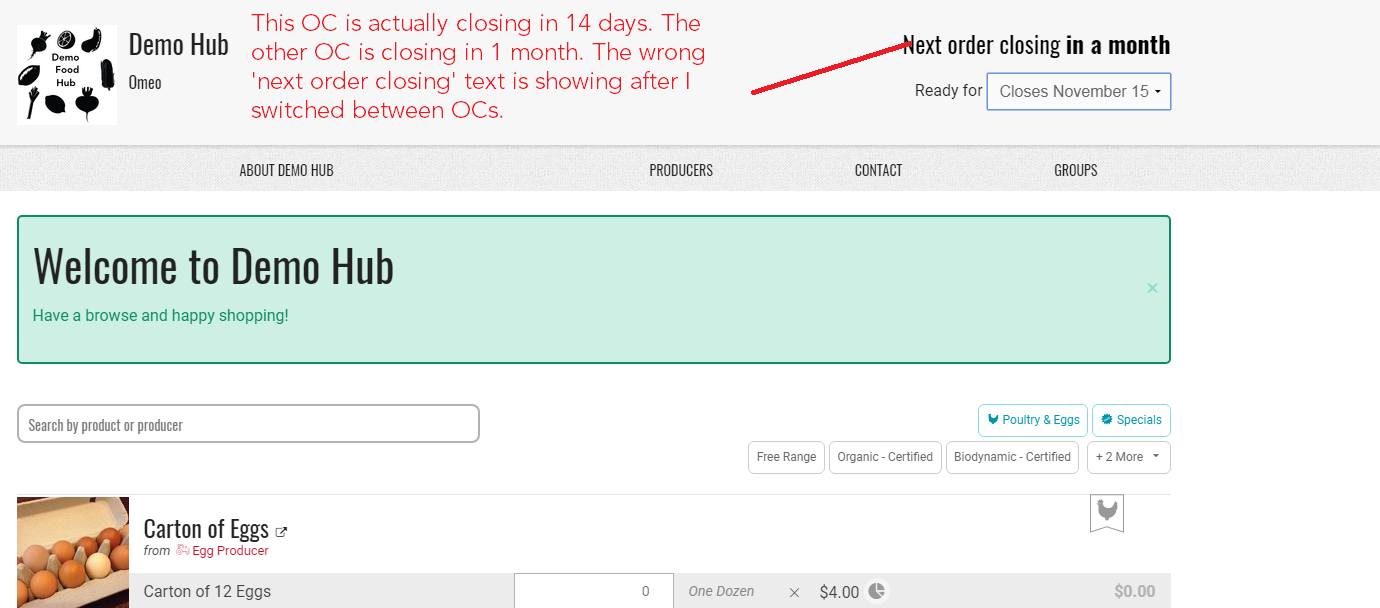
When I first land in a shop that has 2 open OCs, I am prompted to select which OC I want. The correct 'next order closing' date is given (e.g. 5 days). But if I then switch to the other OC, the 'next order closing' date often doesn't update. This can mislead the customer. If I switch again, it might update, meaning I'm seeing the wrong closing count for that OC.
Expected Behavior
When switching OC in one given shopfront, the 'next order closing" date should be the one corresponding to the given order cycle.
Actual Behavior
When switching OC in one given shopfront, the 'next order closing" date is the one corresponding to the precedent order cycle chosen for the same shopfront.
Steps to Reproduce
- Create 2 or 3 order cycles for one same shop, with different ordering periods. Both should be open on the day you do the test of course.
- Go onthe shopfront, you are asked to choose an OC, choose one.
- Then switch to the another one, and switch again and see what happens.
Animated Gif/Screenshot
https://www.useloom.com/share/29d02bd6ae7f412f99b48b48d5ccb6d2
Please see this shop as a demonstration (until Nov 15 2017) - https://openfoodnetwork.org.au/demo-hub/shop
## Context
The user encountered this bug through customers feedbacks who didn't understand the inconsistency of ordering period with what was announced.
Severity
I propose s2 as more than just a few users are impacted, and there is no workaround.
Your Environment
- Version used: 1.10.1
- Browser name and version: Chrome 53.0.2785.116 (64-bit)
- Operating System and version (desktop or mobile): Ubuntu 16.04 LTS
 sstead
All 16 comments
@daniellemoorhead , @oeoeaio and @mkllnk can we please make this issue a priority for early in Jan? It's causing headaches for Synchronicity Farm in QLD.
sstead
on 26 Dec 2017
@sstead I re-based the bug description based on the new template and added s2 severity, I agree with you that it's quite important, and there is no workaround for it. So hopefully we should pick it up as a priority in our new process :-)
 myriamboure
on 3 Jan 2018
myriamboure
on 3 Jan 2018
@HugsDaniel it seems some other things you were working on are a bit blocked... if you want there is still this one that is a priority!
myriamboure
on 20 Feb 2018
The issue seems to come from OrderCycleChangeCtrl in order_cycle_controller.js.coffee.
In line 23 of shop.html.haml view, %strong {{ OrderCycle.orders_close_at() | date_in_words }} gives the previously selected order cycle's closing date, which means that OrderCycle scoped in the controller is the previous one.
There's a method keeping track of previous order cycle in the controller, @Matt-Yorkley do you know the point of it ? I believe it's the one causing trouble, but I can't find how.
 HugsDaniel
on 19 Mar 2018
HugsDaniel
on 19 Mar 2018
I'd say you should look in app/assets/javascripts/darkswarm/services/order_cycle.js.coffee at the orders_close_at() method.
I think it's possible that when %strong {{ OrderCycle.orders_close_at() | date_in_words }} is used on the page, it just outputs the result of that method (once), but it doesn't track changes because it's not an object property. Usually if you use {{ Object.property }}, the value in the view is bound to the value on the object. Does that make sense?
 Matt-Yorkley
on 19 Mar 2018
Matt-Yorkley
on 19 Mar 2018
@Matt-Yorkley I think function calls and object properties behave in the same way. An expression (regardless of whether it is a function call or object property) will be evaluated on every digest cycle unless the expression is prefixed with the one-time binding operator: ::
For example: {{ ::OrderCycle.orders_close_at() | date_in_words }} will only be evaluated once on page load. The line @HugsDaniel is referring to doesn't have that operator, so I think it must be getting stuck for a different reason.
The code is really complicated: there are five separate elements that are involved in changing the order cycle, they are the OrderCycleCtrl (controller), OrderCycleChangeCtrl (controller), ofnChangeOrderCycle (directive), OrderCycle (service) and the select element in shop.html.haml.
Assuming that no items are present in the cart, it looks like this is what happens when a new order cycle is selected from the dropdown, this is what happens:
1) OrderCycle.order_cycle is updated via OrderCycleCtrl (it is bound scope.order_cycle via ngModel)
2) The 'change' callback is fired for the ofnChangeOrderCycle directive.
3) The change callback calls scope.changeOrderCycle() which is defined in the OrderCycleChangeCtrl
4) changeOrderCycle calls OrderCycle.push_order_cycle, and passes it a callback
5) OrderCycle.push_order_cycle sends a PUT request and returns a promise
6) Once the promise is resolved the value of OrderCycle.order_cycle.orders_close_at is set according to the response, and then the callback passed by step 4 is called.
The behaviour @sstead is reporting looks like a race condition to me, and the PUT request at app/assets/javascripts/darkswarm/services/order_cycle.js.coffee:5 and the $timeout call at line app/assets/javascripts/darkswarm/controllers/order_cycle_controller.js.coffee:21 look like the most likely culprits to me. I'm not sure what the $timeout is doing, but that is where I would start.
As far as I can see the previous_order_cycle_id on mentioned in OrderCycleChangeCtrl doesn't seem to be used unless items are in the cart, but I could be wrong.
 oeoeaio
on 21 Mar 2018
oeoeaio
on 21 Mar 2018
Thanks @Matt-Yorkley @oeoeaio, I'll dig into that.
HugsDaniel
on 26 Mar 2018
So, I found a clue; in order_cycle.js.coffee, I console.log as following :
    @order_cycle = orderCycleData # Object or {} due to RABL
    @push_order_cycle: (callback) ->
      console.log(@order_cycle)
      new $resource("/shop/order_cycle").save {order_cycle_id: @order_cycle.order_cycle_id}, (order_data)->
        console.log(order_data)
        OrderCycle.order_cycle.orders_close_at = order_data.orders_close_at
        callback()
Results :
@order_cyclecontains the selected order_cycleorder_datacontains the previous order_cycle
That's where the bug comes from.
I tried to set it right with
OrderCycle.order_cycle.orders_close_at = orderCycleData.orders_close_at
but it doesn't update the view.
I don't get it ! Would you have some clues ?
HugsDaniel
on 3 Apr 2018
Any progress on this @HugsDaniel ? It seems to be some tricky Angular things, maybe you will make a better use of your time by focusing on Ruby things, right? Do you think someone who already know about Angular should work on it instead? Let us know and we can find some Angular beast in our team :-)
myriamboure
on 18 Apr 2018
@myriamboure We took a look with @enricostano and it seems to be worth being tackled by an Angular beast. It goes a bit beyond my Angular knowledge... As I start working on Spree upgrade, maybe I should focus there and let this one be done by someone else, what do you think ?
HugsDaniel
on 19 Apr 2018
Ok let's do that @HugsDaniel :-) I de-assign you and put it back in dev ready. @mkllnk @KeirOsborn @stveep does one of you feel comfortable with Angular and can add that in his pipe? It's a s2 bug so we are supposed to fix it asap.
myriamboure
on 19 Apr 2018
@myriamboure Hi, I might be able to have a look at it this week, if it's still a priority. Let me know.
Thanks
 KeirOsborn
on 24 Apr 2018
KeirOsborn
on 24 Apr 2018
Yes @KeirOsborn. It is still a severity 2
 sauloperez
on 24 Apr 2018
sauloperez
on 24 Apr 2018
Go for it @KeirOsborn, it would be most wonderful if you could solve this!
 daniellemoorhead
on 27 Apr 2018
daniellemoorhead
on 27 Apr 2018
Hey @KeirOsborn any news on this one? :point_right:
myriamboure
on 11 May 2018
Hey @KeirOsborn do you have time to work on it in the coming days? It's been sitting here for a while and is supposed to be high priority (2) and should be fixed asap... let us know, if you can't fix that this week I can ask if someone else is available. Thanks
myriamboure
on 21 May 2018
Related issues
 filipefurtad0
·
3Comments
filipefurtad0
·
3Comments
 RachL
·
3Comments
Matt-Yorkley
·
3Comments
myriamboure
·
3Comments
RachL
·
3Comments
Matt-Yorkley
·
3Comments
myriamboure
·
3Comments
 luisramos0
·
3Comments
luisramos0
·
3Comments
Most helpful comment
@myriamboure Hi, I might be able to have a look at it this week, if it's still a priority. Let me know.
Thanks