Openfoodnetwork: Variants not sorted by weight in shopfront
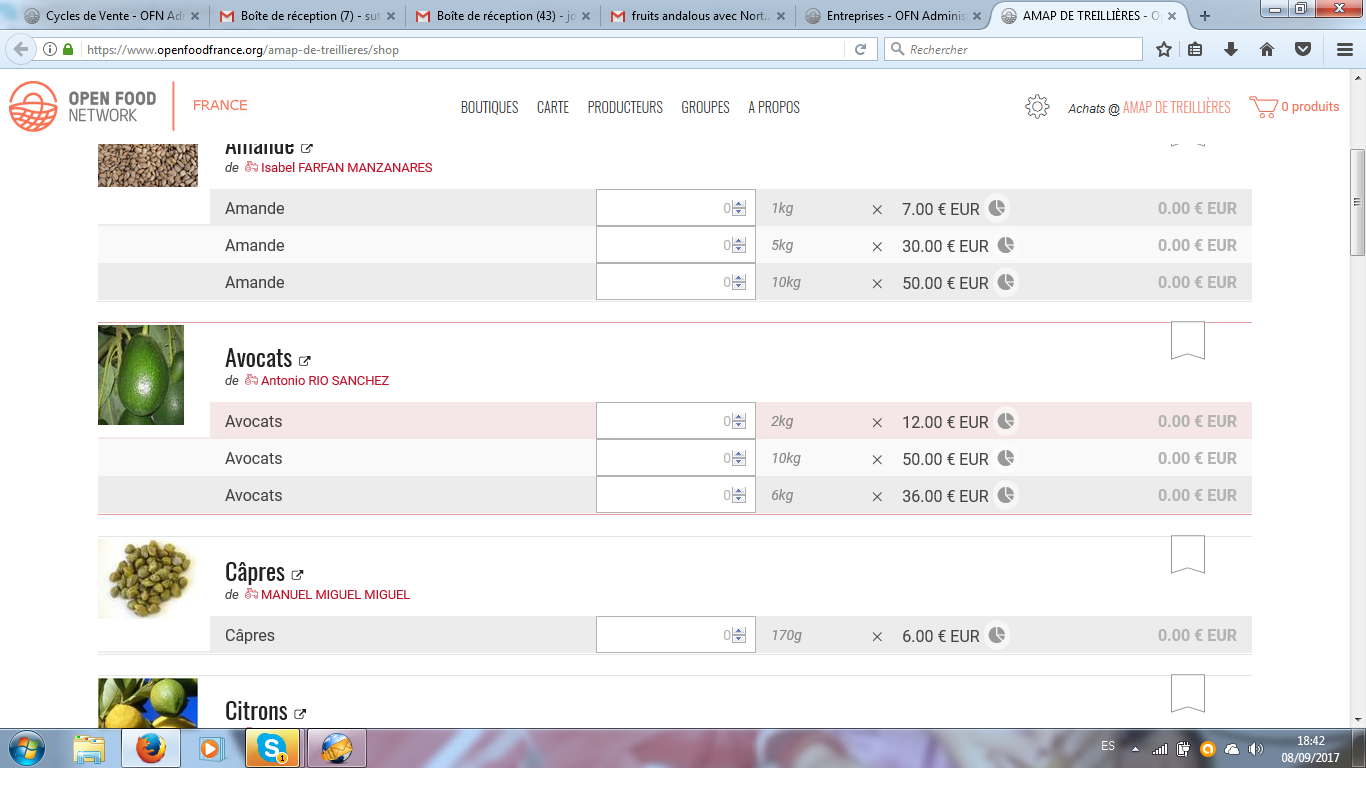
See "avocats" the 10kg variant is in the middle... when the user tested it, he reported that to me, and I tested and on my side it was ok. Is there a delay for the ordering to happen ? This would be quite surprising... I have asked more details if he has, anyone experiencing a bug in variants ordering ?
 myriamboure
All 19 comments
@myriamboure which release are you running?
@Duende13 - just tagging you in case...
 lin-d-hop
on 9 Sep 2017
lin-d-hop
on 9 Sep 2017
1.8.13 @lin-d-hop I had on skype the user, now it's displaying correctly... maybe we shouldn't spend time on it and wait until it happens again... Maybe it's just a short delay in displaying in right order ? Anyway, the user is happy as it's displaying ok now so I'm happy to close it.
myriamboure
on 9 Sep 2017
Twas fixed in https://github.com/openfoodfoundation/openfoodnetwork/pull/1652
Released in v1.8.13.
If if was reported after you deployed this release then watch out, it might be a bug.
If it was reported before you deployed this release you can safely close it.
lin-d-hop
on 9 Sep 2017
Yes, that was reported after the upgrade, so I guess it is a bug somewhere, but I can't reproduce it... and not sure we should spend too much time on it as it seems not to be a persistent bug, now the variant is displayed correctly.
myriamboure
on 10 Sep 2017
Ok so this is happening again, if you click https://www.openfoodfrance.org/amap-de-treillieres/shop you will see by yourself on the "avocats" product.

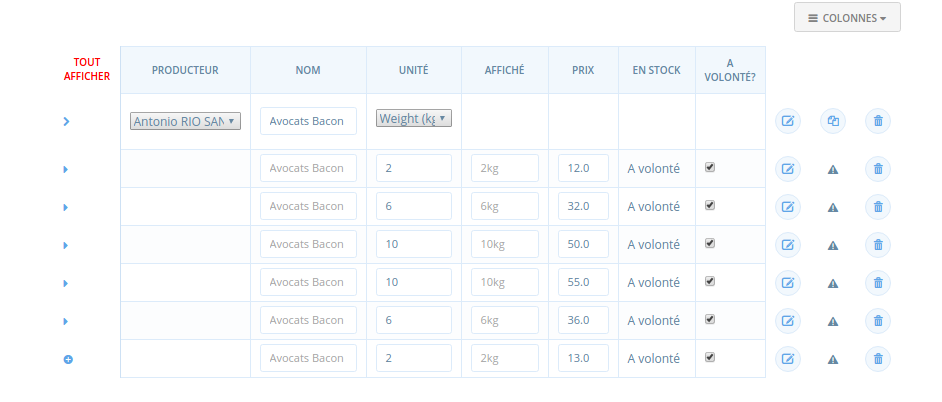
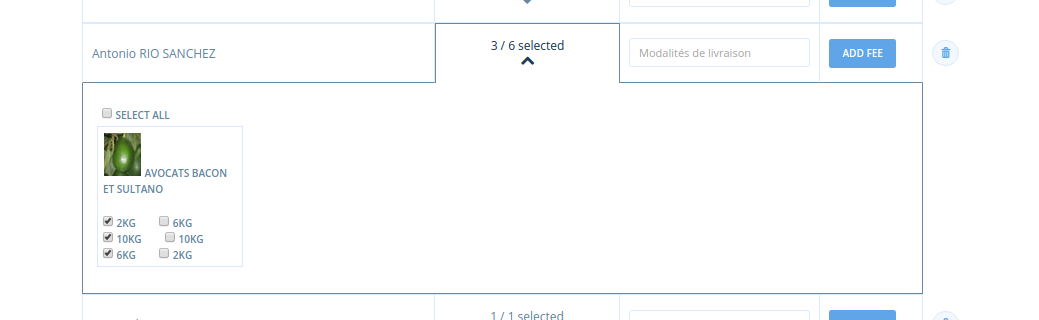
I checked the product, the user created two variants for each weight with diferent prices but he just put one of each weight in the OC so that shouldn't have an impact:
In products list:
In OC:
Any idea where the problem can come from @Matt-Yorkley @lin-d-hop ?
myriamboure
on 13 Sep 2017
@Duende13 can you take a look and see if you can replicate @myriamboures bug please? You recent fix should have fixed this so looks like it's not quite working.
lin-d-hop
on 14 Sep 2017
Hi @lin-d-hop and @myriamboure ,
I'll have a look but just in case , could you ask for more information. Miriam, to the user if he used the 'display as' field? Because I found a case when the order could be a little bit messy, I explained it to Linda and Matt, and we all agreed that the scenario was so unlikely that it will work for the most of the times.
The problem that I found is that the order by units is not possible because is a string, so the order will be quite messy Something like that 1kg, 5kg,500g, So I found that I could get it done going straight away to the unit_value (1000, 5000, 500) in that case works and it shows (500g,1kg,5kg). It works as expected but if the person who entered the variant introduced i.e. 5 instead of 5000 in unit value and 'display as' 5kg. In that case, we'll have the same problem and it will show (5kg,500g,1kg).
We discussed that and the 'display as' field I was told that was used above all for 'cakes', and 'loafs' and things like that, that seriously we doubted that someone was going to enter 1 variant as 5 (unit_value) and 5kg(display_as) and another variant for the same product as 1000(unit_value) and nothing in display_as, so we agreed to stick to unit_value and it should be ok for cakes.
Not sure if it's that the problem but just be sure that you were aware about this. I think that Linda added some test notes about it.
 Duende13
on 15 Sep 2017
Duende13
on 15 Sep 2017
Thank you @Duende13 for your comment, I checked and in the case I describe ("avocats") above there is nothing written in the "display as" field.
Three of the products (with the new prices) have been added months after the first ones, can this have an impact ? I would be surprised, but just wanted you to know that...
Here in the OC he has chosen one variant of 1kg, one of 6 and one of 10, but the fact that in the product list, there are two variants of each weight with same name and unit (but not same price) can this have an impact ?
... don't know...
myriamboure
on 18 Sep 2017
Thank you, @myriamboure! I think you found the problem. In Spree everything is sorted by 'created at' but default. I added the other two fields but maybe 'created at' is still being added making that funny bug. I'll have a look into this and try to reproduce the problem. Thank you for giving me the tip about it (prima attention to detail!) and confirming that it has nothing to do with the 'display as' field.
Duende13
on 18 Sep 2017
@myriamboure is this still a problem? If so it needs to be triaged with the new severity levels 😄
 daniellemoorhead
on 4 May 2018
daniellemoorhead
on 4 May 2018
There is no PR associated so I think it is @daniellemoorhead I put s4 priority.
myriamboure
on 4 May 2018
No design needed for this one. UX wise it makes more sense for lists of products to be ordered by a smallest to largest size especially in the shopper-user view as described.
I don't think it's as important for the ordering to be this way in the back-office product list (but this papercut doesn't ask for that)
I wonder if there's an issue the describes a feature/improvement for enterprise-users to be able to create there own ordering logic. I imagine this could be used in many ways by different shops. e.g. Special related product sales/groupings. I remember an issue for ordering by producer for hubs that sell many producers wares. That's a good design research task
 Erioldoesdesign
on 3 Nov 2020
Erioldoesdesign
on 3 Nov 2020
Is this a priority for anyone? Can be revisited in papercut assessment if it is - requires a little bit more investigation (i.e. is it still a problem etc)
 kirstenalarsen
on 11 Nov 2020
kirstenalarsen
on 11 Nov 2020
@kirstenalarsen yes we get regular feedback on this one. Another way would be to give a solution to change the order?
 RachL
on 11 Nov 2020
RachL
on 11 Nov 2020
_tl;dr_: I investigated on it, and could not reproduce it. Am i missing something?
More:
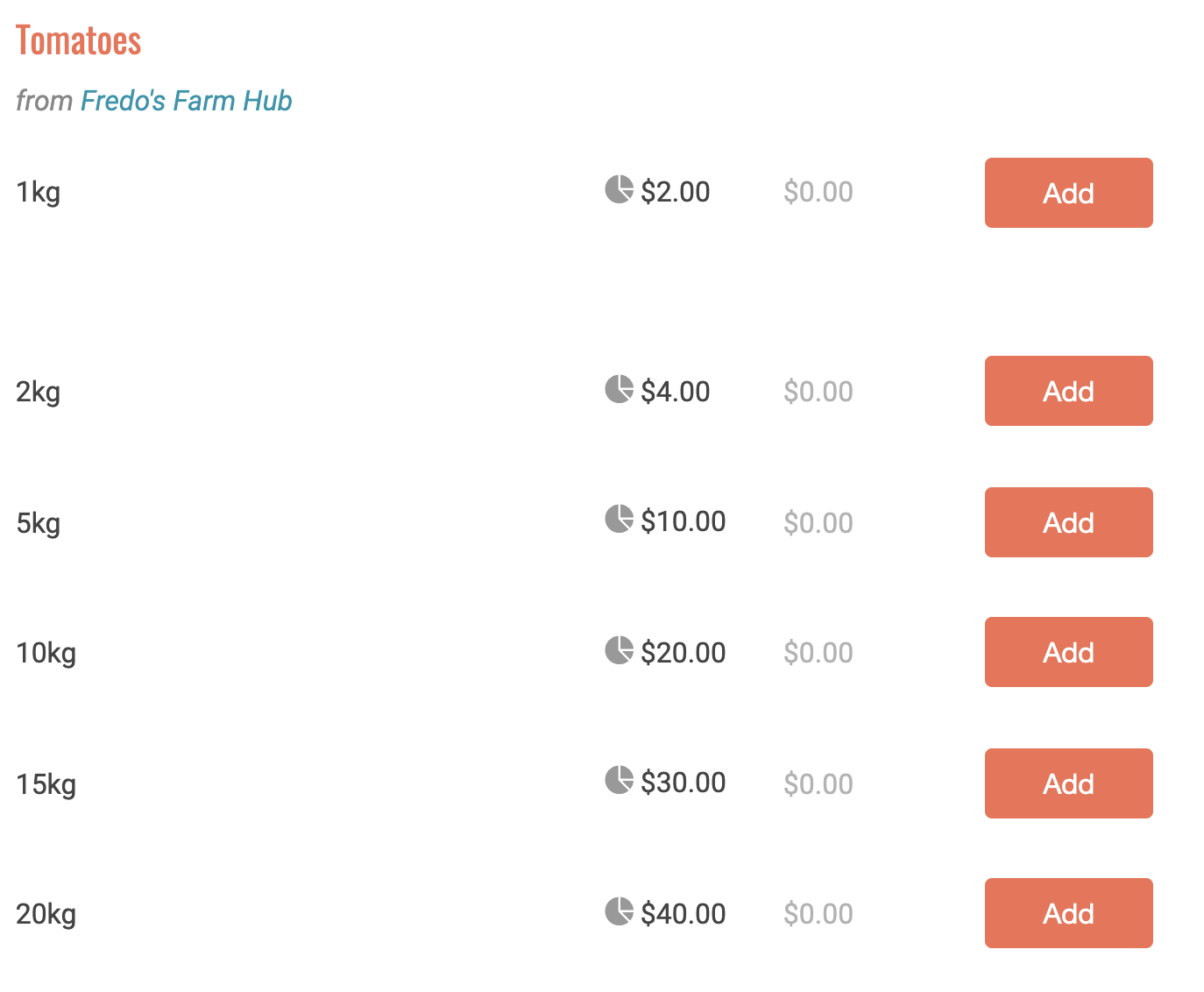
- I created variants on product, ordered by created date in the admin panel with random order of
unitvalue (to be clear, see image#1 below) - In the shop front, the variants are displayed ordered by unit value, as expected. (see image#2 below)
- Seems to be logical since the code specified it explicitly (since this commit b2bae242 specifies to order by
name, and if the same, then order byunit value; I also confirm that is I change thenameof a variant, it is sorted according to this field, as expected)
Conclusion is: Am i missing something?
Image#1

Image#2
 jibees
on 12 Jan 2021
jibees
on 12 Jan 2021
@jibees indeed it seems fixed now 🎉 Sorry if you wasted your time. However I noticed thanks to this shop: https://www.coopcircuits.fr/fleuvedeliens/shop#/shop
that is does not handle well upper cases. For example _Carton_ will be before _bouteille_... 10 will be before 5. Something we can do for that? If too complex, I think we can close, we have bigger fish to catch :)
RachL
on 12 Jan 2021
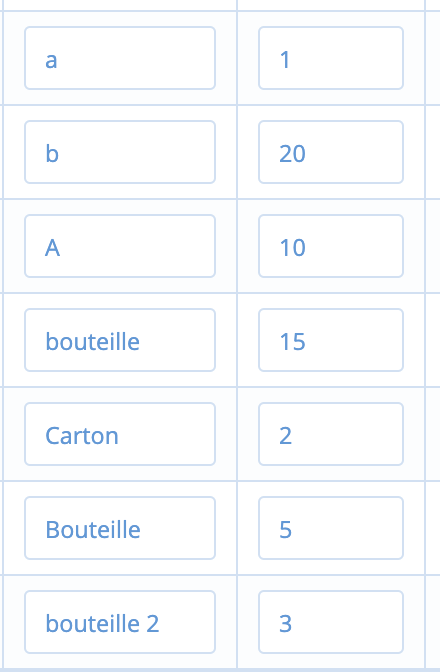
Actually, _this is_ case insensitive.
See my screenshots above: the first two items ('A' and 'a') are ordered by unit value as 'Bouteille' and 'bouteille' are also ordered by unit value (and not taking into account the uppercase or lowercase value)
As a conclusion, the behavior is that it is ordered by name and then by unit_value which also means that '10' will be before '5' if its filled _inside_ the name field (and not the unit value field).
Shop front | Configuration
:-------------------------:|:-------------------------:
 |
| 
jibees
on 12 Jan 2021
ah yes but then we need display_name to behave in the same way, no?
RachL
on 12 Jan 2021
Please forgot my last comment, this shop has used the display AS field when it shouldn't have. All good, nothing to see.... Closing

RachL
on 12 Jan 2021
Related issues
 filipefurtad0
·
3Comments
RachL
·
3Comments
filipefurtad0
·
3Comments
RachL
·
3Comments
 shen-sat
·
3Comments
shen-sat
·
3Comments
lin-d-hop
·
3Comments
shen-sat
·
3Comments
shen-sat
·
3Comments
lin-d-hop
·
3Comments
Most helpful comment
Please forgot my last comment, this shop has used the display AS field when it shouldn't have. All good, nothing to see.... Closing