Opencv4nodejs: Error: The specified module could not be found. [Windows 10]
I installed opencv4nodejs last night and it was working just fine but when I opened my laptop this morning and tried to require("opencv4nodejs") it gave me this error:
internal/modules/cjs/loader.js:718
  return process.dlopen(module, path.toNamespacedPath(filename));
                 ^

Error: The specified module could not be found.
\\?\C:\Users\suryansh\Desktop\d\node-opencv-test\node_modules\opencv4nodejs\build\Release\opencv4nodejs.node
    at Object.Module._extensions..node (internal/modules/cjs/loader.js:718:18)
    at Module.load (internal/modules/cjs/loader.js:599:32)
    at tryModuleLoad (internal/modules/cjs/loader.js:538:12)
    at Function.Module._load (internal/modules/cjs/loader.js:530:3)
    at Module.require (internal/modules/cjs/loader.js:637:17)
    at require (internal/modules/cjs/helpers.js:20:18)
    at Object.<anonymous> (C:\Users\suryansh\Desktop\d\node-opencv-test\node_modules\opencv4nodejs\lib\cv.js:17:8)
    at Module._compile (internal/modules/cjs/loader.js:689:30)
    at Object.Module._extensions..js (internal/modules/cjs/loader.js:700:10)
    at Module.load (internal/modules/cjs/loader.js:599:32)
I have looked at #84 and #50 and tried to fix the error by looking at the solutions provided but the only way I have been able to fix the error is by downloading the module again.
I don't think any of my System variable paths are wrong. I do have another version of OpenCV in the directory: C:\OpenCV24\opencv which I do not think is causing the issue, since I haven't created system variables for it.
OS: Windows 10
System Variables:

In my "Path":
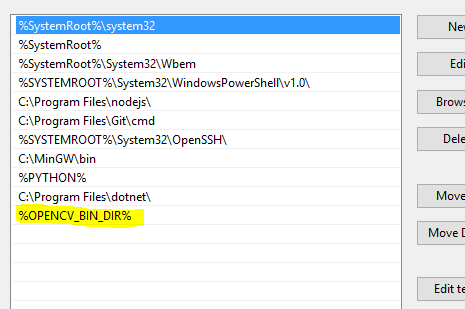
I hope you figure out why this is happening and let me know as soon as possible.
Downloading the module again and again just to fix a small error like this one, will be very tedious and unnecessarily time consuming.
Thank you for your module and your time!
 Frixoe
All 11 comments
When that occurs, could you verify that opencv4nodejs.node still exist under the directory printed (it should)? Then you can open this file with dependency walker to figure out, which runtime dependencies are missing.
 justadudewhohacks
on 26 Aug 2018
justadudewhohacks
on 26 Aug 2018
I opened up opencv4nodejs.node with Dependency Walker and this is what it said:

I have no idea what to make of this. I also don't know which dependency is missing.
Frixoe
on 26 Aug 2018
I think you can ignore the window specific stuff, scroll a bit down and look for dlls related to opencv. For example if the opencv runtime libraries are not found on your system, you might see something like this:

justadudewhohacks
on 26 Aug 2018
I'm getting the exact same errors.
What do I do about these errors? Try to find these .dlls online and download them separately?
Frixoe
on 27 Aug 2018
No, these dlls should be located in your OpenCV bin folder, OPENCV_BIN_DIR, which you added to your system path.
By the way, since you are using an own build of OpenCV, I assume you set OPENCV4NODEJS_DISABLE_AUTOBUILD=1 when you installed the package. Otherwise it will clone and build opencv from source, which will conflict with the OpenCV binaries in your system path.
justadudewhohacks
on 27 Aug 2018
I couldn't find those dlls in the OPENCV_BIN_DIR. What do I do now?
Frixoe
on 27 Aug 2018
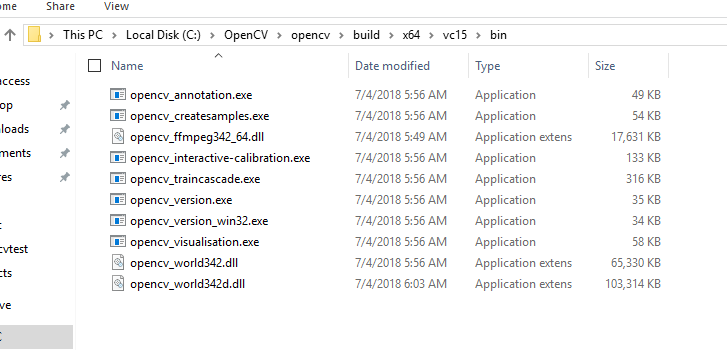
Then what kind of files are in that directory? The dlls should be there once you compiled or downloaded OpenCV.
justadudewhohacks
on 27 Aug 2018
These are the files in the directory:
Frixoe
on 28 Aug 2018
Okay, that's odd, apparently the opencv library opencv4nodejs is built against doesn't match your downloaded OpenCV version, otherwise it would look for opencv_world instead (opencv_world is just a compound library containing all the modules).
My guess is, that you build opencv4nodejs against the auto build by mistake (since dependency walker shows you version 3.4.1 dlls as well?, which is the verison, the auto build script installs currently).
I would suggest setting OPENCV4NODEJS_DISABLE_AUTOBUILD=1 in your envs as well and then reinstall opencv4nodejs.
justadudewhohacks
on 28 Aug 2018
Alright, the error seems to be fixed now.
Thanks!
Frixoe
on 29 Aug 2018
No, these dlls should be located in your OpenCV bin folder,
OPENCV_BIN_DIR, which you added to your system path.By the way, since you are using an own build of OpenCV, I assume you set
OPENCV4NODEJS_DISABLE_AUTOBUILD=1when you installed the package. Otherwise it will clone and build opencv from source, which will conflict with the OpenCV binaries in your system path.
It fixed when i change my system enviroment OPENCV_BIN_DIR and added it to the system path.Thanks~!
 zhangyi0424
on 3 Apr 2020
zhangyi0424
on 3 Apr 2020
Related issues
 ryandons
·
4Comments
ryandons
·
4Comments
 pabx06
·
4Comments
pabx06
·
4Comments
 sinitsyn-alex
·
4Comments
sinitsyn-alex
·
4Comments
 je3f0o
·
6Comments
je3f0o
·
6Comments
 G33kLabs
·
3Comments
G33kLabs
·
3Comments
Most helpful comment
No, these dlls should be located in your OpenCV bin folder,
OPENCV_BIN_DIR, which you added to your system path.By the way, since you are using an own build of OpenCV, I assume you set
OPENCV4NODEJS_DISABLE_AUTOBUILD=1when you installed the package. Otherwise it will clone and build opencv from source, which will conflict with the OpenCV binaries in your system path.