Opencv4nodejs: template matching find multiple
What is the best way to find multiple matches when using template matching?
I have this function (finds brightest spots) but it takes a long time to loop through all rows and cols:
const findMatches = (matrix, probability = 0.95, neighbourSize = 100) => {
  const matches = [];
  for (let matX = 0; matX < matrix.cols; matX += 1) {
    for (let matY = 0; matY < matrix.rows; matY += 1) {
      // Get raw value at coordinates
      const rawValue = matrix.atRaw(matY, matX);

      if (rawValue >= probability) {
        // By default there are no neighbours
        let hasNoNeighbours = true;

        // Loop through existing matches
        matches.forEach((match) => {
          // If we added neighbour earlier
          if (
            matX - match.x - neighbourSize < 0
            && matY - match.y - neighbourSize < 0
          ) {
            hasNoNeighbours = false;
          }
        });

        // If there are no neighbours add match into matches
        if (hasNoNeighbours) {
          matches.push({
            x: matX,
            y: matY,
          });
        }
      }
    }
  }
  return matches;
};
Is there a better (faster) solution?
 developer239
All 5 comments
Yeah looping over an image manually should be avoided in nodejs as it will be slow, especially with large images. Rather one should perform the work on the native side (by using the opencv functions) rather then doing stuff manually on the nodejs side.
Luckily in most of the cases there is a way to implement it with opencv functions. In your case to find the brightest spots, you can first threshold the image with the probability and then use findNonZero, to find these locations. That's what I have done in the Tensorflow example also (lines 42 - 48): https://github.com/justadudewhohacks/opencv4nodejs/blob/e17ebf6f43bee3cb983039a53cb3666456c74608/examples/dnnTensorflowInception.js.
findNonZero will give you the list of Point2s, which you can then use to find these points which are close to your matches.
 justadudewhohacks
on 6 Jan 2018
justadudewhohacks
on 6 Jan 2018
If anyone is interested in the future. I changed my function like this:
export const findNonZeroMatches = (matrix, neighbourSize = 20) => {
  const matches = [];
  const nonZeroMatches = matrix.findNonZero();

  nonZeroMatches.forEach((nonZeroMatch) => {
    let hasNoNeighbours = true;

    matches.forEach((match) => {
      if (
        nonZeroMatch.x - match.x - neighbourSize < 0
        && nonZeroMatch.y - match.y - neighbourSize < 0
      ) {
        hasNoNeighbours = false;
      }
    });

    if (hasNoNeighbours) {
      matches.push({
        x: nonZeroMatch.x,
        y: nonZeroMatch.y,
      });
    }
  });

  return matches;
};
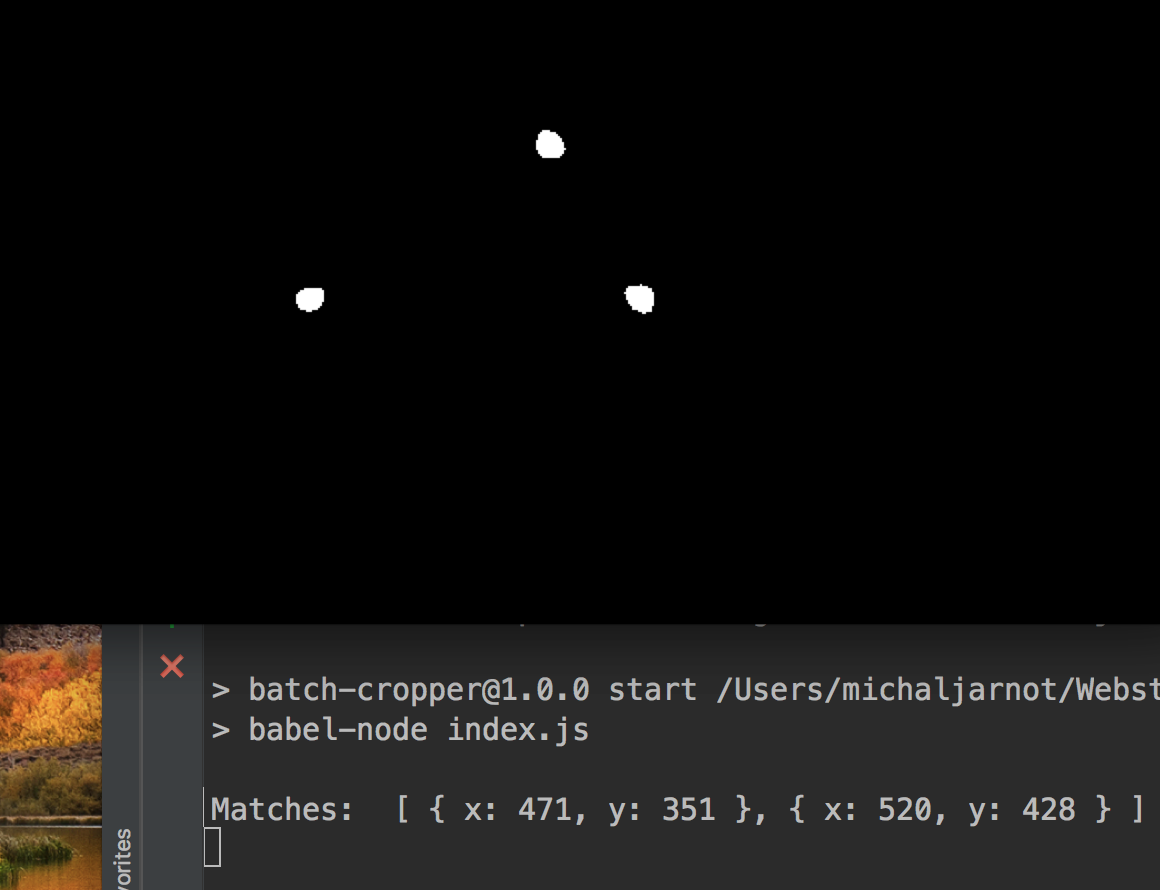
However, it didn't always work so I ended up using the thing that I wrote before.
(there are three matches but after filtering I got only two matches)
developer239
on 7 Jan 2018
Maybe something went wrong in the thresholding step? You can also apply dilation to the thresholded image to make the blobs bigger and then imshow them.
justadudewhohacks
on 7 Jan 2018
Cool :) I will try to make my mask generator function better in the future. I basically copied the code that you have in your example.
I don't need to find process images in real time so I am ok with the current solution. This is my final repository: https://github.com/developer239/simple-color-batch-cropper
I was basically working on automatic image cropper so that I could generate positive/negative samples for haar cascades.
I had all of this working with peterbraden/node-opencv but I didn't really like the code that I wrote. Opencv 3 looks a lot better.
developer239
on 7 Jan 2018
Nice to hear that.
justadudewhohacks
on 7 Jan 2018
Related issues
 sinitsyn-alex
·
4Comments
sinitsyn-alex
·
4Comments
 OluAgunloye
·
3Comments
OluAgunloye
·
3Comments
 Paulito-7
·
5Comments
Paulito-7
·
5Comments
 asishap007
·
6Comments
asishap007
·
6Comments
 SatoshiKawabata
·
5Comments
SatoshiKawabata
·
5Comments
Most helpful comment
Yeah looping over an image manually should be avoided in nodejs as it will be slow, especially with large images. Rather one should perform the work on the native side (by using the opencv functions) rather then doing stuff manually on the nodejs side.
Luckily in most of the cases there is a way to implement it with opencv functions. In your case to find the brightest spots, you can first threshold the image with the probability and then use findNonZero, to find these locations. That's what I have done in the Tensorflow example also (lines 42 - 48): https://github.com/justadudewhohacks/opencv4nodejs/blob/e17ebf6f43bee3cb983039a53cb3666456c74608/examples/dnnTensorflowInception.js.
findNonZero will give you the list of Point2s, which you can then use to find these points which are close to your matches.