Opencv: c++ opencv4.01 called tensorflow inception-v4 model ,readNetFromTensorflow ERROR!
train a tf flowers model with inception-v4,
after got the mode.ckpy , use the code to convert it:
echo "create model.pb over"
cd ..
CUDA_VISIBLE_DEVICES=1 python3 -u export_inference_graph.py \
--model_name=inception_v4 \
--output_file=./data/flowers_5/models/infer/flowers.pb \
--dataset_name=flowers \
--dataset_dir=./data/flowers_5
echo "start create frzee pb"
CUDA_VISIBLE_DEVICES=1 python3 -u /usr/local/lib/python3.5/dist-packages/tensorflow/python/tools/freeze_graph.py \
--input_graph=./data/flowers_5/models/infer/flowers.pb \
--input_checkpoint=./data/flowers_5/models/model.ckpt-10027 \
--output_graph=./data/flowers_5/models/infer/my_freeze.pb \
--input_binary=True \
--output_node_name=InceptionV4/Logits/Predictions
i test the flowers.pb with classify.sh (https://github.com/isiosia/models/tree/lession/slim)
it works well
id:[0] name:[daisy] (score = 0.80188)
id:[1] name:[dandelion] (score = 0.11308)
id:[3] name:[sunflowers] (score = 0.05036)
id:[4] name:[tulips] (score = 0.02128)
id:[2] name:[roses] (score = 0.01340)
then i use it for vs2015+opencv4.01, with the code

then got the error

load models
OpenCV: terminate handler is called! The last OpenCV error is:
OpenCV(4.0.1) Error: Assertion failed (scaleMat.type() == CV_32FC1) in cv::dnn::dnn4_v20181221::`anonymous-namespace'::TFImporter::populateNet, file E:\product\opencv-4.0.1\modules\dnn\src\tensorflow\tf_importer.cpp, line 1377
so i dont know where was wrong?
how can i make it work in c++ opoencv4.01?
@dkurt
 JaosonMa
All 34 comments
Usage questions should go to Users OpenCV Q/A forum: http://answers.opencv.org
If you think this is a bug which should be fixed - provide complete reproducer including models.
 alalek
on 26 Mar 2019
alalek
on 26 Mar 2019
Usage questions should go to Users OpenCV Q/A forum: http://answers.opencv.org
If you think this is a bug which should be fixed - provide complete reproducer including models.
i have done this, but there don have the A,
JaosonMa
on 26 Mar 2019
We really don't have spare time to download datasets and try to train models using outdated instructions (you point on commits which are modified 2+ years ago).
Reproducer should have:
- OpenCV C++ code
- data/images processed by OpenCV code
- no more external dependencies.
Ask for help on http://answers.opencv.org if you are not able to provide this.
Could you try add this before mentioned assertion?
.diff
+std::cout << typeToString(scaleMat.type()) << std::endl;
+scaleMat.convertTo(scaleMat, CV_32FC1);
 CV_Assert(scaleMat.type() == CV_32FC1);
alalek
on 26 Mar 2019
std::cout << typeToString(scaleMat.type()) << std::endl; +scaleMat.convertTo(scaleMat, CV_32FC1);
i tried the code ,

here is the result before change and after change with debug
before change:

after change:

here is my pb. baidu ,i don 't know can you download or not ,
链接:https://pan.baidu.com/s/1d9nWjKV_NCLFuzReOP4WKQ
提取码:94sx
c++ code
include "pch.h"
include
include
include
include
include
include
include
using namespace cv;
using namespace cv::dnn;
using namespace std;
//自己新建一个txt文件,写入分类的标签(一行写一个标签,例如二分类,第一行写good,第二行bad)
string labels_txt_file = R"(D:\downloads\googledownloads\labels.txt)";
string tf_pb_file = R"(D:\downloads\googledownloads\my_freeze.pb)";
vector
void main()
{
Mat src = imread(R"(D:\downloads\googledownloads\437859108_173fb33c98.jpg)");
if (src.empty()) {
cout << "error:no img" << endl;
}
vector
Mat rgb;
int w = 299;
int h = 299;
resize(src, src, Size(w, h));
cvtColor(src, rgb, COLOR_BGR2RGB);
cout << "load models" << endl;
Net net = readNetFromTensorflow(tf_pb_file);
cout << "load over" << endl;
DWORD timestart = GetTickCount();
if (net.empty())
{
cout << "error:no model" << endl;
}
Mat inputBlob = blobFromImage(src, 0.00390625f, Size(w, h), Scalar(), true, false);
//inputBlob -= 117.0;
//执行图像分类
Mat prob;
net.setInput(inputBlob, "input");
prob = net.forward("output");
cout << prob << endl;
//prob=net.forward("softmax2");
//得到最大分类概率
Mat probMat = prob.reshape(1, 1);
Point classNumber;
double classProb;
minMaxLoc(probMat, NULL, &classProb, NULL, &classNumber);
DWORD timeend = GetTickCount();
int classidx = classNumber.x;
printf("\n current image classification : %s, possible : %.2f\n", labels.at(classidx).c_str(), classProb);
cout << "用时(毫秒):" << timeend - timestart << endl;
// 显示文本
putText(src, labels.at(classidx), Point(20, 20), FONT_HERSHEY_SIMPLEX, 1.0, Scalar(0, 0, 255), 2, 8);
imshow("Image Classfication", src);
waitKey(0);
}
vector
{
vector
fstream fp(labels_txt_file);
if (!fp.is_open())
{
cout << "does not open" << endl;
exit(-1);
}
string name;
while (!fp.eof())
{
getline(fp, name);
if (name.length())
classNames.push_back(name);
}
fp.close();
return classNames;
}
JaosonMa
on 26 Mar 2019
here is the layers in my_freeze.pb

input
DecodePng
eval_image/convert_image/Cast
eval_image/convert_image/y
eval_image/convert_image
eval_image/central_crop/Shape_1
eval_image/central_crop/strided_slice/stack
eval_image/central_crop/strided_slice/stack_1
eval_image/central_crop/strided_slice/stack_2
eval_image/central_crop/strided_slice
eval_image/central_crop/Shape_2
eval_image/central_crop/strided_slice_1/stack
eval_image/central_crop/strided_slice_1/stack_1
eval_image/central_crop/strided_slice_1/stack_2
eval_image/central_crop/strided_slice_1
eval_image/central_crop/ToDouble
eval_image/central_crop/mul/y
eval_image/central_crop/mul
eval_image/central_crop/sub
eval_image/central_crop/truediv/y
eval_image/central_crop/truediv
eval_image/central_crop/ToInt32
eval_image/central_crop/ToDouble_1
eval_image/central_crop/mul_1/y
eval_image/central_crop/mul_1
eval_image/central_crop/sub_1
eval_image/central_crop/truediv_1/y
eval_image/central_crop/truediv_1
eval_image/central_crop/ToInt32_1
eval_image/central_crop/mul_2/y
eval_image/central_crop/mul_2
eval_image/central_crop/sub_2
eval_image/central_crop/mul_3/y
eval_image/central_crop/mul_3
eval_image/central_crop/sub_3
eval_image/central_crop/stack/2
eval_image/central_crop/stack
eval_image/central_crop/stack_1/2
eval_image/central_crop/stack_1
eval_image/central_crop/Slice
eval_image/ExpandDims/dim
eval_image/ExpandDims
eval_image/ResizeBilinear/size
eval_image/ResizeBilinear
eval_image/Squeeze
eval_image/Sub/y
eval_image/Sub
eval_image/Mul/y
eval_image/Mul
ExpandDims/dim
ExpandDims
InceptionV4/Conv2d_1a_3x3/weights
InceptionV4/Conv2d_1a_3x3/weights/read
InceptionV4/InceptionV4/Conv2d_1a_3x3/Conv2D
InceptionV4/InceptionV4/Conv2d_1a_3x3/BatchNorm/Const
InceptionV4/Conv2d_1a_3x3/BatchNorm/beta
InceptionV4/Conv2d_1a_3x3/BatchNorm/beta/read
InceptionV4/Conv2d_1a_3x3/BatchNorm/moving_mean
InceptionV4/Conv2d_1a_3x3/BatchNorm/moving_mean/read
InceptionV4/Conv2d_1a_3x3/BatchNorm/moving_variance
InceptionV4/Conv2d_1a_3x3/BatchNorm/moving_variance/read
InceptionV4/InceptionV4/Conv2d_1a_3x3/BatchNorm/FusedBatchNorm
InceptionV4/InceptionV4/Conv2d_1a_3x3/Relu
InceptionV4/Conv2d_2a_3x3/weights
InceptionV4/Conv2d_2a_3x3/weights/read
InceptionV4/InceptionV4/Conv2d_2a_3x3/Conv2D
InceptionV4/InceptionV4/Conv2d_2a_3x3/BatchNorm/Const
InceptionV4/Conv2d_2a_3x3/BatchNorm/beta
InceptionV4/Conv2d_2a_3x3/BatchNorm/beta/read
InceptionV4/Conv2d_2a_3x3/BatchNorm/moving_mean
InceptionV4/Conv2d_2a_3x3/BatchNorm/mo
...
InceptionV4/Logits/PreLogitsFlatten/flatten/strided_slice/stack
InceptionV4/Logits/PreLogitsFlatten/flatten/strided_slice/stack_1
InceptionV4/Logits/PreLogitsFlatten/flatten/strided_slice/stack_2
InceptionV4/Logits/PreLogitsFlatten/flatten/strided_slice
InceptionV4/Logits/PreLogitsFlatten/flatten/Reshape/shape/1
InceptionV4/Logits/PreLogitsFlatten/flatten/Reshape/shape
InceptionV4/Logits/PreLogitsFlatten/flatten/Reshape
InceptionV4/Logits/Logits/weights
InceptionV4/Logits/Logits/weights/read
InceptionV4/Logits/Logits/biases
InceptionV4/Logits/Logits/biases/read
InceptionV4/Logits/Logits/MatMul
InceptionV4/Logits/Logits/BiasAdd
InceptionV4/Logits/Predictions
@alalek @dkurt
JaosonMa
on 26 Mar 2019
here is my train.sh with tensorflow's slim API:
cd ..
CUDA_VISIBLE_DEVICES=1 python3 train_image_classifier.py \
--dataset_name=flowers \
--dataset_dir=./data/flowers_5 \
--model_name=inception_v4 \
--train_dir=./data/flowers_5/models \
--learning_rate=0.001 \
--learning_rate_decay_factor=0.76 \
--num_epochs_per_decay=50 \
--moving_average_decay=0.9999 \
--optimizer=adam \
--ignore_missing_vars=True \
--batch_size=32
JaosonMa
on 26 Mar 2019
i have done this, but there don have the A,
I can not find your question on answers.opencv.org? Please provide a link.
 mshabunin
on 26 Mar 2019
mshabunin
on 26 Mar 2019
i have done this, but there don have the A,
I can not find your question on answers.opencv.org? Please provide a link.
sorry , i mean i don't find the A on answers.opencv.org? and i can not sing in or create an username,
so i have not ask this Q on answers.opecn.org , so sorry
JaosonMa
on 26 Mar 2019
OpenCV: terminate handler is called! The last OpenCV error is:
OpenCV(4.0.1) Error: Unspecified error (Input [eval_image/central_crop/stack] for node [eval_image/central_crop/Slice] not found) in cv::dnn::dnn4_v20181221::`anonymous-namespace'::TFImporter::getConstBlob, file E:\product\opencv-4.0.1\modules\dnn\src\tensorflow\tf_importer.cpp, line 535
JaosonMa
on 26 Mar 2019
@JaosonMa, Please follow issue's template and make it reproducible. Provide a reference to model so we can test it locally.
 dkurt
on 27 Mar 2019
dkurt
on 27 Mar 2019
System information (version)
- OpenCV => :4.01:
- Operating System / Platform => win10 64bite
- Compiler => :vs2017 x86:
Detailed description
i train a model with a tensorflow slim, inception-v4 with code like this
CUDA_VISIBLE_DEVICES=1 python3 train_image_classifier.py \
--dataset_name=flowers \
--dataset_dir=./data/flowers_5 \
--model_name=inception_v4 \
--train_dir=./data/flowers_5/models \
--learning_rate=0.001 \
--learning_rate_decay_factor=0.76 \
--num_epochs_per_decay=50 \
--moving_average_decay=0.9999 \
--optimizer=adam \
--ignore_missing_vars=True \
--batch_size=32
1> i got a tf-model save as model.ckpt-xxx
2> freeze the model to .pb file with the code like this
`echo "create model.pb start"
CUDA_VISIBLE_DEVICES=1 python3 -u export_inference_graph.py \
--model_name=inception_v4 \
--output_file=./data/flowers_5/models/infer_isiosia/flowers.pb \
--dataset_name=flowers \
--dataset_dir=./data/flowers_5
echo "start create frzee pb"
CUDA_VISIBLE_DEVICES=1 python3 -u /usr/local/lib/python3.5/dist-packages/tensorflow/python/tools/freeze_graph.py \
--input_graph=./data/flowers_5/models/infer_isiosia/flowers.pb \
--input_checkpoint=./data/flowers_5/models/model.ckpt-10027 \
--output_graph=./data/flowers_5/models/infer_isiosia/my_freeze.pb \
--input_binary=True \
--output_node_name=InceptionV4/Logits/Predictions
`
3> use the my_freeze.pb to opencv4.01 + vs2017 with code like this
first i got the error , like this

then add some code in openv-dnn module, as @alalek say
https://github.com/opencv/opencv/issues/14149#issuecomment-476475899
then got the error like this
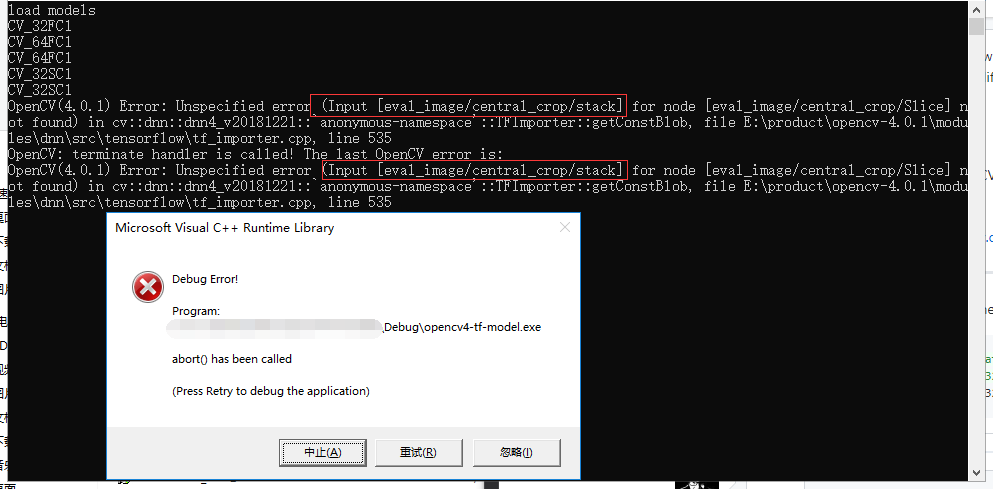
OpenCV: terminate handler is called! The last OpenCV error is:
OpenCV(4.0.1) Error: Unspecified error (Input [eval_image/central_crop/stack] for node [eval_image/central_crop/Slice] not found) in cv::dnn::dnn4_v20181221::`anonymous-namespace'::TFImporter::getConstBlob, file E:\product\opencv-4.0.1\modules\dnn\src\tensorflow\tf_importer.cpp, line 535
Steps to reproduce
'
using namespace cv;
using namespace cv::dnn;
using namespace std;
string labels_txt_file = R"(D:\downloads\googledownloads\labels.txt)";
string tf_pb_file = R"(D:\downloads\googledownloads\my_freeze.pb)";
vector
void main()
{
Mat src = imread(R"(D:\downloads\googledownloads\437859108_173fb33c98.jpg)");
if (src.empty()) {
cout << "error:no img" << endl;
}
vector
Mat rgb;
int w = 299;
int h = 299;
resize(src, src, Size(w, h));
cvtColor(src, rgb, COLOR_BGR2RGB);
cout << "load models" << endl;
Net net = readNetFromTensorflow(tf_pb_file);
cout << "load over" << endl;
DWORD timestart = GetTickCount();
if (net.empty())
...
}
'
pb.file
link: (https://pan.baidu.com/s/14nIYO6yeHaPCDrRCXRsuGQ)
pwd:imzb
@dkurt
forgive me for my bad english !!
JaosonMa
on 27 Mar 2019
@JaosonMa, please do not use Baidu for sharing. We just cannot download anything from there because it downloads .exe files! Please provide a direct link.
dkurt
on 27 Mar 2019
@JaosonMa, please do not use Baidu for sharing. We just cannot download anything from there because it downloads
.exefiles! Please provide a direct link.
sorry, i can not google , and i can not find some good ways ,that can just provide a direct link , can you give me a email or some other ways... so sorry for thie
JaosonMa
on 27 Mar 2019
@JaosonMa, please do not use Baidu for sharing. We just cannot download anything from there because it downloads
.exefiles! Please provide a direct link.sorry, i can not google , and i can not find some good ways ,that can just provide a direct link , can you give me a email or some other ways... so sorry for thie
can you tell me , my steps was right or not,
1> use tensorflow - slim train a model ( https://github.com/tensorflow/models/blob/master/research/slim/preprocessing/preprocessing_factory.py )saved as model.ckpt
2>, use export_inference_graph.py export the model.pb file
3>. use freeze_graph.py ceate the freeze.pb
does opencv 4.01 can load the the freeze.pb direct or not ?
did i miss some steps?
JaosonMa
on 27 Mar 2019
@JaosonMa, please try Dropbox at least.
dkurt
on 27 Mar 2019
@JaosonMa, please try Dropbox at least.
ok ,i will give a shoot.
i also tried this mobilenet_v2_1.0_224

does the mobilenet_v2_1.4_224_frozen.pb can used by opencv4.01 direct?
JaosonMa
on 27 Mar 2019
@JaosonMa, please try Dropbox at least.
i faild , my internet can not use DropBox
JaosonMa
on 27 Mar 2019
@JaosonMa, Thanks for your issue! Please test the changes from PR https://github.com/opencv/opencv/pull/14166. It'll be merged into 3.4 and then ported to master branch.
dkurt
on 27 Mar 2019
@JaosonMa, Thanks for your issue! Please test the changes from PR #14166. It'll be merged into 3.4 and then ported to master branch.
i change these codes in my opencv4.01 source code


then rebuild the opencvdnn modules . try two times with diffient codes:
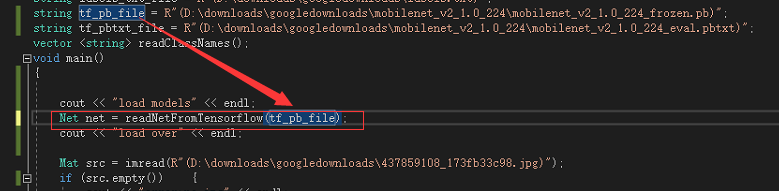
and mobilenet_v2 SUCC!

But inceptionv-v4 Failed!
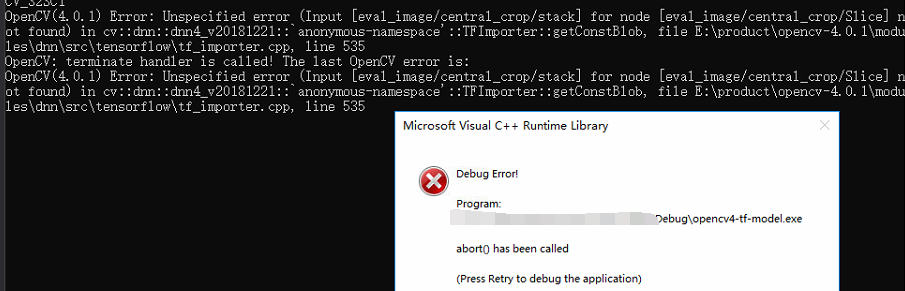
i closed this , i think i must do something wrong with the inception-v4, i will keep trying....
JaosonMa
on 27 Mar 2019
@dkurt @alalek
I tried many many times ,but always failed! ,so please help me again!
i ran the mobilenet_v2_1.0_224 sucess!
so i train the data again with mobilenet_v2_1.0_224 on my data,
after training, got the ckpt,
`cd ..
Where the pre-trained MobilenetV1 checkpoint is saved to.
PRETRAINED_CHECKPOINT_DIR=./data/flowers_2/models/all
Where the training (fine-tuned) checkpoint and logs will be saved to.
TRAIN_DIR=/tmp/flowers-models/mobilenet_v1_1.0_224
Where the dataset is saved to.
DATASET_DIR=./data/flowers_2
DATASET_NAME=flowers
INFER_DIR=./data/flowers_2/models/all/infer
MODEL_NAME=mobilenet_v2_140
echo "create model.pb start"
CUDA_VISIBLE_DEVICES=0 python3 -u export_inference_graph.py \
--model_name=${MODEL_NAME} \
--output_file=${INFER_DIR}/flowers.pb \
--dataset_name=${DATASET_NAME} \
--dataset_dir=${DATASET_DIR}
echo "start create frzee pb"
CUDA_VISIBLE_DEVICES=0 python3 -u /usr/local/lib/python3.5/dist-packages/tensorflow/python/tools/freeze_graph.py \
--input_graph=${INFER_DIR}/flowers.pb \
--input_checkpoint=${PRETRAINED_CHECKPOINT_DIR}/model.ckpt-44885 \
--output_graph=${INFER_DIR}/my_freeze.pb \
--input_binary=True \
--output_node_name=MobilenetV2/Predictions/Reshape_1
`
export_inference_graph.pu
then i got the flowers.pb
and the my_freeze.pb
the use the same code ,the got error :

it seems like that some layers was not found in opencv4.01,so i check the two pbfile(my_freeze.pb and mobilenet_v2_1.0_224_frozen.pb) with code like this:
`mobile_net = '../data/mobilenet_v2_1.4_224/mobilenet_v2_1.4_224_frozen.pb'
my_mobile_net = '../data/flowers_2/models/all/infer/my_freeze.pb'
def create_graph():
with tf.gfile.FastGFile(my_mobile_net, 'rb') as f:
graph_def = tf.GraphDef()
graph_def.ParseFromString(f.read())
tf.import_graph_def(graph_def, name='')
create_graph()
tensor_name_list_my = [tensor.name for tensor in tf.get_default_graph().as_graph_def().node]
print(len(tensor_name_list))
print(len(tensor_name_list_my))
for idx,tensor_name in enumerate(tensor_name_list_my):
if(idx
else:
print(idx+1,"-->",tensor_name,'\n')
`
the length is not same ,

...

...

so i think some thing was wrong with my export_inference_graph.py, can you tell me how can i got the pb just as same as the tf's mobilenet_v1_1.0_224_.pb,
JaosonMa
on 9 Apr 2019
@JaosonMa, before the neural network this graph has a lot of support nodes (jpeg decoding, cropping, resizing). It's might be done out of the network (i.e. by blobFromImage). So you can remove these nodes:
before:

import tensorflow as tf
from tensorflow.tools.graph_transforms import TransformGraph
with tf.gfile.FastGFile('my_freeze.pb') as f:
graph_def = tf.GraphDef()
graph_def.ParseFromString(f.read())
graph_def = TransformGraph(graph_def, ["ExpandDims"], ["MobilenetV2/Predictions/Reshape_1"], ["strip_unused_nodes"])
with tf.gfile.FastGFile("graph.pb", 'wb') as f:
f.write(graph_def.SerializeToString())
after:

dkurt
on 9 Apr 2019
first thank you a lot!!!
i try the code you give me, error like this :


so i change from
with tf.gfile.FastGFile(my_mobile_net) as f: to with tf.gfile.FastGFile(my_mobile_net,'rb') as f:
then it run succ
got the frozen_graph.pb
use frozen_graph.pb in opencv4.01 ,got error:

so i print the nodes , like this:
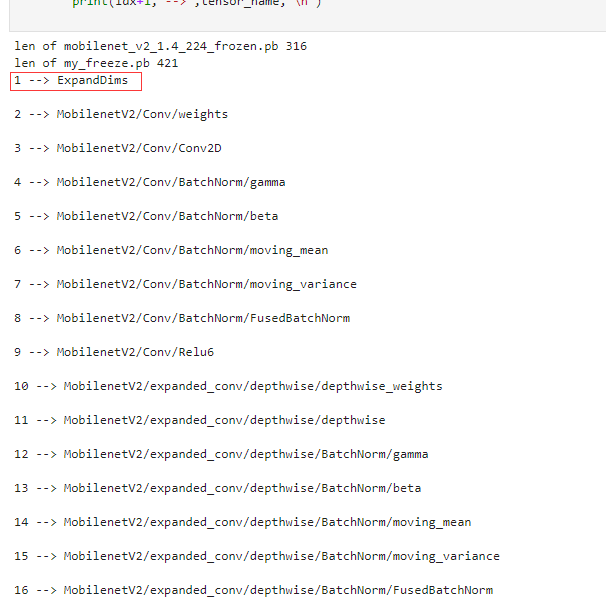
so which is the input?
` Net net = readNetFromTensorflow(tf_pb_file);
Mat src = imread(R"(D:\downloads\googledownloads\dc165458a6955e67399f2186f90cccc9.jpg)");
Mat rgb;
int w = 224;
int h = 224;
resize(src, src, Size(w, h));
Mat inputBlob = blobFromImage(src, 0.00390625f, Size(w, h), Scalar(), true, false);
Mat prob;
net.setInput(inputBlob, "input"); // what should i put in there?
prob = net.forward("MobilenetV2/Predictions/Reshape_1");`
net.setInput(inputBlob, "input"); what should i put in there?
@dkurt
JaosonMa
on 9 Apr 2019
Mat prob;
net.setInput(inputBlob, "ExpandDims");
prob = net.forward("MobilenetV2/Predictions/Reshape_1");
i put ExpandDims in ,it run succ!
i think it is right!
JaosonMa
on 9 Apr 2019
@dkurt So sorry to disturb you again.
I used the pb with input:ExpanDims run succ in opencv4.01,
but the acc is lower than the my_freeze.pb in tensorflow code ,
the acc when before TransformGraph:

my data only have two classes, They are somewhat similar. so acc=0.9 It's almost what I expected.
but used the pb after TranfromGraph , the acc is only 0.65, i don't know why, i check three graphs in tensorboard ,1> tensorflow's slim mobilenet_v2_1.4_224.pb 2> my_freeze.pb 3>frozen_graph.pb
the mobilenetV2 part is all the same

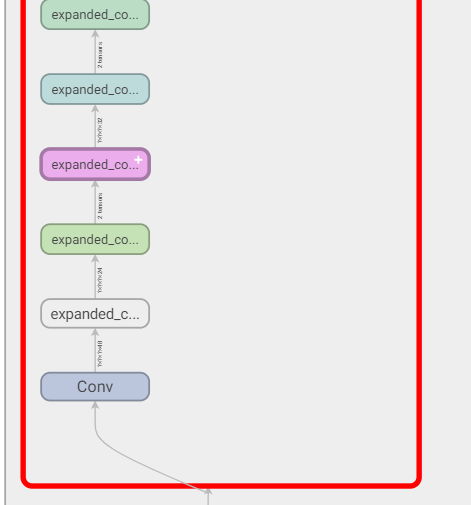
but there input layer was diffient ,
1> mobilenet_v2_1.4_224.pb
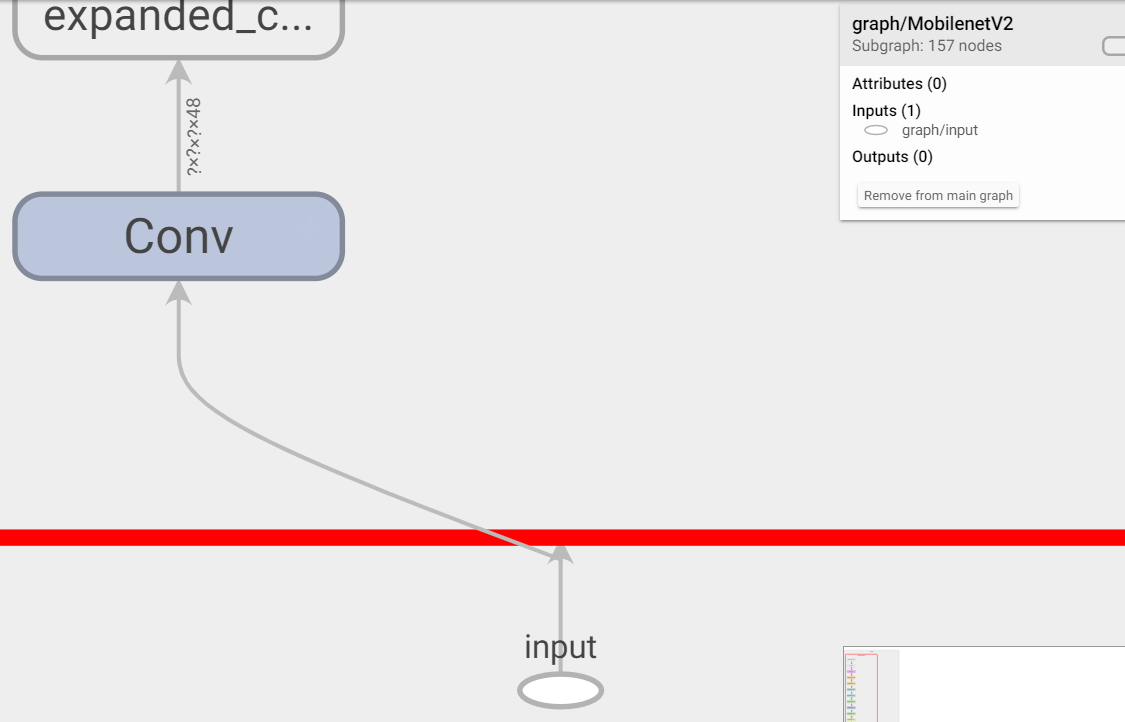
2>my_freeze.pb

3>froze_graph.pb
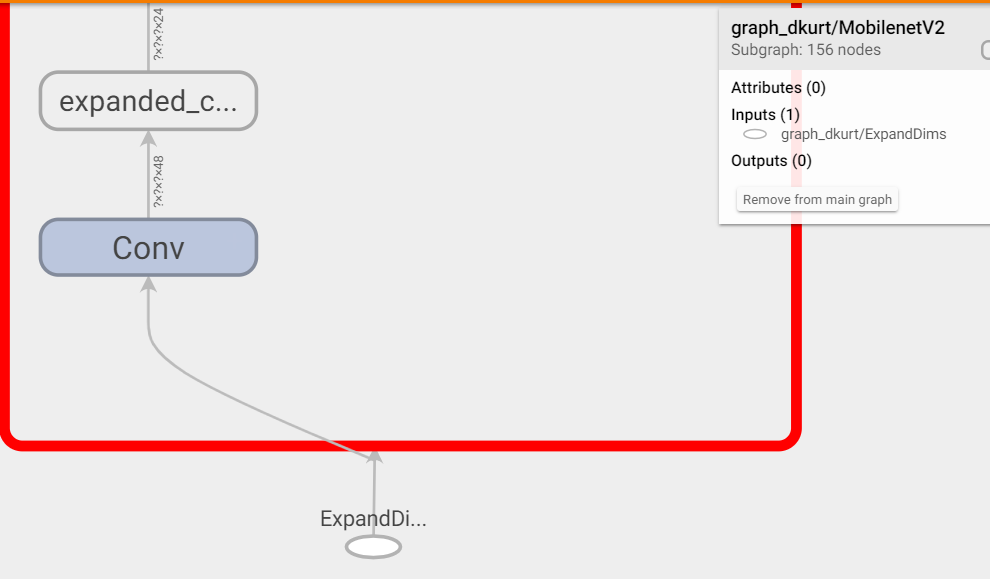
can i just got a pb , just like the mobilenet_v2_1.4_224.pb with the input "input",
Is it possible that this input caused the reduction?
JaosonMa
on 11 Apr 2019
@JaosonMa, Please provide two code snippets: how you run the model with TensorFlow and with OpenCV. Please make it as minimal as possible: remove dataset reading. Just a single image.
dkurt
on 11 Apr 2019
@dkurt
tensorflow:
classify code: classify.py
my_freeze.pb:
class.sh:
labels.txt:
c++:
classfi.cpp:
frozen_graph.pb:
labels.txt: same as tenflow labels.txt
this image is one of the val data , its label is 'N'
in my computer :
tensorflow output is

C++ outPut is

it is diffient!
JaosonMa
on 11 Apr 2019
@dkurt Is this enough for you to debug?What else do you need?I will certainly give it to you.
JaosonMa
on 12 Apr 2019
@dkurt please help me , My project has been delayed for 10 days.

JaosonMa
on 12 Apr 2019
@JaosonMa, please stop it. We already figured out that the problem might be fixed with current version of OpenCV. For now the question is to align TensorFlow and OpenCV usage. Actually, the problem in your code. So be patient please.
dkurt
on 12 Apr 2019
got you , so sorry for what i have done , i will just wait .
JaosonMa
on 12 Apr 2019
@JaosonMa, There are two nodes which impact on different predictions from OpenCV and TensorFlow: DecodeJpeg and ResizeBilinear. The thing is that precision of Jpeg decoding is not similar even between different versions of decoding libraries. ResizeBilinear's interpolation strategy differs from OpenCV's one.
So to achieve similar outputs you need to pass similar inputs to the node after these ones:
import numpy as np
import cv2 as cv
import tensorflow as tf
from tensorflow.tools.graph_transforms import TransformGraph
image = cv.imread("2_1_25_3_1.jpg")
image = image[:,:,[2,1,0]] # BGB 2 RGB
image = cv.resize(image, (224, 224))
paddedImage = cv.copyMakeBorder(image, 15, 15, 15, 15, cv.BORDER_CONSTANT)
#
# TensorFlow
#
with tf.gfile.FastGFile("my_freeze.pb", 'rb') as f:
graph_def = tf.GraphDef()
graph_def.ParseFromString(f.read())
with tf.Session() as sess:
sess.graph.as_default()
tf.import_graph_def(graph_def, name='')
tfOut = sess.run(sess.graph.get_tensor_by_name('MobilenetV2/Predictions/Reshape_1:0'),
feed_dict={'eval_image/convert_image/Cast:0': paddedImage})
print tfOut
#
# OpenCV
#
net = cv.dnn.readNet("graph.pb")
net.setPreferableBackend(cv.dnn.DNN_BACKEND_OPENCV)
blob = cv.dnn.blobFromImage(image, 1.0/127.5, (224, 224), [127.5, 127.5, 127.5])
net.setInput(blob)
cvOut = net.forward()
print cvOut
Central crop looks also a bit confusing (it crops by a 0.875 ratio). So I resized an image out of the graph and added zero paddings so both Central Crop and ResizeBilinear don't affect an accuracy:
TF
[[1.7407431e-01 8.2585084e-01 3.5822773e-05 3.9013106e-05]]
CV
[[1.7408027e-01 8.2584488e-01 3.5821628e-05 3.9013088e-05]]
To achieve better similarity, you man try to define ExpandDims layer as a custom one (read a tutorial https://docs.opencv.org/master/dc/db1/tutorial_dnn_custom_layers.html) so ResizeBilinear will be inside a graph.
Please use a forum for future usage questions: http://answers.opencv.org
dkurt
on 13 Apr 2019
Hey @dkurt, can you clarify the reason to the 15 pixel padding?
 bnascimento
on 21 May 2019
bnascimento
on 21 May 2019
@bnascimento, I guess the same padding (which depends on image size) is done inside the TensorFlow graph (please visualize it with TensorBoard and show the nodes from the beginning up to eval_image/convert_image/Cast:.
dkurt
on 21 May 2019
@JaosonMa hi brother, i also met this problem,Have you already solve it?
 memeda2232
on 21 Nov 2019
memeda2232
on 21 Nov 2019
Related issues
 sungjinp11
·
52Comments
sungjinp11
·
52Comments
 PuchatekwSzortach
·
59Comments
PuchatekwSzortach
·
59Comments
 opencv-pushbot
·
39Comments
opencv-pushbot
·
39Comments
 fnoop
·
35Comments
fnoop
·
35Comments
 Algomorph
·
56Comments
Algomorph
·
56Comments
Most helpful comment
We really don't have spare time to download datasets and try to train models using outdated instructions (you point on commits which are modified 2+ years ago).
Reproducer should have:
Ask for help on http://answers.opencv.org if you are not able to provide this.
Could you try add this before mentioned assertion?
.diff
+std::cout << typeToString(scaleMat.type()) << std::endl;
+scaleMat.convertTo(scaleMat, CV_32FC1);
 CV_Assert(scaleMat.type() == CV_32FC1);