Openbci_gui: Null Pointer on "Start Session" [WiFi]
Problem
UI freezes on "Start Session".
Settings:
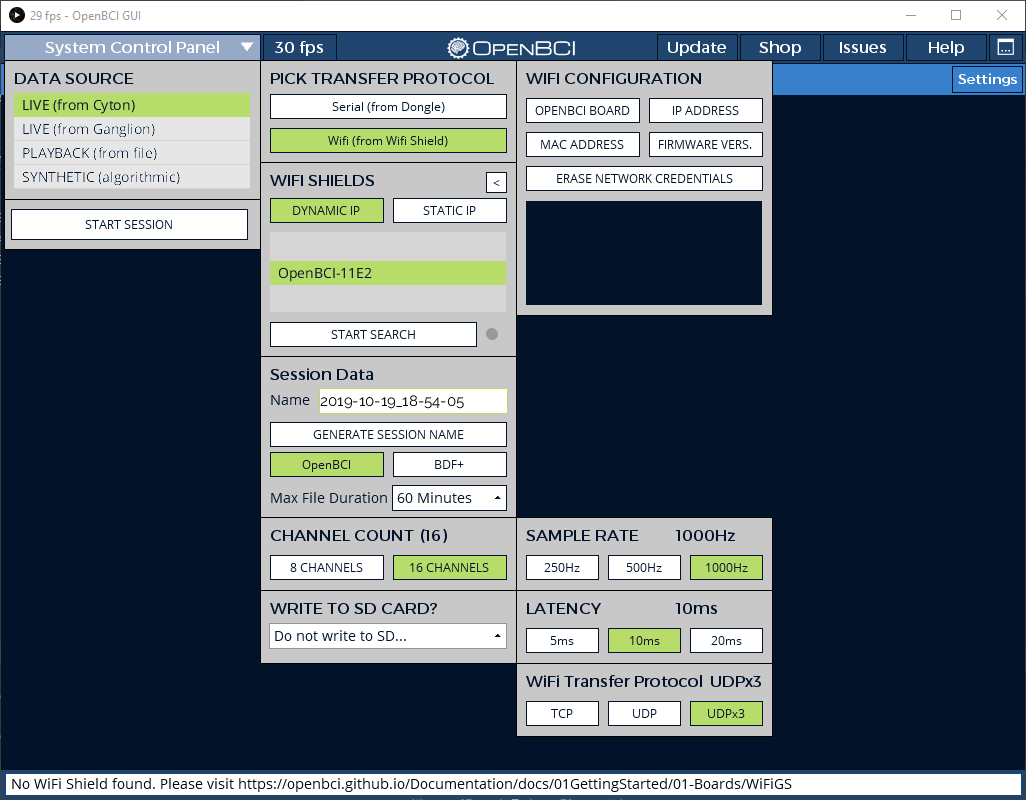
Expected
The streaming UI would show up.
Operating System and Version
Windows
GUI Version
4.1.6
Running standalone app
Downloaded app.
Type of OpenBCI Board
Cyton+Daisy
Are you using a WiFi Shield?
Yes
Console Log
Console Log Started at Local Time: 2019-10-19_18-50-24
Screen Resolution: 1920 X 1080
Welcome to the Processing-based OpenBCI GUI!
For more information, please visit: https://openbci.github.io/Documentation/docs/06Software/01-OpenBCISoftware/GUIDocs
Launching application from local data dir
OpenBCI_GUI: hubStart: OS Detected: Windows
Local Version: 416, Latest Version: 416
GUI is up to date!
OpenBCI_GUI::Setup: Is RX mulitcast: false
OpenBCI_GUI::Setup: Has RX joined multicast: false
OpenBCI_GUI::Setup: Sample Data exists in Documents folder.
ControlP5 2.2.6 infos, comments, questions at http://www.sojamo.de/libraries/controlP5
The file "C:\Users\janha\Documents\OpenBCI_GUI\Settings\UserPlaybackHistory.json" is missing or inaccessible, make sure the URL is valid or that the file has been added to your sketch and is readable.
OpenBCI_GUI::Control Panel: Playback history file not found or other error.
OpenBCI_GUI::Setup: Setup is complete!
Instantiating hub object...
Hub: CheckHubInit: The GUI is connected to the Hub!
sourceList: click!
setInterface: curInterface: -1
channel count set to 8
Setting Latency to 10000
Setting WiFi Internet Protocol to tcp
Setting WiFi style to dynamic
setInterface: curInterface: 2
Setting sample rate for Cyton to 1000Hz
sample rate set to: 1000
refreshWifiList
wifiList: click!
channel count set to 16
Setting WiFi Internet Protocol to udpBurst
Settings: LogFileMaxDuration = 60 minutes
initButtonPressed: Calling initSystem()
=================================================
|| INITIALIZING SYSTEM ||
OpenBCI_GUI: hub : Sent connect to Hub - Id: OpenBCI-11E2 SampleRate: 1000Hz Latency: 10000ms
Index: 0, Size: 0
openBCI_GUI: haltSystem: Halting system for reconfiguration of settings...
Closing any open SD file. Writing 'j' to OpenBCI.
The file "C:\Users\janha\Documents\OpenBCI_GUI\Settings\UserPlaybackHistory.json" is missing or inaccessible, make sure the URL is valid or that the file has been added to your sketch and is readable.
OpenBCI_GUI::Control Panel: Playback history file not found or other error.
Hub: processConnect: made it -- 35354 code: 200
Hub: setBoardType(): sending 'daisy -- 35354
Hub: processBoardType: success -- 35354
java.lang.NullPointerException
at OpenBCI_GUI.systemUpdate(OpenBCI_GUI.java:1280)
at OpenBCI_GUI.draw(OpenBCI_GUI.java:568)
at processing.core.PApplet.handleDraw(PApplet.java:2475)
at processing.opengl.PSurfaceJOGL$DrawListener.display(PSurfaceJOGL.java:866)
at jogamp.opengl.GLDrawableHelper.displayImpl(GLDrawableHelper.java:692)
at jogamp.opengl.GLDrawableHelper.display(GLDrawableHelper.java:674)
at jogamp.opengl.GLAutoDrawableBase$2.run(GLAutoDrawableBase.java:443)
at jogamp.opengl.GLDrawableHelper.invokeGLImpl(GLDrawableHelper.java:1293)
at jogamp.opengl.GLDrawableHelper.invokeGL(GLDrawableHelper.java:1147)
at com.jogamp.newt.opengl.GLWindow.display(GLWindow.java:759)
at com.jogamp.opengl.util.AWTAnimatorImpl.display(AWTAnimatorImpl.java:81)
at com.jogamp.opengl.util.AnimatorBase.display(AnimatorBase.java:452)
at com.jogamp.opengl.util.FPSAnimator$MainTask.run(FPSAnimator.java:178)
at java.util.TimerThread.mainLoop(Timer.java:555)
at java.util.TimerThread.run(Timer.java:505)
SHUTDOWN HOOK
java.lang.NullPointerException
at OpenBCI_GUI$SoftwareSettings.save(OpenBCI_GUI.java:13764)
at OpenBCI_GUI$3.run(OpenBCI_GUI.java:592)
at java.lang.Thread.run(Thread.java:748)
SHUTDOWN HUB
 91378246
All 11 comments
I don't know if this is related, but maybe it helps to resolve this issue (or it is another one):
When trying to get the WiFi shield to start streaming via post /udp I get a 200 but it doesn't send anything. Furthermore I get a "Route not found" on get /udp.
/all:
{"board_connected":true,"heap":19056,"ip":"0.0.0.0","mac":"82:7D:3A:3F:11:E2","name":"OpenBCI-11E2","num_channels":16,"version":"v2.0.5","latency":10000}
Post /udp parameters (json encoded):
delimiter = false,
ip = "192.168.4.2",
latency = 10000,
port = 9137,
redundancy = false,
sample_numbers = false,
timerstamps = true
I don't know if this is related, but maybe it helps to resolve this issue (or it is another one):
When trying to get the WiFi shield to start streaming via post /udp I get a 200 but it doesn't send anything. Furthermore I get a "Route not found" on get /udp.
/all:
{"board_connected":true,"heap":19056,"ip":"0.0.0.0","mac":"82:7D:3A:3F:11:E2","name":"OpenBCI-11E2","num_channels":16,"version":"v2.0.5","latency":10000}Post /udp parameters (json encoded):
delimiter = false,
ip = "192.168.4.2",
latency = 10000,
port = 9137,
redundancy = false,
sample_numbers = false,
timerstamps = true
I also tried to use UDP for cyton + wifi shield and failed to read data(I didnt investigate it so maybe smth was wrong in my code). If someone find a clue let me know please too
 Andrey1994
on 20 Oct 2019
Andrey1994
on 20 Oct 2019
I don't know if this is related, but maybe it helps to resolve this issue (or it is another one):
When trying to get the WiFi shield to start streaming via post /udp I get a 200 but it doesn't send anything. Furthermore I get a "Route not found" on get /udp.
/all:
{"board_connected":true,"heap":19056,"ip":"0.0.0.0","mac":"82:7D:3A:3F:11:E2","name":"OpenBCI-11E2","num_channels":16,"version":"v2.0.5","latency":10000}Post /udp parameters (json encoded):
delimiter = false,
ip = "192.168.4.2",
latency = 10000,
port = 9137,
redundancy = false,
sample_numbers = false,
timerstamps = true
@retiutut Is this another issue? I just can't get UDP to work.
91378246
on 22 Oct 2019
I dont know it is the same issue or another but @retiutut it would be really great if you have time to look at this udp problem.
In fact its the primary reason why tcp is implemented in brainflow instead udp(I tried udp first and failed to receive data). I am still going to take a look at wifi shield firmware and rewrite some code there but I have no time for it right now
Andrey1994
on 22 Oct 2019
I've tested Cyton+WiFi many times over udp, tcp, and udpX3, should be working in the current GUI. Granted, there may be cyclical noise spikes, but it should load and receive data.
I strongly recommend using Cyton+Dongle instead of WiFi if you want reliable data.
I can test again to check for the error in this thread.
Please do not make another issue at this time. Thank you @91378246 for providing plenty of information to start looking into this. 🛠
 retiutut
on 22 Oct 2019
retiutut
on 22 Oct 2019
Are there any specific for udp actions in gui code or it just sends post to /udp ? Maybe another field in json?
Andrey1994
on 22 Oct 2019
In the GUI, it simply sets curInternetProtocol and passes this information to the Hub.
    public void connectWifi(String id) {
        JSONObject json = new JSONObject();
        json.setInt(TCP_JSON_KEY_LATENCY, curLatency);
        if (curInternetProtocol == UDP_BURST) {
            json.setString(TCP_JSON_KEY_PROTOCOL, UDP);
            json.setBoolean(TCP_JSON_KEY_BURST_MODE, true);
        } else {
            json.setString(TCP_JSON_KEY_PROTOCOL, curInternetProtocol);
            json.setBoolean(TCP_JSON_KEY_BURST_MODE, false);
        }
        json.setInt(TCP_JSON_KEY_SAMPLE_RATE, requestedSampleRate);
        json.setString(TCP_JSON_KEY_NAME, id);
        json.setString(TCP_JSON_KEY_TYPE, TCP_TYPE_CONNECT);
        writeJSON(json);
        println("OpenBCI_GUI: hub : Sent connect to Hub - Id: " + id + " SampleRate: " + requestedSampleRate + "Hz Latency: " + curLatency + "ms");
    }
I have a same problem with GUI v4.1.6.
When I use v4.1.3 and push "START SESSION" twice it was resolved.
I only checked with cyton + wifi shield using direct mode.
 yagijin
on 29 Oct 2019
yagijin
on 29 Oct 2019
Hi, I'm also experiencing the same problem as the Original Post see below the console data with the same error after trying to start the system twice.
Everything was working fine up until 3 days ago when I tried to use the OpenBCI with the dongle instead of the Wifi Shield, and ever since I have had this issues when trying to go back to the WiFi Shield.
If I plug in the dongle and use the WiFi protocol it works as expected again (as long as the dongle is always plugged in)
 lopezvaa
on 1 Nov 2019
lopezvaa
on 1 Nov 2019
AHA! I see the same issue with @lopezvaa, @91378246, #642, and #637. 🔥 🔥 🔥
Code has already been pushed to resolve this. Caused by attempting to make a dropdown using an empty serial port list in W_Networking.pde.
Index: 0, Size: 0
openBCI_GUI: haltSystem: Halting system for reconfiguration of settings..
My bet is that the NullPointer occurs because the system has already started halting.
retiutut
on 13 Nov 2019
Fix will be available in GUI 4.1.7-beta.1!
retiutut
on 13 Nov 2019
Related issues
 stellarpower
·
8Comments
stellarpower
·
8Comments
 jps2000
·
5Comments
jps2000
·
5Comments
 Otemo
·
7Comments
Otemo
·
7Comments
 daniellasry
·
8Comments
daniellasry
·
8Comments
 jacobgmartin
·
7Comments
jacobgmartin
·
7Comments