Openbci_gui: Unable to read Cyton Firmware [Windows]
Problem
GUI can not connect to the board.
Expected
Connection to the board.
Operating System and Version
Windows 10
GUI Version
4.1.5
Running standalone app
Downloaded App (Standalone)
Type of OpenBCI Board
Cyton
Are you using a WiFi Shield?
No
Console Log
Console Log Started at Local Time: 2019-09-25_17-05-19
Screen Resolution: 1280 X 1024
Welcome to the Processing-based OpenBCI GUI!
For more information, please visit: https://openbci.github.io/Documentation/docs/06Software/01-OpenBCISoftware/GUIDocs
Launching application from local data dir
OpenBCI_GUI: hubStart: OS Detected: Windows
Local Version: 415, Latest Version: 415
GUI is up to date!
OpenBCI_GUI::Setup: Is RX mulitcast: false
OpenBCI_GUI::Setup: Has RX joined multicast: false
OpenBCI_GUI::Setup: Sample Data exists in Documents folder.
ControlP5 2.2.6 infos, comments, questions at http://www.sojamo.de/libraries/controlP5
The file "C:UsersPedroDocumentsOpenBCI_GUISettingsUserPlaybackHistory.json" is missing or inaccessible, make sure the URL is valid or that the file has been added to your sketch and is readable.
OpenBCI_GUI::Control Panel: Playback history file not found or other error.
OpenBCI_GUI::Setup: Setup is complete!
Instantiating hub object...
Hub: CheckHubInit: The GUI is connected to the Hub!
sourceList: click!
setInterface: curInterface: -1
channel count set to 8
Setting Latency to 10000
Setting WiFi Internet Protocol to tcp
Setting WiFi style to dynamic
setInterface: curInterface: 0
Setting sample rate for Cyton to 250Hz
sample rate set to: 250
serialList: click!
Settings: LogFileMaxDuration = 60 minutes
Calling initSystem()
=================================================
|| INITIALIZING SYSTEM ||
Hub: processConnect: made it -- 10455 code: 200
Hub: setBoardType(): sending 'cyton -- 10456
Hub: processBoardType: success -- 10456
openBCI_GUI: haltSystem: Halting system for reconfiguration of settings...
Cyton: startDataTransfer(): writing 's' to the serial port...
Hub: sendCommand(char): sending 's'
SoftwareSettings: 3 active widgets saved!
Closing any open SD file. Writing 'j' to OpenBCI.
Hub: sendCommand(char): sending 'j'
Hub: processCommand: success -- 11141
Disconnecting serial...
Hub: processCommand: success -- 11193
The file "C:UsersPedroDocumentsOpenBCI_GUISettingsUserPlaybackHistory.json" is missing or inaccessible, make sure the URL is valid or that the file has been added to your sketch and is readable.
OpenBCI_GUI::Control Panel: Playback history file not found or other error.
serialList: click!
Settings: LogFileMaxDuration = 60 minutes
Calling initSystem()
=================================================
|| INITIALIZING SYSTEM ||
openBCI_GUI: haltSystem: Halting system for reconfiguration of settings...
Closing any open SD file. Writing 'j' to OpenBCI.
Disconnecting serial...
The file "C:UsersPedroDocumentsOpenBCI_GUISettingsUserPlaybackHistory.json" is missing or inaccessible, make sure the URL is valid or that the file has been added to your sketch and is readable.
OpenBCI_GUI::Control Panel: Playback history file not found or other error.
serialList: click!
Settings: LogFileMaxDuration = 60 minutes
Calling initSystem()
=================================================
|| INITIALIZING SYSTEM ||
Hub: processConnect: made it -- 22706 code: 200
Hub: setBoardType(): sending 'cyton -- 22706
Hub: processBoardType: success -- 22707
openBCI_GUI: haltSystem: Halting system for reconfiguration of settings...
Cyton: startDataTransfer(): writing 's' to the serial port...
Hub: sendCommand(char): sending 's'
SoftwareSettings: 3 active widgets saved!
Closing any open SD file. Writing 'j' to OpenBCI.
Hub: sendCommand(char): sending 'j'
Hub: processCommand: success -- 23144
Disconnecting serial...
Hub: processCommand: success -- 23196
The file "C:UsersPedroDocumentsOpenBCI_GUISettingsUserPlaybackHistory.json" is missing or inaccessible, make sure the URL is valid or that the file has been added to your sketch and is readable.
OpenBCI_GUI::Control Panel: Playback history file not found or other error.
ConsoleLog: Copying console log to clipboard!
 BCIstorm
All 14 comments
This is exactly why we have Issue templates:
https://github.com/OpenBCI/OpenBCI_GUI/issues/597
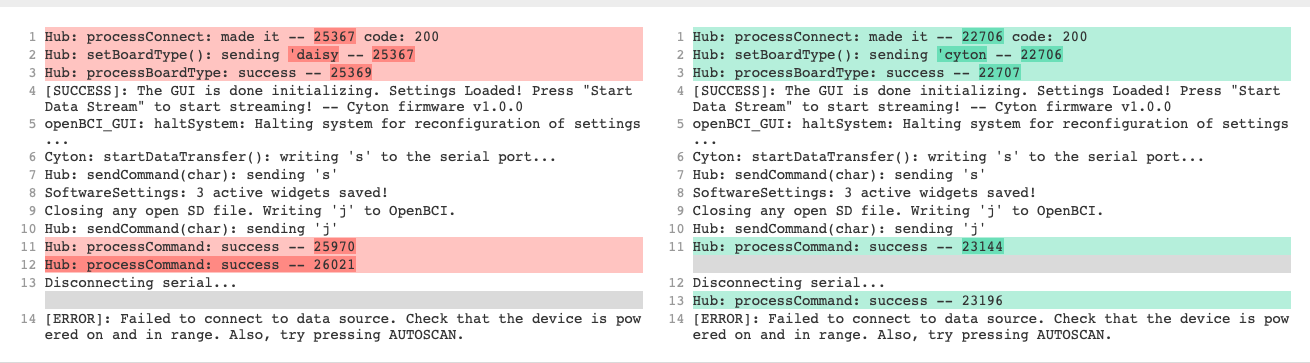
Pretty much a duplicate issue of #597, except happening on Windows also. It's great news that this behaves the same way across platforms.
This means your Cyton firmware is probably out of date, and it's time to update the Cyton firmware.
To confirm, when did you purchase the Cyton? Please look at #597.
 retiutut
on 26 Sep 2019
retiutut
on 26 Sep 2019
Thanks for the answer @retiutut , but looking at #597 , although @djan4848 updated the firmware, the problem stills exits, right? I don't feel comfortable updating the firmware... Is it possible to go back to firmware 1.0.0 if this upgrade does not work?
It was working on an older version (GUI version 3.3.2) where one needed to move the OpenBCIHUB and OpenBCI_GUI folders to the ProgramFiles folder and check the Run as Administrator box. Is it still necessary? And is it still necessary to first execute the HUB and only then the GUI?
I bought the OpenBCI Cyton board around June 2015.
BCIstorm
on 26 Sep 2019
@BCIstorm That's an isolated issue with @djan4848's board. Your board is definitely out of date also. I think I changed the code in 4.1.6-beta.0 to allow users to go into the GUI even with old firmware. Let me check.
Still, your board is VERY out of date at this time. That's what's causing a problem with 4.1.5.
It was working on an older version (GUI version 3.3.2) where one needed to move the OpenBCIHUB and OpenBCI_GUI folders to the ProgramFiles folder and check the Run as Administrator box. Is it still necessary? And is it still necessary to first execute the HUB and only then the GUI?
GUI autolaunches Hub and is included with GUI as a signed app on Windows, so yes it's necessary and no you shouldn't have to do anything now to make it work.
retiutut
on 26 Sep 2019
I think I changed the code in 4.1.6-beta.0 to allow users to go into the GUI even with old firmware. Let me check.
I did not change this behavior. You are going to have to update the firmware if you want to use the latest GUI. The commands that are sent to the board have changed so much that it won't work. Nothing is wrong with the GUI in regards to this matter, so it abandons initialization because it can't detect your Cyton version.
retiutut
on 26 Sep 2019
I don't feel comfortable updating the firmware... Is it possible to go back to firmware 1.0.0 if this upgrade does not work?
I don't blame you! This step is normally done in the OpenBCI lab before shipping out Cytons to customers. I would hope you can change the Cyton firmware to any version you like at any time!
When you are ready, I highly recommend going through Cyton firmware upgrade carefully. You have me and the Forums to help with this process. 😄
retiutut
on 26 Sep 2019
Thank you @retiutut , I will try. I'm reading the instructions to upgrade the Cyton firmware and it says
The radio firmware (the firmware for the dongle and the radio module on your Cyton Board) has not been updated since prior to Fall 2016, so as long as you purchased your Cyton Board after that date, you do not need to worry about reprogramming your radios.
I bought the equipment in 2015... Should I upgrade also the radio firmware?
BCIstorm
on 27 Sep 2019
@wjcroft Does he need to upgrade radio firmware?
retiutut
on 27 Sep 2019
Richard and BCIstorm, YES, a V1 Cyton has the old RFduino firmware. All three processors must be updated in the EXACT sequence specified.
https://github.com/OpenBCI/OpenBCI_Cyton_Library/blob/master/UPGRADE_GUIDE.md
 wjcroft
on 27 Sep 2019
wjcroft
on 27 Sep 2019
Thank you for the answers @retiutut and @wjcroft . Just to clarify, on my Cyton board I read "V3 - 32". So I guess this is Cyton version 3 with 32bits but apparently has firmware version 1 ?
Upgrading the RFduino using 0.1uF capacitor, FTDI cable and soldering stuff? Scary.
BCIstorm
on 27 Sep 2019
BCIstorm, hi. The V3 printed on the Cyton board is NOT the firmware level, but the hardware level. V1 hardware was an Arduino shield.
Yes, the RFduinos must be upgraded. FTDI 'friend' not needed, you use the dongle you already have.
wjcroft
on 27 Sep 2019
Thank you @wjcroft . I'm finishing my PhD on which I'm using the OpenBCI. Doing that upgrade now is too risky for me, not only for time available to do it but also because I'm very scary to damage some component(s). I think I will upgrade it after finishing the PhD.
So, for now, can you please tell me what is the last version of the GUI that I can use with my equipment?
BCIstorm
on 27 Sep 2019
BCIstorm, do you really NEED the GUI? Why not just use either of the two Python repos and stream out LSL to some app that can do further analysis, such as OpenViBE, Matlab, EEGLAB, etc.
The GUI from 4 years ago had hugely less features than the current software.
If you have a working GUI for your board, just continue using it. There are not many updates beyond what you have, until the firmware changes happened.
wjcroft
on 27 Sep 2019
I just use the GUI to verify if the EEG signals are OK (not noisy or weak otherwise adjust sensor on the scalp of the person) and adjust gain on one channel (check the impedance would also be nice).
So, I just need a real-time and simple visualization tool and some commands to control some parameters.
@wjcroft Jackpot! That's what I'm trying to do! Use LSL to synchronize data from OpenBCI with data from another equipment (Eye-tracker). After the signals are acquired (I mean, I'm not doing real-time analysis) I'm using Python to do some signal processing and plots.
So, what do you suggest?
BCIstorm
on 28 Sep 2019
https://www.google.com/search?q=python+real+time+graph
You can use a separate thread in your Python program to accept various commands, which trigger SDK actions.
One note on V1 firmware. It is fine for modest length sessions, say up to half hour. If session length approaches an hour, a known firmware bug sometimes hangs the data stream. This was fixed in later Cyton / RFduino firmwares.
Alternately you can send your stream to OpenViBE, which can also do realtime plots, signal processing, etc.
Probably continue to use your old GUI to check impedance.
wjcroft
on 28 Sep 2019
Related issues
 Otemo
·
7Comments
Otemo
·
7Comments
 cfausn
·
3Comments
cfausn
·
3Comments
 jps2000
·
5Comments
jps2000
·
3Comments
jps2000
·
5Comments
jps2000
·
3Comments
 pirelaurent
·
5Comments
pirelaurent
·
5Comments
Most helpful comment
Richard and BCIstorm, YES, a V1 Cyton has the old RFduino firmware. All three processors must be updated in the EXACT sequence specified.
https://github.com/OpenBCI/OpenBCI_Cyton_Library/blob/master/UPGRADE_GUIDE.md