Openbci_gui: Corrupt BDF files producted
Problem
When saving the file using the BDF+ format, the file produced cannot be read by either the OpenBCI or EEGLAB. Tried from 4.0.2 up to 4.1.0 version. TXT files write and read fine. I'm attaching a sample capture of TXT and BDF.
Expected
The .bdf file format to be read by OPENBCI
Operating System and Version
Windows 10 x64 pro up to date
GUI Version
tried 4.0.2, 4.0.3, 4.0.4 and 4.1.0 beta 0
Running standalone app
Standalone
Type of OpenBCI Board
Ganglion with CSR Dongle
Are you using a WiFi Shield?
 kosmad
All 22 comments

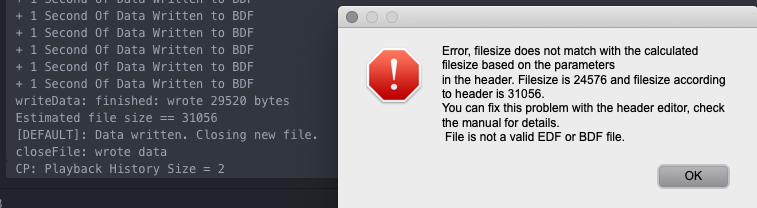
Maybe it closes the file write before it should? I tried to convert it using EDFbrowser and got this message
kosmad
on 16 Feb 2019
In DataLogging.pde:
/**
 * @description Close an open BDF file. This will also update the number of data
 *  records.
 */
void closeLogFileBDF() {
  if (fileoutput_bdf != null) {
    //TODO: Need to update the rows written in the header
    fileoutput_bdf.closeFile();
  }
}
I need a valid BDF file or reference on how to apply this fix marked as TODO in the code.
 retiutut
on 22 Feb 2019
retiutut
on 22 Feb 2019
Tried from 4.0.2 up to 4.1.0 version. TXT files write and read fine.
Yes, this is the format used by OpenBCI GUI.
Expected: The .bdf file format to be read by OPENBCI
BDF is for other applications. TXT is for OpenBCI GUI.
Can you provide a link to a valid BDF file?
retiutut
on 22 Feb 2019
Tried from 4.0.2 up to 4.1.0 version. TXT files write and read fine.
Yes, this is the format used by OpenBCI GUI.
Expected: The .bdf file format to be read by OPENBCI
BDF is for other applications. TXT is for OpenBCI GUI.
Can you provide a link to a valid BDF file?
Hi there,
It won't produce any valid BDF files, only corrupted ones like in the zip I've attached... It's not a one time bug, I can't actually save anything as a working bdf file at all! Does it every-time
Thank you for your time!
kosmad
on 22 Feb 2019
https://www.teuniz.net/edfbrowser/EDFbrowser%20manual.html
Header editor
This tool can be used to edit (or anonymize) the header (file info) like subject, birthdate, etc.
You can also edit labels (signalnames), physical dimension, pre-filter and transducer names.
If the file you want to edit has been opened in EDFbrowser already, close it first before starting
this tool.
This tool can also be used to repair a file that can not be opened with EDFbrowser because of
invalid characters in the header (the EDF format allows 7-bit ascii characters only) or other errors.Other errors that can be fixed with this tool:
- a wrong timestamp format in the header (a colon instead of a dot between the numbers)
- a wrong number of datarecords written in the header
- a wrong filesize (file is not ending on the boundary of a datarecord)
- a broken number i.e. a number with decimal(s) in the digital maximum/minimum field
- the value for digital maximum is lower than or equal to digital minimum
Do as follows: In EDFbrowser go to Tools -> Header editor. Select the file. Now click on the
"save" button (you don't need to edit the content manually). Close the header editor.
Now open the file in the usual way.
retiutut
on 28 Mar 2019
The difference between valid and invalid BDF file headers:
There is also extraneous data printing at the bottom of the files.

retiutut
on 28 Mar 2019
Website to compare text files: https://text-compare.com
Valid and Invalid files: valid-invalid-GanglionBDFs.zip
retiutut
on 28 Mar 2019
For more information on previous BDF issues: refer to https://github.com/OpenBCI/OpenBCI_GUI/issues/266. GUI no longer freezes when trying to make a BDF, as shown above. Still, this is a hard dependency to maintain, as mentioned at the bottom of the issue.
retiutut
on 16 May 2019
Adding a warning message at the bottom of the GUI and the full fix in the console log.


retiutut
on 17 May 2019

retiutut
on 17 May 2019
retiutut
on 30 May 2019
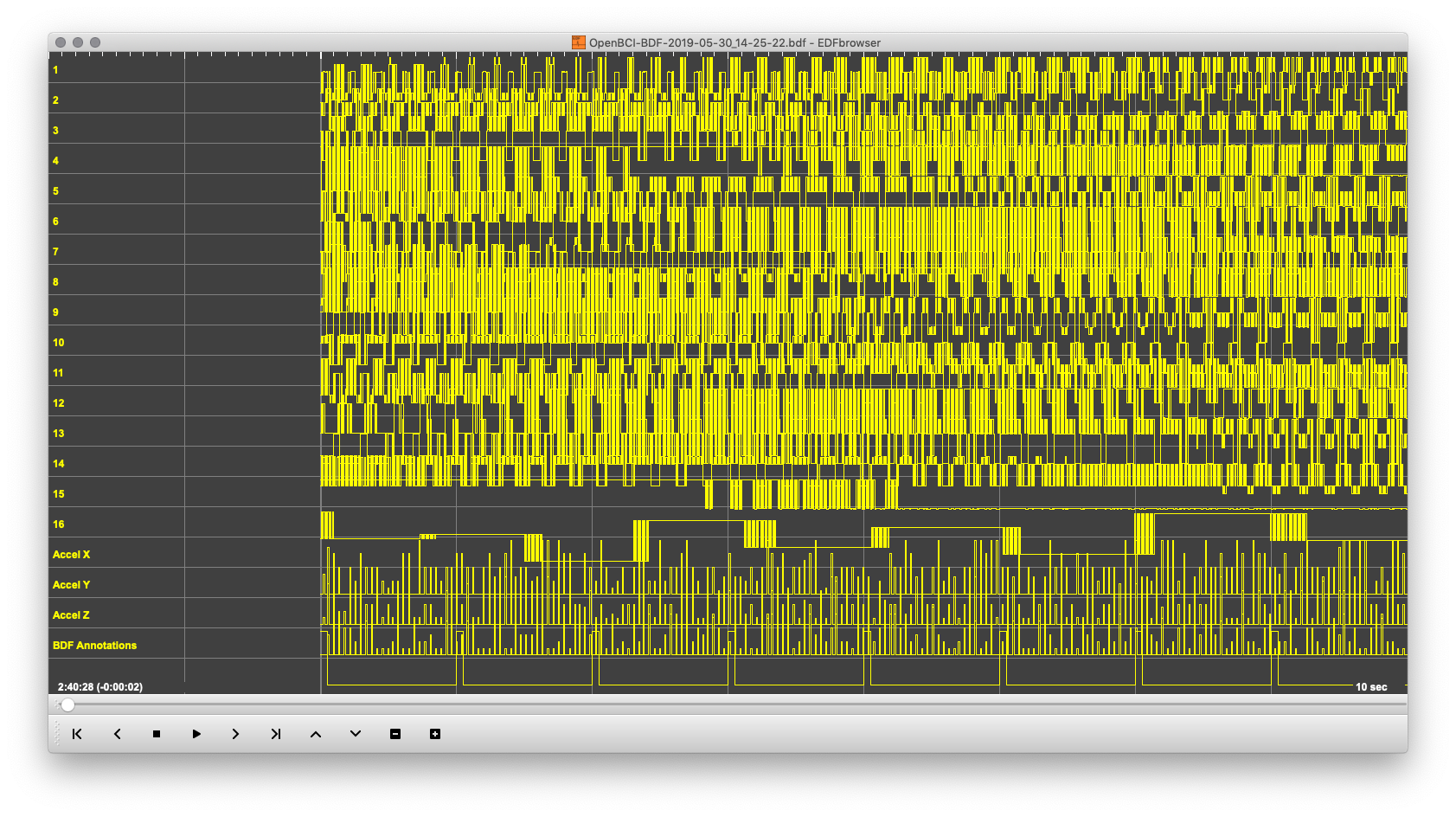
The above data is correct because the Cyton was not connected to a user.
This issue has been fixed via the above commits. Tested with Cyton+Daisy and Ganglion.
retiutut
on 30 May 2019
Richard, hi. Which GUI release zip has the working BDF+ ? I just tried outputing BDF from the 4.1.3beta1, and see no BDF files. Not in UserscroftMy DocumentsOpenBCI_GUI . Though if I do a normal CSV output, it does end up there.
And also not in Program FilesOpenBCI_GUISavedData either.
An earlier test with 4.1.2 did create a zero length OpenBCI-BDF-2019-06-27_14-01-47.bdf in SavedData. But I understood that in 4.1.3 SavedData folder is no longer used.
 wjcroft
on 27 Jun 2019
wjcroft
on 27 Jun 2019
@wjcroft Are you using Windows? I think you are. I’ll have to double check this feature on Windows.
retiutut
on 28 Jun 2019
Yes, Windows 7 64-bit here.
wjcroft
on 28 Jun 2019
On my Windows 10 64-bit machine, 4.1.3-beta1 standalone makes the temp file in C:UsersRetiututDownloadsOpenBCI_GUI
BDF file is made and saved to C:UsersRetiututDocumentsOpenBCI_GUI
BDF sessions, including the temp file, are being moved to C:UsersRetiututDocumentsOpenBCI_GUIRecordings after 4.1.3-beta1
retiutut
on 28 Jun 2019
Nope on Windows 7 64-bit, 4.1.3-beta1 (standalone) produces ZERO folders or files in croftDownloads. Do I need to have the OpenBCI_GUI folder in Downloads pre-existing before running the GUI?
Only the txt CSV's are being stored in Documents. No BDF files there.
wjcroft
on 28 Jun 2019
It made the temp.txt in the downloads folder because _that's where I launched the standalone app from_. Sorry for the confusion.
Can you find a temp.txt in, or around, the standalone GUI folder?
retiutut
on 28 Jun 2019
OK, think we're getting closer. I launch the GUI with a shortcut. It points to 'Target' in "C:Program FilesOpenBCI_GUIOpenBCI_GUI.exe". And 'Start in' is: "C:Program FilesOpenBCI_GUI". So yes, in the start folder is a temp.txt file.
So apparently there is some issue with permission or something, prohibiting moving that to DocumentsOpenBCI? Should I change the 'Start in' folder to something else? Is the temp.txt the same as the final .bdf when it is renamed?
You may need to clarify this Start-in folder change needed to users that have shortcuts.
Thanks, Richard for looking into this.
wjcroft
on 28 Jun 2019
It's more like creating/destroying/reading/writing. We make a temp.txt and then use that to make our BDF file with header/etc, which happens when a user clicks "STOP SYSTEM" aka now "STOP SESSION".
@wjcroft You shouldn't need to change anything. The idea with these changes is that all new data associated with the GUI will be in C:UsersRetiututDocumentsOpenBCI_GUI
retiutut
on 28 Jun 2019
@wjcroft If you have to, you could try a pre-bdf fix GUI to see that it can make a BDF in an older location (like SavedData). This issue resolved errors in the file header/length of the bdf.
retiutut
on 28 Jun 2019
Richard, it does not appear that the current GUI bdf logic can deal with a 'Start in' folder that is in "C:Program FilesOpenBCI_GUI". I suggest you try that case yourself to see that it does not work. Where should I set the shortcut to 'Start in'? It sounds like it needs to be in croftDocumentsOpenBCI_GUI. This is a change from previous versions and I think needs to be conveyed to users of old shortcuts.
This would not be an issue if an installer program created the preferred shortcut to use or Start menu startup. But the Windows zips are not installers, just the folder, files that is dropped into Program Files. I think in the old days the Windows installers actually did have some type of installer. I'm not asking for an installer to be created. I'll try changing my shortcut to start-in DocumentsOpenBCI_GUI.
I'm raising these issues because they confused me and would certainly confuse users trying to utilize bdf output.
The older 4.1.2 version DID create a zero length bdf in SavedData, but obviously broken.
wjcroft
on 28 Jun 2019
Related issues
 jps2000
·
5Comments
jps2000
·
5Comments
 rakansha
·
5Comments
rakansha
·
5Comments
 mgroth0
·
5Comments
mgroth0
·
5Comments
 daniellasry
·
8Comments
daniellasry
·
8Comments
 cfausn
·
3Comments
cfausn
·
3Comments