Openbci_gui: Unable to convert large files from SD card: Out of Memory Error
Problem
I'm trying to open a large file I recorded on the SD card during a 8 hours of sleep. In order to translate the file I know I have to open the OpenBCI GUI within processing, which works fine. I go through the steps (playback from file -- convert SD for playback), but when I select my file, I fairly quickly get the error pasted below. I went to the processing prefs and changed the "increase maximum available memory" from 256 to 1600, but it makes no difference. I HAVE succeeded in translating and opening a very small test file (maybe 5 minutes of data), so the problem seems to be simply file size. In the folder where the translated versions end up I do see files from my attempts to translate... but they are all 7.6mb. So it is as if the process starts fine, but conks out after a mere 7.6mb. Any idea of how I can fix this, or is the OpenBCI software just not suitable for large, long sleep-data files? (like, 700-800mb)?
Expected
I'd like to be able to open a large file from the SD card.
Operating System and Version
macOS 10.12.6
GUI Version
3.2.0
Running standalone app
Running from Processing 3 (necessary for this process, right?)
Type of OpenBCI Board
Cyton
Are you using a WiFi Shield?
NO
Here's the full error text:
java.lang.RuntimeException: java.lang.OutOfMemoryError: Java heap space
at processing.opengl.PSurfaceJOGL$2.run(PSurfaceJOGL.java:412)
at java.lang.Thread.run(Thread.java:748)
Caused by: java.lang.OutOfMemoryError: Java heap space
at java.util.Arrays.copyOfRange(Arrays.java:3664)
at java.lang.StringBuffer.toString(StringBuffer.java:669)
at java.io.BufferedReader.readLine(BufferedReader.java:327)
at java.io.BufferedReader.readLine(BufferedReader.java:389)
at OpenBCI_GUI.convertSDFile(OpenBCI_GUI.java:7396)
at OpenBCI_GUI$ControlPanel.update(OpenBCI_GUI.java:3087)
at OpenBCI_GUI.systemUpdate(OpenBCI_GUI.java:1024)
at OpenBCI_GUI.draw(OpenBCI_GUI.java:485)
at processing.core.PApplet.handleDraw(PApplet.java:2437)
at processing.opengl.PSurfaceJOGL$DrawListener.display(PSurfaceJOGL.java:859)
at jogamp.opengl.GLDrawableHelper.displayImpl(GLDrawableHelper.java:692)
at jogamp.opengl.GLDrawableHelper.display(GLDrawableHelper.java:674)
at jogamp.opengl.GLAutoDrawableBase$2.run(GLAutoDrawableBase.java:443)
at jogamp.opengl.GLDrawableHelper.invokeGLImpl(GLDrawableHelper.java:1293)
at jogamp.opengl.GLDrawableHelper.invokeGL(GLDrawableHelper.java:1147)
at com.jogamp.newt.opengl.GLWindow.display(GLWindow.java:759)
at com.jogamp.opengl.util.AWTAnimatorImpl.display(AWTAnimatorImpl.java:81)
at com.jogamp.opengl.util.AnimatorBase.display(AnimatorBase.java:452)
at com.jogamp.opengl.util.FPSAnimator$MainTask.run(FPSAnimator.java:178)
at java.util.TimerThread.mainLoop(Timer.java:555)
at java.util.TimerThread.run(Timer.java:505)
 benevans101
All 15 comments
Please upload the file
 andrewjaykeller
on 17 Jul 2018
andrewjaykeller
on 17 Jul 2018
Hi Andrew - thanks for your help. The problem is that the file is too big - 800MB! It covers a full night's sleep. I cannot upload files larger than 10MB here, but I can dropbox it if you think seeing the file itself would help. Like I said, I CAN convert smaller files, so it seems to be just a size issue?
benevans101
on 17 Jul 2018
Hi, I just converted an 113Mb in 8 seconds on my mac book pro. I don't think the size was the issue, i think it was a bug.
andrewjaykeller
on 17 Jul 2018
The GUI you are using is a a little out of date, since you are running from processing, you should try and use this new code in the development branch. You can either download the development branch or clone this repository and checkout the development branch if you're familar with git!
andrewjaykeller
on 17 Jul 2018
Hmm. I'm not too familiar with Github, but I think I can figure it out. You also reminded me that I can give it a try on another computer. I'll let you know if either works! Since this sort of problem hasn't been reported by anybody else, I can only assume there is some problem with my machine/software...
benevans101
on 17 Jul 2018
Update: I tried using the development gui you suggested to translate the file, and no luck. I tried using a different computer, no luck. Then, just to be on the safe side, I reformatted the SD card and recorded half an hour of data. This translated no problem (though it was about 30Mb). So possibly it was just that particular file was problematic, or possibly it is in fact some sort of maximum size issue. I'm reluctant to save another night's worth of data to the card if it might fail too, but I'll try that to see if it was, indeed, an error on the card/file somehow. Thanks again.
benevans101
on 20 Jul 2018
Update 2: I managed to finally record another night's session on a newly formatted card. Again, I get the "out of memory error" using either GUI. Effectively this means I cannot currently use my OpenBCI device to record real sleep data! If anybody out there has any idea how to solve this, or has a similar problem, I'd love to hear about it. I think my only chance of recovering this data now is to set up a Windows virtual machine and use software from SpiSOP that says it can translate the card data... Sux!
benevans101
on 25 Jul 2018
maybe a python script to convert this data is the right idea.
andrewjaykeller
on 25 Jul 2018
Can you send the dropbox link?
andrewjaykeller
on 25 Jul 2018
My pleasure - and again thanks for your help:
https://www.dropbox.com/s/aonf8d9f7yhun69/OBCI_02.TXT?dl=0
If you can translate it, then we'll know there is some problem at my end. If not, then perhaps there is some screw-up in the recording of the file (but then why would smaller files work?)
If you want to check out SpiSOP's translation software, info about it can be found about halfway down the page here:
https://www.spisop.org/openbci/
It is built for Windows, so I'm trying to get that to work on a windows virtual box, but for some reason I can't get a 64 bit version of Windows installed on my Mac (no matter what, a it ends up being a 32 bit version??)... so I keep getting the error "The version of this file is not compatible with the version of Windows you're running.... etc." So, altogether, pretty frustrating!
benevans101
on 25 Jul 2018
Hi,
I have the same issue with one night recording (4channels; 12hours).....and converting the openbci.txt file with spisop did not resolve the problem:
"java.lang.OutOfMemoryError: Requested array size exceeds VM limit" with processing3....
(dell workstation 16Go RAM; Win10-64bit; processing3; cyton (bought in march 2019); OBCI_01.TXT = 800 Mo; OBCI_01.TXT.new.csv = 136Mo.
I will try tonight with only 4hours recording....
did you find a solution ?
good night,
Xavier
 xdrouot
on 19 Apr 2019
xdrouot
on 19 Apr 2019
Hi Xavier -
The only way I've managed is through SpiSop. I'm almost positive that you can get SpiSop to work, but it is certainly not designed for amateurs like me. The guy who designed it is very generous and helpful, but he sometimes he has a tendency to assume you know everything he knows... I'm actually away on vacation all week, but I was working on posting a slightly more user-friendly account of SpiSop. I'll get back to it next week, if that's not too late for you. You can also try contacting SpiSop directly. One possible reason that it didn't work for you is that your configuration is different than his (as is mine). But it does work!
If you get a better, easier solution in the meantime, please let me know! You can also have a look at my rather long explanation of how I managed to get my four hour recordings into EDF format so I could open with EDF VIewer (since the native GUI isn't really designed for analyzing PSGs): http://www.dreamrealizationlab.com/psg-step-5-getting-off-the-sd-card/
There might be an easier way to do that too, but it works. I'm far from an expert on any of this!
I'll be back next Sunday and will be getting back into all of this again then.
benevans101
on 19 Apr 2019
Hi benevans101,
Stay in hollidays....!!!
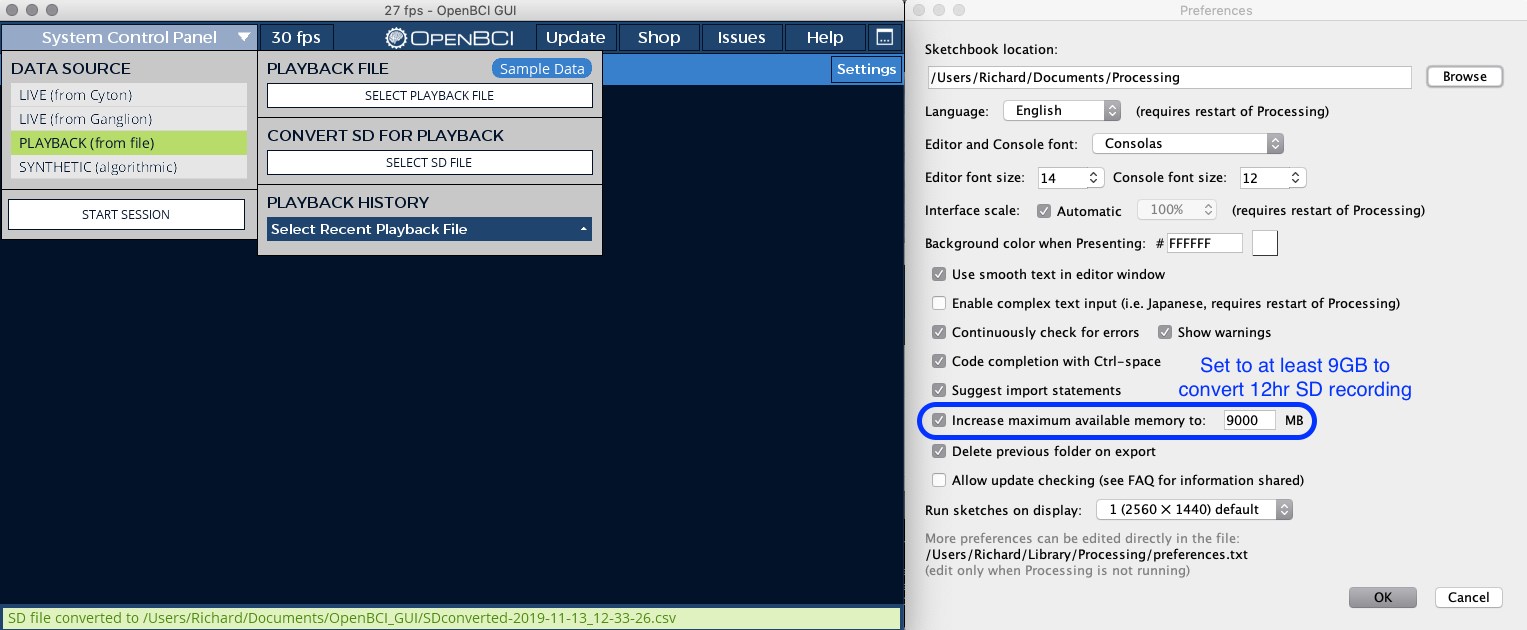
i succeeded in converting file from SD to .txt by increasing +++++the memory allocated to processing: in processing, you'll find "preferences" (in file/preferences) and set the item "increse memory available" to 16384MB. it took times but it works (for 12hours recordings/one channel = 700Mo). also I have 16Go RAM on my workstation.
I'm now looking to save this in edf format.....I have some difficulties with edfbrowser because of interleaved accelerometry which maked the nb of column differents each 4 raws....
I'll visit your website, may you've find a solution.
enjoy your hollidays
Xavier
xdrouot
on 20 Apr 2019
Hey all, thanks for documenting you findings so far. This item is on our to-do list. We'll find a way to be more efficient with memory.
 daniellasry
on 20 Apr 2019
daniellasry
on 20 Apr 2019
I don't think there is a way to set the Java Heap Space from the Processing code, since this would normally be done using JVM command line arguments.
I made a ~10 min recording with SD duration set to 12 hours. The SD card file says its ~800mb.
- Changing the max available memory works best when launching the GUI from processing, instead of processing-java and VSCode
- Setting my max available memory to 4gb was not enough
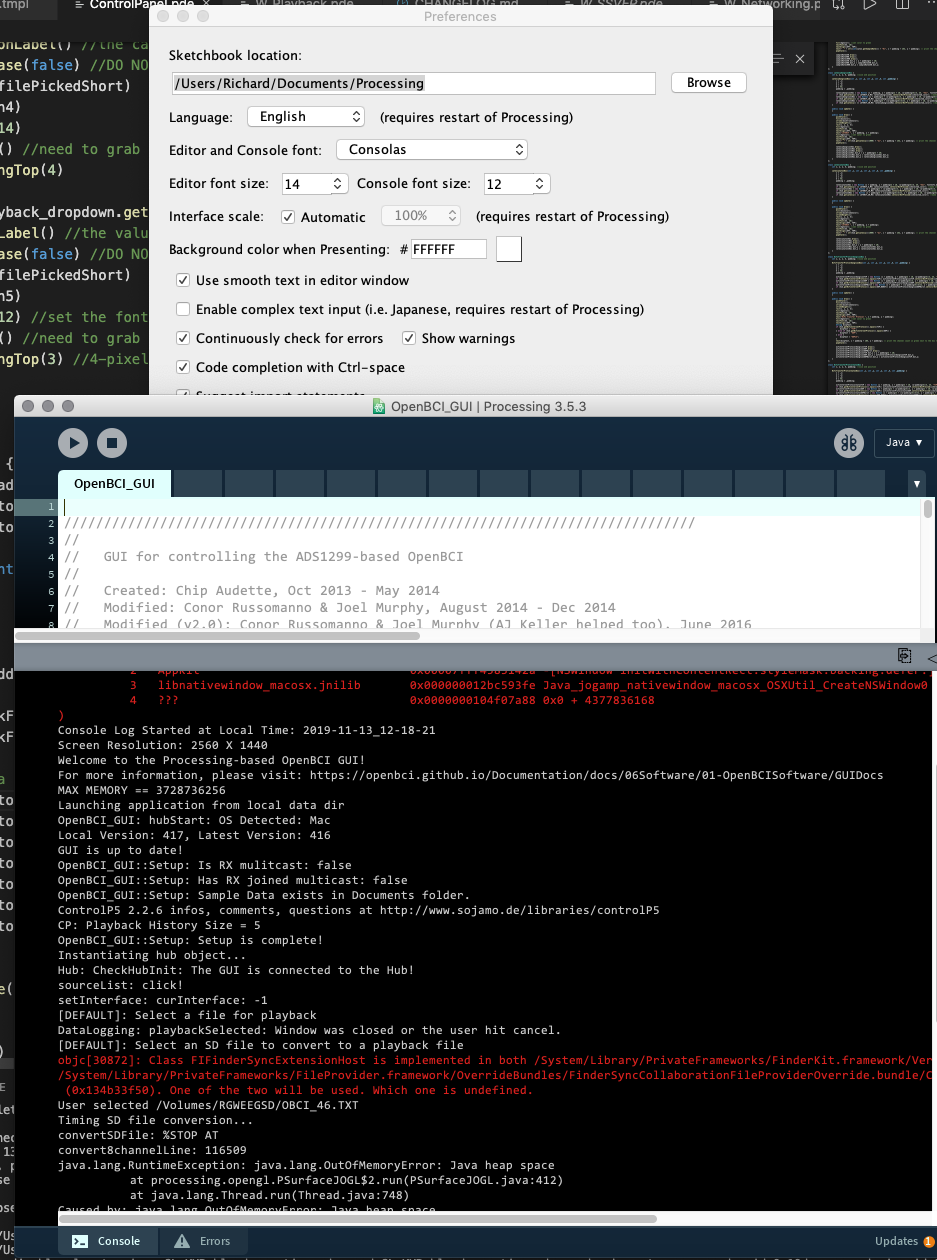
- Setting memory to 8gb is not enough either, each time confirming heap space size in the log line
MAX MEMORY == 7456948224 - Works with max available memory set to 9gb

To resolve this issue, I think it is most appropriate to add this to the docs as a special case for the GUI. New section should be titled "How to convert large SD file recordings". Use the following screenshot:
 retiutut
on 13 Nov 2019
retiutut
on 13 Nov 2019
Related issues
 jps2000
·
6Comments
jps2000
·
6Comments
 Otemo
·
7Comments
Otemo
·
7Comments
 jacobgmartin
·
7Comments
jacobgmartin
·
7Comments
 Elisabeth-github
·
3Comments
Elisabeth-github
·
3Comments
 rakansha
·
5Comments
rakansha
·
5Comments