Openalpr: 'Alpr' object has no attribute 'loaded'
I believe it is a problem that some people may face in the future
Things I already did:
Install openalpr:
sudo apt-get update && sudo apt-get install -y openalpr openalpr-daemon openalpr-utils libopenalpr-dev
Install wit the bash:
bash <(curl http://deb.openalpr.com/install)
git clone https://github.com/openalpr/openalpr.git
cd openalpr/src/bindings/python/
python setup.py install
Applying the binding
cd src/bindings/python/
python<version> setup.py install
Importing at eclipse and coping the PYTHON example as showed at here
from openalpr import Alpr

alpr = Alpr("us", "/path/to/openalpr.conf", "/path/to/runtime_data")
if not alpr.is_loaded():
    print("Error loading OpenALPR")
    sys.exit(1)

alpr.set_top_n(20)
alpr.set_default_region("md")

results = alpr.recognize_file("/path/to/image.jpg")

i = 0
for plate in results['results']:
    i += 1
    print("Plate #%d" % i)
    print("   %12s %12s" % ("Plate", "Confidence"))
    for candidate in plate['candidates']:
        prefix = "-"
        if candidate['matches_template']:
            prefix = "*"

        print("  %s %12s%12f" % (prefix, candidate['plate'], candidate['confidence']))

# Call when completely done to release memory
alpr.unload()
But after all this im getting the error:
Traceback (most recent call last):
  File "***.py", line 10, in <module>
    alpr = Alpr("eu", "/etc/openalpr/openalpr.conf", "***/runtime_data")
  File "/usr/local/lib/python3.5/dist-packages/openalpr/openalpr.py", line 85, in __init__
    self._recognize_raw_image_func = self._openalprpy_lib.recognizeRawImage
  File "/usr/lib/python3.5/ctypes/__init__.py", line 360, in __getattr__
    func = self.__getitem__(name)
  File "/usr/lib/python3.5/ctypes/__init__.py", line 365, in __getitem__
    func = self._FuncPtr((name_or_ordinal, self))
AttributeError: /usr/lib/libopenalprpy.so: undefined symbol: recognizeRawImage
Exception ignored in: <bound method Alpr.__del__ of <openalpr.openalpr.Alpr object at 0x7fac75d2da20>>
Traceback (most recent call last):
  File "/usr/local/lib/python3.5/dist-packages/openalpr/openalpr.py", line 258, in __del__
    if self.is_loaded():
  File "/usr/local/lib/python3.5/dist-packages/openalpr/openalpr.py", line 135, in is_loaded
    if not self.loaded:
AttributeError: 'Alpr' object has no attribute 'loaded'
Why this is happening?
EDIT:
The installation by rpm its the non-comercial (free) version, which its callable only by terminal, while the bash installation require a comercial license
 henriqueblobato
All 9 comments
recognizeRawImage is not available in release build (2.3.0) of Python wrapper. You will have to build master to get latest openalprpy.dll or remove definition of recognizeRawImage in openalpr.py
 r1me
on 6 Jul 2017
r1me
on 6 Jul 2017
Can you please create a release 2.3.1 which includes the definition of recognizeRawImage - please. I am having trouble compiling master manually. (aside - visual studio 2015 is hard to get and 2017 (current free version of studio) is not supported)
 tlawork
on 31 Jul 2017
tlawork
on 31 Jul 2017
I have the same problem, anyone know how to solve it?
 klwlau
on 18 Apr 2018
klwlau
on 18 Apr 2018
@klwlau and @tlawork follow this comment.
 sleebapaul
on 18 Apr 2018
sleebapaul
on 18 Apr 2018
@sleebapaul this solve my problem! thanks so much
klwlau
on 19 Apr 2018
TBH not a nice solution but,
If you don't use recognize_ndarray; removing it from the source code worked for me as @r1me mentioned.
Because I used easiest way to install alpr libraries and I found that it was not updated as git master so there was missing function.
 memoricab
on 2 Mar 2019
memoricab
on 2 Mar 2019
I met with this problem when I was trying to run openalpr on raspberry and I haven't found a solution fits my problem yet.
 HanyuuLu
on 1 Nov 2019
HanyuuLu
on 1 Nov 2019
Traceback (most recent call last):
File "allapi.py", line 36, in
alpr = Alpr("us", "/etc/openalpr/openalpr.conf", "/usr/share/openalpr/runtime_data")
File "/home/zm/code/main/detection/openCVYolo/alpr/python/openalpr/openalpr.py", line 85, in __init__
self._recognize_raw_image_func = self._openalprpy_lib.recognizeRawImage
File "/usr/lib/python3.6/ctypes/__init__.py", line 361, in __getattr__
func = self.__getitem__(name)
File "/usr/lib/python3.6/ctypes/__init__.py", line 366, in __getitem__
func = self._FuncPtr((name_or_ordinal, self))
AttributeError: /usr/lib/libopenalprpy.so: undefined symbol: recognizeRawImage
Exception ignored in:>
Traceback (most recent call last):
File "/home/zm/code/main/detection/openCVYolo/alpr/python/openalpr/openalpr.py", line 258, in __del__
if self.is_loaded():
File "/home/zm/code/main/detection/openCVYolo/alpr/python/openalpr/openalpr.py", line 135, in is_loaded
if not self.loaded:
AttributeError: 'Alpr' object has no attribute 'loaded'
no solution seems to work in my case.
Help
 rishabhoswal
on 29 Jan 2020
rishabhoswal
on 29 Jan 2020
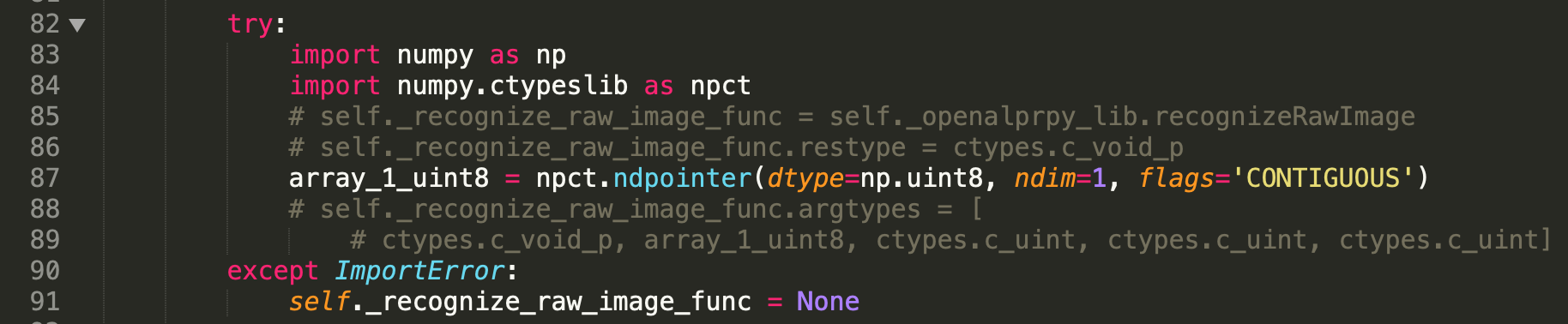
recognizeRawImageis not available in release build (2.3.0) of Python wrapper. You will have to build master to get latestopenalprpy.dllor remove definition ofrecognizeRawImageinopenalpr.py
once I get the binding setup, I commented out the following lines in /opt/anaconda3/lib/python3.7/site-packages/openalpr and it runs just fine
 robertmzm
on 20 Feb 2021
robertmzm
on 20 Feb 2021
Related issues
 amchoukir
·
7Comments
amchoukir
·
7Comments
 simplyeazy
·
10Comments
simplyeazy
·
10Comments
 guyingqiong
·
10Comments
guyingqiong
·
10Comments
 tmscer
·
8Comments
tmscer
·
8Comments
 warpdriv
·
3Comments
warpdriv
·
3Comments
Most helpful comment
@sleebapaul this solve my problem! thanks so much