Open3d: Use create_pyramid to down sample Depth image is incorrect
Is your feature request related to a problem? Please describe.
When I use my own acquired data as input to the ReconstructionSystem, I find that the data is too large(1920*1080), resulting in slower speeds. So I want to down sample the RGB and Depth image before create_from_color_and_depth.
Because the data type returned by o3d.io.read_image does not seem so simply to handle. So I checked the official documentation and found a function named create_pyramid(...) of the class open3d.geometry.Image. Link
But this function only supports one way of downsampling (regardless of Gaussian kernel). I checked the source code and found :
https://github.com/intel-isl/Open3D/blob/b5429cd86fed60e555836d6f9d804d46593d67ab/src/Open3D/Geometry/Image.cpp#L164-L173
ImagePyramid Image::CreatePyramid in ImageFactory.cpp and then call the function pyramid_image[i - 1]->Downsample() in Image.cpp
For depth image, the averaging method leads to wrong results. Similarly bilinear interpolation can also produce erroneous results.
I think we should use some 'rough' methods for downsampling the Depth image, such as
- remove a few lines directly without interpolation
- or nearest-neighbor interpolation
If you use the interpolation method, it will produce noise points as shown in the right figure.
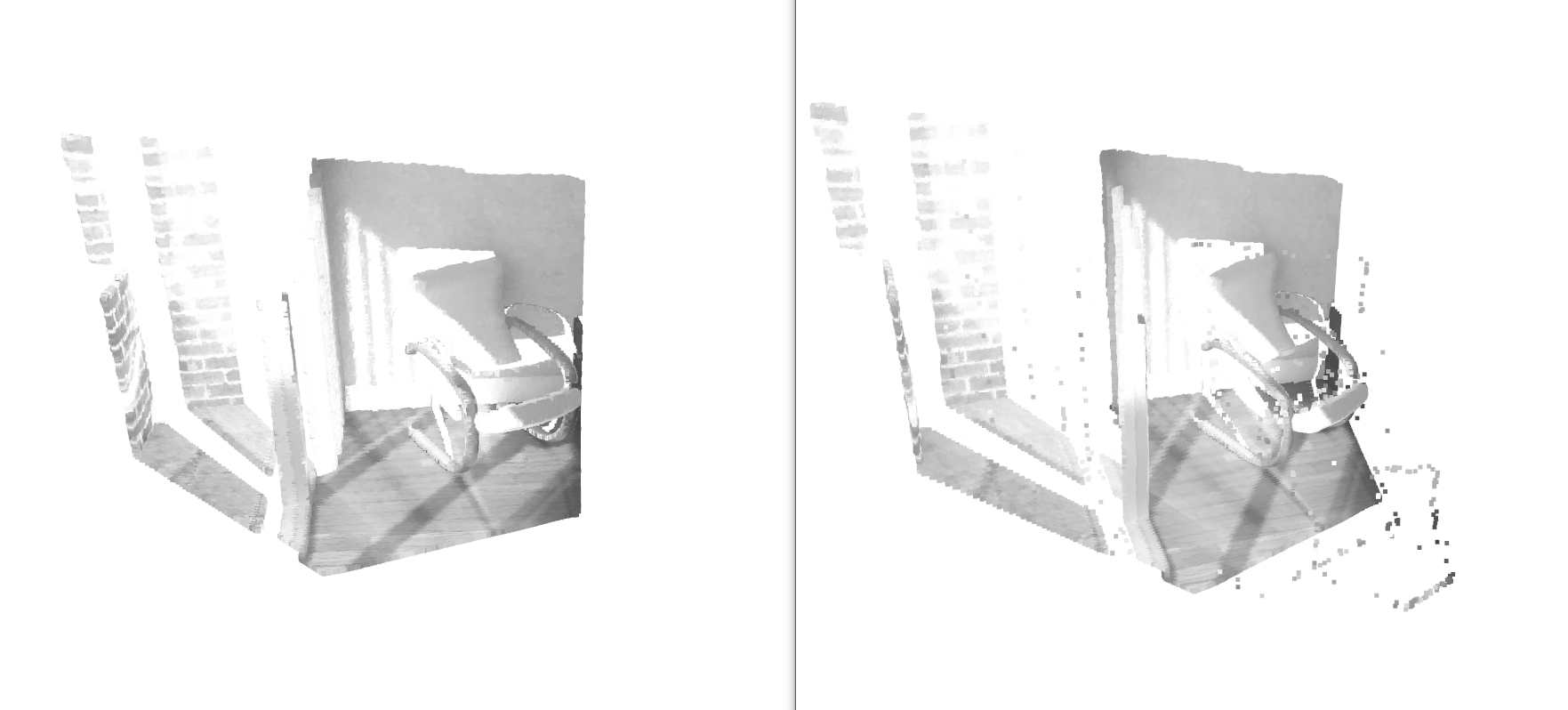
Note: Need to scale the camera intrinsic parameters
Describe the solution you'd like
- Provides a choice of several different downsampling methods
- By the way, if there is a way to handle the data returned by
o3d.io.read_imagewith opencv etc.very easily, it is ok. But now I can read them with numpy, but I don't know how to package them into an image class in open3d.
Describe alternatives you've considered
Modify the source code to achieve simple sampling, but I think it will be inconvenient for me when I need use open3d in other computers in the future.
 MaxChanger
All 2 comments
The image is scaled by the following code, and the parameter interpolation = cv2.INTER_NEAREST can be used to reconstruct no noise points.
But if I use cv2.INTER_CUBIC or cv2.INTER_LINEAR, the result is still noisy
import cv2
import numpy as np
src_color = cv2.imread("./color/00000.jpg", cv2.IMREAD_UNCHANGED)
src_depth = cv2.imread("./depth/00000.png", cv2.IMREAD_UNCHANGED)
print(src_color.shape, src_depth.shape)
width = int(src_color.shape[1] / 2)
height = int(src_color.shape[0] / 2)
dim = (width, height)
tmp_color = cv2.resize(src_color, dim, interpolation = cv2.INTER_NEAREST)
tmp_depth = cv2.resize(src_depth, dim, interpolation = cv2.INTER_NEAREST)
cv2.imwrite("./color_down/00000.jpg", tmp_color)
cv2.imwrite("./depth_down/00000.png", tmp_depth)
print(tmp_color.shape, tmp_depth.shape)
I found a simple solution by looking at working with numpy.py
https://github.com/intel-isl/Open3D/blob/b5429cd86fed60e555836d6f9d804d46593d67ab/examples/Python/Basic/working_with_numpy.py#L40
so we cloud use opencv and numpy to process the image, but I still think it's more perfect to provide an interpolation option in function create_pyramid(...)
    color = o3d.io.read_image(color_file)
    depth = o3d.io.read_image(depth_file)
    tmp_color_mat = np.asarray(color)    # uint8
    tmp_depth_mat = np.asarray(depth)    # uint16
    width  = int(tmp_color_mat.shape[1] / 2)
    height = int(tmp_color_mat.shape[0] / 2)
    dim = (width, height)
    tmp_color_mat = cv2.resize(tmp_color_mat, dim, interpolation = cv2.INTER_NEAREST)
    tmp_depth_mat = cv2.resize(tmp_depth_mat, dim, interpolation = cv2.INTER_NEAREST)
    color = o3d.geometry.Image(tmp_color_mat.astype(np.uint8))
    depth = o3d.geometry.Image(tmp_depth_mat.astype(np.uint16))
Related issues
 mutp
·
4Comments
mutp
·
4Comments
 lordlycastle
·
3Comments
lordlycastle
·
3Comments
 samarth-robo
·
3Comments
samarth-robo
·
3Comments
 HaiyongJiang
·
3Comments
HaiyongJiang
·
3Comments
 blackccpie
·
3Comments
blackccpie
·
3Comments
Most helpful comment
I found a simple solution by looking at
working with numpy.pyhttps://github.com/intel-isl/Open3D/blob/b5429cd86fed60e555836d6f9d804d46593d67ab/examples/Python/Basic/working_with_numpy.py#L40
so we cloud use opencv and numpy to process the image, but I still think it's more perfect to provide an interpolation option in function
create_pyramid(...)