Open3d: Problem Installing open3d in Windows
Hi everyone...
I have followed installation guide from getting started page here
Here is the results of Cmake configure (I use Visual Studio 14 2015 Win64)
Disable Open3D_BUILD_UNIT_TESTS since it is not fully supported on Windows.
Compiling on Windows
Compiling with MSVC
Open3D_USE_OPENMP=ON
Open3D_BUILD_LIBREALSENSE=ON
Open3D_BUILD_PYTHON_BINDING=ON
Open3D_BUILD_PYTHON_BINDING_TESTS=ON
Finding dependencies of Open3D
Dependencies are built from source if they are not found in the system
Could NOT find GLEW (missing:  GLEW_INCLUDE_DIR GLEW_LIBRARY)
Build GLEW from source
Could NOT find PkgConfig (missing:  PKG_CONFIG_EXECUTABLE)
Use eigen3 included in Open3D
Build libjpeg from source
Build libpng from source
Build glfw from source
Could NOT find Vulkan (missing:  VULKAN_LIBRARY VULKAN_INCLUDE_DIR)
Using Win32 for window creation
Build jsoncpp from source
Build tinyfiledialogs from source
Build librealsense from source
pybind11 v2.2.1
Open3D_BUILD_TESTS=ON
Open3D_BUILD_UNIT_TESTS=OFF
Build experimental projects
Configuring done
And here is the build result use VS2015. I only got 17 succeeded with 31 failed
------ Build started: Project: INSTALL, Configuration: Release x64 ------
 -- Install configuration: "Release"
 CMake Error at Python/cmake_install.cmake:50 (file):
   file INSTALL cannot find "E:/Data Pribadi/Point
   Cloud/python/Open3D-master/build/lib/Release/py3d.cp35-win_amd64.pyd".
  Call Stack (most recent call first):
    cmake_install.cmake:39 (include)


C:\Program Files (x86)\MSBuild\Microsoft.Cpp\v4.0\V140\Microsoft.CppCommon.targets(133,5): error MSB3073: The command "setlocal
C:\Program Files (x86)\MSBuild\Microsoft.Cpp\v4.0\V140\Microsoft.CppCommon.targets(133,5): error MSB3073: "C:\Program Files\CMake\bin\cmake.exe" -DBUILD_TYPE=Release -P cmake_install.cmake
C:\Program Files (x86)\MSBuild\Microsoft.Cpp\v4.0\V140\Microsoft.CppCommon.targets(133,5): error MSB3073: if %errorlevel% neq 0 goto :cmEnd
C:\Program Files (x86)\MSBuild\Microsoft.Cpp\v4.0\V140\Microsoft.CppCommon.targets(133,5): error MSB3073: :cmEnd
C:\Program Files (x86)\MSBuild\Microsoft.Cpp\v4.0\V140\Microsoft.CppCommon.targets(133,5): error MSB3073: endlocal & call :cmErrorLevel %errorlevel% & goto :cmDone
C:\Program Files (x86)\MSBuild\Microsoft.Cpp\v4.0\V140\Microsoft.CppCommon.targets(133,5): error MSB3073: :cmErrorLevel
C:\Program Files (x86)\MSBuild\Microsoft.Cpp\v4.0\V140\Microsoft.CppCommon.targets(133,5): error MSB3073: exit /b %1
C:\Program Files (x86)\MSBuild\Microsoft.Cpp\v4.0\V140\Microsoft.CppCommon.targets(133,5): error MSB3073: :cmDone
C:\Program Files (x86)\MSBuild\Microsoft.Cpp\v4.0\V140\Microsoft.CppCommon.targets(133,5): error MSB3073: if %errorlevel% neq 0 goto :VCEnd
C:\Program Files (x86)\MSBuild\Microsoft.Cpp\v4.0\V140\Microsoft.CppCommon.targets(133,5): error MSB3073: :VCEnd" exited with code 1.
========== Build: 1 succeeded, 31 failed, 16 up-to-date, 0 skipped ==========
I cannot find py3d.cp35-win_amd64.pyd file
And based on getting started page , after I build use VS2015, what should I do next?
I tried to import py3d but I got error ImportError: No module named 'py3d'
Pls help
 serdadoe
All 10 comments
Hi. Here are my comments:
- Check that visual studio project made successfully using cmake. I cannot see
Generating donemessage from your cmake log. The errors from visual studio also look like cmake issue. - Check visual studio version. It is required to use VS2015 Update 3 or later.
 syncle
on 16 May 2018
syncle
on 16 May 2018
Thank you :)
I retried using VS2017 and got 47 succeeded.
And how can I import open3d to Anaconda?
serdadoe
on 17 May 2018
Great. If you build a project using INSTALL option, you don't have to explicitly copy python module to the system path.
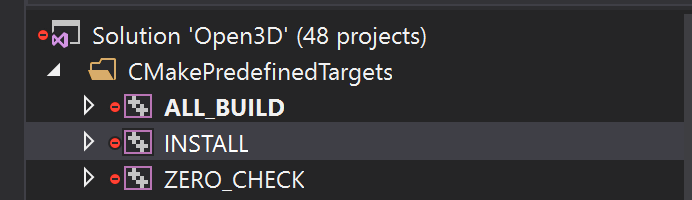
If you are on the anaconda environment with the same python version used for open3d build, you can simply begin with
python
>>> import open3d
Solved :) thank you!!
And one more question, every time I use draw_geometries syntax, I have to close the display windows to continue the program. Is it possible to display multiple windows in the same time?
serdadoe
on 18 May 2018
That's great. Now you are ready to enjoy Open3D!
The closest answer I can give you is using non-blocking rendering. You can update your geometry and refresh frame while not blocked by rendering loop. Please check this tutorial: http://open3d.org/docs/tutorial/Advanced/non_blocking_visualization.html
Opening multiple windows is technically possible. However, I haven't made good tutorial yet. I will check on that too. :)
syncle
on 18 May 2018
Great! Thank you...
How can I display multiple windows using draw_geometries or visualization ?
serdadoe
on 26 May 2018
In order to open multiple windows, you need to break into the rendering loop of the Visualizer. See this for details of the rendering loop:
http://www.open3d.org/docs/tutorial/Advanced/non_blocking_visualization.html
Something like:
vis1 = Visualizer()
vis1.create_window()
vis1.add_geometry(geometry1)
vis2 = Visualizer()
vis2.create_window()
vis2.add_geometry(geometry2)
while not some_ending_condition:
    vis1.poll_events()
    vis2.poll_events()
    vis1.update_renderer()
    vis2.update_renderer()
vis1.destroy_window()
vis2.destroy_window()
 qianyizh
on 29 May 2018
qianyizh
on 29 May 2018
My python versions for the Anaconda command line environment and CMake match. Yet, I'm getting the error below for import open3d after typing 'python' in the Anaconda enviroment.
Error:
ImportError: DLL load failed: The specified module could not be found.
Any idea what's going on? All of my builds in CMake were completed with no errors. I get the same error when running a python script in Spyder. I'm also using the following line in Spyder.
sys.path.append("C:/Users/imaging/Open3D/build")
I was told the 'build' folder is where the py3d (open3d) is located.
Here is my full script.
import shlex, subprocess
import sys
sys.path.append("C:/Users/imaging/Open3D/build")
from py3d import *
import matplotlib.pyplot as plt
import numpy as np

pointcloudpath='D:/Maize Scanning Summer 2018/Scans/Maizebas060218.1.1.1.1.1_Scan_000_res_1_qual_1X_onefourth.fls/'
pointcloudpath=pointcloudpath.replace('\\','/')
pcd=read_point_cloud(pointcloudpath)
print(pcd)
pcdarray=np.array(pcd.points)
draw_geometries([pcd])
 theriny
on 7 Jul 2018
theriny
on 7 Jul 2018
@theriny did you use Visual Studio to compile it? If that is the case, the directory should be C:/Users/imaging/Open3D/build/lib/Python/Release/, in which you should find a file named open3d.cp36-win_amd64.pyd or something like that.
I also notice you are importing py3d. It is an old name. If you are using the latest build, this should be open3d.
qianyizh
on 9 Jul 2018
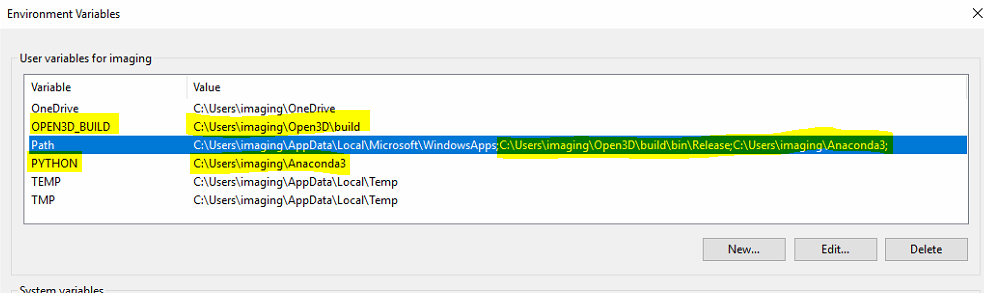
@qianyizh Yes, I did use VS to compile. I fixed the problem. It seems that Python and Open3D were not on the same system path. So, I basically created variables for each of them which includes there path/location on my machine. Then, I added them to the same variable named 'Path'.
If that is the case, the directory should be C:/Users/imaging/Open3D/build/lib/Python/Release/, in which you should find a file named open3d.cp36-win_amd64.pyd or something like that.
I did not change my path to the location that you quoted above, but my code still works.
theriny
on 9 Jul 2018
Related issues
 mutp
·
4Comments
mutp
·
4Comments
 martinakos
·
4Comments
martinakos
·
4Comments
 DKandrew
·
4Comments
DKandrew
·
4Comments
 Prakash19921206
·
4Comments
Prakash19921206
·
4Comments
 edxsx
·
3Comments
edxsx
·
3Comments