The support for RGB-D data has three aspects:
- Offline read RGB-D data and process them
- Stream RGB-D data from a camera and record it to disk
- Stream RGB-D data from a camera and process it on-the-fly
Currently Open3D partially support (1) by allowing reading RGB-D image pairs. It support formats from a few different datasets. However, some other formats like the legacy ONI format (http://qianyi.info/scenedata.html http://redwood-data.org/indoor/tutorial.html) are not supported.
I think (2) is important too. But I don't know if there is a "mainstream" sensor that is worth developing a UI for it.
I tried to develop a recorder for the RealSense DS4 sensor a long time ago (https://github.com/IntelVCL/Open3D/blob/master/src/Test/TestRealSense.cpp). DS4's driver was not well supported by Linux and caused lots of headache. Also, I am not happy about the quality of the images produced by DS4 (significantly worse than Primesense).
Primesense can only be bought from black market now 5 years after the acquisition by Apple. Both OpenNI and OpenNI2 drivers have not been maintained for years.
KinectOne is heavy. The calibration between color and depth camera has many issues. It is never considered to be a good camera for SLAM.
Structure sensor + iPad is a good combination. But the recording requires iOS programming. I have implemented an app for this purpose. I don't think I can integrate it easily to Open3D. Also I could not find a standard format that can support fast recording while being easily parse-able.
I had lots of experience with Tango, both phone and tablet. But rumor said that Google had shut it down.
I am very open to adding support to RGB-D cameras. I think it helps a lot if we can have a convenient tool to collect RGB-D data for SLAM. But I am struggling in finding a good mainstream RGB-D setup. Suggestions are very welcome.
 qianyizh
All 48 comments
Hi, @qianyizh,
I'm also in similar situation as yours. Thanks for listing your comments on such list of rgb-d camera. BTW, most of them seems to be discontinued except the Intel RealSense product. So I think RealSense camera would be main-stream rgb-d camera in future. I notice that you mentioned driver in DS4 is currently unsatisfactory, I cannot give a comment as I don't have one. Have you tried ROS wrapper for that? BTW,DS5 (D400 series) camera has been released recently and I'm looking for the user feedback ...
 amiltonwong
on 26 Mar 2018
amiltonwong
on 26 Mar 2018
Realsense DS5 indeed looks very nice. @syncle can you take a look at the DS5 sensors?
qianyizh
on 26 Mar 2018
Sure. I will try DS5 and share thoughts on this new camera.
 syncle
on 26 Mar 2018
syncle
on 26 Mar 2018
I'm looking to possibly acquire these: https://www.stereolabs.com/
Not the same depth technology as a kinect, but definitely affordable.
 rukie
on 17 Apr 2018
rukie
on 17 Apr 2018
Met same problems before. We tried with Intel's RealSense D435 RGBD camera recently, which has easy-to-use SDK (librealsense 2.0) and good official support. The calibration for each sensor are finished as inner parameters accessible via SDK API. Depth to RGB alignment can be automatically finished via functions, too. Highly recommended.
BTW, though it is a structured light camera, the depth camera can be used outdoor. So it should be a main-stream product in near future. (Even already is ...)
 kuonangzhe
on 27 Apr 2018
kuonangzhe
on 27 Apr 2018
Have anyone succeeded in reconstructing a scene using D435?
I tried it myself and have no luck with it.
The quality of the reconstructed mesh is no where near the ones produced from public datasets, which are taken with ASUS Xtion (http://redwood-data.org/indoor_lidar_rgbd/index.html).
 yuyu2172
on 10 May 2018
yuyu2172
on 10 May 2018
@syncle can you buy a DS5 sensor and try it out? I also want to buy a sensor for myself to play around. But I am burning my personal funds, so would rather be a bit careful, 😄
qianyizh
on 12 May 2018
@yuyu2172 Did you reconstruct the scene with D435 using its SDK or Open3D?
 wpxu08
on 26 May 2018
wpxu08
on 26 May 2018
@yuyu2172 same issue here. I have tried with different scenes recorded using D435 vbbut with no success so far ( with the D435 intrinsic parameters ). The resulted fragments (obtained by make_fragments.py) are not well aligned even before registering them. On public datasets, it works fine.
Really strange!
 arrfou90
on 7 Jun 2018
arrfou90
on 7 Jun 2018
@arrfou90 @yuyu2172 , would you share your recorded dataset captured by D435? We may test it and correct what's wrong with the reconstruction.
amiltonwong
on 7 Jun 2018
@amiltonwong I have attached in the link a recorded data with Intel realsense D435 (with D435 intrinsic parameters ) plus the results when using the Reconstruction tutorials.
https://drive.google.com/file/d/1cEe6m29lVsy9SYxFH97yPmFONDguf7KQ/view?usp=sharing
arrfou90
on 7 Jun 2018
Hi @amiltonwong, any updates on this case?
arrfou90
on 11 Jun 2018
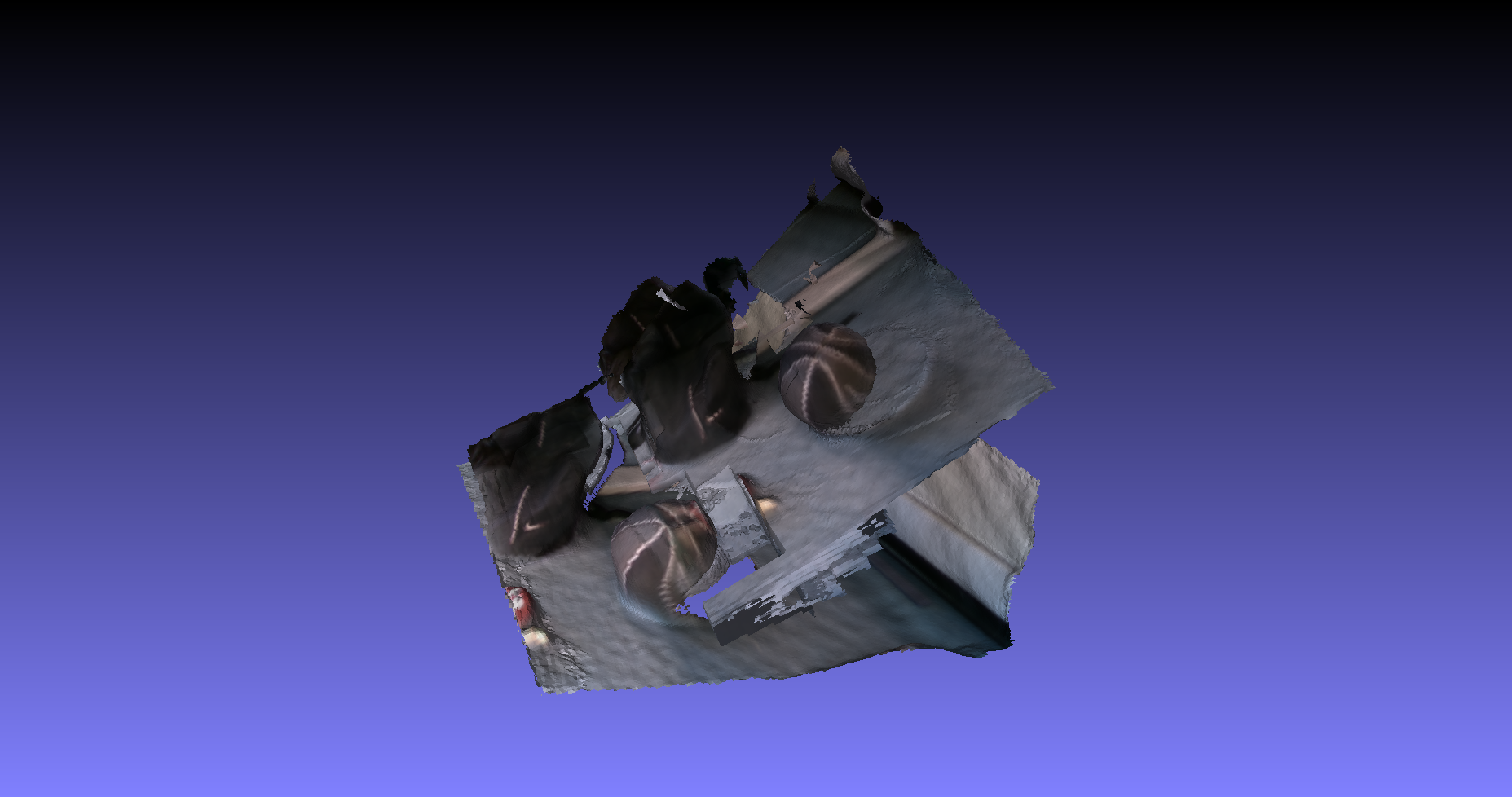
Thanks @arrfou90 for your sharing, I'll test it in these days and update the comments
amiltonwong
on 11 Jun 2018
amiltonwong
on 11 Jun 2018
Hi, @arrfou90 ,
I see that your result doesn't register well. Could you tell me the method you applied ? Is the one mentioned in Open3D tutorial on reconstruction system? All submodules such as fragment creation, fragment registration, scene integration were already applied to get such output? If yes, I may try another method to reconstruct it.
amiltonwong
on 11 Jun 2018
@amiltonwong Yes, exactly. These results are obtained by the Open3D tutorial on reconstruction system . All submodules are applied to get such output. I have used the same reconstruction system on other datasets like redwood-data and I got very good reconstructions.
Thanks for the update.
arrfou90
on 11 Jun 2018
We have exactly the same problem using d415 or d435.
The reconstruction system works with datasets provided by open3d but not with the rosbags saved with the d400.
I think it is a serious issue for open3d : kinect, primesens and xtion belong to the past and a lot of people are looking for a solution to use the d400 family.
 Fred3D-tech
on 5 Jul 2018
Fred3D-tech
on 5 Jul 2018
Update my experience on D415 and D435.
I practice it using another RGBD-SLAM package (RTAB-MAP), the live mapping experience is satisfactory. I guess there needs some specific parameters tuning (e.g. calibration parameter) for D415 and D435 in current Open3D.
amiltonwong
on 5 Jul 2018
My conclusion:
The reconstruction system provided in the tutorials is tuned for PrimeSense. With D435/D415 the reconstruction system suffers from the RGBDOdometry estimation when creating the fragments by make_fragments.py. Increasing the n_frames_per_fragment would help ( it makes a fragment with less numbers of RGBD frames) because D435 capture objects at close distances, which make it quit difficult to keep the tracking between RGBD frames). I agree with @argosvr, D400 family is important for Open3D
arrfou90
on 5 Jul 2018
Yeah the current reconstruction system in the tutorial is tuned for PrimeSense/Xtion camera. My guess is that it should work with the RealSense D400 series but needs non-trivial amount of parameter tuning.
@syncle I assume you can work on it?
qianyizh
on 5 Jul 2018
Yep. I will work on this issue. @argosvr @arrfou90 @amiltonwong. Can you guys share short period of RGBD sequences for me? (maybe about 300 frames) I will need to collect many examples to find out issues.
syncle
on 5 Jul 2018
I've just tried the image sequence shared by @arrfou90.
It is simply because of file naming issue. For example, the file shared by @arrfou90 had the following names:
image1.png
image2.png
image3.png
:
This can cause problem as the file list retrieved by Python could be
image1.png
image10.png
image11.png
:
This issue will make a large frame jump, and can break RGBD odometry.
I just renamed the frames like this (like the dataset in the tutorial)
image000000.png
image000001.png
image000002.png
:
and could get the following result:
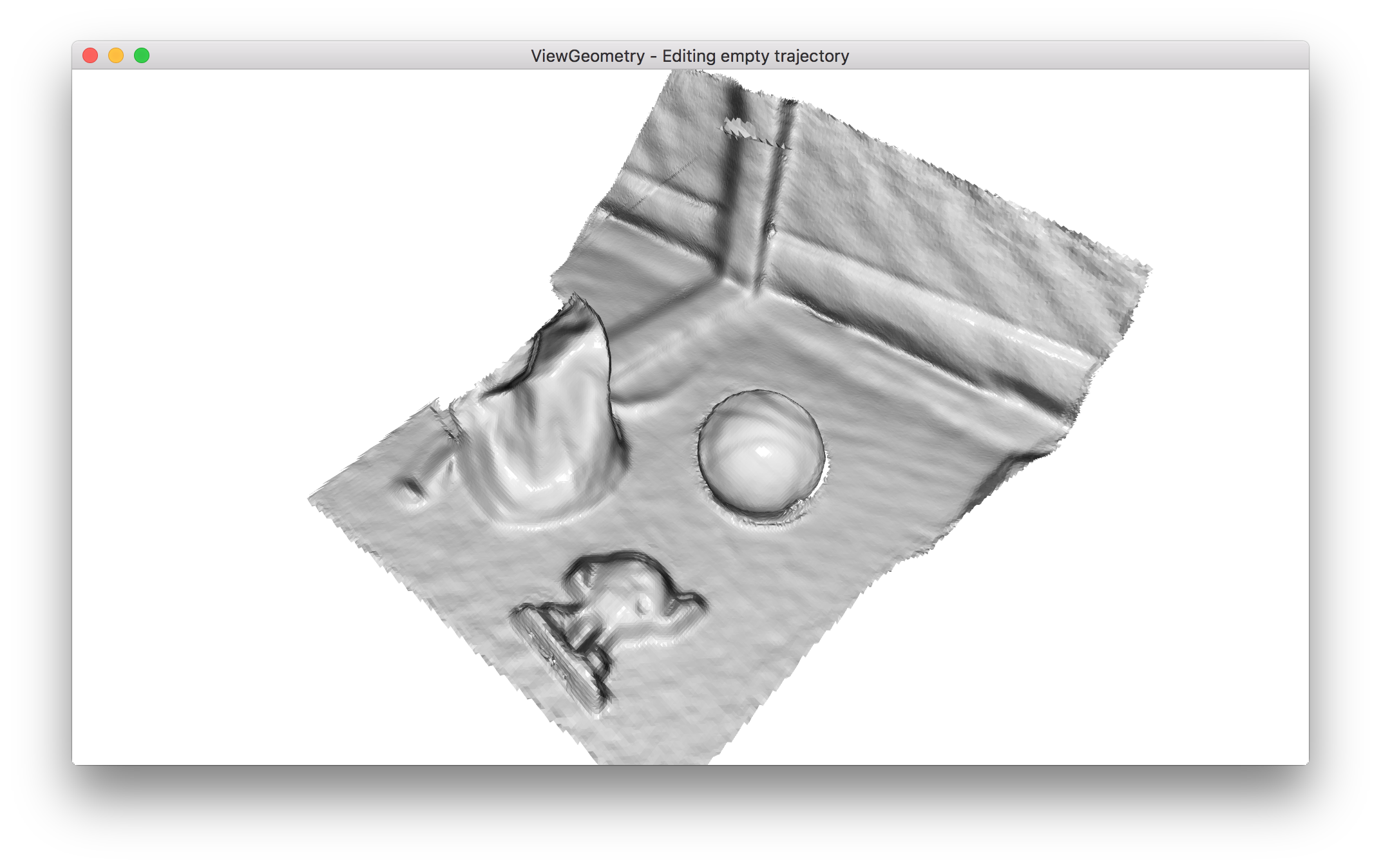
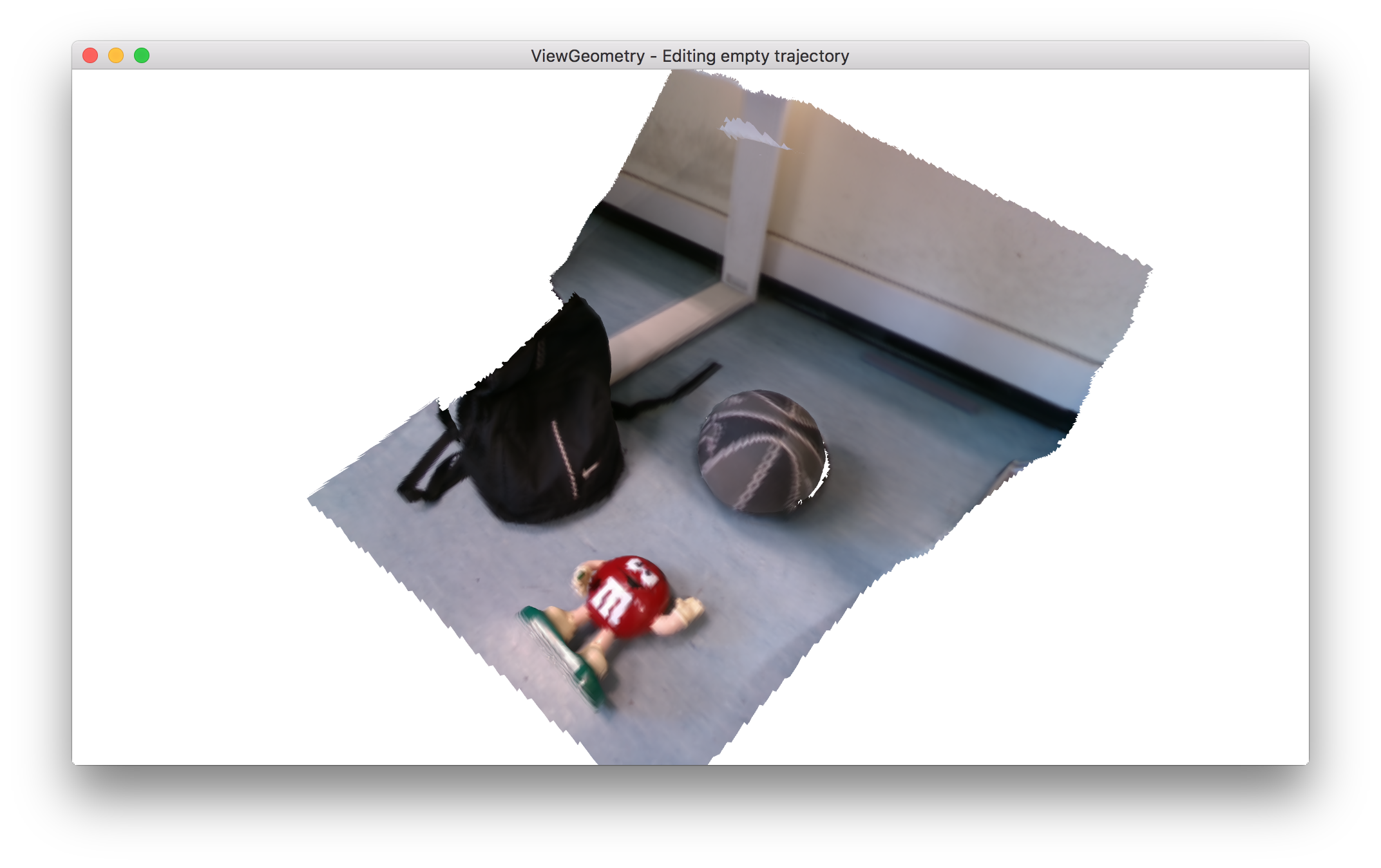
Note: I haven't tuned any parameter for this result :)
I also found out that PrimeSenseDefault produces better result than the provided intrinsic value. @arrfou90, did you calibrate the Realsense camera by yourself? If there is a some factory standard parameter that I can try? I can add it to the pre-defined camera intrinsic set for Open3D.
syncle
on 5 Jul 2018
@arrfou90 ? what were the parameters used to capture with the Realsense ? (expo, laser power, etc..)
@syncle here is a link with a capture: you will see that we had no problem with the name of our pictures files and then our problem is certainly coming from something else.
1st test: https://www.dropbox.com/s/5u7mokwbvaj391a/dataset_30fps.zip?dl=0
2nd test : https://www.dropbox.com/s/i5rc9gr8xhtju0r/out124026.tar.gz?dl=0
3rd test: https://www.dropbox.com/s/rxyqn8rj90cqp3h/out121007.tar.gz?dl=0
intrinsic parameters for the camera: https://www.dropbox.com/s/h55ede6s1ep39su/intrinsic_811112060195.json?dl=0
Fred3D-tech
on 6 Jul 2018
@syncle that is true, thank you. The RGBD odometry breaks because of file naming issue! I have regenerated the results with proper ordering of the files sequence and it is working as expected. I would suggest to read the files in Alphanumeric order. I have a simple code that can be added to the def get_file_list(path, extension=None): inside common.py instead of python native function file_list.sort().
@syncle did you calibrate the Realsense camera by yourself?
No, I have used the factory standard parameter with VGA resolution. I will make sure of the parameters and report back to you.
@argosvr what were the parameters used to capture with the Realsense ? (expo, laser power, etc..)
I have used the factory standard parameter.
arrfou90
on 6 Jul 2018
@arrfou90: Can you test your function on both Python 2.x and 3.x and submit PR for this? This will help Open3D users to avoid this issue.
@argosvr, I just checked your sequence, and found several issues.
124026 sequence
It is a rotating table.
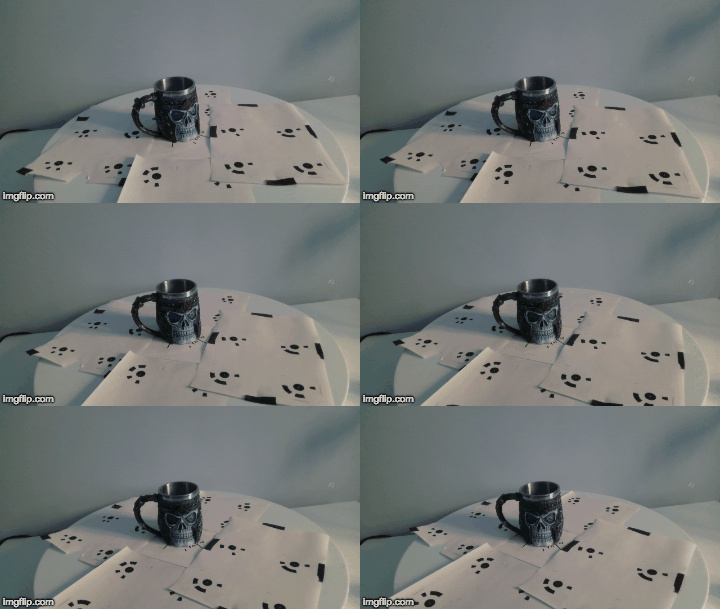
This is ill-posed problem for RGBD Odometry. The principle goal of RGBD Odometry is to estimate camera pose. In this case, there is dual solution that can corresponds to foreground (object on the rotating table) motion or background (static wall) motion. Due to this reason, we got the following reconstruction:
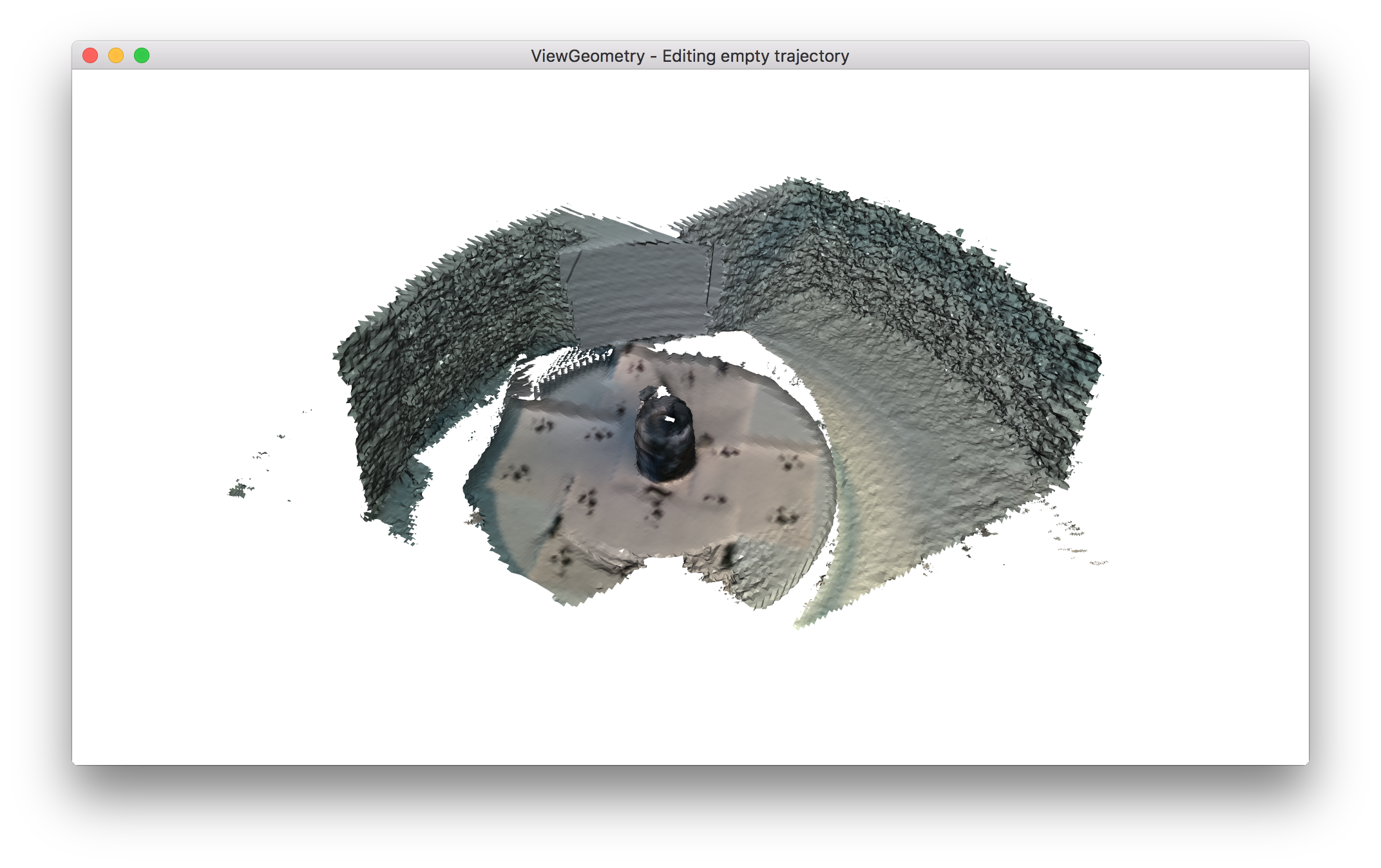
Actually I liked this result since the odometry tried to estimate pose based on the foreground object although there are severe outlier on the background.
This is not the case if you apply multiview stereo + sfm system. I am pretty sure the white background is just ignored since there is no feature. If you are interested in scanning foreground objects, I recommend you to fill out 0 values on the region you are not interested (wall in the background). Odometry module will ignore background region.
121007 sequence
It is too noisy and full of invalid depth values. I think the depth camera is too close to the scene. Try using depth camera within valid range. In this case, basically the depth cannot be useable.
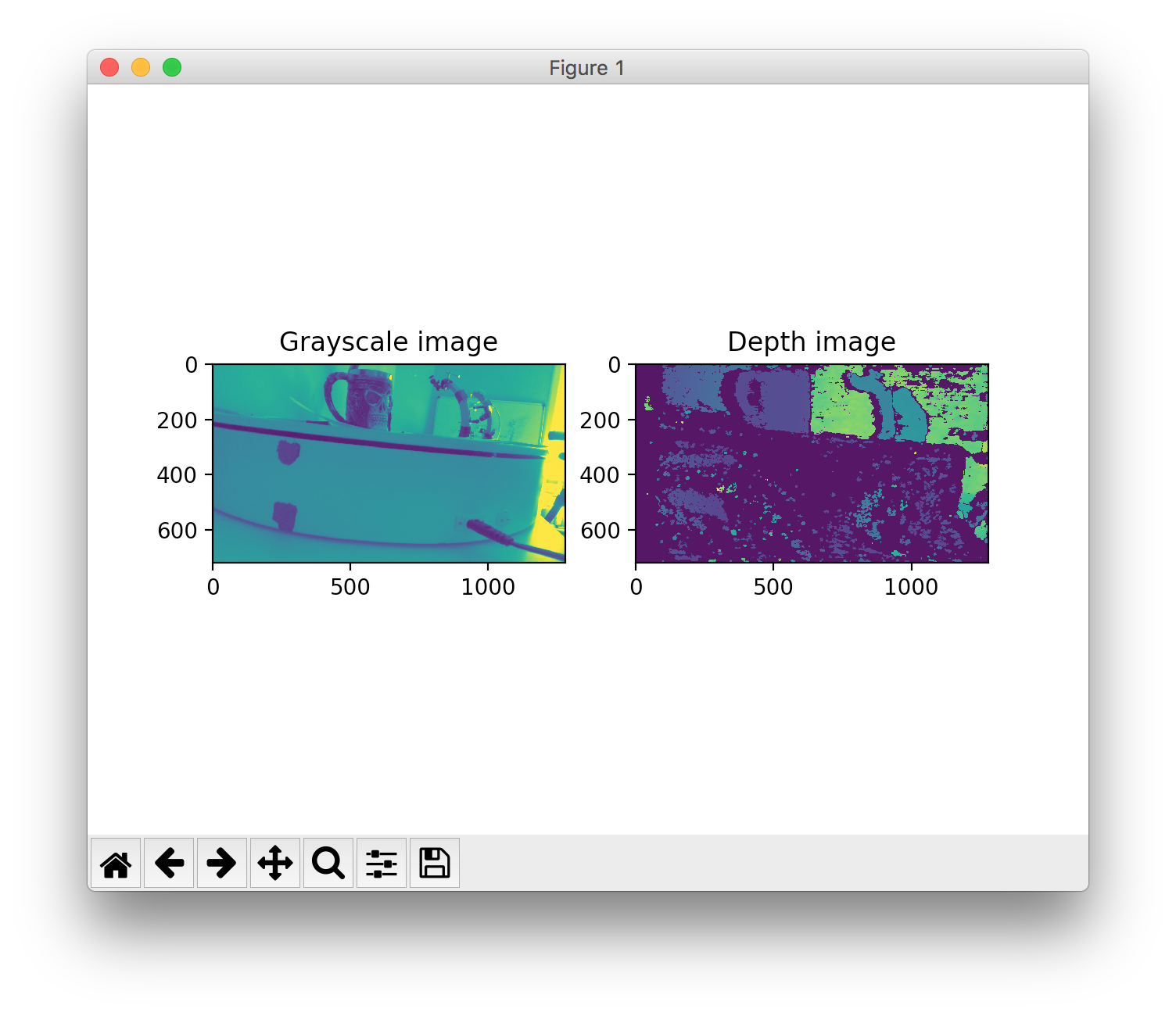
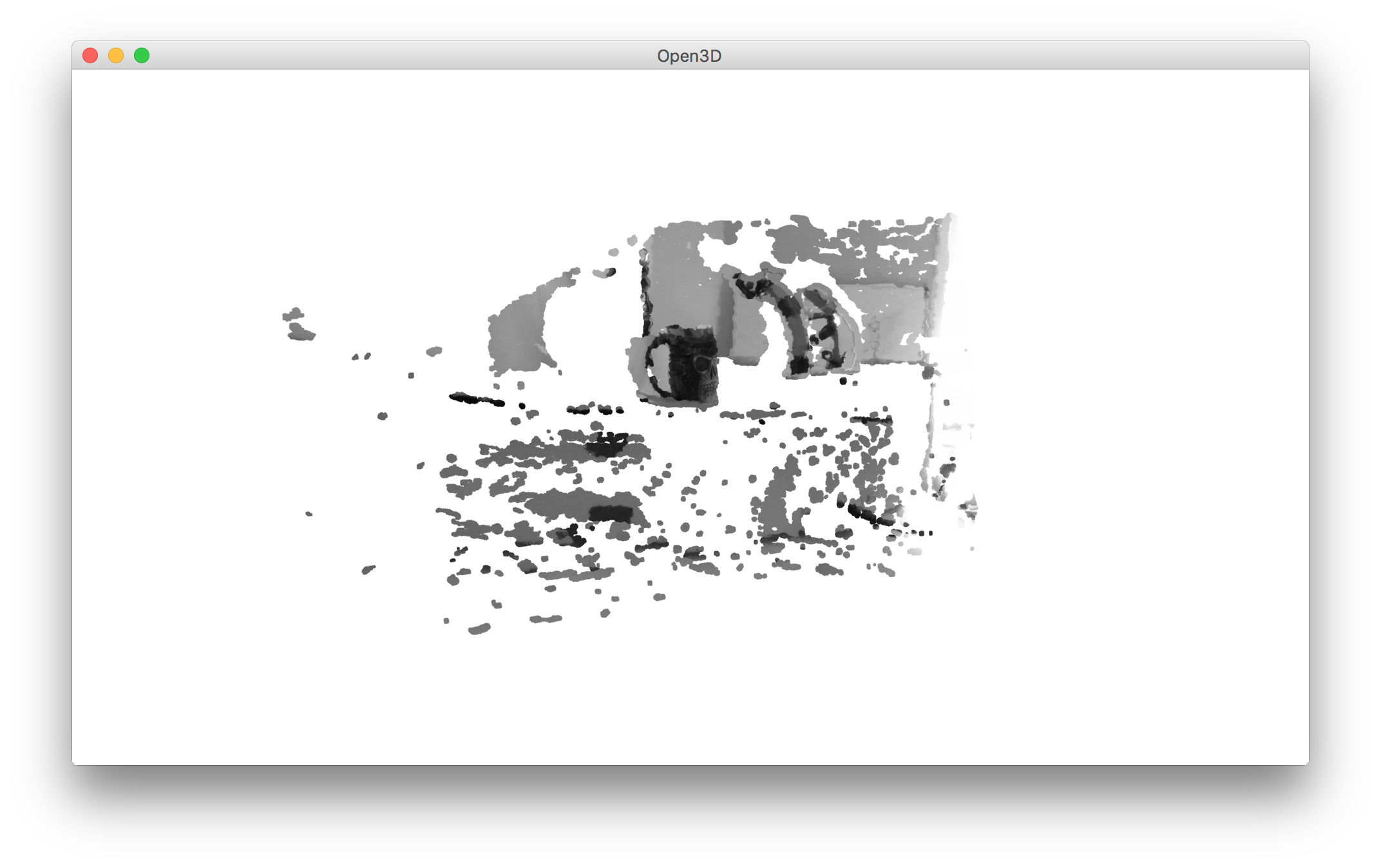
I haven't tested dataset_30fps sequence. It is too large to me to perform a quick test using my laptop, but hope my comments on the other sequences will help your research!
Based on my quick tests, the issue regarding odometry module is not about specific parameter tunning. It is rather due to file name conventions (@arrfou90), target scene issues (124026 sequence by @argosvr) or depth camera issues (121007 sequence by @argosvr). Please correct me if I am wrong :)
syncle
on 6 Jul 2018
@syncle ; thanks for the test.
For the 124026 sequence, I thought about keeping only the rotating object, defining a max depth in order to exclude the background. I thought there was a max-depth parameter usable to exclude the background.
Anyway, using the 3d reconstruction given in the doc (http://www.open3d.org/docs/tutorial/ReconstructionSystem/system_overview.html), I'm very far away from the results you got.
Could you give a link with the code you used ? it would be a good starting point for us.
the 121007 sequence is very noisy, I agree. First of all, the distance has to be +20cm more to the object and the light has to be better.
"I recommend you to fill out 0 values on the region you are not interested" 👍 : can you tell us a little bit more about that ?
Fred3D-tech
on 7 Jul 2018
Could you give a link with the code you used ? it would be a good starting point for us.
I just used reconstruction pipeline without any parameter tunning. This is my shell command:
python make_fragments.py -path_intrinsic /Users/jaesikpa/Downloads/out124026/intrinsic_811112060195.json /Users/jaesikpa/Downloads/out124026/out124026/
Can you try again with up-to-date Open3D pipeline? If the reconstruction result is not the same for some reason, we need to fix it. I used MacOSX, single threaded pipeline.
fill out 0 values on the region you are not interested
Please see:
https://github.com/IntelVCL/Open3D/blob/6ed03b43f256d43a3835a306ab819c5cc9616e20/src/Core/Odometry/Odometry.cpp#L327-L336
The RGBD Odometry ignores depth values which are out of valid depth range, marked as zero, or negative values.
What I want to say is quite similar what you already mentioned with some minor difference. Instead of manually setting maximum depth, you can make custom back ground mask. When you make a RGBD image, fill the depth of background as 0 using that mask, and put it to the Odometry module.
This would be more explicit way to ignore background region regardless of distance to the background, and that tweaked depth map would be much better for the volume integration (only foreground object will be integrated as 0 depth will be ignored).
syncle
on 7 Jul 2018
Using your shell command on Ubuntu I get this ...
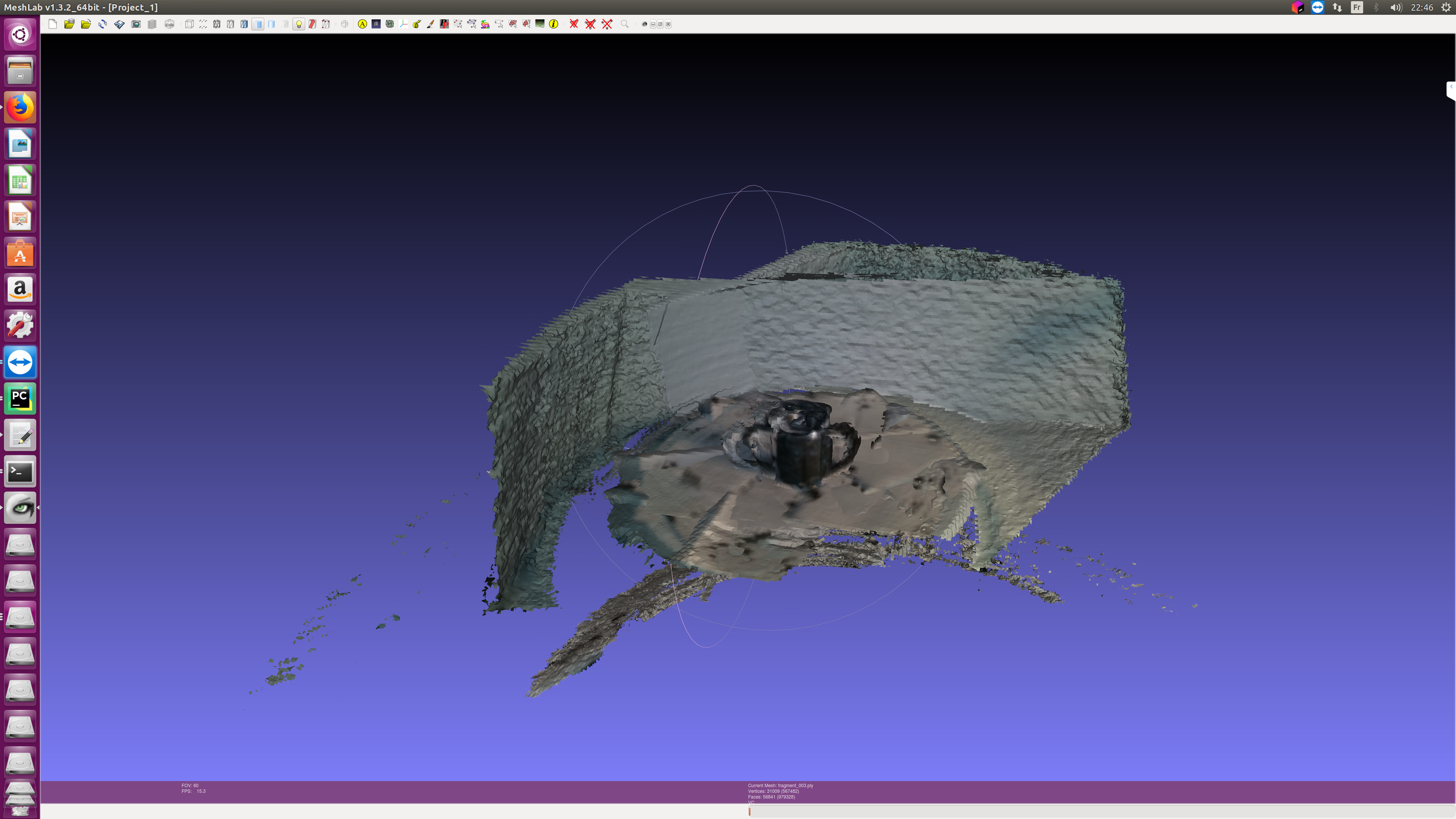
Did you changed very recently your pipeline ?
As far as "masquing" is concerned, I will try on monday.
Fred3D-tech
on 7 Jul 2018
It's bit weird. I will try the same thing on Ubuntu 16.04. (on Monday too :)
syncle
on 8 Jul 2018
@arrfou90: Can you test your function on both Python 2.x and 3.x and submit PR for this? This will help Open3D users to avoid this issue.
@syncle
Yes, sure. I did the test and I am going to submit a PR soon.
arrfou90
on 9 Jul 2018
@argosvr: I got the same result using Ubuntu. The only difference is that I've showed one fragment and you've showed the whole reconstruction. As I explained before, the sequence is not valid for reconstruction system as the scene is not static. Please mask out background scene and try again.
syncle
on 9 Jul 2018
@syncle The calibration of the D400 family sensors is done internally on board and these parameters are accessible only via SDK API. I have extracted the parameters via the Intel realsense APIs for D415 and D435 that I have.
I suppose these intrinsic parameters are slightly different depending on each sensor (i.e. two D435 sensors could have slightly different intrinsic parameters). For example, the intrinsic parameters provided by @argosvr are different than the ones I have here.
Here are the intrinsic parameters I have.
- For D415 the intrinsic parameters for a 1280X720 is:
{ "width" : 1280, "height" : 720, "intrinsic_matrix" : [ 937.448,0, 0, 0, 937.448, 0, 630.899, 349.994, 1 ] } - For D435 the intrisnic paramters for a 1280X720 is:
{
"width" : 1280,
"height" : 720,
"intrinsic_matrix" :
[
    644.616, 0, 0,
    0, 644.616, 0,
    644.684, 355.551, 1
]
}
I think for a tutorial adding these parameters is fine. However, reading directly from the Intel realsense SDKs makes more sense.
arrfou90
on 11 Jul 2018
If using kinect2, which way is better?
- align the depth image to color image. Both are 1920 * 1080 resolution.
- align the color image to depth image. Both are 512 * 424.
 lrxjason
on 16 Jul 2018
lrxjason
on 16 Jul 2018
Both is good depending on the application: 1 is good for color map optimization, and 2 is good enough for RGBD odometry and scene reconstruction.
syncle
on 16 Jul 2018
I'm using the libfreenect2 to register the color and depth images with method 2. After applying the register function, the resized color image has some invalid pixels. Is that good for scene reconstruction?
lrxjason
on 16 Jul 2018
Why not just make a ROS node to receive RGB-D images from an independent source like realsense ROS node? That would be much easier to implement and maintain by decoupling Open3D and the device-dependent software.
 cedrusx
on 7 Aug 2018
cedrusx
on 7 Aug 2018
Thanks @cedrusx! In addition, I would like to mention realsense wrapper for opencv as well. https://github.com/IntelRealSense/librealsense/tree/master/wrappers/opencv
syncle
on 7 Aug 2018
@amiltonwong I have attached in the link a recorded data with Intel realsense D435 (with D435 intrinsic parameters ) plus the results when using the Reconstruction tutorials.
https://drive.google.com/file/d/1cEe6m29lVsy9SYxFH97yPmFONDguf7KQ/view?usp=sharing
@arrfou90: Sorry if this is unrelated. Could you please share the setting that you used to capture the dataset? I used D435 as well but I couldn't get such a good quality depth map.
Which tool did you use to capture 200+ images efficiently? I am looking at Open3D Realsense example:
http://www.open3d.org/docs/tutorial/ReconstructionSystem/capture_your_own_dataset.html
However, for some reasons, the depth images do not seem to be captured in the same format as your dataset, and I have been unsuccessful with the Open3D reconstruction system.
 data-metrics
on 22 Nov 2018
data-metrics
on 22 Nov 2018
Hi @liambll, I have used ROS to record the data. I have written a subscriber that listens to the images which are published by the Intel realsense ROS Wrapper. If you feel comfortable with using ROS, I can share with you the ROS subscriber node I have.
I have not used the Open3D tutorial to record the data so far, but I suppose it should work too! Please explain more what is the problem you have, share the data, so I can take a look.
arrfou90
on 22 Nov 2018
@arrfou90: My bad. It is working now.
Initially I put the object in open space and it seems that messes up my depth images from Intel Realsense camera. I tried putting the object in a box and it is working fine now, although I can see your 3D reconstructed object has much better details than mine.
I will experiment with different settings more to see if I can get better details.
data-metrics
on 26 Nov 2018
The support for RGB-D data has three aspects:
- Offline read RGB-D data and process them
- Stream RGB-D data from a camera and record it to disk
- Stream RGB-D data from a camera and process it on-the-fly
Currently Open3D partially support (1) by allowing reading RGB-D image pairs. It support formats from a few different datasets. However, some other formats like the legacy ONI format (http://qianyi.info/scenedata.html http://redwood-data.org/indoor/tutorial.html) are not supported.
I think (2) is important too. But I don't know if there is a "mainstream" sensor that is worth developing a UI for it.
I tried to develop a recorder for the RealSense DS4 sensor a long time ago (https://github.com/IntelVCL/Open3D/blob/master/src/Test/TestRealSense.cpp). DS4's driver was not well supported by Linux and caused lots of headache. Also, I am not happy about the quality of the images produced by DS4 (significantly worse than Primesense).
Primesense can only be bought from black market now 5 years after the acquisition by Apple. Both OpenNI and OpenNI2 drivers have not been maintained for years.
KinectOne is heavy. The calibration between color and depth camera has many issues. It is never considered to be a good camera for SLAM.
Structure sensor + iPad is a good combination. But the recording requires iOS programming. I have implemented an app for this purpose. I don't think I can integrate it easily to Open3D. Also I could not find a standard format that can support fast recording while being easily parse-able.
I had lots of experience with Tango, both phone and tablet. But rumor said that Google had shut it down.
I am very open to adding support to RGB-D cameras. I think it helps a lot if we can have a convenient tool to collect RGB-D data for SLAM. But I am struggling in finding a good mainstream RGB-D setup. Suggestions are very welcome.
@qianyizh @syncle could you provide some update what is the status for cases (2) and (3). To my understanding at the moment (3) is not implemented yet while (2) is partially addressed with the following (http://www.open3d.org/docs/tutorial/ReconstructionSystem/capture_your_own_dataset.html). I say partially because it is only for the realsense cameras and as far as I noticed there is only a python script (no C++ implementation), is that correct?
Also another question is, considering that someone has already a tango device is it possible to use with open3D in order to reconstruct the 3d scene.
 ttsesm
on 4 Jan 2019
ttsesm
on 4 Jan 2019
Anybody knows how to change realsense intrinsic parameter to kinect v1 intrinsic? I cannot use kinect v1 to get fragment and 3D reconstruction.
 lintianfang
on 17 Oct 2019
lintianfang
on 17 Oct 2019
Anybody knows how to change realsense intrinsic parameter to kinect v1 intrinsic? I cannot use kinect v1 to get fragment and 3D reconstruction.
Do you already have the intrinsic parameters of Kinect V1? Assuming you are following the below guide:
http://www.open3d.org/docs/release/tutorial/ReconstructionSystem/capture_your_own_dataset.html
You can replace the intrinsic camera parameters at:
Open3Dexamples\Python\ReconstructionSystem\datasetrealsense\camera_intrinsic.json
data-metrics
on 17 Oct 2019
Anybody knows how to change realsense intrinsic parameter to kinect v1 intrinsic? I cannot use kinect v1 to get fragment and 3D reconstruction.
Do you already have the intrinsic parameters of Kinect V1? Assuming you are following the below guide:
http://www.open3d.org/docs/release/tutorial/ReconstructionSystem/capture_your_own_dataset.html
You can replace the intrinsic camera parameters at:
Open3Dexamples\Python\ReconstructionSystem\datasetrealsense\camera_intrinsic.json
I don't have the intrinsic of kinect v1, and I plan to get the intrinsic by some calibration tool, do you have any recommendation method for calibration? Also, there are two cameras(rgb and IR), which intrinsic should I use in Open3D. Thanks very much for your reply.
lintianfang
on 18 Oct 2019
@lintianfang
I used checkerboard and OpenCV to estimate camera intrinsic parameters in another project.
https://opencv-python-tutroals.readthedocs.io/en/latest/py_tutorials/py_calib3d/py_calibration/py_calibration.html
data-metrics
on 19 Oct 2019
Any news of supporting Kinect V1 or V2?
 e270889o
on 23 Oct 2019
e270889o
on 23 Oct 2019
@lintianfang
I used checkerboard and OpenCV to estimate camera intrinsic parameters in another project.
https://opencv-python-tutroals.readthedocs.io/en/latest/py_tutorials/py_calib3d/py_calibration/py_calibration.html
Thanks a lot for giving me the tutorial, I have got the camera matrix by the tutorial. The new problem is when I use open3d reconstruction to build 3D model for my office room, I just got a small number of discrete points of making fragments, do I have to change some other parameters such as follows, BTW, I obtained the depth and color image(color-alighed-to-depth) by using OpenNi for kinect v1.
"name": "Open3D reconstruction tutorial http://open3d.org/docs/release/tutorial/ReconstructionSystem/system_overview.html",
"path_dataset": "dataset/20191023/",
"path_intrinsic": "dataset/20191023/kinect_intrinsic.json",
"max_depth": 3.0,
"voxel_size": 0.05,
"max_depth_diff": 0.07,
"preference_loop_closure_odometry": 0.1,
"preference_loop_closure_registration": 5.0,
"tsdf_cubic_size": 3.0,
"icp_method": "point_to_plane",
"global_registration": "ransac",
"python_multi_threading": true
lintianfang
on 23 Oct 2019
Time to close this question.
 germanros1987
on 5 Mar 2020
germanros1987
on 5 Mar 2020
Related issues
 mike239x
·
4Comments
mike239x
·
4Comments
 edxsx
·
3Comments
edxsx
·
3Comments
 prerakmody
·
3Comments
prerakmody
·
3Comments
 masonsun
·
3Comments
masonsun
·
3Comments
 DKandrew
·
4Comments
DKandrew
·
4Comments
Most helpful comment
I've just tried the image sequence shared by @arrfou90.
It is simply because of file naming issue. For example, the file shared by @arrfou90 had the following names:
This can cause problem as the file list retrieved by Python could be
This issue will make a large frame jump, and can break RGBD odometry.
I just renamed the frames like this (like the dataset in the tutorial)
and could get the following result:


Note: I haven't tuned any parameter for this result :)
I also found out that
PrimeSenseDefaultproduces better result than the provided intrinsic value. @arrfou90, did you calibrate the Realsense camera by yourself? If there is a some factory standard parameter that I can try? I can add it to the pre-defined camera intrinsic set for Open3D.