Open-shell-menu: Serious problem, seems to have been caused by installation of build 4.4.147
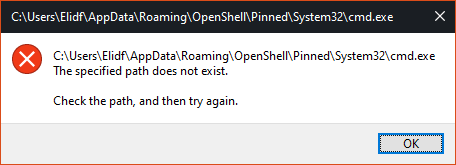
Whenever I try to run any system32 app, I receive an error like this one:
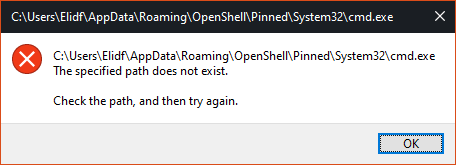
This makes the feature completely unusable. I have tried uninstalling and reinstalling, which does not fix the issue.
I am not sure if this applies to other types of apps as well, but from what I can tell all non system32 apps work fine.
 bonzibudd
All 12 comments
I'm using build 4.4.147 and don't have any new problems that I know of relating to Open-Shell.
Before that, I was using Open-Shell 4.4.144 version
My system is 64 bit Win10 2004
 CTVCAM8
on 13 Aug 2020
CTVCAM8
on 13 Aug 2020
good blanked .. hehehehe .... :+1: this shows experiences ..
 blackcrack
on 13 Aug 2020
blackcrack
on 13 Aug 2020
Sorry @bonzibudd, I can't help you.
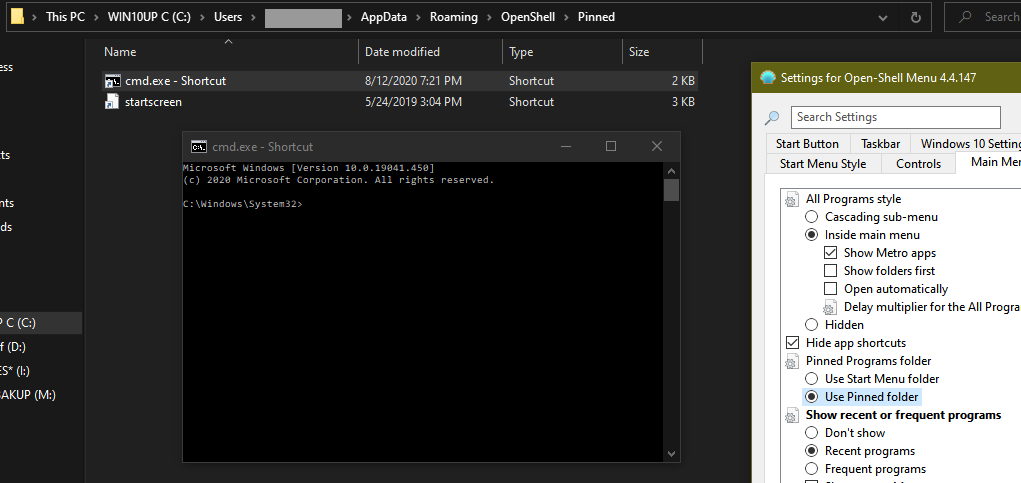
I tried pinning with the "Use Start Menu folder" option-works.
CTVCAM8
on 13 Aug 2020
@bonzibudd
Please do following:
- enable logging
- replicate the issue (open start menu, try to run cmd)
- provide log here
 ge0rdi
on 13 Aug 2020
ge0rdi
on 13 Aug 2020
@ge0rdi
StartMenuLog.txt
For some reason it thinks all system32 apps are pinned. This doesn't seem to apply to apps in C:\Windows, or apps in the Start menu folders in ProgramData and AppData respectively. I installed this version of Open-Shell on a VM and did not have the same issue, so this may or may not be related to the newest builds.
bonzibudd
on 13 Aug 2020
my system Windows 7 pro (with the update today ..) , no problem..
blackcrack
on 13 Aug 2020
@bonzibudd
I don't see any issue in log.
Could you describe what exactly are you doing? Step-by-step.
ge0rdi
on 13 Aug 2020
- click start button
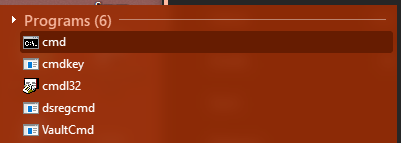
- type "cmd" or "mspaint" or any other system32 program
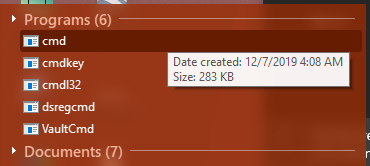
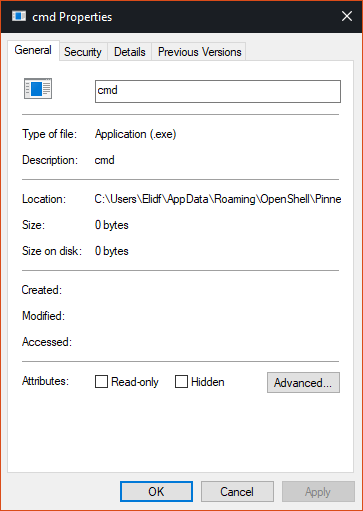
These apps don't have any icons and point to the "pinned" folder which doesn't have anything in it, as I don't have anything pinned to the menu. - Click the app or click enter on it
When I click the icon it gives me this error:
Would it be worth uninstalling Open-Shell and deleting the OpenShell registry key? I have been looking around and it does have some remnants of old pinned items which could be causing some problems.
bonzibudd
on 13 Aug 2020
Its weird :( Not sure where those items are coming from, but they are incorrect.
Would it be worth uninstalling Open-Shell and deleting the OpenShell registry key?
First try to delete cached information:
Settings -> Backup -> Clear cached information
If that doesn't help then try:
- backup your settings
- exit Open-Shell
- delete
HKEY_CURRENT_USER\SOFTWARE\OpenShellregistry key - start Open-Shell and check if the issue is fixed
- import your settings
- check if everything is OK
ge0rdi
on 13 Aug 2020
Ok, so the registry thing did end up fixing it. The items are displaying and opening correctly after a re-install.
That's one of the weirder problems I've had with Open-Shell or Classic Shell. Is there any reason that the System32 apps would be treated differently than others in this regard?
bonzibudd
on 13 Aug 2020
Is there any reason that the System32 apps would be treated differently than others in this regard?
Hard to tell. Apparently you had some wrong info stored for them. But how did it get to that state, I cannot say.
You don't have backup of that registry key, do you?
ge0rdi
on 13 Aug 2020
@ge0rdi sadly no. All I can say is that I saw that there were some old pinned items stored there, one of which was a system32 app.
I'll play around with it some more and see if I can consistently replicate it.
bonzibudd
on 13 Aug 2020
Related issues
 paraworlds2
·
28Comments
paraworlds2
·
28Comments
 Aokromes
·
34Comments
Aokromes
·
34Comments
 Brummolix
·
15Comments
Brummolix
·
15Comments
 nyanpasu64
·
22Comments
nyanpasu64
·
22Comments
 Darthagnon
·
19Comments
Darthagnon
·
19Comments
Most helpful comment
I'm using build 4.4.147 and don't have any new problems that I know of relating to Open-Shell.
Before that, I was using Open-Shell 4.4.144 version
My system is 64 bit Win10 2004