Open-shell-menu: Start menu: Custom scrollbars on Win10?
In previous versions of Windows (8,7), Classic shell and Open-Shell used the scrollbar options provided by the skin file. That does not seem to be the case anymore with Windows 10. The scrollbars in all skins look like this:

I tagged this as a feature request because I don't know if this is intentional or not.
 bonzibudd
All 10 comments
I've asked for this too, a couple of years ago.
Now if only more than two people (like qty 100) could ask for this feature to work again, then something might happen. :)
Way back when Windows 10 first came out, all 7 style skins could have this feature.
The "Metro.skin7" used to show colored scrollbars. If you look at the skin file you can see the scrollbar section.
I made some skins that had this feature as well.
Once Creators update came out, Ivo's code got disregarded by Windows 10. :(
 CTVCAM8
on 7 Aug 2020
CTVCAM8
on 7 Aug 2020
That's interesting.
I also found that the scrollbar doesn't seem to have been completely overridden, as it still shows up here, in the search function:

Since it still appears in the search section, it seems possible that it could be added back.
bonzibudd
on 9 Aug 2020
Hey @bonzibudd
Good work.
I do believe you have found something important for the coders to ponder on.
Why can Search scrollbar show a skinned scrollbar and only show Windows 10 default scrollbar in programs tree?
This is excellent news. I tried a number of skins that have skinned bitmaps, arrows, etc inside the skin file.
There has to be a small bit of code that's making the skinning info to be bypassed in the Windows 10 programs tree?

CTVCAM8
on 10 Aug 2020
There is also another way the programs tree scrollbar can be skinned sometimes.
That is, through a theme that makes use of the UxTheme.
@NebelNidas made me aware of this in this thread (near the bottom):
https://github.com/Open-Shell/Open-Shell-Menu/issues/364
It bricked my Windows 10. Thankfully a restore point brought my computer back to life. :)
So to get this skinning scrollbar feature working fully again, there has to be code,
I assume in the SkinManager.cpp or SkinManager.h
Not a coder, but I can see programs tree and scrollbar code:
if (g_CustomScrollbarThread && g_CustomScrollbarThread==GetCurrentThreadId() && hTheme==g_CustomScrollbarTheme)
{
    CProgramsTree::DrawScrollbarBackground(hdc,iPartId,iStateId,pRect);
    return S_OK;
and further on UxTheme at bottom, more code:
else
HMODULE hUxTheme=LoadLibrary(L"uxtheme.dll");
DWORD ver=GetVersionEx(hUxTheme);
if (hUxTheme && ver>=0x6020000)
All we need is people who know code to take up the challenge and figure out where it's getting hung up for the internal scrollbar skinning in the program's tree area.
It's not adding a new feature, it's getting it to work correctly again. :)
CTVCAM8
on 11 Aug 2020
Yeah, I am aware of Ux theming, I have used it in the past and it generally works well (Sometimes not after updating, but it is what it is). It's almost as good as OSM's and is a viable workaround.
Hopefully this feature will return at some point.
bonzibudd
on 11 Aug 2020
Guys, please, try this build.
It fixes theme usage for programs tree window.
And thanks for the hint with properly themed scroll bar in search window. It helped to identify the problem.
 ge0rdi
on 11 Aug 2020
ge0rdi
on 11 Aug 2020
Look at that!
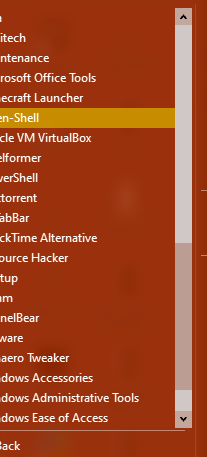
Completely fixed from what I can tell. I didn't expect this to be in place so quickly.
Thanks for the work on keeping this feature alive!
bonzibudd
on 11 Aug 2020
Thankyou @ge0rdi
So happy this is fixed!
Tried on Windows 10 2004-works
I also tried on Windows 8.1 to make sure it still works as usual-Works as before.
Wonder how long it would be before it is a secure stable release to the general public?
I had trouble downloading it on New Edge. Firefox let it download without any security blocking.
CTVCAM8
on 11 Aug 2020
@CTVCAM8
Wonder how long it would be before it is a secure stable release to the general public?
Fix is now in master.
So it is already in latest nightly build.
I will create new official release at some point (need to check changes since last release).
Didn't want to create release for every simple fix.
ge0rdi
on 12 Aug 2020
I understand. Was not trying to speed it up in any way.
The reason I was asking was once it is is an ok release, I see now it is a nightly build, I will mention in the old Classic Shell forum about new Open_Shell nightly build that fixes the skinned scrollbar.
I see @bonzibudd is having some problem so I'll wait first to see if something develops.
CTVCAM8
on 13 Aug 2020
Related issues
 bepvte
·
4Comments
bepvte
·
4Comments
 mbielech5
·
3Comments
mbielech5
·
3Comments
 eacartwright
·
3Comments
eacartwright
·
3Comments
 dertuxmalwieder
·
4Comments
dertuxmalwieder
·
4Comments
 Hasnep
·
3Comments
Hasnep
·
3Comments
Most helpful comment
@CTVCAM8
Fix is now in master.
So it is already in latest nightly build.
I will create new official release at some point (need to check changes since last release).
Didn't want to create release for every simple fix.