Open-shell-menu: Menus (or toolbar) in File Explorer doesn't seem to be removed after uninstalling it
The 'menus' in File Explorer doesn't seem to be removed after uninstalling it
So I just did a uninstall, reboot, and then 'the menus' in File Explorer is still there

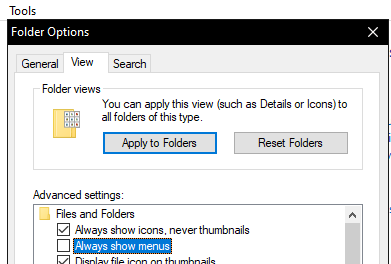
Tried to open Folder Options --> View tab --> uncheck 'Always show menus' does not work
Version:
- Open-Shell: 4.4.142
- OS: Windows 7 (Service Pack 1)
If anyone know how to remove it, please tell us how to do it.
 favianrizqulloh
All 16 comments
 xcasxcursex
on 29 May 2020
xcasxcursex
on 29 May 2020
I tried that already and it didn't work
favianrizqulloh
on 29 May 2020
I notice in your screenshot, you're showing the 'My Computer', which is supposed to always show the menu - that option is not meant to work everywhere. Try opening the control panel for example.

xcasxcursex
on 29 May 2020

favianrizqulloh
on 29 May 2020
Ohhh kaaayy that's weird. Sorry I can't reproduce that here :(
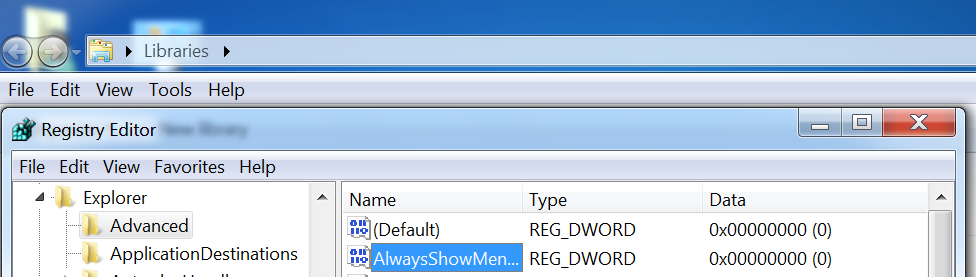
If you open regedit, and browse to Computer\HKEY_CURRENT_USER\Software\MicrosoftWindows\CurrentVersion\Explorer\Advanced , there should be a key there called "AlwaysShowMenus", is it set to 0?
xcasxcursex
on 29 May 2020
Okay, there's no key called "AlwaysShowMenus" in my PC. So I added that key and set to 0, restart, and still... No luck :(
(and thank you for trying to help 😊)
favianrizqulloh
on 29 May 2020
I fear I may be of limited help because I'm on Win10 and you're on... Win8? I forget what the old ones look like hahah
I have installed the open shell windows extension and removed it though, and this setting is being respected here, so I don't know why your PC doesn't want to do as it's told :(
Do you have this key: Computer\HKEY_LOCAL_MACHINE\SOFTWARE\MicrosoftWindows\CurrentVersion\Explorer\Advanced\Folder\AlwaysShowMenus ?
If so, there should be a key in there called RegPath, which appended with the value for the key ValueName specifies the registry path that is used to store this setting - which in my case is the key you edited above.... but again, this might be a Win10 thing. If you've ticked and unticked that box then it should have changed the setting so the fact that key doesn't exist for you, suggests that it's stored elsewhere in your case. Perhaps the above, may help you find out where.
Make sure you undo anything you change in case I'm leading you down the wrong path here. I don't see this causing any harm, but it's probably best not to leave something strange in your registry.
xcasxcursex
on 29 May 2020
I'm using Windows 7
and yup... tick and untick the box changes the value here
but no changes made
favianrizqulloh
on 29 May 2020
It's really odd that it was missing entirely. As best I can tell reading the source here, this app doesn't remove it - and if it's missing, ticking the box in settings recreates it, so I don't see how it was missing. Something is very amiss here.
I was hoping I could help you with a setting you might have overlooked but it seems there's something else at play. I guess it's nice that you've excluded this setting being on, as causing the problem but now you've got another "why isn't this working?" question to add to the original... I'm sorry!
xcasxcursex
on 29 May 2020
Hmm same issue here. Tried all of the methods given above, nothing is working
 alfieedev
on 1 Jun 2020
alfieedev
on 1 Jun 2020
I've also had this issue several times in the past. I then always restored my system to an earlier System Restore Point, but obviously that's not a good solution. According to several sources in various Windows forums, this solution should work (although I cannot verify it now, as I don't know of any way to reproduce this issue):
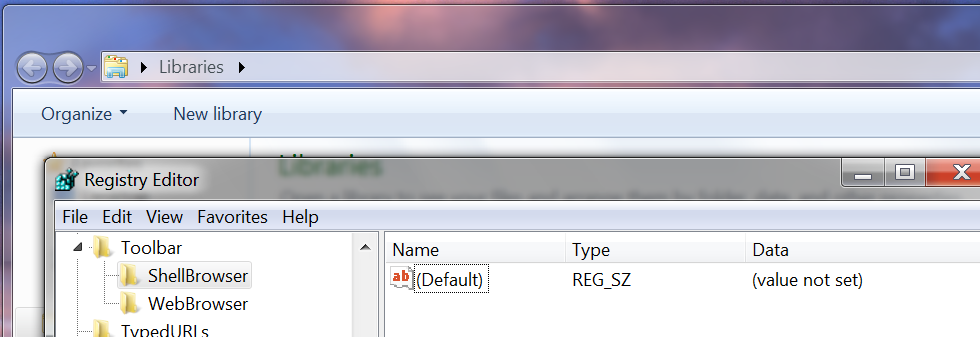
Navigate to registry key
HKEY_CURRENT_USER\Software\Microsoft\Internet Explorer\Toolbar\ShellBrowserand delete theITBar7Layoutvalue.
 NebelNidas
on 6 Jun 2020
NebelNidas
on 6 Jun 2020
@alfieedev @NebelNidas You guys on Win7 too?
IE trick is worth a try since IE and explorer are basically the same in ye olde windows.
xcasxcursex
on 7 Jun 2020
can confirm this is it. It works now! Thanks 😄
favianrizqulloh
on 7 Jun 2020
Had a poke around and a few seconds of searching tells me that this is in fact a very old win7 bug that happens to all kinds of different IE/Explorer toolbar addons. Good catch @NebelNidas !
Probably can close this one I guess @favianrizqulloh
xcasxcursex
on 7 Jun 2020
@xcasxcursex It's been around since at least Windows Vista, seems like Microsoft never bothered to fix it as it's a very rare bug to occur. So it's still possible to get it in Windows 10, unfortunately... 😕
NebelNidas
on 7 Jun 2020
I do have a vague recollection of it being especially problematic around a time when malware toolbars were booming. I was getting out of the desktop tech support space back then so I kinda caught a glimpse of it on the way out. I'm getting old, and so is win7, but some things never change.... Like MS leaving old bugs until it's too late.
Offtopic my favourite one lately is that Window's scheduler has always been junk, MS ignored it for years and years while a small subculture of CPU-intensive users (physics sims, audio and video editing, etc) cried... and when Ryzen CPUs dropped they completely broke it. They're finally scrambling to fix it now, after 25 years. Meanwhile windows runs faster on linux in a VM than it does on bare metal. LOL.
I guess we should expect these things around here, given that we're all trying to emulate an ancient long dead and actually decent start menu LOL
xcasxcursex
on 7 Jun 2020
Related issues
 ImZary
·
3Comments
ImZary
·
3Comments
 GTK66
·
3Comments
GTK66
·
3Comments
 josephpstich
·
4Comments
josephpstich
·
4Comments
 indyjonny
·
3Comments
indyjonny
·
3Comments
 dertuxmalwieder
·
4Comments
dertuxmalwieder
·
4Comments
Most helpful comment
I've also had this issue several times in the past. I then always restored my system to an earlier System Restore Point, but obviously that's not a good solution. According to several sources in various Windows forums, this solution should work (although I cannot verify it now, as I don't know of any way to reproduce this issue):