Open-shell-menu: Better Windows Integration
Greetings,
two little things that annoy me about Classic Shell/Start that I would like to get fixed in a future release:
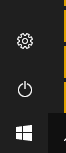
- When I open the menu, the Windows button is not highlighted. I do not know if that is true for every Windows version but for Windows 10 it certainly is.
- When you open the menu while in fullscreen by pressing the Windows key and then close it by pressing the key again, the taskbar is still there, which is, at least to me, quite annoying.
I am using Classic Shell 4.3.1 on Windows 10 Build 1803.
 MarekWojt
All 6 comments
I can't duplicate that issue on my windows 10 Pro 1803 I have installed Classic Start 4.4.109 https://github.com/passionate-coder/Classic-Start/releases/download/v4.4.109-dev/ClassicStartSetup_4_4_109.exe
 Clintlgm
on 22 Jul 2018
Clintlgm
on 22 Jul 2018
Okay, I think I will have to specify my issue a bit further as both issues seem to depend on certain conditions:
Point 1: This only applies to the stock Windows button. Probably you were using a customized version of it when testing?
Point 2: This seems to only be true for certain programs, like Honeyview and MPC-HC, while it works perfectly fine in Chromium for example. In MPV on the other hand, even with the native start menu the task bar does not disappear.
I do not know what causes these differences in behavior but I think if the native menu can make the task bar disappear in these cases, then so can you, right?
MarekWojt
on 22 Jul 2018
Point 1 confirmed

Point 2
Seems I've encountered same issue before, but sometimes even without Classic Shell & Classic Start
 coddec
on 23 Jul 2018
coddec
on 23 Jul 2018
Well since you brought up specific programs that I don't have, I retested again with my taskbar set to auto-hide and not to auto-hide. I ran Outlook 2013 full screen. Start button reacts the same. I am using a custom start button Metro Button Size 2.bmp. It stays Blue until I click it our open it with the windows key then it becomes red green blue yellow. on my system full screen still allows the taskbar to be seen unless I have selected to autohide?
Clintlgm
on 23 Jul 2018
Since @MarekWojt opened this issue, has this been resolved/corrected?
It's been almost a year since this has been discussed and it may need to be closed.
~Ibuprophen
 Ibuprophen
on 30 May 2019
Ibuprophen
on 30 May 2019
I'm going to close this issue as Issuer Unresponsive to this submission.
If necessary, the OP Issuer may open up a new issue.
Thank you very much for your time, patience and understanding with this! 👍
~Ibuprophen
Ibuprophen
on 3 Jun 2019
Related issues
 Hasnep
·
3Comments
Hasnep
·
3Comments
 bepvte
·
4Comments
bepvte
·
4Comments
 GTK66
·
3Comments
GTK66
·
3Comments
 mbielech5
·
3Comments
mbielech5
·
3Comments
 Gittyperson
·
3Comments
Gittyperson
·
3Comments