Open-event-server: Invoice cant render currency symbol
Details :
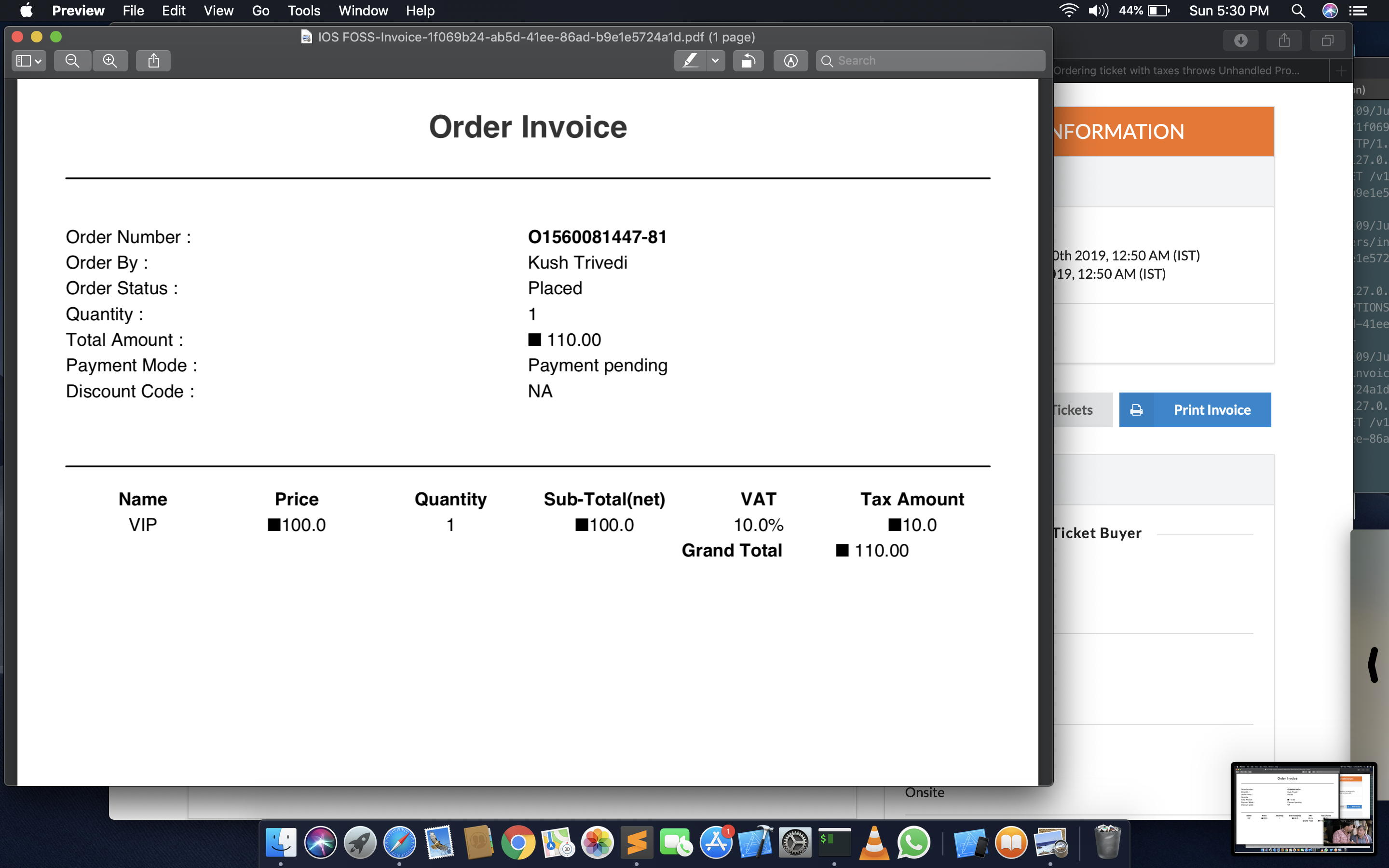
- Invoice generated after buying ticket is not rendering
Currency Symboland showing a black dot instead
Screenshot
 kushthedude
All 11 comments
@mrsaicharan1 Can you please have look into it
kushthedude
on 9 Jun 2019
@kushthedude Which currency symbol were you using?
 mrsaicharan1
on 9 Jun 2019
mrsaicharan1
on 9 Jun 2019
INR
On Sun, 9 Jun 2019 at 7:56 PM, Saicharan Reddy notifications@github.com
wrote:
@kushthedude https://github.com/kushthedude Which currency symbol were
you using?—
You are receiving this because you were mentioned.
Reply to this email directly, view it on GitHub
https://github.com/fossasia/open-event-server/issues/6018?email_source=notifications&email_token=AKQMTLWBB4XK55RCWOORDKLPZUHKNA5CNFSM4HWJI7SKYY3PNVWWK3TUL52HS4DFVREXG43VMVBW63LNMVXHJKTDN5WW2ZLOORPWSZGODXILCKI#issuecomment-500216105,
or mute the thread
https://github.com/notifications/unsubscribe-auth/AKQMTLRQFSXOKR45XCNBCELPZUHKNANCNFSM4HWJI7SA
.
kushthedude
on 9 Jun 2019
@kushthedude Why is the order invoice on the pending page? There should never be an order invoice for a pending order.
mrsaicharan1
on 11 Jun 2019
@kushthedude Why is the order invoice on the pending page? There should never be an order invoice for a pending order.
That's an order invoice of Placed Order, And there should be an invoice of Offline Order AFAIK ?
kushthedude
on 11 Jun 2019
This is happening for quite a few currency symbols. I've explored what was going wrong and found out that pisa, the library which is currently being used to generate invoice pdfs is not able to render these symbols properly. I've experienced problems with rendering HTML tables/borders in the past too when I was working on making the invoice similar to Eventbrite. For a workaround, to display what currency is present, I was thinking of removing the template filter which is being used so that it would display INR, THB in the order invoice. This would be better than displaying ■. Is that okay @iamareebjamal @shreyanshdwivedi @uds5501 ?
mrsaicharan1
on 24 Jun 2019
@mrsaicharan1 I think it will be fine to work that way.
 uds5501
on 24 Jun 2019
uds5501
on 24 Jun 2019
Try some solutions here https://duckduckgo.com/?q=pisa+python+unicode&t=canonical&ia=web
 iamareebjamal
on 24 Jun 2019
iamareebjamal
on 24 Jun 2019
@iamareebjamal, tried out some solutions before, will try these out too and
get back to you.
On Mon, 24 Jun 2019 at 7:41 PM, Areeb Jamal notifications@github.com
wrote:
Try some solutions here
https://duckduckgo.com/?q=pisa+python+unicode&t=canonical&ia=web—
You are receiving this because you were mentioned.Reply to this email directly, view it on GitHub
https://github.com/fossasia/open-event-server/issues/6018?email_source=notifications&email_token=AGAHUW67C26QVOFR62BIXQTP4DIZ3A5CNFSM4HWJI7SKYY3PNVWWK3TUL52HS4DFVREXG43VMVBW63LNMVXHJKTDN5WW2ZLOORPWSZGODYNBXRI#issuecomment-505027525,
or mute the thread
https://github.com/notifications/unsubscribe-auth/AGAHUW5NBEMASBCENEBIUPTP4DIZ3ANCNFSM4HWJI7SA
.
mrsaicharan1
on 24 Jun 2019
@iamareebjamal I've tried the solutions but alas, the black dot icon still remains. :/
mrsaicharan1
on 5 Jul 2019
OK, go ahead with what was planned
iamareebjamal
on 5 Jul 2019
Related issues
 SaptakS
·
3Comments
SaptakS
·
3Comments
 aviaryan
·
3Comments
SaptakS
·
3Comments
aviaryan
·
3Comments
SaptakS
·
3Comments
 dr0pdb
·
4Comments
dr0pdb
·
4Comments
 shubham-padia
·
4Comments
shubham-padia
·
4Comments
Most helpful comment
This is happening for quite a few currency symbols. I've explored what was going wrong and found out that
pisa, the library which is currently being used to generate invoice pdfs is not able to render these symbols properly. I've experienced problems with rendering HTML tables/borders in the past too when I was working on making the invoice similar to Eventbrite. For a workaround, to display what currency is present, I was thinking of removing the template filter which is being used so that it would displayINR,THBin the order invoice. This would be better than displaying ■. Is that okay @iamareebjamal @shreyanshdwivedi @uds5501 ?