Open-event-server: Update PayPal integration and make it agnostic
Describe the bug
Currently, PayPal is configured that it is too frontend/ember data-centric, and not agnostic which makes it difficult for Android apps to do stuff, as there is no standard JSONAPI library and we have to do filtering and resource querying by hand.
Docs - https://developer.paypal.com/docs/archive/checkout/how-to/server-integration
 liveHarshit
All 23 comments
@liveHarshit Are you interested working on it or should i try ?
 kushthedude
on 27 May 2019
kushthedude
on 27 May 2019
@liveHarshit Are you interested working on it or should i try ?
You can try, I'm not familiar with the server implementation.
liveHarshit
on 28 May 2019
@liveHarshit Please add AliPay to the title too as soon as https://github.com/fossasia/open-event-server/pull/5960 is merged. Would like to fix this as soon as possible.
 mrsaicharan1
on 2 Jun 2019
mrsaicharan1
on 2 Jun 2019
@mrsaicharan1 Please add the implementation to the server docs also, so I can follow the document instructions.
liveHarshit
on 2 Jun 2019
@mrsaicharan1 @kushthedude What is the status?
liveHarshit
on 12 Jun 2019
@mrsaicharan1 @kushthedude What is the status?
Will start working on this as soon as the intial workflow for alipay gateway is done! Here's the status of the PR https://github.com/fossasia/open-event-frontend/pull/3047. As soon as this is merged, I'll get onto implementing server independent
mrsaicharan1
on 17 Jun 2019
@iamareebjamal I should implement it with Braintree with this documentation https://developer.paypal.com/docs/accept-payments/express-checkout/ec-braintree-sdk/server-side/python/, right?
I'm a bit confused because Paypal server integration for Android app tutorials/blogs,... I found are so various, some of them redirect to the documentation links which have been deleted
 anhanh11001
on 29 Jun 2019
anhanh11001
on 29 Jun 2019
No, braintree is not supported on our server
https://github.com/fossasia/open-event-server/issues/5185
@anhanh11001 See the current implementation on the server, and coordinate with @liveHarshit to list what is missing/required and make appropriate changes
 iamareebjamal
on 29 Jun 2019
iamareebjamal
on 29 Jun 2019
Braintree will be better if you can remove the limitation listed in the issue above
iamareebjamal
on 29 Jun 2019
Stripe configuration is accepting following payload request -
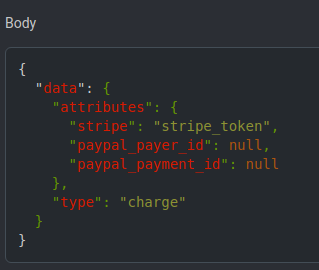
So that we can charge a token after completing the payment.
But for PayPal it is -
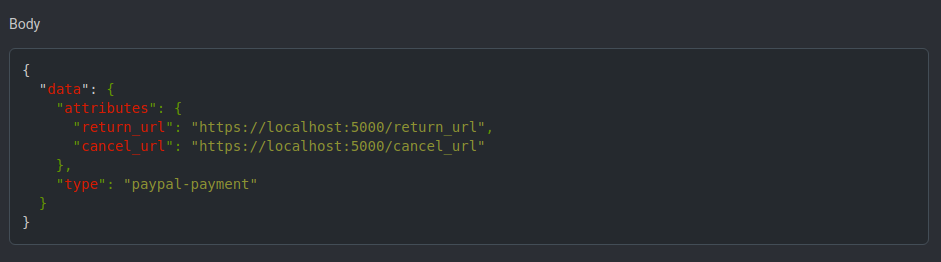
And the response from PayPal Android SDK after successful payment-
{
                        "client": {
                            "environment": "sandbox",
                            "paypal_sdk_version": "2.16.0",
                            "platform": "Android",
                            "product_name": "PayPal-Android-SDK"
                        },
                        "response": {
                            "create_time": "2018-12-30T19:59:20Z",
                            "id": "PAY-0JW58086WS3706240LQUSHEQ",
                            "intent": "sale",
                            "state": "approved"
                        },
                        "response_type": "payment"
                    }
We should accept the token.
liveHarshit
on 29 Jun 2019
@iamareebjamal Do we have a live API key for PayPal?
liveHarshit
on 29 Jun 2019
That is not needed on Android I guess
iamareebjamal
on 29 Jun 2019
That is not needed on Android I guess
Required for PayPal Android SDK, according to the documentation: https://github.com/paypal/PayPal-Android-SDK/blob/master/docs/single_payment.md
liveHarshit
on 29 Jun 2019
So the guidance I read in blog posts and tutorials often start with let's say a shop A want to sell stuff, they create a Paypal account (containing client token) and then inside the app they put the token created. So user can make payment with that token, but only to the Paypal account. But we want to make payment with different Paypal users -> different token -> I haven't found a good solution for this.
The problem is for Braintree SDK doesn't seem to support that multiple Paypal accounts seller, and for old Paypal Android SDK, it seems to be the same, and the documentation is deleted so I don't know. Please give some advices @iamareebjamal I'll spend the rest of today to see if I can find something
anhanh11001
on 29 Jun 2019
One solution I suggest is to create a pending order for the user, just like in the frontend. And then in the Android app, we will display a dialog to indicate that payment should be done in WebView, and we can redirect user to that by [BASE_URL}/orders/
anhanh11001
on 29 Jun 2019
One solution I suggest is to create a pending order for the user, just like in the frontend. And then in the Android app, we will display a dialog to indicate that payment should be done in WebView, and we can redirect user to that by [BASE_URL}/orders/
/pending @liveHarshit
Yes, It can be implemented until Braintree supports on the server.
liveHarshit
on 29 Jun 2019
Braintree was supported a year ago but it had to go as it doesn't support the kind of payment we need. So I'm not even sure if implementing Braintree into the server would help.
anhanh11001
on 29 Jun 2019
One solution I suggest is to create a pending order for the user, just like in the frontend. And then in the Android app, we will display a dialog to indicate that payment should be done in WebView, and we can redirect user to that by [BASE_URL}/orders/
/pending @liveHarshit
It will not work currently as the user needs to log in and after login, the page destroyed. First needs to solve on the frontend.
liveHarshit
on 29 Jun 2019
I think even Eventbrite doesn't have their Paypal integrated in their Android app as well. You can try to search for The Day Party with J.Cole in New York in Eventbrite. It is an event with Paypal payment method and it immediately redirects to the website when ordering ticket @liveHarshit
anhanh11001
on 29 Jun 2019
I think even Eventbrite doesn't have their Paypal integrated in their Android app as well. You can try to search for The Day Party with J.Cole in New York in Eventbrite. It is an event with Paypal payment method and it immediately redirects to the website when ordering ticket @liveHarshit
I'm not sure it is web view as PayPal is opening in the app itself. But sure that it is not PayPal Android SDK.
liveHarshit
on 29 Jun 2019
[BASE_URL}/orders/
/pending
Why this link. Can't we directly redirect to PayPal payment link?
liveHarshit
on 29 Jun 2019
The Day Party with J.Cole in New York in Eventbrite
This event configuration is different. Please try with other paid events.
liveHarshit
on 29 Jun 2019
Client ID is different from API key
iamareebjamal
on 29 Jun 2019
Related issues
 mariobehling
·
4Comments
mariobehling
·
4Comments
mariobehling
·
4Comments
mariobehling
·
4Comments
 shubham-padia
·
4Comments
mariobehling
·
4Comments
shubham-padia
·
4Comments
mariobehling
·
4Comments
 Aju100
·
4Comments
Aju100
·
4Comments