Open-event-server: HTTP 500 on filtering events according to starts-at
Describe the bug
On filtering events according to 'starts-at' 500 error is encountered while the filtering works for other fields like 'name' , 'location-name' etc
To Reproduce
Try filtering according to 'starts-at' like
https://open-event-api-dev.herokuapp.com/v1/events?filter=[{"name":"starts-at","op":"eq","val":"2018-03-18T06:00:00+00:00"}]
Expected behavior
It should return events according to 'starts-at' and not show an error
 nikit19
All 22 comments
Here's the error that occurs:
sqlalchemy.exc.DataError: (psycopg2.DataError) invalid input syntax for type timestamp with time zone: "2018-03-18T06:00:00 00:00"
LINE 8: ..._deleted_at IS NULL AND anon_2.events_starts_at = '2018-03-1...
Looking into it.
 schedutron
on 15 Jun 2018
schedutron
on 15 Jun 2018
When flask's request.args is read in the server code, specifically in flask-rest-jsonapi file, it looks like this:
ImmutableMultiDict([('filter', '[{"name":"starts-at","op":"eq","val":"2018-03-18T06:00:00 00:00"}]')])
So, clearly, the "+" in the timestamp gets incorrectly interpreted as a space, which is causing the syntax error I mentioned above.
schedutron
on 15 Jun 2018
@iamareebjamal @srv-twry How should this be fixed? Should I add code to modify request.args before it is used to query the data?
schedutron
on 15 Jun 2018
First, any invalid input data should be responded with a proper error message, and then yes, there should be a mechanism to handle special characters in the request
 iamareebjamal
on 15 Jun 2018
iamareebjamal
on 15 Jun 2018
https://github.com/fossasia/flask-rest-jsonapi
We are using a modified version of the library. Please open the issue in that repository and fix it there.
 dr0pdb
on 15 Jun 2018
dr0pdb
on 15 Jun 2018
dr0pdb
on 15 Jun 2018
dr0pdb
on 15 Jun 2018
@srv-twry Thanks, but the request variable is imported from flask, not flask-rest-jsonapi. I can change the request variable in flask-rest-jsonapi's resource.py (where the data fetch happens) module if that's what you want?
schedutron
on 15 Jun 2018
Oh, alright. I just gave you the link because I thought it is related to that library and hence it would be helpful for you. I haven't done any research on this from my side. Feel free to do some research and then fix it :)
dr0pdb
on 15 Jun 2018
I read about this, and modifying the behaviour of request's argument parsing would be a bad idea. These special characters do cause problems.
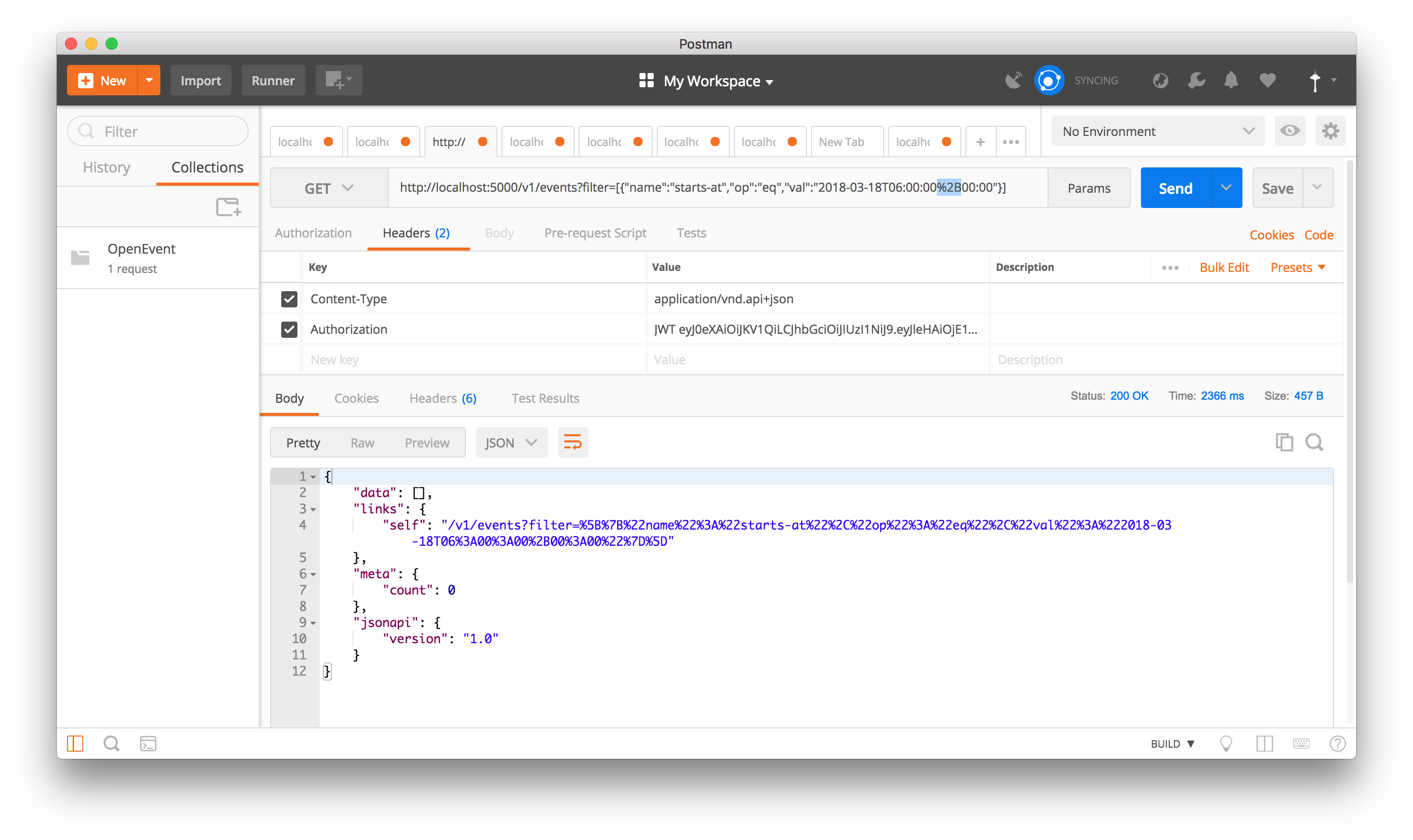
@nikit19 To fix this, the client needs to replace + with its encoded form, i.e, %2B. I replaced it in Postman and then 500 was not raised:
schedutron
on 15 Jun 2018
@srv-twry @iamareebjamal Should the issue be closed now?
schedutron
on 15 Jun 2018
@schedutron thanks for the solution
but if you try to use the like operator it also won't work
https://open-event-api-dev.herokuapp.com/v1/events?filter=[{"name":"starts-at","op":"like","val":"2018-03-18%"}]
This should return all the events on that date. But I get the same 500 error
nikit19
on 15 Jun 2018
@nikit19 Okay, but is it working with the equality operator?
schedutron
on 16 Jun 2018
@schedutron yeah your solution works with the equality operator but It would really help if it the like operator would work as well
nikit19
on 16 Jun 2018
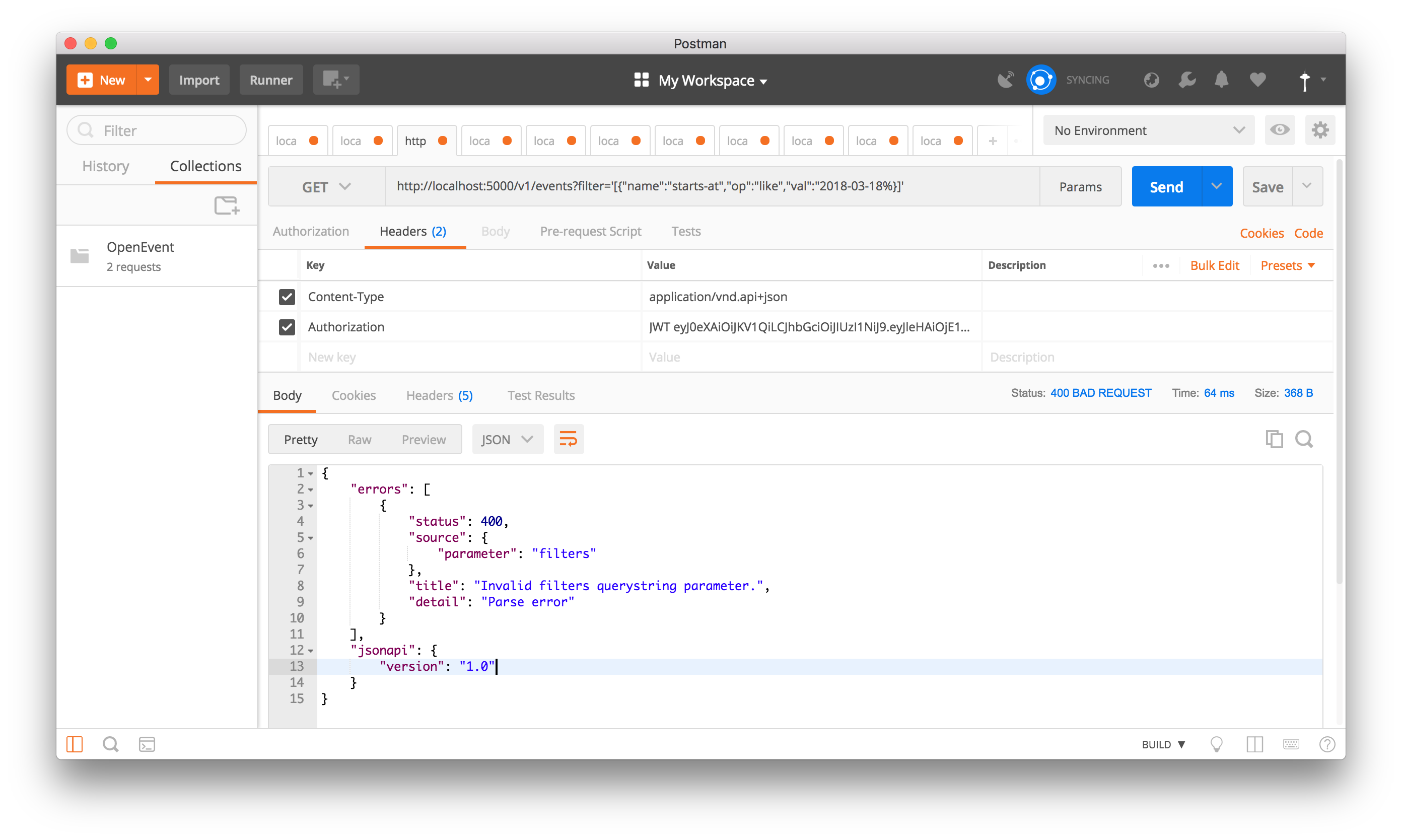
I get a 400 error:
schedutron
on 17 Jun 2018
@schedutron it is because the endpoint you entered is not correct.
There are no ' in the url and you forgot to add a" after the %
nikit19
on 17 Jun 2018
@nikit19 This is related to https://stackoverflow.com/questions/42449756/postgresql-error-operator-does-not-exist-date-unknown, looking where in the server this can be incorporated.
schedutron
on 17 Jun 2018
@nikit19 try with op=gt
https://open-event-api-dev.herokuapp.com/v1/events?filter=[{"name":"starts-at","op":"gt","val":"2018-03-18%"}]
like and ilike isn't working
 bhaveshAn
on 23 Jun 2018
bhaveshAn
on 23 Jun 2018
Closing this
bhaveshAn
on 23 Jun 2018
@bhaveshAn but the issue is still valid IMO
nikit19
on 23 Jun 2018
for using like and ilike ?
bhaveshAn
on 23 Jun 2018
yes
nikit19
on 23 Jun 2018
Since, the objective is fulfilled using greater than operator (op=gt).
https://open-event-api-dev.herokuapp.com/v1/events?filter=[{"name":"starts-at","op":"gt","val":"2018-03-18%"}]
Hence closing this one!
Feel free to ask if persists
bhaveshAn
on 11 Jul 2018
Related issues
 shubham-padia
·
4Comments
shubham-padia
·
4Comments
 SaptakS
·
3Comments
SaptakS
·
3Comments
 mariobehling
·
4Comments
mariobehling
·
4Comments
mariobehling
·
4Comments
mariobehling
·
4Comments
 Masquerade0097
·
3Comments
Masquerade0097
·
3Comments