Open-event-droidgen: Adding a video button in SessionDetail Activity
Actual Behaviour
Currently the app doesnt make use of video url to enable watching live event.
Expected Behaviour
Adding video button
Steps to reproduce it
-
LogCat for the issue
-
Screenshots of the issue
-
Would you like to work on the issue?
Yes
Target Milestone to solve the issue
 arp95
arp95
All 24 comments
Is the video node added in SQLite database yet?
It's in the realm implementation only I guess
 iamareebjamal
on 26 May 2017
iamareebjamal
on 26 May 2017
@iamareebjamal we are moving to realm shortly so i think it shouldnt be an issue.
arp95
on 26 May 2017
Are we looking to bring this feature by 4 June? I feel it is a full-fledged feature and needs to be added in greater detail. Shouldn't be just a button I suppose?
What do you think @arp95 @iamareebjamal @the-dagger @mananwason @mariobehling
 mahikaw
on 28 May 2017
mahikaw
on 28 May 2017
I think this can't be added yet as we have no such node in SQLite database. That's why I asked @arp95 if it should be added yet
iamareebjamal
on 28 May 2017
yes i think as realm gets added i will work on it. @iamareebjamal you can add "later" tag.
arp95
on 28 May 2017
This can be taken up now. @arp95 Please select appropriate milestone
iamareebjamal
on 3 Jun 2017
@iamareebjamal i was thinking of adding a video button in SessionDetail Activity and the card as seen in Google IO. We dont need a separate section for it right?
arp95
on 4 Jun 2017
Yeah, but how are you preparing to show the video from source though?
iamareebjamal
on 4 Jun 2017
via an implicit intent. if the "video" json field is null i make the button darkish type and if the youtube link is available i provide a coloured button which on click takes me to youtube to show the event. is it fine?
arp95
on 4 Jun 2017
Please confirm that the API will only contain Youtube links. I think it may contain any link.
@the-dagger @mariobehling Should we show the video in application or delegate the task to browser?
iamareebjamal
on 4 Jun 2017
fine then. till then adding the button.
Adding it to the next milestone please.
arp95
on 4 Jun 2017

Is the following button fine @iamareebjamal .Dont look into the ui, i am planning for the redesign of the ui for sessiondetail activity. should we use this button?
arp95
on 4 Jun 2017
Before the redesign, add a card for video and if the feed is youtube video, pull a thumbnail from YouTube REST API and show it as card background with play button on top of it
iamareebjamal
on 4 Jun 2017
shouldnt we use a simple approach, where use a video button and set it coloured when a link is there otherwise not. using a youtube thumbnail in the background doesnt look good i think.
arp95
on 4 Jun 2017
If we show a thumbnail, it'll be more appealing and straightforward tell the user that this is the video.
And about disabled button where video is not present, we should rather hide it completely
iamareebjamal
on 5 Jun 2017
ok working on it. just to clear it out there would be 2 drawables right?
arp95
on 5 Jun 2017
One card for video and a play drawable on top of it
iamareebjamal
on 5 Jun 2017
@iamareebjamal +1.
Also, you don't event need to use the Youtube API for getting thumbnails.
Youtube has a simple URL for getting video thumbnail in which you can replace the video key with the one you want and get relevant thumbnails.
http://img.youtube.com/vi/" + VIDEO_ID + "/0.jpg
 the-dagger
on 7 Jun 2017
the-dagger
on 7 Jun 2017
@the-dagger That is what I was talking about when mentioning Youtube's REST API :smile:
iamareebjamal
on 7 Jun 2017
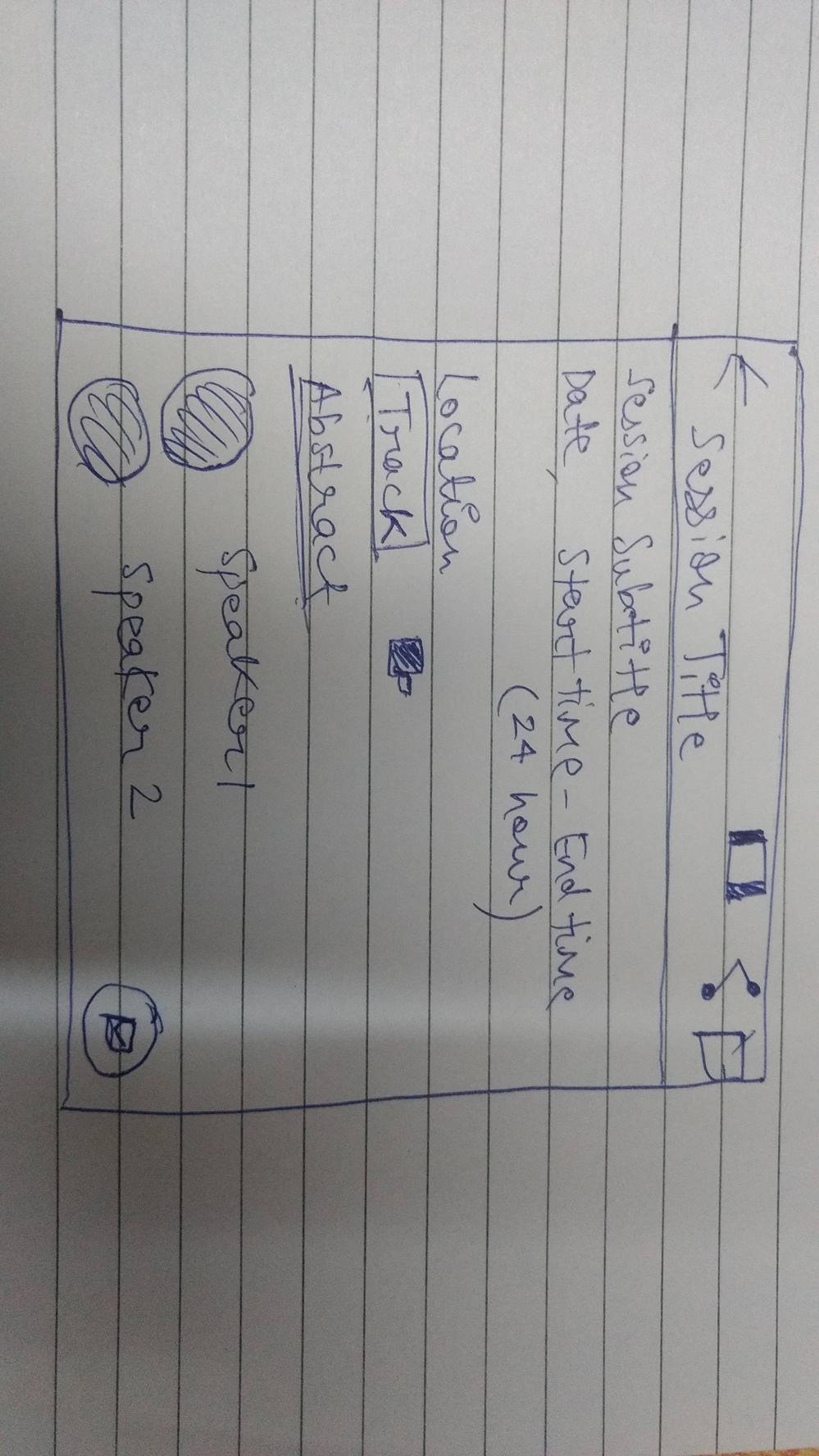
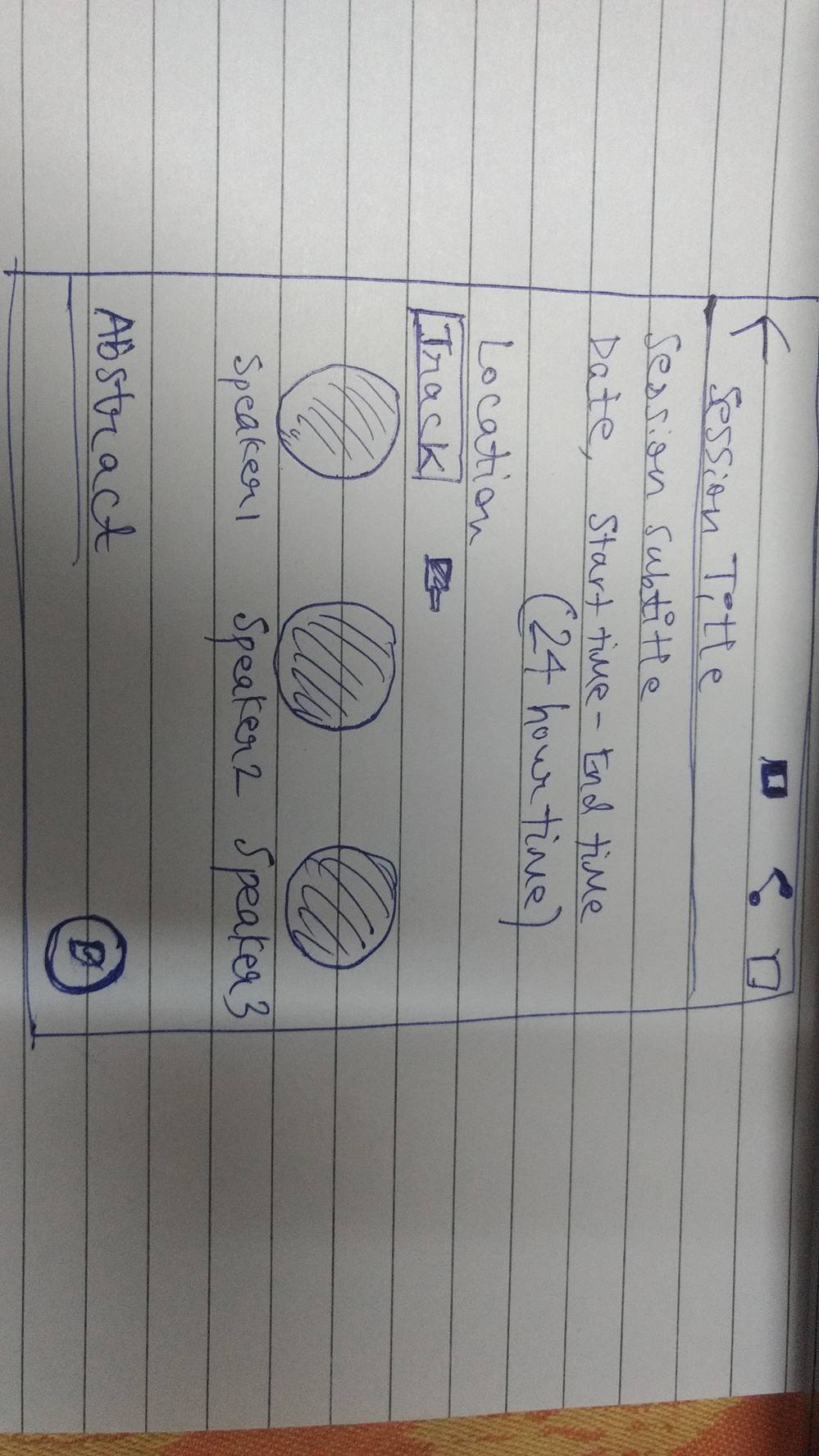
@the-dagger @iamareebjamal @Shailesh351 @mahikaw @shreyasnbhat
please tell which one looks better.
arp95
on 8 Jun 2017
@arp95 I think the first one with vertical scroll for speakers looks more elegant and hence, better to me.
mahikaw
on 9 Jun 2017
@arp95 Why are you recreating the sessionDetailActivity?
This issue is regarding adding a video section to the Detail Page right?
In both of the screenshots you uploaded, I can nowhere see any mention of the videos.
SessionDetailActivity is fine as it is right now, just find a way to add trailers to it so that it matches the overall design logic.
the-dagger
on 9 Jun 2017
@the-dagger
actually i created an issue for recreating the session detail activity but you said all the discussion needs to take place here. fine then.
so should i ad the video button in the activity then?
arp95
on 9 Jun 2017
Yeah, just add the video in here. 👍
SessionDetail activity looks good to me in its current state.
--
Best,
Harshit Dwivedi
the-dagger
on 9 Jun 2017
Related issues
 mariobehling
·
8Comments
mariobehling
·
8Comments
 dreadpool2
·
7Comments
dreadpool2
·
7Comments
 Shailesh351
·
6Comments
mahikaw
·
8Comments
Shailesh351
·
6Comments
mahikaw
·
8Comments
 97k
·
5Comments
97k
·
5Comments