Onpremise: Short timeout on Snuba causing installation to fail.
Version Information
commit 2608caab24d0fb9e5e6042370cb018c7189618c7 (HEAD, tag: 20.9.0, origin/releases/20.9.0)
Author: getsentry-bot <[email protected]>
Date:   Tue Sep 15 18:04:34 2020 +0000

    release: 20.9.0
Description
Sentry installation fails on VM due to performance issues
Steps to Reproduce
- Create VM (12 cores / 16Gb RAM).
- Start installation.
- Watch installation fail due to waiting for kafka to come up.
- Kafka container is actually up but the installation fails.
Logs
Don't have right now.
Workaround
There is a relatively small timeout in snuba image, patching that helps to go past Kafka check and installation succeeds, basically increased this 10x:
"socket.timeout.ms": 10000,
...
client.list_topics(timeout=10)
Full "patch":
diff --git a/.env b/.env
index c12f688..56e5a50 100644
--- a/.env
+++ b/.env
@@ -4,6 +4,7 @@ SENTRY_EVENT_RETENTION_DAYS=90
 # See https://docs.docker.com/compose/compose-file/#ports for more
 SENTRY_BIND=9000
 SENTRY_IMAGE=getsentry/sentry:20.9.0
-SNUBA_IMAGE=getsentry/snuba:20.9.0
+#SNUBA_IMAGE=getsentry/snuba:20.9.0
+SNUBA_IMAGE=getsentry/snuba:20.9.0-patched
 RELAY_IMAGE=getsentry/relay:20.9.0
 SYMBOLICATOR_IMAGE=getsentry/symbolicator:0.2.0
diff --git a/patches/snuba/Dockerfile b/patches/snuba/Dockerfile
new file mode 100644
index 0000000..ed4a672
--- /dev/null
+++ b/patches/snuba/Dockerfile
@@ -0,0 +1,3 @@
+FROM getsentry/snuba:20.9.0
+ADD bootstrap.py /usr/src/snuba/snuba/cli/bootstrap.py
+
diff --git a/patches/snuba/bootstrap.py b/patches/snuba/bootstrap.py
new file mode 100644
index 0000000..40c429c
--- /dev/null
+++ b/patches/snuba/bootstrap.py
@@ -0,0 +1,101 @@
+import logging
+from typing import Optional, Sequence
+
+import click
+
+from snuba import settings
+from snuba.datasets.factory import ACTIVE_DATASET_NAMES, get_dataset
+from snuba.environment import setup_logging
+from snuba.migrations.migrate import run as run_migrate
+from snuba.migrations.connect import check_clickhouse_connections
+
+
[email protected]()
[email protected](
+    "--bootstrap-server",
+    default=settings.DEFAULT_BROKERS,
+    multiple=True,
+    help="Kafka bootstrap server to use.",
+)
[email protected]("--kafka/--no-kafka", default=True)
[email protected]("--migrate/--no-migrate", default=True)
[email protected]("--force", is_flag=True)
[email protected]("--log-level", help="Logging level to use.")
+def bootstrap(
+    *,
+    bootstrap_server: Sequence[str],
+    kafka: bool,
+    migrate: bool,
+    force: bool,
+    log_level: Optional[str] = None,
+) -> None:
+    """
+    Warning: Not intended to be used in production yet.
+    """
+    if not force:
+        raise click.ClickException("Must use --force to run")
+
+    setup_logging(log_level)
+
+    logger = logging.getLogger("snuba.bootstrap")
+
+    import time
+
+    if kafka:
+        logger.debug("Using Kafka with %r", bootstrap_server)
+        from confluent_kafka.admin import AdminClient, NewTopic
+
+        attempts = 0
+        while True:
+            try:
+                logger.debug("Attempting to connect to Kafka (attempt %d)", attempts)
+                client = AdminClient(
+                    {
+                        "bootstrap.servers": ",".join(bootstrap_server),
+                        "socket.timeout.ms": 10000,
+                    }
+                )
+                client.list_topics(timeout=10)
+                break
+            except Exception as e:
+                logger.error(
+                    "Connection to Kafka failed (attempt %d)", attempts, exc_info=e
+                )
+                attempts += 1
+                if attempts == 60:
+                    raise
+                time.sleep(1)
+
+        topics = {}
+        for name in ACTIVE_DATASET_NAMES:
+            dataset = get_dataset(name)
+            writable_storage = dataset.get_writable_storage()
+
+            if writable_storage:
+                table_writer = writable_storage.get_table_writer()
+                stream_loader = table_writer.get_stream_loader()
+                for topic_spec in stream_loader.get_all_topic_specs():
+                    if topic_spec.topic_name in topics:
+                        continue
+                    logger.debug(
+                        "Adding topic %s to creation list", topic_spec.topic_name
+                    )
+                    topics[topic_spec.topic_name] = NewTopic(
+                        topic_spec.topic_name,
+                        num_partitions=topic_spec.partitions_number,
+                        replication_factor=topic_spec.replication_factor,
+                    )
+
+        logger.debug("Initiating topic creation")
+        for topic, future in client.create_topics(
+            list(topics.values()), operation_timeout=1
+        ).items():
+            try:
+                future.result()
+                logger.info("Topic %s created", topic)
+            except Exception as e:
+                logger.error("Failed to create topic %s", topic, exc_info=e)
+
+    if migrate:
+        check_clickhouse_connections()
+        run_migrate()
diff --git a/patches/snuba/patch.sh b/patches/snuba/patch.sh
new file mode 100755
index 0000000..4e86945
--- /dev/null
+++ b/patches/snuba/patch.sh
@@ -0,0 +1,4 @@
+#!/usr/bin/env bash
+
+docker build --tag getsentry/snuba:20.9.0-patched .
+
P S
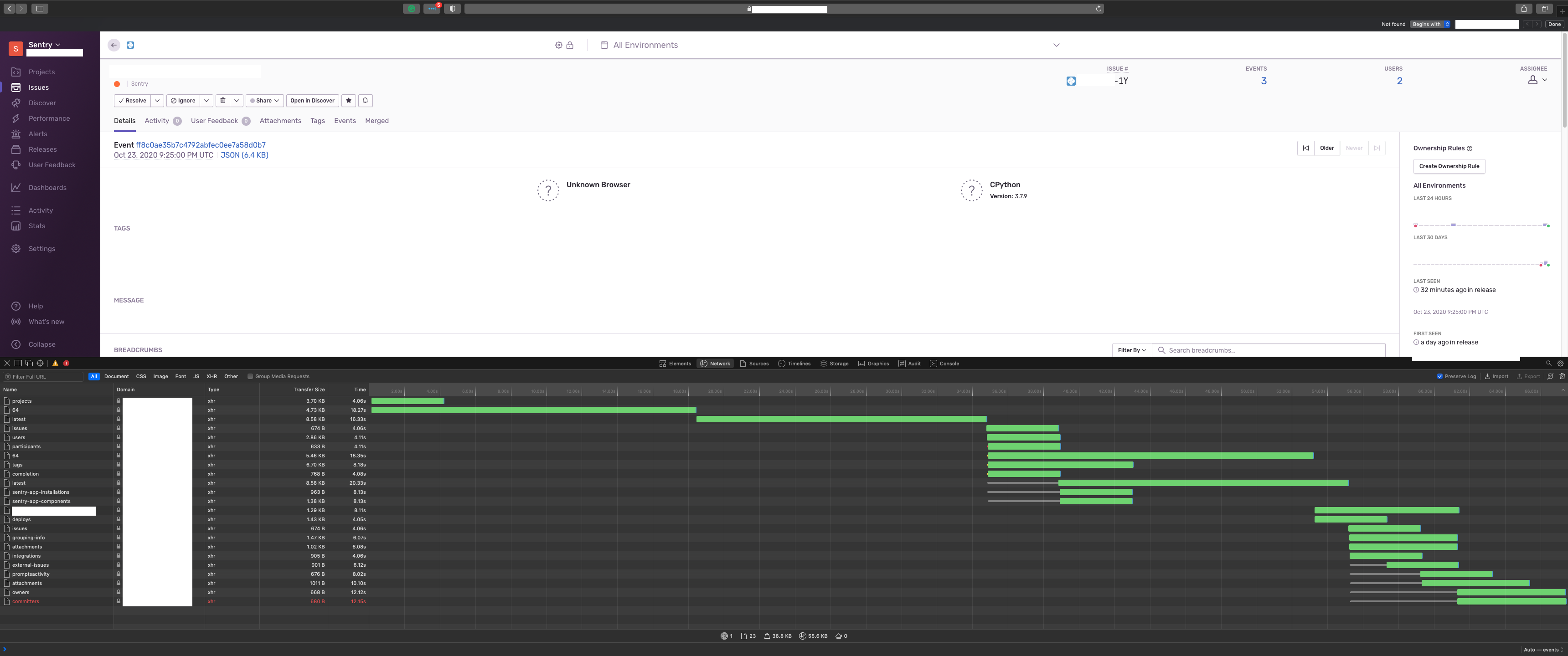
After installation Sentry is slow (HTTP / AJAX requests take 3-5 seconds), it does not seem that there is something obviously wrong with allocated resources, there are free RAM and CPU but Sentry is not responsive, htop shows that there is no load but 800+ threads are odd. VM dedicated to Sentry only and does not have anything significant running on it except Puppet agent.
  1  [                                                0.0%]   4  [                                                0.0%]   7  [                                                0.0%]   10 [                                                0.0%]
  2  [                                                0.0%]   5  [                                                0.0%]   8  [                                                0.0%]   11 [                                                0.0%]
  3  [||||||||||||||||||||||||||||||||||||||||||||||100.0%]   6  [                                                0.0%]   9  [                                                0.0%]   12 [                                                0.0%]
  Mem[|||||||||||||||||||||||||||||||||||||||||||||||||||||||||||||||||||||||||||||||||||||                5.34G/15.7G]   Tasks: 128, 864 thr; 1 running
  Swp[                                                                                                         0K/980M]   Load average: 0.15 0.14 0.10
                                                                                                                          Uptime: 12 days, 18:47:44
 alexanderilyin
All 11 comments
Just updated to 20.10.1 had to patch in a similar way, here are related logs from failed install:
...
Creating sentry_onpremise_snuba-api_run ... done
+ '[' b = - ']'
+ snuba bootstrap --help
+ set -- snuba bootstrap --no-migrate --force
+ set gosu snuba snuba bootstrap --no-migrate --force
+ exec gosu snuba snuba bootstrap --no-migrate --force
2020-10-19 23:22:14,498 Connection to Kafka failed (attempt 0)
Traceback (most recent call last):
  File "/usr/src/snuba/snuba/cli/bootstrap.py", line 58, in bootstrap
    client.list_topics(timeout=1)
cimpl.KafkaException: KafkaError{code=_TRANSPORT,val=-195,str="Failed to get metadata: Local: Broker transport failure"}
2020-10-19 23:22:16,501 Connection to Kafka failed (attempt 1)
Traceback (most recent call last):
  File "/usr/src/snuba/snuba/cli/bootstrap.py", line 58, in bootstrap
    client.list_topics(timeout=1)
cimpl.KafkaException: KafkaError{code=_TRANSPORT,val=-195,str="Failed to get metadata: Local: Broker transport failure"}
%3|1603149737.503|FAIL|rdkafka#producer-2| [thrd:kafka:9092/bootstrap]: kafka:9092/bootstrap: Connect to ipv4#192.168.64.5:9092 failed: Connection refused (after 2002ms in state CONNECT)
2020-10-19 23:22:18,504 Connection to Kafka failed (attempt 2)
Traceback (most recent call last):
  File "/usr/src/snuba/snuba/cli/bootstrap.py", line 58, in bootstrap
    client.list_topics(timeout=1)
cimpl.KafkaException: KafkaError{code=_TRANSPORT,val=-195,str="Failed to get metadata: Local: Broker transport failure"}
2020-10-19 23:22:20,507 Connection to Kafka failed (attempt 3)
....
Traceback (most recent call last):
  File "/usr/src/snuba/snuba/cli/bootstrap.py", line 58, in bootstrap
    client.list_topics(timeout=1)
cimpl.KafkaException: KafkaError{code=_TRANSPORT,val=-195,str="Failed to get metadata: Local: Broker transport failure"}
Traceback (most recent call last):
  File "/usr/local/bin/snuba", line 33, in <module>
    sys.exit(load_entry_point('snuba', 'console_scripts', 'snuba')())
  File "/usr/local/lib/python3.8/site-packages/click/core.py", line 722, in __call__
    return self.main(*args, **kwargs)
  File "/usr/local/lib/python3.8/site-packages/click/core.py", line 697, in main
    rv = self.invoke(ctx)
  File "/usr/local/lib/python3.8/site-packages/click/core.py", line 1066, in invoke
    return _process_result(sub_ctx.command.invoke(sub_ctx))
  File "/usr/local/lib/python3.8/site-packages/click/core.py", line 895, in invoke
    return ctx.invoke(self.callback, **ctx.params)
  File "/usr/local/lib/python3.8/site-packages/click/core.py", line 535, in invoke
    return callback(*args, **kwargs)
  File "/usr/src/snuba/snuba/cli/bootstrap.py", line 58, in bootstrap
    client.list_topics(timeout=1)
cimpl.KafkaException: KafkaError{code=_TRANSPORT,val=-195,str="Failed to get metadata: Local: Broker transport failure"}
An error occurred, caught SIGERR on line 244
Cleaning up...
I mean it tries 60 times with 1 second intervals which translates roughly to a minute. With your patch, that becomes an hour. Sounds like an issue specific to your system, don't you think?
 BYK
on 20 Oct 2020
BYK
on 20 Oct 2020
I think we can allow people to pass a longer waiting time for slower systems as a solution so you don't have to patch the image.
BYK
on 20 Oct 2020
Hmm, looking closer, I think the real fix you have is the modified "socket.timeout.ms" value, which looks reasonable to me, given that the default is already 30 seconds.
@mattrobenolt @lynnagara any idea why we reduced this to only 1 second and any objections for raising it to 10?
BYK
on 20 Oct 2020
Given that on-premise only works on a single machine, I'm not sure what situation where you'd need a connect timeout more than a even like, 50ms. I think increasing to 10s just masks a problem that the system is _massively_ overloaded that it can't connect over localhost in 10 seconds. Even with a real network hop, there's no valid reason to even be more than 1000ms.
 mattrobenolt
on 20 Oct 2020
mattrobenolt
on 20 Oct 2020
@BYK I created this in order to help people who had similar problems when install.sh fails waiting for Kafka and all support they got is wait for retries and eventually, it should continue but it does not because it fails due to requests being slow. Yes, the performance problem is specific to the current VM but it's not clear where the bottleneck (RAM/CPU/HDD) is and I have feeling that oper people having troubles with install/upgrade are actually facing the same/similar performance problems.
@mattrobenolt on my current VM with 12 CPU and 16GB RAM Sentry is super slow and I'm not sure which of 25 docker containers is having problems. Except for Sentry containers, there is only a Puppet agent is running in the background and creating no load. Ideas for triaging performance issues are welcome. As I mentioned it worked great on the HW server with 256 CPU and 200Gb RAM and NVME drives but I can't use that one to host Sentry anymore and it's not clear what resource requirement is.
alexanderilyin
on 20 Oct 2020
@alexanderilyin - on my _very_ humble XPS laptop (compared to your specs) everything works smoothly and I don't need to wait for Kafka for minutes or for the HTTP requests to finish. It only has 6 cores with hyperthreading and uses ~4-6 gigs of RAM while running things like Firefox etc on the side.
There's clearly something wrong with that VM.
BYK
on 20 Oct 2020
@alexanderilyin are you able to try and see what might be causing this slowness on your end?
BYK
on 30 Oct 2020
@BYK no update on that yet, VM seems to be oversized and maybe hypervisor is doing something odd with its resources so current idea is to downsize VM and see if it makes difference. Here is an overview of the last couple of days:
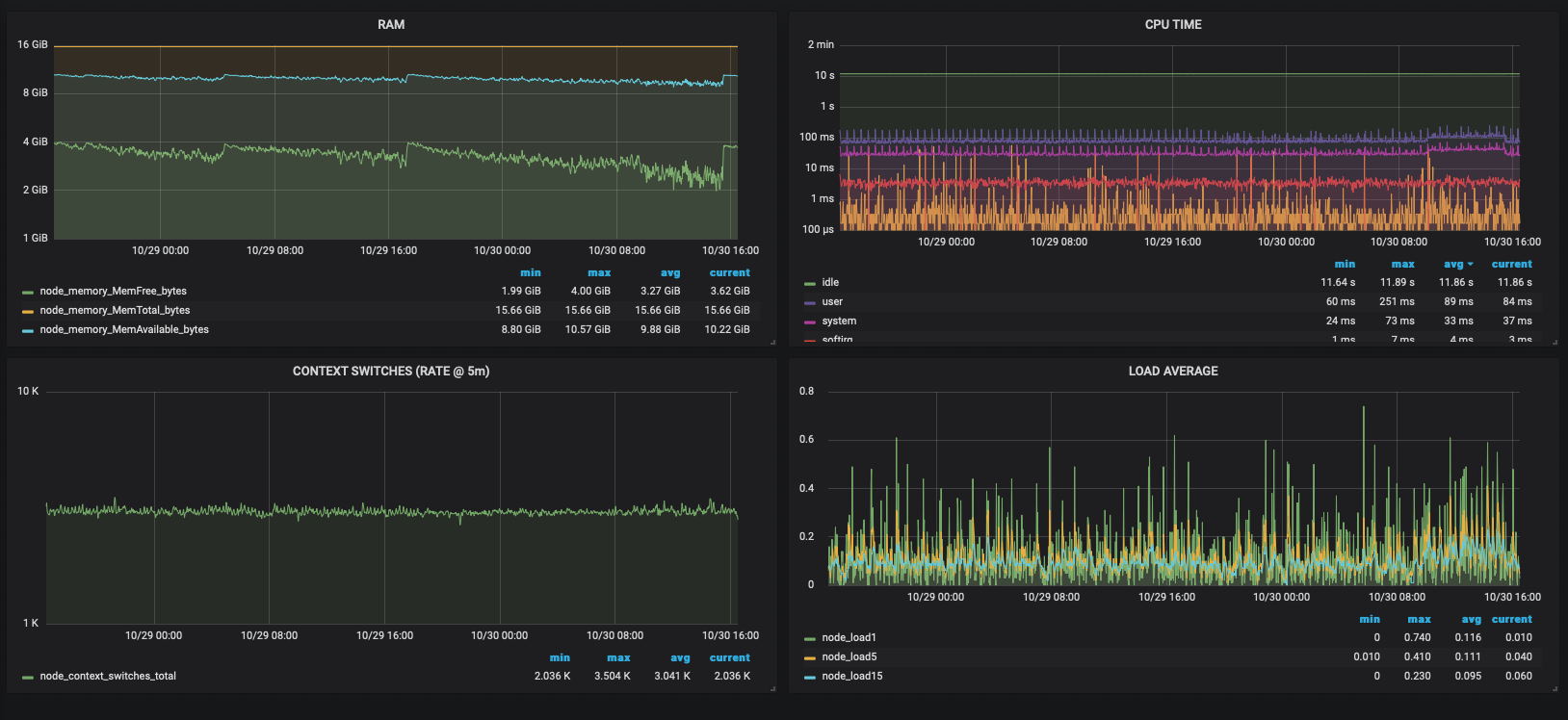
and here how performance problems look like (had to remove some sensitive data):
alexanderilyin
on 31 Oct 2020
@alexanderilyin any updates? Otherwise I'll close until further information can be gathered to make this issue actionable.
BYK
on 10 Nov 2020
Closing due to staleness. @alexanderilyin feel free to comment back here with your findings later on.
BYK
on 9 Dec 2020
Related issues
 dotconnor
·
6Comments
dotconnor
·
6Comments
 giggsey
·
3Comments
giggsey
·
3Comments
 wodCZ
·
5Comments
wodCZ
·
5Comments
 jansorg
·
3Comments
jansorg
·
3Comments
 TheRatG
·
4Comments
TheRatG
·
4Comments