Onpremise: Cant enable ssl in sentry.config.conf?
Hey i am running the latest nightly Sentry 20.7.0.dev 02dfdc2d
first off bravo, this was a breeze to get going to serve a basic onpremise, legit took longer to spin up a box in AWS :D.
Sorry for posting in two places, but i mostly solved my first issue ( https://forum.sentry.io/t/sentry-nightly-expose-port-80/10260/3 ) and was wondering if i have stumbled across a possible bug in the nightly?
basically when i enable the ssl settings in sentry.config.conf, the server just starts throwing 502s (see attached link for error detail from nginx docker container) o.0.
So i could just ignore it but, im also getting told that the page is "insecure ssl". not a big deal but bugs the perfectionist in me :D
any idea what i have done wrong ?
Thanks in advance!
 phyzical
All 11 comments
Hi @phyzical,
Glad to hear your first-time experience was smooth, that's what we are striving for! (that said, AWS is a very low bar to be compared when it comes to UX 😁)
Regarding your first issue, there's an open PR to allow setting the default port to something else: https://github.com/getsentry/onpremise/pull/512.
For SSL, the configurations are only for guidance. I have adding fully automated SSL support to on-premise on my mental bucket list but didn't have the time to get to it. Hopefully, we'll at least have some better docs explaining the process on enabling SSL for on-premis in a few months.
That said, if you are feeling ambitions, we are always eager to get pull requests ;)
 BYK
on 30 Jun 2020
BYK
on 30 Jun 2020
hey @BYK thanks for the replies.
i would be happy to make a PR for the docs in-regards to the SSL situation, unfortunately i still have not imaged to get it to work correctly.
The way i "fixed" https with the reverse proxy turned out that i was "cheating", as all requests from within sentry land still were using :9000, so things like slack integrations would fail expecting the callback to be sentry.domain.com but it would get sentry.domain.com:9000 instead. (so i will try again with the port override but without enabled the ssl settings in the sentry.conf in case it makes a difference)
Also for some reason as soon as i would uncomment the ssl stuff in the sentry.config.py it would straight out just 502. any idea why that might be?
I will try to have another crack if i find spare time later in the week 👍
as for the location of the docs where are these currently / where will they be located (if they dont exist) incase i do get it working and i can make a contribution?
phyzical
on 30 Jun 2020
@phyzical we get Sentry going with HTTPS by sticking this Reverse Proxy in front of it:
https://github.com/linuxserver/docker-letsencrypt
Here's the config we used in config/nginx/proxy-confs/sentry.subdomain.conf (in the letsencrypt container):
# make sure that your dns has a cname set for sentry

server {
    listen 443 ssl;
    listen [::]:443 ssl;

    server_name sentry.*;

    include /config/nginx/ssl.conf;

    client_max_body_size 0;

    # enable for ldap auth, fill in ldap details in ldap.conf
    #include /config/nginx/ldap.conf;

    # enable for Authelia
    #include /config/nginx/authelia-server.conf;

    location / {
        # enable the next two lines for http auth
        #auth_basic "Restricted";
        #auth_basic_user_file /config/nginx/.htpasswd;

        # enable the next two lines for ldap auth
        #auth_request /auth;
        #error_page 401 =200 /ldaplogin;

        # enable for Authelia
        #include /config/nginx/authelia-location.conf;

        include /config/nginx/proxy.conf;
        resolver 127.0.0.11 valid=30s;
        set $upstream_app sentry.example.com;
        set $upstream_port 9000;
        set $upstream_proto http;
        proxy_pass $upstream_proto://$upstream_app:$upstream_port;

    }
}
Probably a better way of doing it by using the sentry_onpremise_default network in the letsencrypt container so we route packets internally within the docker network but we just proxied the host name and put a firewall in front.
 leonroy
on 1 Jul 2020
leonroy
on 1 Jul 2020
thanks for the suggestion, this is my personal fav reverse proxy image too for my unraid box :D was actually considering giving it a go.
Follow up question @leonroy are you able to confirm if this resolves for example the items in the document HEAD from using the original web port and http? Like i have been successful in getting ssl + https with an auto redirect from http to https but for some reason its like the application itself is enforcing port 9000 at a certain level points and this is the cause for the ssl invalidation/oauth requests for integrations being funky?
for example the last two are the favicons being loaded in the documents
so that suggests to me the application itself is injecting its ~host~ as http://DOMAIN.com:9000 in certain places still?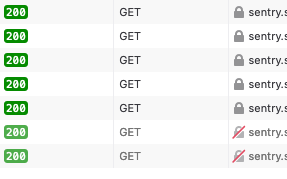
or directly from the head
```
````
or this even though i'm accessing via a https://DOMAIN.com it still says the uri is http://DOMAIN.com:9000

Edit; maybe that's part of my issue trying to apply the reverse proxies i'm used to in that exact image and just missing some key "proxy config". ill chuck it into the docker compose and see how it goes anyway!
phyzical
on 1 Jul 2020
ah i think i might have found what im missing :D.....
system.url-prefix >.> now to figure out what i need to not change nginx side to allow it to use DOMAIN.com
phyzical
on 1 Jul 2020
yeeeep i feel so stooooooopid :D completly forgot about url.prefix its cause i got impatient and just yolod through the initial screen i blame you @BYK (not really) its just too easy!

so yeah i would be happy to write up a quick snippet of the https / ssl @BYK just let me know where to slot it, ill open a pr shoving it into the readme for now 👍
@leonroy thanks for the suggestion, it led me to the right google fu :D
phyzical
on 1 Jul 2020
pr submitted, the readme change itself i hope is enough evidence for anyone who stumbles across this :) ill also post the resolution in the sentry forum incase that's sniffed out.
phyzical
on 1 Jul 2020
I'd keep this issue open until your PR is merged @phyzical 😉
BYK
on 1 Jul 2020
This issue has gone three weeks without activity. In another week, I will close it.
But! If you comment or otherwise update it, I will reset the clock, and if you label it Status: Accepted, I will leave it alone ... forever!
"A weed is but an unloved flower." ― _Ella Wheeler Wilcox_ 🥀
![github-actions[bot] picture](https://avatars.githubusercontent.com/in/15368?v=4&s=40) github-actions[bot]
on 4 Jan 2021
github-actions[bot]
on 4 Jan 2021
This issue has gone three weeks without activity. In another week, I will close it.
But! If you comment or otherwise update it, I will reset the clock, and if you label it Status: Accepted, I will leave it alone ... forever!
"A weed is but an unloved flower." ― _Ella Wheeler Wilcox_ 🥀
github-actions[bot]
on 22 Feb 2021
Closing as we now recommend terminating SSL/TLS at load balancer level, instead of modifying the built-in nginx config: https://develop.sentry.dev/self-hosted/#productionalizing
BYK
on 4 Mar 2021
Related issues
 multinerd
·
5Comments
multinerd
·
5Comments
 WoLpH
·
3Comments
WoLpH
·
3Comments
 wodCZ
·
5Comments
wodCZ
·
5Comments
 kh0r
·
5Comments
kh0r
·
5Comments
 rmisyurev
·
4Comments
rmisyurev
·
4Comments
Most helpful comment
yeeeep i feel so stooooooopid :D completly forgot about url.prefix its cause i got impatient and just yolod through the initial screen i blame you @BYK (not really) its just too easy!
so yeah i would be happy to write up a quick snippet of the https / ssl @BYK just let me know where to slot it, ill open a pr shoving it into the readme for now 👍
@leonroy thanks for the suggestion, it led me to the right google fu :D