Onpremise: ./install.sh Failed: 'system-key' Must be set.
For beginners, follow the tutorial to install!
environment:
MacOS: 10.15.2
Docker: 19.03.5
Docker-Compose: 1.24.1
Steps:
1 - git clone https://github.com/getsentry/onpremise.git
2 - cd onpremise && ./install.sh
Finally the error like the image:
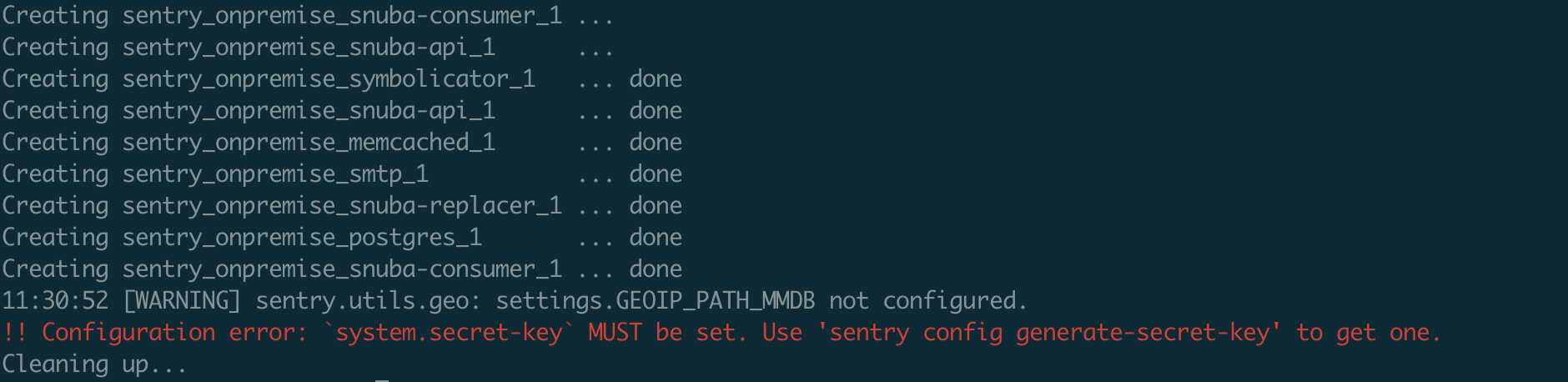
Error info: !! Configuration error: system.secret-key MUST be set. Use 'sentry config generate-secret-key' to get one.
Any idea?
 luffyZh
All 8 comments
Can you share the full install logs that are automatically generated?
 BYK
on 9 Jan 2020
BYK
on 9 Jan 2020
@BYK Hi, the complete file is here: sentry install log
luffyZh
on 10 Jan 2020
@BYK And I find a strange thing.Install several times(change some config reinstall), one of which will succeed and the others will fail
luffyZh
on 10 Jan 2020
It is the automatic secret key generation. Since it is random, a second run simply generates a new secret that is actually valid:
Generating secret key...
tr: Illegal byte sequence
I'll investigate this but have never encountered this before on the systems I worked with (WSL, Google Cloud Build and TravisCI) so if you can share your system details, it may help me identify what's going wrong there. -- just saw it is MacOS, will investigate.
BYK
on 10 Jan 2020
It is the automatic secret key generation. Since it is random, a second run simply generates a new secret that is actually valid:
Generating secret key...
tr: Illegal byte sequenceI'll investigate this but have never encountered this before on the systems I worked with (WSL, Google Cloud Build and TravisCI) ~so if you can share your system details, it may help me identify what's going wrong there.~ -- just saw it is MacOS, will investigate.
Thanks,./install.sh is very convenient, but in my environment, it is not always successful, it needs to install several times to succeed
luffyZh
on 10 Jan 2020
Thanks,./install.sh is very convenient, but in my environment, it is not always successful, it needs to install several times to succeed
Yup, submitted a potential fix: #338. Feel free to try that branch for now.
BYK
on 10 Jan 2020
Thanks,./install.sh is very convenient, but in my environment, it is not always successful, it needs to install several times to succeed
Yup, submitted a potential fix: #338. Feel free to try that branch for now.
Thank you. I'll try and give you feedback
luffyZh
on 10 Jan 2020
@BYK Great job~I installed twice,both succeed!
luffyZh
on 10 Jan 2020
Related issues
 eandersons
·
5Comments
eandersons
·
5Comments
 wodCZ
·
5Comments
wodCZ
·
5Comments
 adrielliu
·
3Comments
adrielliu
·
3Comments
 TheRatG
·
4Comments
TheRatG
·
4Comments
 meriturva
·
6Comments
meriturva
·
6Comments
Most helpful comment
Thank you. I'll try and give you feedback