Oni Version:
0.3.4, 0.3.5, 0.3.6, 0.3.7
Neovim Version (Linux only):
Operating System:
macOS 10.13.5
Issue:
I just noticed, that typing in Oni is a bit sluggish. It's only a matter of milliseconds but it seems like the display of the characters is lagging a bit and in general Oni struggles to update the screen.
Also the CPU use tends to go up, to about 50% (_Oni Helper_ process in the Activity Monitor)
Expected behavior:
In other Neovim GUI clients the typing seems faster and more fluid.
Actual behavior:
Steps to reproduce:
I have tried both the webGL and canvas renderer and didn't see any difference.
I'm attaching here the export of the performance profiling that I took while typing into an empty buffer.
Edit: the profiling was done with v 0.3.4 and I think the spikes (flame chart) were even higher with v 0.3.7. But issue is the same
 bfulop
All 3 comments
@bryphe got a discussion around this in pull request #2219
 martinhj
on 28 Jun 2018
martinhj
on 28 Jun 2018
Thanks @bfulop - really helpful to have that trace.
Yes, we can see the CPU get pegged here:
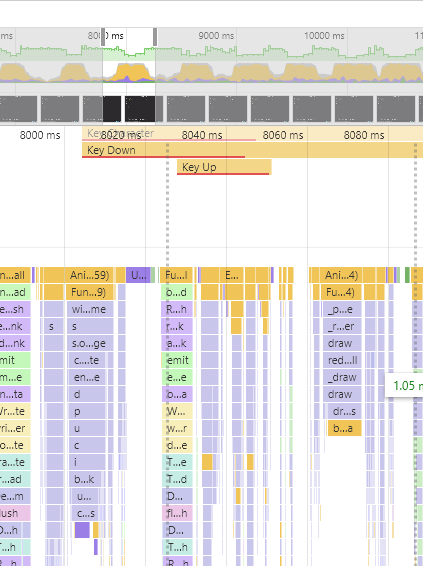
which is not what we want!
Agree with @martinhj - it looks like we are spending an inordinate amount of time in the typing predictions (which aren't doing their job here - they should make the typing feel _faster_, not slow it down - #2219 should help improve this, as using the DOM for it is too heavyweight).
In the meantime, it might be worth turning off the typing prediction behavior - you can do this with "editor.typingPrediction": false, in your config. Interested if this improves the performance for you.
And it looks like you've already done this, but if not, you might want to set ui.animations.enabled to false too.
I also see a couple of places where we might be rendering React components too aggressively:
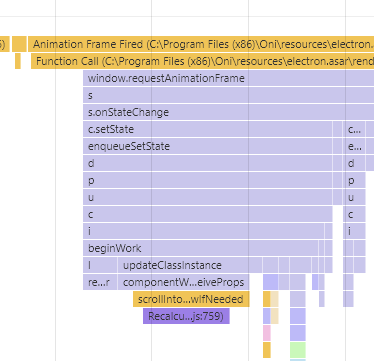
This looks like a case where we are re-rendering the tab (and calling a scrollIntoViewIfNeeded unnecessarily) - need to check that too and see if that's the case.. But that's a pretty small part of the profile; the typing predictions seemed to be problematic here.
Thanks again for the trace, @bfulop ! 👍 LMK how it goes after turning the predictions off
 bryphe
on 28 Jun 2018
bryphe
on 28 Jun 2018
Thanks @bryphe for the detailed explanation and tips for improving the speed.
I set "editor.typingPrediction": false and turned off animations and now the typing experience is much better. The CPU use is still a bit higher than for example in VimR (which doesn't have any plugins installed).
I close the issue now and keep en eye on #2219 and watch how the CPU changes with the updates.
bfulop
on 29 Jun 2018
Related issues
 akinsho
·
3Comments
akinsho
·
3Comments
 tcoopman
·
3Comments
tcoopman
·
3Comments
 dlee
·
3Comments
bryphe
·
3Comments
bryphe
·
3Comments
dlee
·
3Comments
bryphe
·
3Comments
bryphe
·
3Comments
Most helpful comment
Thanks @bfulop - really helpful to have that trace.
Yes, we can see the CPU get pegged here:

which is not what we want!
Agree with @martinhj - it looks like we are spending an inordinate amount of time in the typing predictions (which aren't doing their job here - they should make the typing feel _faster_, not slow it down - #2219 should help improve this, as using the DOM for it is too heavyweight).
In the meantime, it might be worth turning off the typing prediction behavior - you can do this with
"editor.typingPrediction": false,in your config. Interested if this improves the performance for you.And it looks like you've already done this, but if not, you might want to set
ui.animations.enabledtofalsetoo.I also see a couple of places where we might be rendering React components too aggressively:

This looks like a case where we are re-rendering the tab (and calling a
scrollIntoViewIfNeededunnecessarily) - need to check that too and see if that's the case.. But that's a pretty small part of the profile; the typing predictions seemed to be problematic here.Thanks again for the trace, @bfulop ! 👍 LMK how it goes after turning the predictions off