Oni: How do I change the background color in a theme?
I'm using the solarized8_light theme, but I don't like the mustardy yellow that gets set as the background color.

I tried copying the theme to my plugins directory and changing the background color to a different value, but it had no effect.
So I have a few questions:
- How can I change this background color?
- Is it calculated on the fly or is it set somewhere?
- does the value come from the vim theme in
solarized8.vim?
 LucianBuzzo
All 12 comments
Hi, you can over-ride individual parts of the colour scheme by specifying a hex value in your config.js.
For the outer part (which I think you are referring to) it would be:
"colors.background": "#000000",
There is a complete list of the parts you can over-ride in ThemeManager.ts: https://github.com/onivim/oni/blob/master/browser/src/Services/Themes/ThemeManager.ts
You just have to pre-fix the with colors..
As for where the values are set and initial come from, you can see the examples of onedark, nord and both solarized in the Extensions folder here : https://github.com/onivim/oni/tree/master/extensions
They are built using a base vim colour scheme with an associated json file to apply a consistent theme to the Oni UI as far as I know. I think there is also the hope of allowing VSCode themes to work with Oni in the future, giving us all more choices in themes.
Hope that helps!
 CrossR
on 4 Mar 2018
CrossR
on 4 Mar 2018
Thanks for the feedback! I guess Oni parses the color values from the vim theme and translates them to a hex value that can be used in HTML/CSS right?
LucianBuzzo
on 4 Mar 2018
We actually have two cases. We enable theming via json - and we'll use those values if available:
https://github.com/onivim/oni/blob/3935c1869484034f02f9ba6be60c6ccb215e5c5f/extensions/theme-solarized/colors/solarized8_light.json#L5
Otherwise, we try and pick out colors from the background and foreground of the vim theme: https://github.com/onivim/oni/blob/3935c1869484034f02f9ba6be60c6ccb215e5c5f/browser/src/Services/Themes/ThemeManager.ts#L163
(Like, if you run :colorscheme delek - we don't have a theme for that, so we'd just try our best to pick stuff out that matches).
And then if you override via your config as @CrossR mentioned, that takes precedence over both
 bryphe
on 7 Mar 2018
bryphe
on 7 Mar 2018
@hoschi - I know you use solarized-light - how do you feel about the mustard color background? I'm not a fan either of that particular background color,, but I also don't use solarized light. 🤔
bryphe
on 7 Mar 2018
@bryphe I'm not a big fan either, but doesn't triggers me too hard.
@LucianBuzzo do you have suggestions about the color?
What about setting the same color as the editor background?
 hoschi
on 7 Mar 2018
hoschi
on 7 Mar 2018
For solarized users like myself, I think the expectation is that the background would be a a color from the theme, or a slightly lighter/darker shade of it.
I think I'm using the same color as the editor background

using a config like this:
{
"ui.colorscheme": "solarized8_light",
"colors.background": "#eee8d5",
"colors.title.background": "#eee8d5",
}
I much prefer this, though I might experiment with a ever so slightly darker tone.
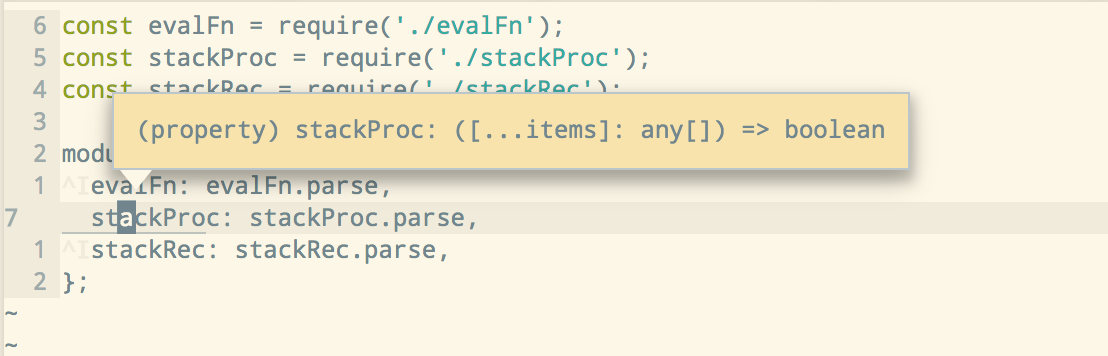
Can anyone tell me which value changes the color of the popovers?
These things for example:
LucianBuzzo
on 7 Mar 2018
Thanks, I'll try it out today.
hoschi
on 8 Mar 2018
@LucianBuzzo don't use solarized personally but that is much nicer, I just arbitrarily chose colors from the vim theme would you be interested in making a PR with the settings you use if @bryphe doesn't object to changing the color
Re the tooltip theres options for it you can look at here
 akinsho
on 8 Mar 2018
akinsho
on 8 Mar 2018
+1 for changing the tooltip/completion colors. Right now it's the default which is very dark and hard to read with Solarized Light :(
I can't even seem to turn off the autocompletion and just have what Neovim does in the terminal, any setting of editor.completions.mode doesn't seem to result in the normal Neovim popup :(
 cflewis
on 1 Jun 2018
cflewis
on 1 Jun 2018
@cflewis you should be able to set "editor.completions.mode": "native", to get the native Neovim popups. However, that is only going to apply to the Vim completions, rather than the Oni LSP bits I think.
CrossR
on 1 Jun 2018
@CrossR this doesn't seem to work for me, even if I put it both in config.js or config.tsx. I'd show you a screenshot, but gnome-screenshot just shows a black rectangle; it can't seem to recognize how the pop-up is rendered.
cflewis
on 5 Jun 2018
I believe, I have to share the result of my efforts with other Solarized Light users.
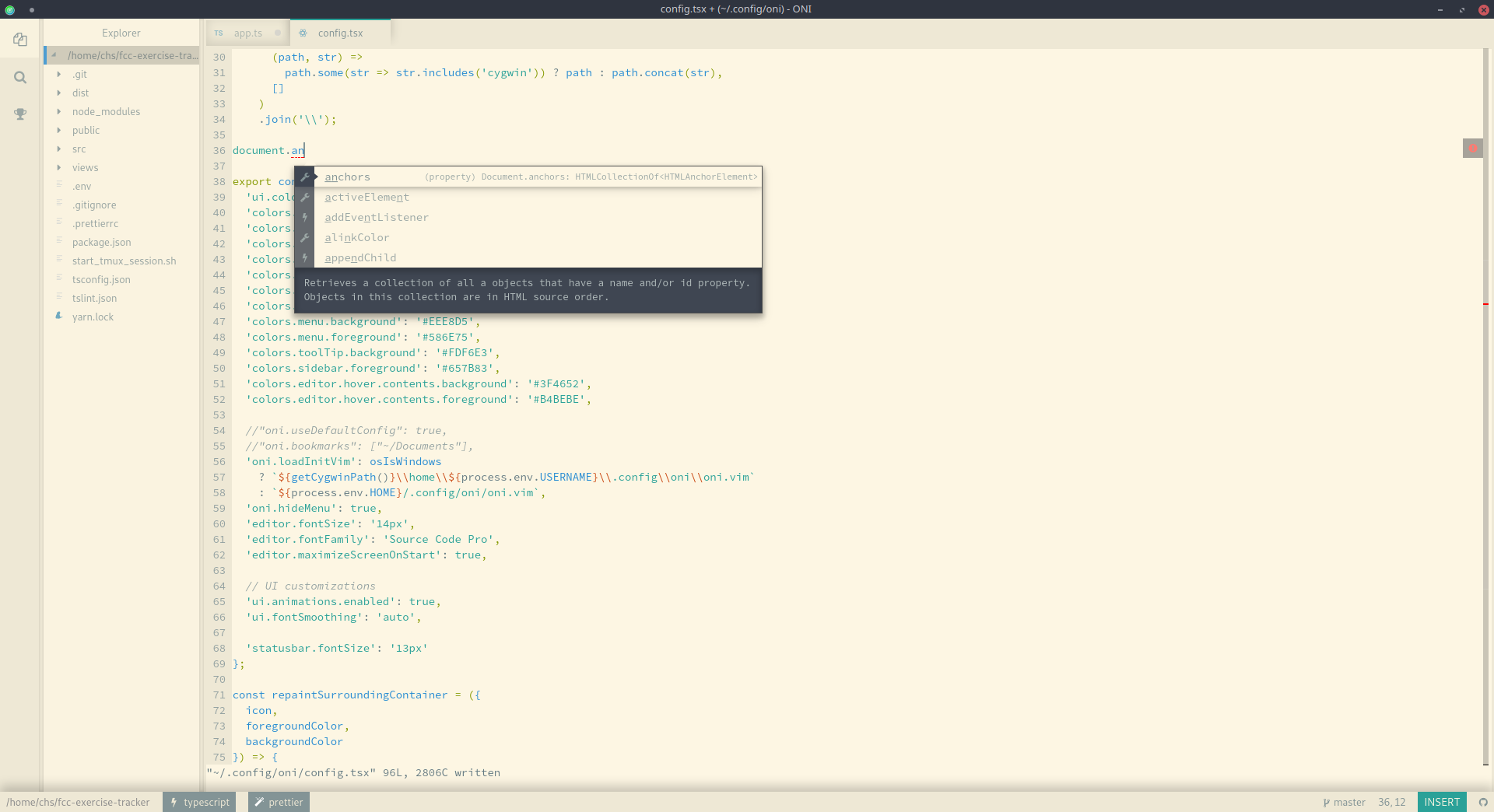
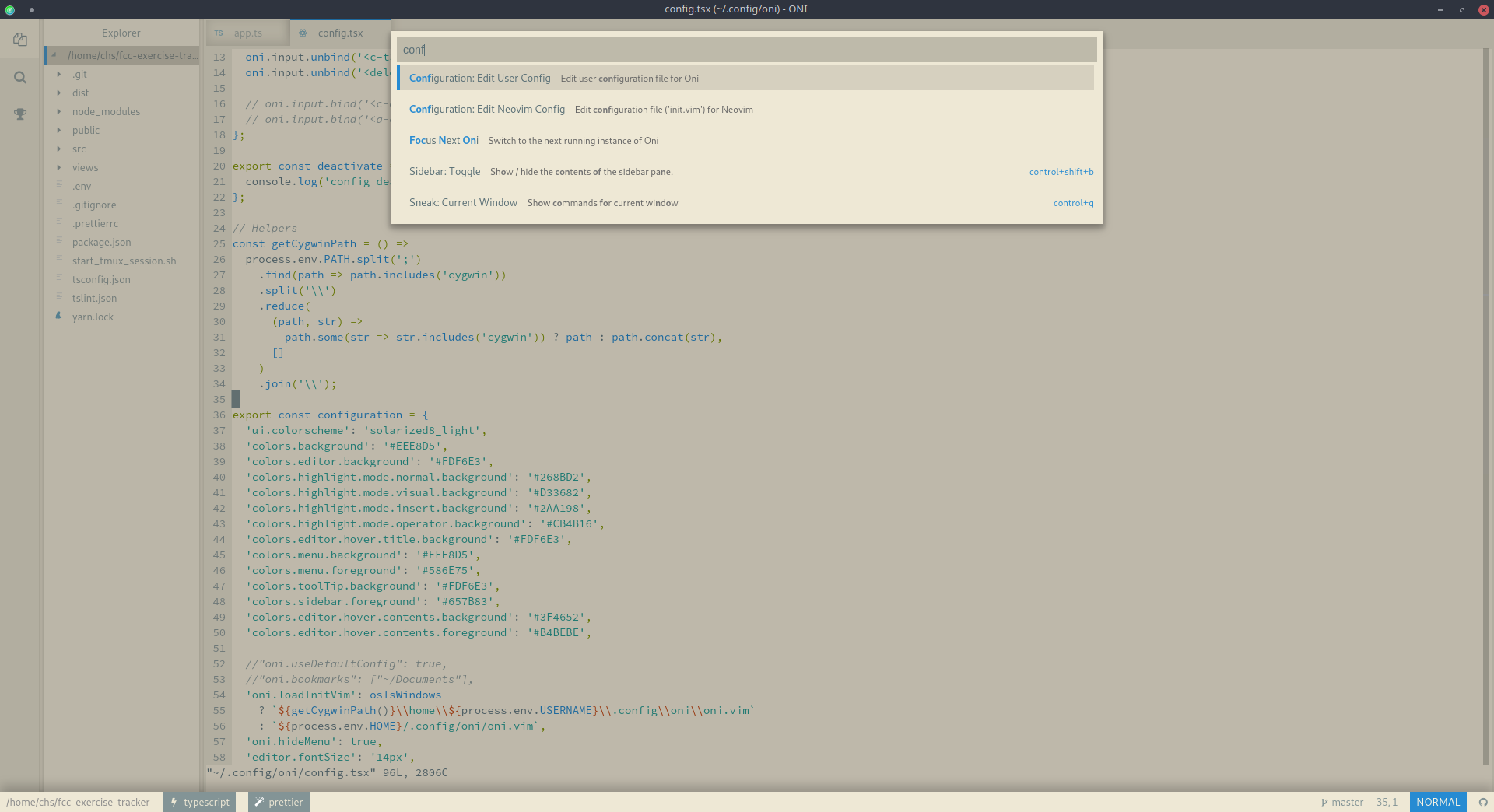
export const configuration = {
  'ui.colorscheme': 'solarized8_light',
  'colors.background': '#EEE8D5',
  'colors.editor.background': '#FDF6E3',
  'colors.highlight.mode.normal.background': '#268BD2',
  'colors.highlight.mode.visual.background': '#D33682',
  'colors.highlight.mode.insert.background': '#2AA198',
  'colors.highlight.mode.operator.background': '#CB4B16',
  'colors.editor.hover.title.background': '#FDF6E3',
  'colors.menu.background': '#EEE8D5',
  'colors.menu.foreground': '#586E75',
  'colors.toolTip.background': '#FDF6E3',
  'colors.sidebar.foreground': '#657B83',
  'colors.editor.hover.contents.background': '#3F4652',
  'colors.editor.hover.contents.foreground': '#B4BEBE'
}
You can even repaint filetype and prettier icons in some hacky way which will certainly be broken one day...
 Beaglefoot
on 23 Jun 2018
Beaglefoot
on 23 Jun 2018
Related issues
bryphe
·
3Comments
 dlee
·
3Comments
akinsho
·
3Comments
dlee
·
3Comments
akinsho
·
3Comments
 nwaywood
·
3Comments
nwaywood
·
3Comments
 Canop
·
3Comments
Canop
·
3Comments
Most helpful comment
I believe, I have to share the result of my efforts with other Solarized Light users.
You can even repaint filetype and prettier icons in some hacky way which will certainly be broken one day...