Onesignal-ios-sdk: Does XCFramework version support new ARM based Mac?
Description:
Hi, we integrated XCFramework version of OneSignal iOS SDK and it worked on an Intel CPU Macbook, however it didn't work on new ARM based Mac e.g. Mac Mini. Are we missing anything while setting this up?
Environment
Steps to Reproduce Issue:
Anything else:
(crash stacktraces, as well as any other information here)
 josephktcheung
All 7 comments
Howdy,
it didn't work on new ARM based Mac
Thank you. Can you please provide more information? What about the integration didn't work?
 rgomezp
on 1 Dec 2020
rgomezp
on 1 Dec 2020
@josephktcheung What architecture are you building the mac version for?
 emawby
on 4 Dec 2020
emawby
on 4 Dec 2020
Hi — I'm also receiving encountering this problem. I'm working off of my M1 Macbook Pro, and my xcode build is erroring with this message:
ld: in /Users/...Pods/OneSignal/iOS_SDK/OneSignalSDK/Framework/OneSignal.framework/OneSignal(OneSignal-arm64-master.o), building for iOS Simulator, but linking in object file built for iOS, file '/Users/.../Pods/OneSignal/iOS_SDK/OneSignalSDK/Framework/OneSignal.framework/OneSignal'
clang: error: linker command failed with exit code 1 (use -v to see invocation)
My build is targeting arm64. From googling around, it seems like other extensions are having similar issues: here is a thread from firebase. Here's my OneSignal install from the Podfile:
target 'OneSignalNotificationServiceExtension' do
  pod 'OneSignal', '>= 2.9.3', '< 3.0'
end
Let me know if there's any information I'm not providing
 nputnam-hu
on 15 Dec 2020
nputnam-hu
on 15 Dec 2020
Same here with cocoapods
 Erumaru
on 15 Dec 2020
Erumaru
on 15 Dec 2020
Hi,
I'm using OneSignal version 2.15.0 and I am having the same issue when I try to build on the simulator. I think OneSignal needs to add support for arm64 simulators.
To help you get a better understanding of what we need here is the folder inside OneSignal.xcframework vs another third-party dependency (Crisp) that uses XCFramework.
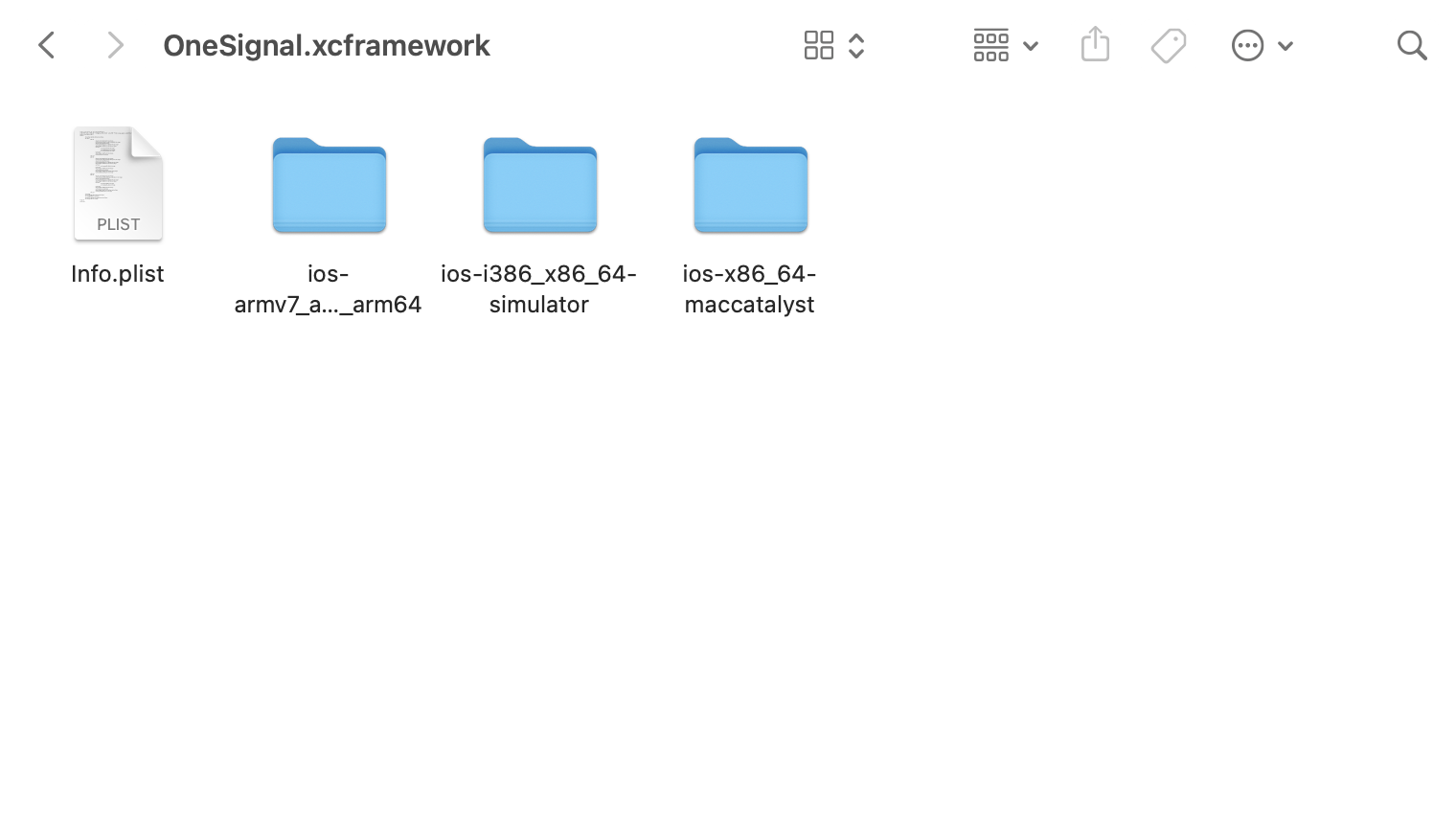

Notice that OneSignal doesn't have arm64 simulator like Crisp.xcframework. It does have arm64 to be built on a device but not an arm64 simulator which is present on the M1 Macs.
This is why I'm getting this error message:
missing required architecture arm64 in file /Users/johnappleseed/Library/Developer/Xcode/DerivedData/AppName-gfokweabokxwszhigttygwyfrajj/Build/Products/Development-iphonesimulator/OneSignal.framework/OneSignal (2 slices)
Could you please prioritize this issue? We have developers that are using the M1 Macs and this practically stops them from working.
 trevinwisaksana
on 15 Dec 2020
trevinwisaksana
on 15 Dec 2020
Hello we are working on this and it should be available in the next release. In the mean time try to run Xcode and the Simulator in Rosetta.
To do this go to Simulator in finder -> Right Click -> Get Info -> Click the "Open using Rosetta" check box
NOTE: The fix will be for the OneSignal XCFramework not the standard OneSignal Framework (for now). In order to use the XCFramework please update your podfile following instructions here.
This process will be improved in the future by registering the OneSignal XCFramework as its own pod.
emawby
on 16 Dec 2020
Does XCFramework support M1 iPhone simulator without Rosetta now?
 cclaflin89
on 10 Feb 2021
cclaflin89
on 10 Feb 2021
Related issues
 huahengling
·
5Comments
huahengling
·
5Comments
 arthurdapaz
·
5Comments
arthurdapaz
·
5Comments
 konkontos
·
3Comments
konkontos
·
3Comments
 0x7fs
·
6Comments
0x7fs
·
6Comments
 ogres
·
3Comments
ogres
·
3Comments
Most helpful comment
Hi,
I'm using OneSignal version 2.15.0 and I am having the same issue when I try to build on the simulator. I think OneSignal needs to add support for arm64 simulators.
To help you get a better understanding of what we need here is the folder inside OneSignal.xcframework vs another third-party dependency (Crisp) that uses XCFramework.
Notice that OneSignal doesn't have arm64 simulator like Crisp.xcframework. It does have arm64 to be built on a device but not an arm64 simulator which is present on the M1 Macs.
This is why I'm getting this error message:
missing required architecture arm64 in file /Users/johnappleseed/Library/Developer/Xcode/DerivedData/AppName-gfokweabokxwszhigttygwyfrajj/Build/Products/Development-iphonesimulator/OneSignal.framework/OneSignal (2 slices)Could you please prioritize this issue? We have developers that are using the M1 Macs and this practically stops them from working.