Onesignal-ios-sdk: Always displaying Open Website? prompt on hard launch
Description:
Goal is to handle launchURL natively and open in our own custom view. This is working when notification is opened while app is in background/foreground, but when app is not running, and notification click launches app, the "Open Website?" alert is displayed and the launchUrl is opened in Safari.

Environment
iOS SDK: 3.0.0 beta 2 cocoapods
Steps to Reproduce Issue:
Install iOS SDK version 3.0.0 beta 2 with Cocoapods into a project
OneSignal.setAppSettings([kOSSettingsKeyInAppLaunchURL: true])
        OneSignal.initWithLaunchOptions(launchOptions)
        OneSignal.setAppId(Config.oneSignalAppId)

        let notificationOpenedBlock: OSNotificationOpenedBlock = { result in
            if let launchUrl = result.notification.launchURL {
                self.launchStory(StoryIdentifier(url: launchUrl))
            }
        }
        OneSignal.setNotificationOpenedHandler(notificationOpenedBlock)
- Make sure the app is killed, and click on a notification to launch app
Code will not hit your OSHandleNotificationActionBlock and instead the "Open Website?" alert will be displayed. Ideally, we'd like to handle this case natively just like we can if app is in foreground/background. Alternatively, we'd at least like an option so this alert isn't displayed and URL is automatically opened.
 starchey
All 24 comments
@starchey Hello, I am not able to reproduce this issue. In my testing of this workflow on the major release branch the opened handler is still being called when the app is swiped away and I am able to intercept and handle the launch url before the onesignal built in prompt. There is no difference based on app state.
Are you sure that the opened block isn't being called at all?
 emawby
on 26 Oct 2020
emawby
on 26 Oct 2020
@emawby Deleted comment from a few minutes ago after additional testing. I was incorrect earlier, the OSHandleNotificationActionBlock is being hit, but the "Open Website?" alert is still being displayed in this case. The difference I'm seeing is in other app states the "Open Website?" alert is not appearing, which is desirable.
One note, if I set OneSignal.setLogLevel(.LL_VERBOSE, visualLevel: .LL_VERBOSE), I am not seeing the built-in prompt. However, I do see other debug alerts.
starchey
on 28 Oct 2020
My main question is if there is a way to disable this "Open Website?" alert since we'd like to handle the launchUrl with our own native view? In the Android SDK, if we set notification opened handler and set the com.onesignal.NotificationOpened.DEFAULT meta tag to DISABLE we are able to, is there a similar approach available on iOS?
starchey
on 29 Oct 2020
@starchey This option doesn't exist on iOS (limitation of iOS itself), but a workaround could be to not include the url for the iOS notification and include it elsewhere in the notification metadata instead.
emawby
on 30 Oct 2020
@emawby Testing against a fork of 3.0 major release branch, if I comment out the code inside OneSignalHelper.displayWebView and have it do nothing, I get the functionality I'm after--any notification open is exclusively handled by my OSNotificationOpenedBlock sent into OneSignal.setNotificationOpenedHandler.
Its possible I'm introducing some unintended side-effects, but wouldn't it be possible to introduce a user default similar to OSUD_NOTIFICATION_OPEN_LAUNCH_URL, and if set, simply return from OneSignalHelper.displayWebView without doing anything? This seems to provide similar functionality to com.onesignal.NotificationOpened.DEFAULT = DISABLE on Android.
starchey
on 2 Nov 2020
Well the issue is clearly visible here:
https://github.com/OneSignal/OneSignal-iOS-SDK/blob/478daa9fd1cd9ff774368395c16484b38f365f1b/iOS_SDK/OneSignalSDK/Source/OneSignalHelper.m#L874
Basically there is no option to disable this dialog?
 KestasVenslauskas
on 13 Jan 2021
KestasVenslauskas
on 13 Jan 2021
@KestasVenslauskas ,
Thanks for digging into the SDK.
It looks like that has been there for 2 years. We will investigate what changed that is causing this to constantly show.
Thanks for your patience.
Duplicates:
 rgomezp
on 13 Jan 2021
rgomezp
on 13 Jan 2021
same here, And any update?
 Zestpond
on 24 Jan 2021
Zestpond
on 24 Jan 2021
Same
 azai91
on 28 Jan 2021
azai91
on 28 Jan 2021
Howdy y'all,
Thanks for your patience. No update as of yet but @gonzalonarbaiz is looking into this one.
We will update as soon as we know more.
Cheers
rgomezp
on 28 Jan 2021
Hey everyone, any progress on this? it is making the deep links pretty annoying as it alerts every time instead of just navigating. it only started happening after we updated to 4.0.0.
 aduca98
on 6 Feb 2021
aduca98
on 6 Feb 2021
Just an update, the workaround @emawby worked well for now.
If you wipe the launch url from the send push notification request and just put the url in the additional/metadata of the push notification, you can then parse the data in the one signal notification opened handler and if there is a url navigate to it automatically.
Would def be good to fix the underlying issue but this worked for us for now so thought I'd broadcast it.
aduca98
on 6 Feb 2021
Same problem here, crucial to our business to get this fixed ASAP.
 mikevercoelen
on 8 Feb 2021
mikevercoelen
on 8 Feb 2021
@aduca98 Can you give an example how you handle this, what I tried is this:
const getScreenFromNotification = notification => {
  const appUrl = notification?.additionalData?.app_url

  if (!appUrl) {
    return null
  }

  const url = new URL(appUrl)
  const screen = url.hostname
  return screen
}

// ..

OneSignal.setNotificationOpenedHandler(openedEvent => {
  const notification = openedEvent?.notification
  const screen = getScreenFromNotification(notification)
  setInitialUrl(appUrl)
})
But setNotificationOpenedHandler seems to behave differently on IOS vs Android. Android this solution is working fine.
Then in my React Navigation setup I have this:
//...
  async getInitialURL () {
    // Check if app was opened from a deep link (which happens with OneSignal)
    const url = await Linking.getInitialURL()

    if (url !== null) {
      return url
    }

    const initialUrl = getInitialUrl()

    if (initialUrl) {
      return initialUrl
    }
  }
//...
same problem here, any update?
 shwethadn
on 8 Feb 2021
shwethadn
on 8 Feb 2021
Started getting this alert after updating to 4.0 on react-native. +1 on this.
 luco
on 9 Feb 2021
luco
on 9 Feb 2021
On 3.9.2 (React Native) it didn't happen.
luco
on 10 Feb 2021
Howdy,
Thank you everyone for your patience. We have a fix going out in the next release.
Enjoy!
rgomezp
on 12 Feb 2021
Don't forget to set OneSignal_suppress_launch_urls to YES on your plist or it won't work.
luco
on 17 Feb 2021
I'm very confused by the documentation. OneSignal_suppress_launch_urls is only supposed to suppress http:// and https:// launch URLs, right?
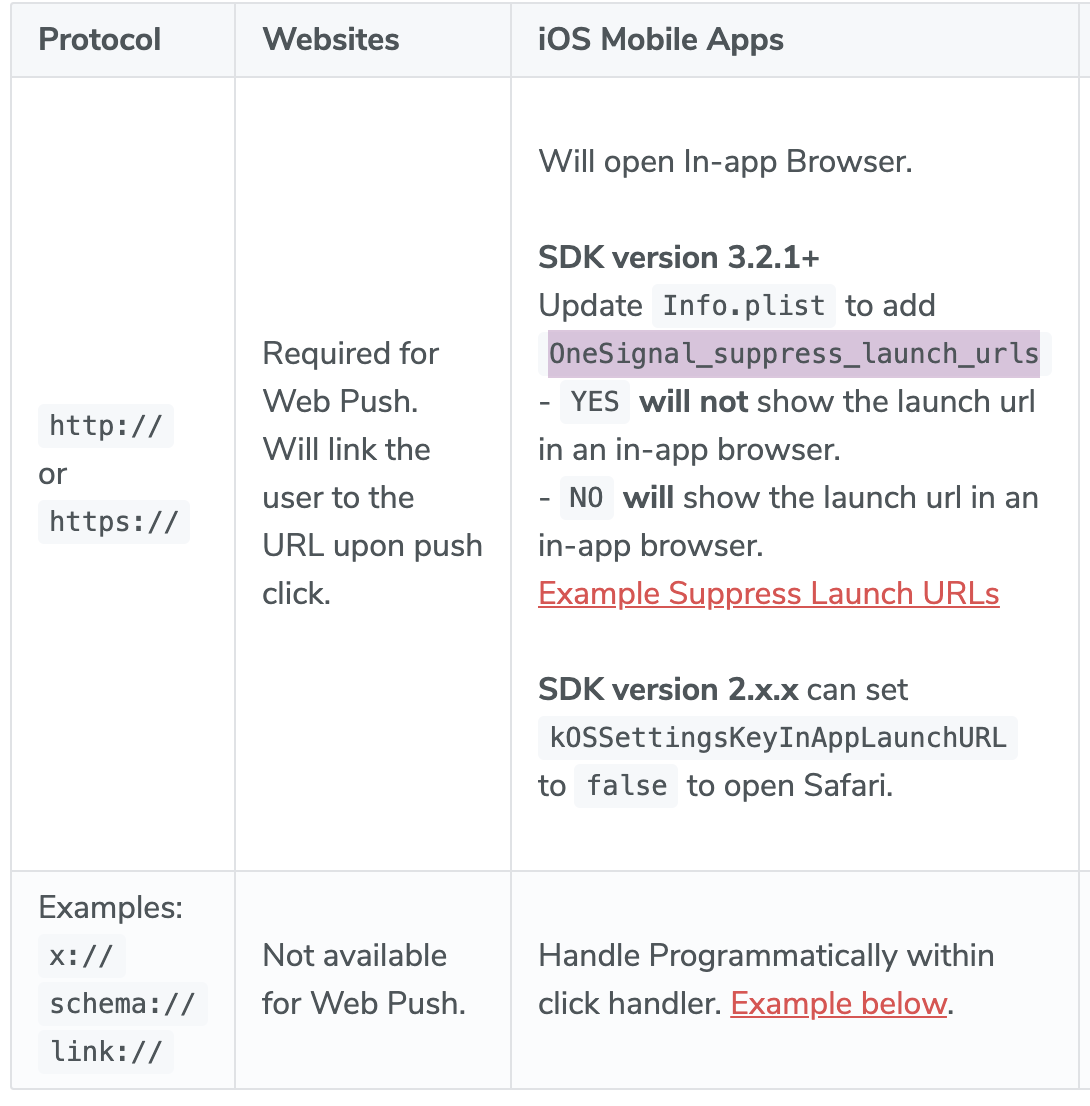
from: https://documentation.onesignal.com/docs/links#launch-url
What's the behavour for app schemes like myApp://main? Does the flag suppress that as well?
 leethree
on 19 Feb 2021
leethree
on 19 Feb 2021
Wait so now settings OneSignal_suppress_launch_urls just ignores launch url? Or it's just for me?
As of previous comment I also have a case to open my app scheme not just http or https
KestasVenslauskas
on 19 Feb 2021
@KestasVenslauskas Yes I'm seeing the same behaviour. All launch URL will just be ignored, regardless of the schema. Not sure if it's intended 🤷🏼
leethree
on 19 Feb 2021
I think that's fine but they did not mentioned the behavior...
It's fine because you can handle linking manually with NotificationOpenedHandler where you can get launchURL.
KestasVenslauskas
on 19 Feb 2021
Is there any news on this occasion? I have a project in React Native and I cannot remove/edit this alert when deep linking.
 FedorLvov
on 25 Feb 2021
FedorLvov
on 25 Feb 2021
Related issues
 adambolcsfoldi
·
4Comments
adambolcsfoldi
·
4Comments
 luai-kalkatawi
·
4Comments
luai-kalkatawi
·
4Comments
 pvcary
·
5Comments
pvcary
·
5Comments
 0x7fs
·
6Comments
0x7fs
·
6Comments
 konkontos
·
3Comments
konkontos
·
3Comments
Most helpful comment
@starchey This option doesn't exist on iOS (limitation of iOS itself), but a workaround could be to not include the url for the iOS notification and include it elsewhere in the notification metadata instead.